Fortinet certification · Exam FCSS_EFW_AD-7.6

FCSS_EFW_AD-7.6 Mock Exam Page 2

FCSS - Enterprise Firewall 7.6 Administrator

Free FCSS_EFW_AD-7.6 mock exam questions 11–20, each with the answer and an explanation.

20 questions · 39 minutes · free, no sign-up

Free FCSS_EFW_AD-7.6 questions

11–20 of 33 free
Question 11 Choose 1
Refer to the exhibit, which shows a partial enterprise network.
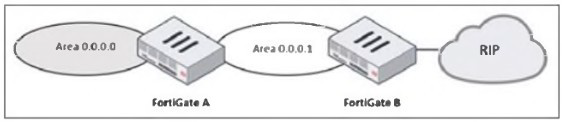
An administrator would like the area 0.0.0.0 to detect the external network.
What must the administrator configure?
Show answerHide answer

Correct answer: A Enable RIP redistribution on FortiGate B.

Explanation

Explanation:
In the given topology, FortiGate B connects to a RIP network on one side and to OSPF Area 0.0.0.1 on the other. FortiGate A connects Area 0.0.0.1 to the OSPF backbone area (0.0.0.0). The administrator wants routers in the OSPF backbone to learn routes from the external RIP network. For OSPF Area 0.0.0.0 to detect external networks that originate from RIP, those RIP routes must first be imported (redistributed) into OSPF. Only then can they propagate through Area 0.0.0.1 and reach Area 0.0.0.0.
This redistribution must occur at the point where RIP and OSPF meet—FortiGate B. Without redistribution, RIP routes remain local to the RIP domain and are never introduced into the OSPF LSDB, meaning no OSPF router in Area 0.0.0.0 would ever learn them.
When the administrator enables RIP → OSPF redistribution on FortiGate B, these RIP routes are converted into Type-5 External LSAs and injected into the OSPF LSDB. These LSAs then propagate across Area 0.0.0.1, reach FortiGate A, and eventually appear in Area 0.0.0.0. This is the correct and necessary mechanism to allow OSPF to detect routes that originate outside the OSPF domain.
Redistribution is a fundamental requirement whenever two different routing protocols interoperate, which is what is happening here: RIP on one side, OSPF on the other. Therefore, option A is the only answer that ensures external detection in the OSPF backbone.

❌ Why the other options are incorrect

B. Configure a distribute-route-map-in on FortiGate B.
A distribute-route-map-in is used to filter incoming OSPF routes, not to inject external ones. It does not redistribute RIP into OSPF. Instead, it would restrict routes, which is the opposite of the intended goal. It cannot make Area 0.0.0.0 detect RIP routes.

C. Configure a virtual link between FortiGate A and B.
A virtual link is used to reconnect an OSPF area to the backbone if it becomes discontiguous. In this topology, Area 0.0.0.1 is already properly connected to Area 0.0.0.0 through FortiGate A. A virtual link does nothing to advertise or inject RIP routes. It plays no role in external route propagation.

D. Set area 0.0.0.1 to stub on FortiGate A and B.
A stub area blocks external Type-5 LSAs, which means RIP-learned routes would not propagate into Area 0.0.0.1 or Area 0.0.0.0. Making the area a stub would actively prevent external route detection. This option contradicts the goal.

📘 References

FortiOS Routing Guide → Route Redistribution (RIP ↔ OSPF)
Shows requirement for explicit redistribution between different protocols.
FortiOS Handbook – OSPF External Routes (Type-5 LSAs)
Explains how redistributed external routes are propagated.
NSE 4 & NSE 5 Training Modules → OSPF Redistribution Concepts
Recommends redistribution at the protocol boundary device.
Question 12 Choose 1
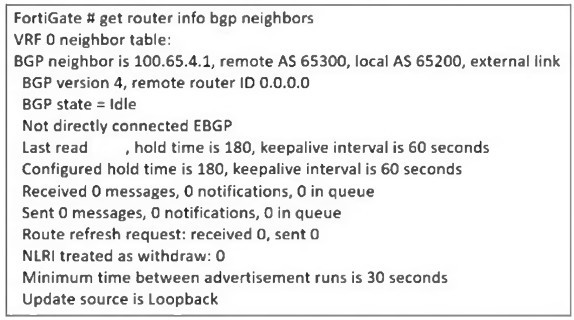
Refer to the exhibit, which contains a partial command output.
The administrator has configured BGP on FortiGate. The status of this new BGP configuration is shown in the exhibit.
What configuration must the administrator consider next?
Show answerHide answer

Correct answer: D Enable ebgp-enforce-multihop.

Explanation

Explanation:
The BGP status output shows the FortiGate’s BGP neighbor (100.65.4.1) is stuck in the Idle state. One key detail in the exhibit is the line:

“Not directly connected EBGP”
“Update source is Loopback”

This indicates the administrator has configured the update-source as a loopback interface. When BGP uses a loopback as the source, the session becomes multihop, because the loopback IP is not directly connected to the remote peer. By default, eBGP requires the neighbor to be directly connected, meaning TTL = 1. When the update source is loopback, TTL = 1 is insufficient, so the BGP session never progresses past the Idle state.
To allow an eBGP session between loopback interfaces or across intermediate hops, FortiGate requires explicitly enabling:
set ebgp-enforce-multihop enable
This command allows the FortiGate to initiate an eBGP session beyond a single hop—necessary when using loopback update sources or when the neighbors are not physically adjacent. Once this setting is applied, the FortiGate sends BGP packets with a higher TTL, allowing the session to reach the remote peer and move beyond Idle into Active/Established.
Because the exhibit clearly states the update source is loopback and that the session is “Not directly connected EBGP,” enabling multihop is the correct and required next step.

❌ Why the other options are incorrect

A. Configure a static route to 100.65.4.1.
A missing route would cause the BGP state to remain Idle, but the exhibit does not show unreachable status or missing next-hop. The key clue is the use of a loopback update source, not a reachability problem. The session would show error messages related to adjacency failure if routing was the issue. Here, the problem is TTL enforcement, not routing.

B. Configure the local AS to 65300.
The output already shows: Remote AS 65300, Local AS 65200 These AS numbers are correct and intentional. Changing the local AS to 65300 would create an iBGP session instead of eBGP, altering routing design and not fixing the Idle state. AS mismatch is not the cause here; the cause is the loopback-based multihop requirement.

C. Contact the remote peer administrator to enable BGP.
If the remote peer had not enabled BGP, the local FortiGate would typically move to Active state (sending connection attempts). Remaining in Idle occurs before attempting TCP connection, and the "not directly connected" line indicates the problem is configuration—not a remote BGP shutdown. There is no evidence in the output that the remote router is misconfigured or unreachable.

References:
FortiOS BGP Guide → eBGP multihop configuration
FortiOS CLI Reference → set ebgp-enforce-multihop
NSE 4 / NSE 5 Routing Modules → eBGP multihop and loopback update-source behavior
FortiOS Troubleshooting BGP → Idle state diagnostics
Question 13 Choose 1
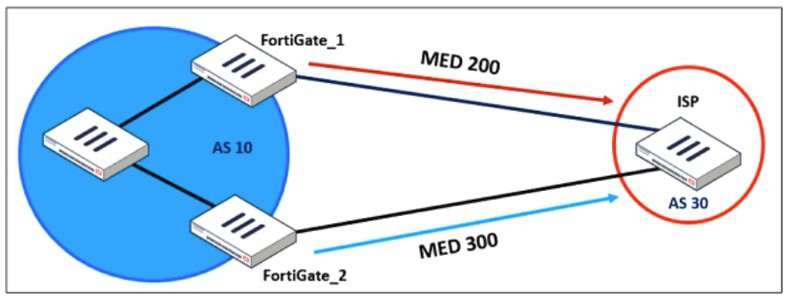
Refer to the exhibit, which shows a network diagram.

An administrator would like to modify the MED value advertised from FortiGate_1 to a BGP neighbor in the autonomous system 30.
What must the administrator configure on FortiGate_1 to implement this?
Show answerHide answer

Correct answer: A route-map-out

Explanation

Explanation:
In the exhibit, FortiGate_1 is peering with an ISP in AS 30 and must advertise a modified MED (Multi-Exit Discriminator) value. MED is a BGP path attribute used to influence inbound traffic from an external AS by indicating the preferred entry point into your AS. To change the MED sent to the external BGP neighbor, you must apply a route-map in the outbound direction.
On FortiGate, modifying BGP path attributes—including MED—requires attaching a route-map-out to the BGP neighbor configuration. The route-map can match prefixes and then set attributes such as:

set metric → modifies MED
set local-preference
set community
set weight, etc.

Since the requirement is specifically to modify MED advertised from FortiGate_1 toward AS 30, a route-map-out is the correct mechanism. This ensures that the ISP receives routes with the desired MED (in this case, 200), which then influences the ISP’s inbound traffic decision.
The FortiGate BGP process uses route-maps for all attribute manipulation in outbound advertisements, making option A the correct and necessary configuration step.

❌ Why the other options are incorrect

B. network-import-check
This setting controls whether FortiGate requires a matching route in the routing table before advertising a BGP network statement. It has no ability to modify BGP attributes such as MED. It affects advertisement eligibility, not attribute manipulation.

C. prefix-list-out
A prefix list can only permit or deny matched prefixes—it cannot modify BGP path attributes. Prefix lists are used to filter prefixes being advertised but have no function related to MED, local-preference, weight, or any path-attribute changes. Therefore, it cannot implement the required MED modification.

D. distribute-list-out
A distribute list is applied to filter routes, not modify their attributes. Distribute lists use ACLs or prefix lists to control which routes are advertised or accepted. They provide no mechanism for setting MED or other attributes. Thus, they cannot accomplish the task described in the question.

📘 References

FortiOS BGP Configuration Guide → Route-maps
States that route-maps are used to set BGP attributes including MED.
FortiOS CLI Reference → config router route-map
Describes set metric for modifying MED.
Fortinet NSE 4/5 Routing Training
Defines MED manipulation as an outbound attribute adjustment requiring a route-map.
FortiOS BGP Neighbor Configuration
Shows applying set route-map-out to influence attributes sent to peers.
Question 14 Choose 2
An administrator is checking an enterprise network and sees a suspicious packet with the MAC address e0:23:ff:fc:00:86.
What two conclusions can the administrator draw? (Choose two.)
Show answerHide answer

Correct answer: A, C The suspicious packet is related to a cluster that has VDOMs enabled.The suspicious packet is related to a cluster with a group-id value lower than 255.

Explanation

Explanation:
Fortinet HA clusters use virtual MAC addresses derived from a predictable pattern. The MAC shown in the question:
e0:23:ff:fc:00:86
belongs to Fortinet’s OUI range (e0:23:ff) and matches the pattern used by FGCP HA virtual MACs, especially when VDOMs and vclusters are enabled.

✔️ Why Answer A is Correct

A. The suspicious packet is related to a cluster that has VDOMs enabled.
FortiGate clusters operating with VDOMs and vclusters generate additional virtual MAC addresses.
These MACs follow the pattern based on the Fortinet OUI e0:23:ff.
When VDOMs are enabled, each vcluster uses its own MAC addressing scheme.
Therefore, a MAC beginning with e0:23:ff:fc strongly indicates HA activity within a VDOM-enabled cluster.

✔️ Why Answer C is Correct

C. The suspicious packet is related to a cluster with a group-id value lower than 255.
The HA group-id (also called cluster-id) is encoded into the last byte(s) of the virtual MAC address.
For FGCP, group-id must be < 255.
The MAC address:
e0:23:ff:fc:00:86
contains the value 0x86 (decimal 134) → a valid group-id inside the <255 range.
This confirms the packet originates from an FGCP cluster using a valid group-id.

❌ Why the Other Options Are Incorrect

B. The network includes FortiGate devices configured with the FGSP protocol.
FGSP does NOT use virtual MAC addresses.
FGSP does session synchronization only, with no shared MAC and no failover.

Therefore this MAC cannot be attributed to FGSP.

D. The suspicious packet corresponds to port 7 on a FortiGate device.
Fortinet MACs do not encode interface numbers in their MAC addresses.
The last byte (0x86) is related to group-id, not to a physical port.

📚 References
FortiOS Handbook – HA Guide (FGCP Virtual MAC Address Format)
NSE Training – FortiGate High Availability Module
Fortinet OUI allocations (e0:23:ff)
Question 15 Choose 1
A vulnerability scan report has revealed that a user has generated traffic to the website example.com (10.10.10.10) using a weak SSL/TLS version supported by the HTTPS web server.
What can the firewall administrator do to block all outdated SSL/TLS versions on any HTTPS web server to prevent possible attacks on user traffic?
Show answerHide answer

Correct answer: A Configure the unsupported SSL version and set the minimum allowed SSL version in the HTTPS settings of the SSL/SSH inspection profile.

Explanation

Explanation:

A. Configure the unsupported SSL version and set the minimum allowed SSL version in the HTTPS settings of the SSL/SSH inspection profile.
FortiGate allows administrators to enforce SSL/TLS version control through the SSL/SSH inspection profile.
By setting the minimum allowed SSL/TLS version (e.g., TLS 1.2 or TLS 1.3), the firewall blocks any traffic attempting to negotiate weaker versions (SSLv3, TLS 1.0, TLS 1.1).
This is the direct and supported method to prevent users from connecting to HTTPS servers that still allow outdated protocols.

Why the other options are wrong:

B. Enable auto-detection of outdated SSL/TLS versions in the SSL/SSH inspection profile to block vulnerable websites. ❌ Incorrect.
There is no “auto-detection” feature in FortiOS SSL/SSH inspection profiles. Administrators must explicitly configure minimum SSL/TLS versions.

C. Install the required certificate in the client's browser or use Active Directory policies to block specific websites as defined in the SSL/SSH inspection profile. ❌ Incorrect.
Certificates and AD policies do not control SSL/TLS protocol negotiation. They only affect trust and site access, not protocol enforcement.

D. Use the latest certificate, Fortinet_SSL_ECDSA256, and replace the CA certificate in the SSL/SSH inspection profile. ❌ Incorrect.
Updating certificates does not block weak SSL/TLS versions. Certificates are about identity and trust, not protocol enforcement.

Reference
FortiOS 7.6 Administration Guide – SSL/SSH Inspection Profiles: Administrators can configure the minimum and maximum SSL/TLS versions allowed for HTTPS traffic.
Fortinet KB: Configuring SSL/TLS protocol versions in SSL inspection profiles
Question 16 Choose 1
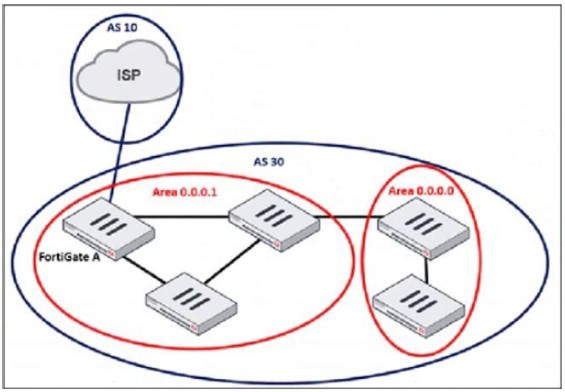
Refer to the exhibit, which shows an enterprise network connected to an internet service provider.

The administrator must configure the BGP section of FortiGate A to give internet access to the enterprise network.
Which command must the administrator use to establish a connection with the internet service provider?
Show answerHide answer

Correct answer: A config neighbor

Explanation

Explanation:
To establish a BGP session between FortiGate A and the ISP, the administrator must configure the BGP neighbor — which defines the remote peer (ISP router) and its IP address. This is the foundational step in BGP peering.
The config neighbor command is used inside the BGP configuration to specify:
The remote IP address of the ISP router
The remote AS number
Optional parameters like route-maps, password, update-source, etc.
This is the only command among the options that directly initiates a BGP peering session.

Why the other options are incorrect:

B. config redistribute bgp ❌
Used to redistribute BGP routes into another routing protocol (e.g., OSPF), not to establish a BGP session.

C. config router route-map ❌
Used to filter or manipulate routes during import/export. It’s optional and not required to establish a BGP connection.

D. config redistribute ospf ❌
Used to redistribute OSPF routes into BGP or another protocol. Again, not relevant to initiating a BGP peer.

Reference
FortiOS 7.6 CLI Guide – config router bgp section
Fortinet NSE 4/FCSS Training – BGP Peering and Route Advertisement
Question 17 Choose 1
An administrator needs to install an IPS profile without triggering false positives that can impact applications and cause problems with the user's normal traffic flow.
Which action can the administrator take to prevent false positives on IPS analysis?
Show answerHide answer

Correct answer: A Use the IPS profile extension to select an operating system, protocol, and application for all the network internal services and users to prevent false positives.

Explanation

Explanation:
To reduce false positives in IPS analysis, FortiGate allows administrators to fine-tune IPS signatures using IPS profile extensions. This includes:
Operating system filtering: Only apply signatures relevant to the OS in use (e.g., Windows, Linux).
Protocol filtering: Focus on protocols actually used in the environment (e.g., HTTP, DNS).
Application filtering: Target specific applications (e.g., Apache, IIS) to avoid irrelevant detections.
This selective approach ensures that IPS only inspects traffic that matches the actual environment, minimizing false positives and avoiding disruption to legitimate traffic.

Why the other options are incorrect:

B. Enable Scan Outgoing Connections… ❌ Misleading.
Scanning outgoing traffic helps detect botnet callbacks or data exfiltration, but it does not prevent false positives in IPS analysis. IPS primarily inspects incoming and internal traffic for exploit patterns.

C. Use an IPS profile with action monitor… ❌Risky.
While “monitor” mode avoids blocking traffic, it still logs all detections — including false positives — and does not prevent them. Also, relying on monitor mode can compromise security posture if real threats are not blocked.

D. Install missing or expired SSUTLS certificates… ❌ Irrelevant.
SSL/TLS certificates affect HTTPS inspection and trust validation, not IPS false positives. IPS operates at the packet level and signature matching, independent of certificate status.

Reference:
FortiOS 7.6 Administration Guide – Intrusion Prevention System (IPS)
Fortinet KB: How to reduce IPS false positives using profile extensions
Question 18 Choose 1
An administrator received a FortiAnalyzer alert that a 1 disk filled up in a day. Upon investigation, they found thousands of unusual DNS log requests, such as JHCMQK.website.com, with no answers. They later discovered that DNS exfiltration was occurring through both UDP and TLS.
How can the administrator prevent this data theft technique?
Show answerHide answer

Correct answer: D Use an IPS profile and DNS exfiltration-related signatures.

Explanation

Explanation:
The scenario describes a classic DNS tunneling or DNS exfiltration attack. In this technique, an attacker encodes stolen data into a series of subdomain labels of DNS queries (like JHCMQK.website.com). Since DNS is a critical and often allowed protocol, it can be used to bypass traditional security controls to sneak data out of the network. The fact that there are "no answers" is common, as the act of sending the query itself is the exfiltration method.

Let's analyze the options:

D. Use an IPS profile and DNS exfiltration-related signatures.
The FortiGate Intrusion Prevention System (IPS) includes specific signatures designed to detect and block DNS tunneling and exfiltration. These signatures analyze DNS traffic patterns, such as the length of subdomains, the frequency of requests, and the entropy of the strings (which would be high in encoded/encrypted data), to identify malicious activity. Since the attack is occurring over both UDP (standard DNS) and TLS (DNS-over-HTTPS/DoH), an IPS is the ideal tool as it can inspect the encrypted TLS traffic for DoH tunneling if the FortiGate is performing SSL/TSL inspection.

A. Create an inline-CASB to protect against DNS exfiltration.
Incorrect. An inline Cloud Access Security Broker (CASB) is designed to monitor and enforce security policies on transactions between users and cloud applications (like SaaS services). It does not inspect or control core network protocols like DNS at the packet level.

B. Configure a File Filter profile to prevent DNS exfiltration.
Incorrect. The File Filter profile is designed to block the transfer of files based on their type (e.g., .exe, .zip) over protocols like HTTP, FTP, and SMB. The data in a DNS exfiltration attack is not being transferred as a file within these protocols; it is encoded within the DNS protocol itself, which File Filter does not inspect.

C. Enable DNS Filter to protect against DNS exfiltration.
Incorrect. The DNS Filter service on a FortiGate is primarily used for content filtering—blocking access to malicious, adult, or other unwanted websites by categorizing the domain being queried. It is not designed to analyze the content of the subdomain for encoded data, which is the mechanism of this attack. It would see a query for website.com and allow it if the domain is categorized as benign.

Reference:

Fortinet Documentation: FortiOS Handbook - Intrusion Prevention System (IPS). The solution involves creating or using an existing IPS sensor and enabling signatures related to DNS tunneling and exfiltration, such as those found in the "DNS.Over.TLS" and "DNS" signature subgroups. Applying this sensor to the relevant security policies will inspect and block the malicious DNS traffic on both UDP and TLS ports.
Question 19 Choose 1
Refer to the exhibits.

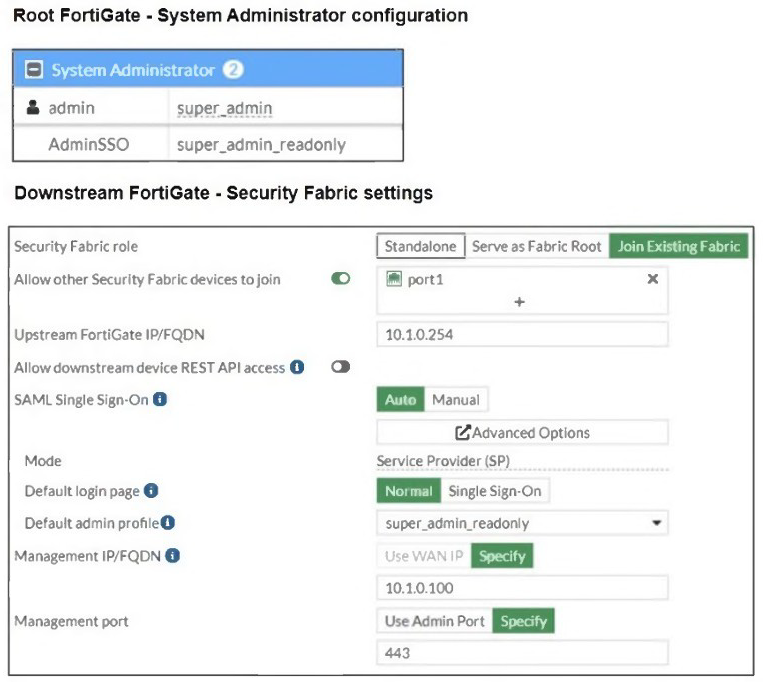
The Administrators section of a root FortiGate device and the Security Fabric Settings section of a downstream FortiGate device are shown.
When prompted to sign in with Security Fabric in the downstream FortiGate device, a user enters the AdminSSO credentials.
What is the next status for the user?
Show answerHide answer

Correct answer: C The user receives an authentication failure message.

Explanation

Explanation:
In this scenario, the downstream FortiGate is configured to use SAML Single Sign-On (SSO) via the Security Fabric. The user attempts to authenticate using the AdminSSO account, which is defined on the root FortiGate with the role super_admin_readonly.
However, the Management IP/FQDN field in the downstream FortiGate’s Security Fabric settings is incorrectly set to super_admin_readonly — which is a username, not a valid IP or FQDN. This misconfiguration breaks the SAML authentication flow.

As a result:
The downstream FortiGate cannot properly reach the upstream FortiGate for SAML assertion.
The SSO login attempt fails due to invalid or unreachable identity provider configuration.

Why the other options are incorrect:

A. Prompted to create an SSO administrator account ❌ Incorrect.
FortiGate does not prompt users to create SSO accounts during login. Accounts must be pre-configured.

B. Authentication failure message ❌ Duplicate of C.
This option is redundant and likely a distractor.

D. Accesses downstream FortiGate with super_admin privileges ❌ Incorrect.
Even if AdminSSO has super_admin_readonly rights on the root FortiGate, the downstream FortiGate cannot validate the login due to the misconfigured Management IP/FQDN.

Reference
FortiOS 7.6 Administration Guide – Security Fabric and SAML SSO setup
Fortinet KB: Troubleshooting SAML login failures in Security Fabric

🔍 Summary:
The login fails because the Management IP/FQDN is misconfigured as a username, not a valid endpoint. SAML cannot complete, and the user receives an authentication failure.
Question 20 Choose 1
An administrator must standardize the deployment of FortiGate devices across branches with consistent interface roles and policy packages using FortiManager.
What is the recommended best practice for interface assignment in this scenario?
Show answerHide answer

Correct answer: A Enable metadata variables to use dynamic configurations in the standard interfaces of FortiManager.

Explanation

Explanation:
The goal is to standardize deployment while accommodating minor branch-to-branch variations, such as different interface names or IP schemes. FortiManager's Metadata Variables are the designed best practice for this exact scenario.

A Standard Interface object is created in FortiManager (e.g., WAN_INTERFACE).
A Metadata Variable (e.g., %WAN_Port%) is assigned to the interface's "Physical Name" field.

In the Device Manager, each branch FortiGate is assigned a unique value for this variable (e.g., port1 for one branch, wan1 for another).
The same Policy Package can then be applied to all devices. During installation, FortiManager dynamically resolves the %WAN_Port% variable to the correct physical interface name for each specific device, achieving standardization with flexibility.

Why other options are incorrect:

B. Use the Install On feature:
This feature controls which devices a policy package is installed on, but it does not dynamically change the interface names within the policies themselves. It lacks the granularity for interface assignment.

C. Use device database scripts:
While powerful for automation, scripts are complex and not the primary, standardized method for this specific task. Metadata variables provide a simpler, GUI-driven, and centrally managed solution.

D. Create normalized interface types per-platform:
This describes the function of Platform Sets, which are used to map physical interfaces to logical roles (WAN, DMZ, etc.) before importing a device. It is a foundational step for model variance but does not handle the dynamic assignment of variables for consistent policy application across a standardized deployment.

Reference:

Fortinet Documentation: FortiManager Administration Guide - "Using metadata in policies and objects". This section details how to use variables to create dynamic configurations that adapt to individual devices while using a single, standardized policy package.
Full mock exam

Sit the FCSS_EFW_AD-7.6 exam before exam day

Full-length mocks with the same number of questions and the same time limit as the real FCSS_EFW_AD-7.6 exam. Every attempt draws a new set of questions from the full bank, so you can keep going until you pass comfortably.

Get full FCSS_EFW_AD-7.6 mock exam
  • 36questions per mock
  • 70 mintime limit
  • 112questions in the bank
  • Newmock on every attempt