Fortinet certification · Exam FCP_FCT_AD-7.4

FCP_FCT_AD-7.4 Mock Exam Page 3

Fortinet NSE 6 FortiClient EMS 7.4 Administrator

Free FCP_FCT_AD-7.4 mock exam questions 21–30, each with the answer and an explanation.

20 questions · 33 minutes · free, no sign-up

Free FCP_FCT_AD-7.4 questions

21–30 of 30 free
Question 21 Choose 1
Which component or device shares device status information through ZTNA telemetry?
Show answerHide answer

Correct answer: A FortiClient

Explanation

Explanation:

This question focuses on which component provides device status information, also known as ZTNA telemetry, within a Fortinet Zero Trust Network Access (ZTNA) deployment. ZTNA relies heavily on understanding the security posture of the connecting endpoint.

✅ Correct Option: A. FortiClient
FortiClient is the endpoint agent that collects and sends device posture information, such as operating system version, patch status, running processes, and security software status, to the FortiGate and FortiClient EMS as part of ZTNA telemetry. This information is critical for evaluating the trustworthiness of a device before granting access.

❌Incorrect options:

B. FortiGate
FortiGate is the policy enforcement point that receives ZTNA telemetry and applies access policies based on it. It does not generate the device status information itself; it processes it after receiving it from endpoints.

C. FortiGate Access Proxy
The FortiGate Access Proxy is a function of the FortiGate that acts as a secure gateway for ZTNA connections. While it's part of the ZTNA flow, it relies on FortiClient for device status telemetry, rather than being the source of that information.

D. FortiClient EMS
FortiClient EMS (Endpoint Management System) collects and manages the telemetry data from multiple FortiClient agents. It acts as a central repository and management console for endpoint posture information, but the initial sharing of the device status originates directly from the FortiClient endpoint agent.

Reference:
⇒ FortiClient ZTNA documentation [docs.fortinet.com] This documentation outlines the architecture of Fortinet ZTNA, emphasizing FortiClient's role in gathering and sharing endpoint telemetry for posture assessment and policy enforcement.
Question 22 Choose 1
A new chrome book is connected in a school's network. Which component can the EMS administrator use to manage the FortiClient web filter extension installed on the Google Chromebook endpoint?
Show answerHide answer

Correct answer: A FortiClient EMS

Explanation

Explanation:

This question evaluates your understanding of how Chromebook endpoints are centrally managed. When the FortiClient web filter extension is deployed on a Google Chromebook, the management and configuration must be performed from a centralized control platform rather than locally on the device.

✅ Correct Option: A
FortiClient EMS is the centralized management platform used to configure, monitor, and manage FortiClient components, including the web filter extension installed on Chromebooks. EMS allows administrators to apply web filter profiles, enforce policies, and control settings remotely, which fulfills the requirement for managing the extension.

❌ Incorrect options:

B. FortiClient site categories:
Site categories are predefined web filtering classifications used within a web filter profile. They are not a management component and cannot directly control or manage the Chromebook extension independently.

C. FortiClient customer URL list:
The customer URL list is used to create specific allow or block rules within web filtering policies. It supports filtering decisions but does not function as the management component for the extension.

D. FortiClient web filter extension:
The extension itself performs filtering on the Chromebook, but it does not provide centralized configuration capabilities. It must be managed and configured through FortiClient EMS.

Reference:
⇒ FortiClient EMS Administration Guide: Configuring the FortiClient Web Filter extension
– Confirms that FortiClient EMS is used to manage and configure the web filter extension on Google Chromebooks.
Question 23 Choose 1
A FortiClient EMS administrator is implementing additional security on FortiClient for compliance checks. Which tags can the administrator configure to detect endpoints based on vulnerability severity levels? (Choose one answer)
Show answerHide answer

Correct answer: D Security posture tags

Explanation

Explanation:

This question asks about the type of tags in FortiClient EMS that allow an administrator to identify endpoints based on their vulnerability severity levels for compliance and security checks.

✅ Correct Option: D. Security posture tags
Security posture tags are specifically designed in FortiClient EMS to assess and categorize endpoints based on their compliance with security policies, including vulnerability severity levels. These tags allow the administrator to apply granular security policies based on the endpoint's current security state.

❌Incorrect options:

A. Outbreak alert tags
Outbreak alert tags are used to identify endpoints that are currently experiencing or have recently experienced security incidents or active threats, rather than their underlying vulnerability severity levels for proactive compliance.

B. Classification tags
Classification tags are more general-purpose tags used for grouping endpoints based on various criteria like department, location, or operating system. They are not primarily designed to detect specific vulnerability severity levels.

C. Fabric tags
Fabric tags are used within the Fortinet Security Fabric to group and identify devices (not just endpoints) for policy orchestration and visibility across different Fortinet products. While related to security grouping, they are not specifically focused on endpoint vulnerability severity.

Reference:
⇒ Configuring security posture tags in FortiClient EMS [docs.fortinet.com] This section of the FortiClient EMS Administration Guide specifically details how security posture tags are configured and used to assess endpoint compliance, including vulnerability detection and severity levels.
Question 24 Choose 1
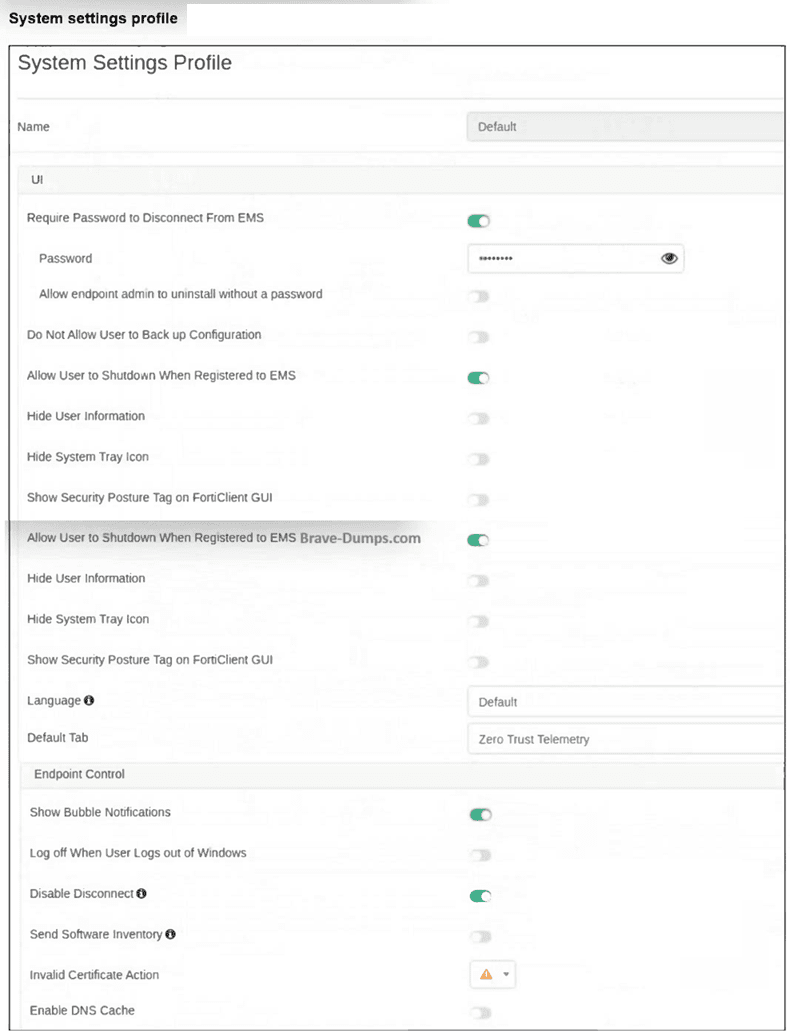
Refer to the exhibit.

Which behavior should you expect when FortiClient with an invalid certificate is connecting to FortiClient EMS? (Choose one answer)
Show answerHide answer

Correct answer: C FortiClient displays a warning message to the end user.

Explanation

Explanation:

This question tests your ability to interpret System Settings Profile configurations within FortiClient EMS. It specifically focuses on the "Invalid Certificate Action" setting and how it dictates the interaction between the FortiClient agent and the EMS server when a trust issue occurs.

✅ Correct Option:

C. FortiClient displays a warning message to the end user:
This is the correct choice because the exhibit shows the "Invalid Certificate Action" is configured with a warning icon (orange triangle with an exclamation mark). In FortiClient EMS 7.4, this specific icon indicates that the endpoint will alert the user of the certificate discrepancy rather than silently allowing or strictly blocking the connection.

❌ Incorrect Options:

A. FortiClient is blocked from connecting to FortiClient EMS:
Blocking would typically be represented by a "Deny" or "Block" action in the dropdown; the current warning icon signifies that the connection proceeds after the user is notified of the risk.

B. FortiClient requires an additional password to connect to FortiClient EMS:
There is no configuration in the "Invalid Certificate Action" section that triggers a password prompt; password requirements in the exhibit are limited to disconnecting from EMS or uninstallation.

D. FortiClient EMS pushes a valid certificate to FortiClient:
EMS does not automatically resolve an invalid certificate state by "pushing" a new one during the connection handshake; the certificate must be updated via a profile deployment or manual installation to resolve the warning.

Reference:
⇒ FortiClient EMS 7.4.0 Administration Guide - System Settings
This documentation confirms that the "Invalid Certificate Action" determines whether FortiClient warns the user, ignores the error, or blocks the connection when encountering an untrusted EMS certificate.
Question 25 Choose 2
Which two are benefits of using multi-tenancy mode on FortiClient EMS? (Choose two.)
Show answerHide answer

Correct answer: C, D The fabric connector must use an IP address to connect to FortiClient EMS. It provides granular access and segmentation.

Explanation

Explanation:

📘 Question Summary:
This question evaluates understanding of FortiClient EMS multi-tenancy mode and how it affects deployment architecture, access control, and integration with the Fortinet Security Fabric. Candidates must know how multi-tenancy changes EMS connectivity requirements, administrative separation, and tenant-level segmentation. The focus is on operational benefits rather than infrastructure duplication or licensing behavior, requiring familiarity with EMS design principles and Fortinet’s centralized endpoint management model.

✔ Correct Answer:

C. The fabric connector must use an IP address to connect to FortiClient EMS.
In multi-tenancy mode, FortiClient EMS requires the FortiGate fabric connector to connect using a fixed IP address rather than a hostname. This ensures proper tenant identification and consistent mapping within the Security Fabric. Hostname-based resolution is not supported in this mode because EMS must reliably associate incoming connections with the correct tenant context, which is enforced through IP-based connectivity.

D. It provides granular access and segmentation.
Multi-tenancy mode is specifically designed to deliver strong administrative separation and role-based access control. Each tenant has isolated policies, endpoints, and administrators, preventing cross-tenant visibility. This segmentation aligns with Fortinet design principles for managed service providers and large enterprises, allowing fine-grained control while maintaining a single EMS instance for centralized yet securely partitioned management.

✖ Incorrect Answer:

A. Separate host servers manage each site.
Multi-tenancy does not require or imply separate FortiClient EMS servers per site. A single EMS instance can host multiple tenants concurrently. The architecture is intentionally centralized to reduce infrastructure overhead while still maintaining logical separation. Requiring separate host servers would contradict the efficiency and scalability goals that multi-tenancy mode is intended to provide.

B. Licenses are shared among sites.
Licensing in FortiClient EMS is global to the EMS instance, not dynamically shared or pooled per tenant as a feature of multi-tenancy. While licenses may cover multiple endpoints, multi-tenancy itself does not introduce license sharing as a defined benefit. License allocation and consumption remain independent of tenant segmentation and are not used as a mechanism for site-based distribution.

🧩 Conclusion:
The correct answers confirm that multi-tenancy mode enhances FortiClient EMS by enforcing IP-based fabric connector integration and enabling strong administrative segmentation. These capabilities align with Fortinet’s architecture for secure, scalable endpoint management, particularly in service provider or multi-department environments. Candidates should remember that multi-tenancy focuses on logical isolation and access control, not on licensing optimization or deploying separate EMS servers.

Reference:
FortiClient EMS Administration Guide, Fortinet
Fortinet Security Fabric Integration Documentation
FortiClient EMS Multi-Tenancy Configuration Guide, Fortinet
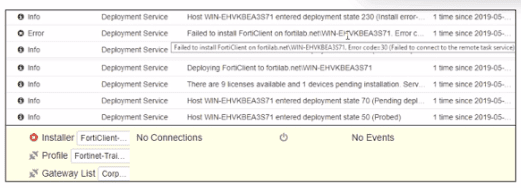
Question 26 Choose 1
Exhibit.

Based on the logs shown in the exhibit, why did FortiClient EMS tail to install FortiClient on the endpoint?
Show answerHide answer

Correct answer: D The task scheduler service is not running.

Explanation

Explanation:

This question tests your ability to diagnose FortiClient EMS deployment failures by interpreting error logs. The exhibit shows a specific error: "Failed to connect to the remote task service" (Error code: 30), which indicates a problem with a required Windows service on the endpoint.

✅Correct Option:

✅ D. The task scheduler service is not running.
The error message "Failed to connect to the remote task service" directly indicates that the Task Scheduler service on the target endpoint is either not running or not accessible . FortiClient EMS uses the Task Scheduler service to schedule and execute the deployment tasks on remote endpoints . This service must be set to Automatic on Windows endpoints for successful FortiClient installation .

❌Incorrect options:

❌ A. The FortiClient antivirus service is not running.
FortiClient is not yet installed on the endpoint (the deployment failed), so its antivirus service cannot be running. This is a post-installation condition, not relevant to installation failure .

❌ B. The Windows installer service is not running.
While the Windows Installer service (set to Manual) is required for deployment , the specific error in the exhibit points to the Task Scheduler service, not the Windows Installer service.

❌ C. The remote registry service is not running.
Although the Remote Registry service must be set to Automatic for EMS deployments , the error message explicitly mentions "remote task service," not registry access. A Remote Registry issue would generate a different error, such as "failed to access the remote device registry" .

Reference:
⇒ Fortinet Community: Technical Note - FortiClient fails to install from FortiClient EMS
This article confirms that error messages including "failed to connect to the remote task service" indicate the Task Scheduler service is not running on the endpoint .

⇒ Fortinet Documentation: Preparing Windows endpoints for FortiClient deployment
This guide lists Task Scheduler: Automatic as a required service on each Windows endpoint before deploying FortiClient .
Question 27 Choose 1
An administrator must deploy FortiClient for an organization that has BYOD and remote users. What can the administrator use to deploy FortiClient? (Choose one answer)
Show answerHide answer

Correct answer: C Microsoft Intune

Explanation

Explanation:

This question tests FortiClient deployment methods suitable for BYOD and remote users in EMS 7.4. It evaluates administrator knowledge of MDM solutions that handle unmanaged personal devices and distributed endpoints without domain dependency.

✅Correct Option:

C. Microsoft Intune:
Specifically designed for BYOD and remote user scenarios, Intune enables cloud-based FortiClient deployment to personal and mobile devices. It supports iOS, Android, Windows, and macOS endpoints through app management policies, ensuring secure initial installation and EMS connectivity without requiring Active Directory domain joins.

❌Incorrect options:

A. FortiClient zero-touch provisioning:
Not a recognized FortiClient deployment method. Zero-touch applies to FortiGate or other network devices, not endpoint agents like FortiClient.

B. Microsoft System Center Configuration Manager (SCCM):
Limited to managed corporate Windows domain-joined devices. SCCM requires Active Directory infrastructure unsuitable for BYOD personal devices and remote unmanaged endpoints.

D. Group Policy Object (GPO):
Requires Active Directory domain membership for deployment. Inapplicable to BYOD personal devices and remote users outside corporate domain control.

Reference:
🔧 FortiClient EMS: Initially deploying FortiClient software to endpoints - Lists MDM solutions including Intune as primary method for BYOD/mobile deployments.
Question 28 Choose 1
Refer to the exhibit, which shows FortiClient EMS deployment, profiles.

When an administrator creates a deployment profile on FortiClient EMS. which statement about the deployment profile is true?
Show answerHide answer

Correct answer: A Deployment-2 will upgrade FortiClient on both the AD group and workgroup.

Explanation

Explanation:

This question tests your ability to interpret FortiClient EMS deployment profile configurations. The exhibit shows two deployment profiles with different packages, assigned groups, priorities, and enabled states. The key factors to evaluate are the deployment package type, assigned groups scope, and whether the profile is enabled or disabled.

✅ Correct Option:

A. Deployment-2 will upgrade FortiClient on both the AD group and workgroup.
Deployment-2 is enabled (checkbox is checked), uses the "To-Upgrade" package, and is assigned to "All Groups" which covers both the AD group (trainingAD.training.lab) and workgroup endpoints. Since it is the only active deployment profile, it will execute the upgrade across all assigned endpoint groups.

❌ Incorrect Options:

B. Deployment-1 will install FortiClient on new AD group endpoints.
Deployment-1 is clearly disabled (checkbox is unchecked), meaning it will not execute on any endpoints regardless of its package type or group assignments. A disabled profile performs no deployment actions.

C. Deployment-2 will install FortiClient on both the AD group and workgroup.
Deployment-2 is assigned the "To-Upgrade" package, which is designed for upgrading existing FortiClient installations, not performing fresh installs. Installation is handled by the "First-Time-Installation" package assigned to Deployment-1.

D. Deployment-1 will upgrade FortiClient only on the workgroup.
Deployment-1 uses the "First-Time-Installation" package, not an upgrade package. Additionally, it is disabled, so it will not perform any action on any group, whether workgroup or AD group.

Reference:
🔧 FortiClient EMS Deployment Profiles – FortiClient EMS 7.4 Administration Guide
⇒ This page explains deployment profile configuration including package types (First-Time-Installation vs. To-Upgrade), group assignments, priority ordering, and the effect of enabling or disabling a deployment profile.

🔧 Managing FortiClient Deployments – FortiClient EMS 7.4
⇒ Confirms that only enabled deployment profiles are executed by EMS and that the "All Groups" assignment scope includes both AD-joined and workgroup endpoints.
Question 29 Choose 1
Which Fortinet solution can you integrate FortiClient with to use the single sign-on mobility agent (SSOMA) feature? (Choose one answer)
Show answerHide answer

Correct answer: A FortiAuthenticator

Explanation

Explanation:

This question identifies the specific Fortinet identity management solution required to enable the Single Sign-On Mobility Agent (SSOMA) functionality. It focuses on how the endpoint agent communicates with the fabric's authentication services to streamline user login processes across the network.

✅ Correct Option:

A. FortiAuthenticator:
This is the correct choice because SSOMA is designed to work specifically with FortiAuthenticator to provide seamless user identification. When enabled, FortiClient sends the logged-in user's information to FortiAuthenticator, which then communicates with the FortiGate to allow identity-based policy enforcement without requiring multiple logins.

❌ Incorrect Options:

B. FortiSASE:
While FortiSASE uses FortiClient for connectivity and can perform authentication, it is a cloud-delivered security service rather than the specific identity provider or agent-broker required for the SSOMA feature itself. It focuses more on SASE-based security rather than local SSOMA identity propagation.

C. FortiPAM:
FortiPAM focuses on Privileged Access Management, which is used for controlling and monitoring access to sensitive infrastructure by high-level accounts. It does not serve as the mobility agent broker that synchronizes standard user SSO sessions within the broader security fabric.

D. FortiNAC:
FortiNAC is used for network access control, visibility, and automated response based on device type and security posture. However, it does not manage the specific SSOMA identity synchronization between endpoints and the security fabric that FortiAuthenticator handles.

Reference:
⇒ FortiClient 7.4.0 Administration Guide - SSOMA
This documentation confirms that the Single Sign-On Mobility Agent (SSOMA) requires integration with FortiAuthenticator to share user logon information with the Fortinet Security Fabric. ​
Question 30 Choose 1
An administrator installs FortiClient on Windows Server. What is the default behavior of real-time protection control?
Show answerHide answer

Correct answer: C Real-time protection is disabled

Explanation

Explanation:

This question tests your understanding of how FortiClient’s real-time antivirus protection behaves when installed on a Windows Server platform. FortiClient adjusts default antivirus settings on servers to avoid potential performance impact and service interruption.

🟢 Correct Option: C
When FortiClient is installed on a Windows Server, real-time protection is disabled by default. Fortinet’s official documentation shows that FortiClient automatically disables real-time scanning on server operating systems until a profile is pushed from EMS that explicitly enables it. This behavior ensures server stability and avoids conflicts with server workloads.

🔴 Incorrect options:

A. Real-time protection must update AV signature database:
Updating the antivirus signature database is not the default behavior being asked — the question is specifically about the default state of real-time protection, not how signatures are updated.

B. Real-time protection sends malicious files to FortiSandbox when the file is not detected locally:
Sending files to FortiSandbox is a separate sandbox integration feature; it is not part of the default real-time protection behavior on Windows Server.

D. Real-time protection must update the signature database from FortiSandbox:
FortiSandbox is not used as the default signature update source. FortiClient receives signatures from FortiGuard services. This statement does not describe default real-time protection behavior.

Reference:
⇒ https://docs.fortinet.com/document/forticlient/6.0.2/administration-guide/14184/enabling-realtime-protection
— Confirms that FortiClient automatically disables real-time protection on Windows Server installations until a policy enables it.

That's the last free question

You've seen the free 30% (30 of 100 questions). Full access unlocks every question and full-length FCP_FCT_AD-7.4 mock exams (40 questions, 65 minutes), a different mock on every attempt.

Unlock full mock exam
Full mock exam

Sit the FCP_FCT_AD-7.4 exam before exam day

Full-length mocks with the same number of questions and the same time limit as the real FCP_FCT_AD-7.4 exam. Every attempt draws a new set of questions from the full bank, so you can keep going until you pass comfortably.

Get full FCP_FCT_AD-7.4 mock exam
  • 40questions per mock
  • 65 mintime limit
  • 100questions in the bank
  • Newmock on every attempt