Fortinet certification · Exam FCP_FCT_AD-7.4

FCP_FCT_AD-7.4 Mock Exam Page 2

Fortinet NSE 6 FortiClient EMS 7.4 Administrator

Free FCP_FCT_AD-7.4 mock exam questions 11–20, each with the answer and an explanation.

20 questions · 33 minutes · free, no sign-up

Free FCP_FCT_AD-7.4 questions

11–20 of 30 free
Question 11 Choose 1
An administrator configures ZTNA configuration on the FortiGate. Which statement is true about the firewall policy?
Show answerHide answer

Correct answer: A It redirects the client request to the access proxy.

Explanation

Explanation:

📘 Question Summary:
The question evaluates a candidate's understanding of how Zero Trust Network Access (ZTNA) policies are structured within the FortiOS environment. Specifically, it tests knowledge regarding the technical function of a ZTNA firewall policy compared to standard policies. To answer correctly, one must understand the interaction between the ZTNA access proxy, the incoming client traffic, and how the FortiGate handles redirection to ensure that authentication and security posture checks are enforced before granting access to internal applications.

✅ Correct Answer:
Option A is correct because the ZTNA firewall policy acts as the enforcement point that redirects client requests to the designated access proxy. In a ZTNA deployment, when a client attempts to connect to a protected resource, the firewall policy identifies the traffic based on the ZTNA tags and destination. It then transparently steers that traffic toward the internal access proxy component, which performs the necessary certificate validation and security posture assessment before allowing the session to proceed.

❌ Incorrect Answer:
Options B, C, and D are incorrect due to fundamental misinterpretations of the FortiOS configuration hierarchy. While a ZTNA policy "uses" a proxy in a general sense, its specific technical role in the configuration GUI and CLI is the redirection mechanism. The ZTNA server is a separate object defined under the ZTNA menu, not within the firewall policy itself. Furthermore, policies do not "only" use tags; they also incorporate standard firewall criteria like source interfaces and destination addresses to maintain granular control.

🧩 Conclusion:
The correct answers confirm that the primary role of a ZTNA firewall policy is the redirection of client requests to the integrated access proxy. This mechanism ensures that all traffic is strictly governed by identity and device health status before reaching the application layer. Candidates must remember that the firewall policy serves as the bridge between the incoming connection and the proxy logic, maintaining the core "verify-then-trust" principle essential for a successful Fortinet ZTNA implementation.

Reference:
Official Fortinet documentation on "ZTNA firewall policies" and "Access proxy configuration" within the FortiOS 7.4 Administration Guide and the ZTNA Deployment Guide.
Question 12 Choose 1
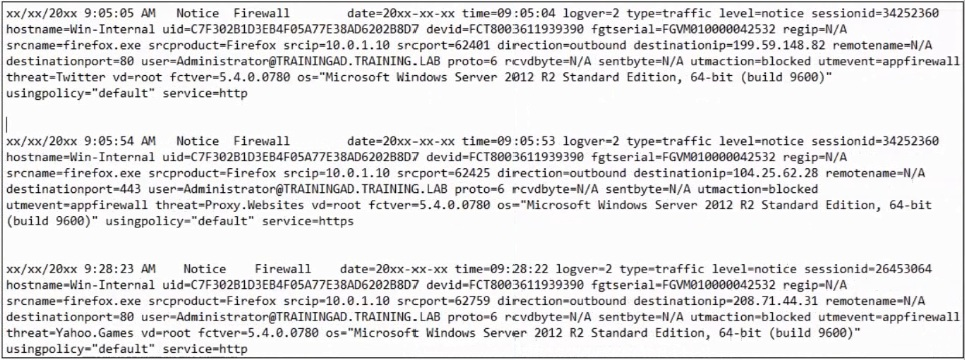
Refer to the exhibit.

Based on the FortiClient logs shown in the exhibit which application is blocked by the application firewall?
Show answerHide answer

Correct answer: D Firefox

Explanation

Explanation:

📘 Question Summary:
This question assesses the ability to interpret FortiClient application firewall logs and identify blocked applications based on raw log data. Candidates must analyze log entries containing session details, process information, and threat events to determine which application triggered the blocking action. The evaluation tests practical skills in log analysis, understanding FortiClient endpoint security enforcement mechanisms, and correlating process names with application identifiers within the application firewall framework.

✔ Correct Answer:
Option D is correct because the log entries explicitly show "srcname=firefox.exe" and "srcproduct=Firefox" in multiple blocked events. The application firewall enforcement is clearly targeting the Firefox browser process across all three log samples. Each entry displays "utmevent=appFirewall" indicating application-level blocking, with Firefox consistently identified as the source application attempting connections to various destinations. The logs demonstrate that regardless of the destination being accessed, the Firefox application itself is subject to blocking rules configured within FortiClient's application control policies.

✖ Incorrect Answer:

Option A is incorrect because Twitter appears only as a threat classification descriptor ("threat=Twitter") in one log entry, not as the blocked application. The threat field identifies the category or signature of detected activity, whereas the actual blocked application is determined by the srcname and srcproduct fields showing Firefox. Twitter represents the content or service being accessed rather than the executable process subject to application firewall enforcement, demonstrating confusion between threat categorization and application identification.

Option B is invalid because Facebook does not appear anywhere within the provided log entries as either a source application or threat category. While the logs show various threats including proxy websites, Yahoo Games, and Twitter, Facebook is completely absent from all three samples. This option represents a distractor with no supporting evidence in the exhibit data, testing whether candidates actually examine log content rather than making assumptions about commonly blocked social media platforms.

Option C is inaccurate because Internet Explorer never appears in the logs as the source application. Although the operating system field shows "Microsoft Windows Server 2012 R2 Standard Edition" indicating a Windows environment where Internet Explorer might be installed, the actual blocked process is consistently identified as Firefox throughout all entries. The srcname field would display "iexplore.exe" if Internet Explorer were being blocked, but instead shows "firefox.exe" in every instance, clearly eliminating this option.

🧩 Conclusion:
The correct answer demonstrates that Firefox is the application blocked by FortiClient's application firewall, as evidenced by consistent "srcname=firefox.exe" and "srcproduct=Firefox" fields across all log entries. Candidates should recognize that application firewall blocking is determined by examining process-level identifiers in the srcname and srcproduct fields, not by threat categories or destination services mentioned elsewhere in logs. Understanding this distinction between the application initiating connections and the content or threats associated with those connections is fundamental for accurate FortiClient log interpretation and troubleshooting endpoint security policies.

📚 Reference:
FortiClient Administration Guide - Log Message Reference - Fortinet Documentation Library
FortiClient Endpoint Security Technical Documentation - Application Firewall Logging
Question 13 Choose 1
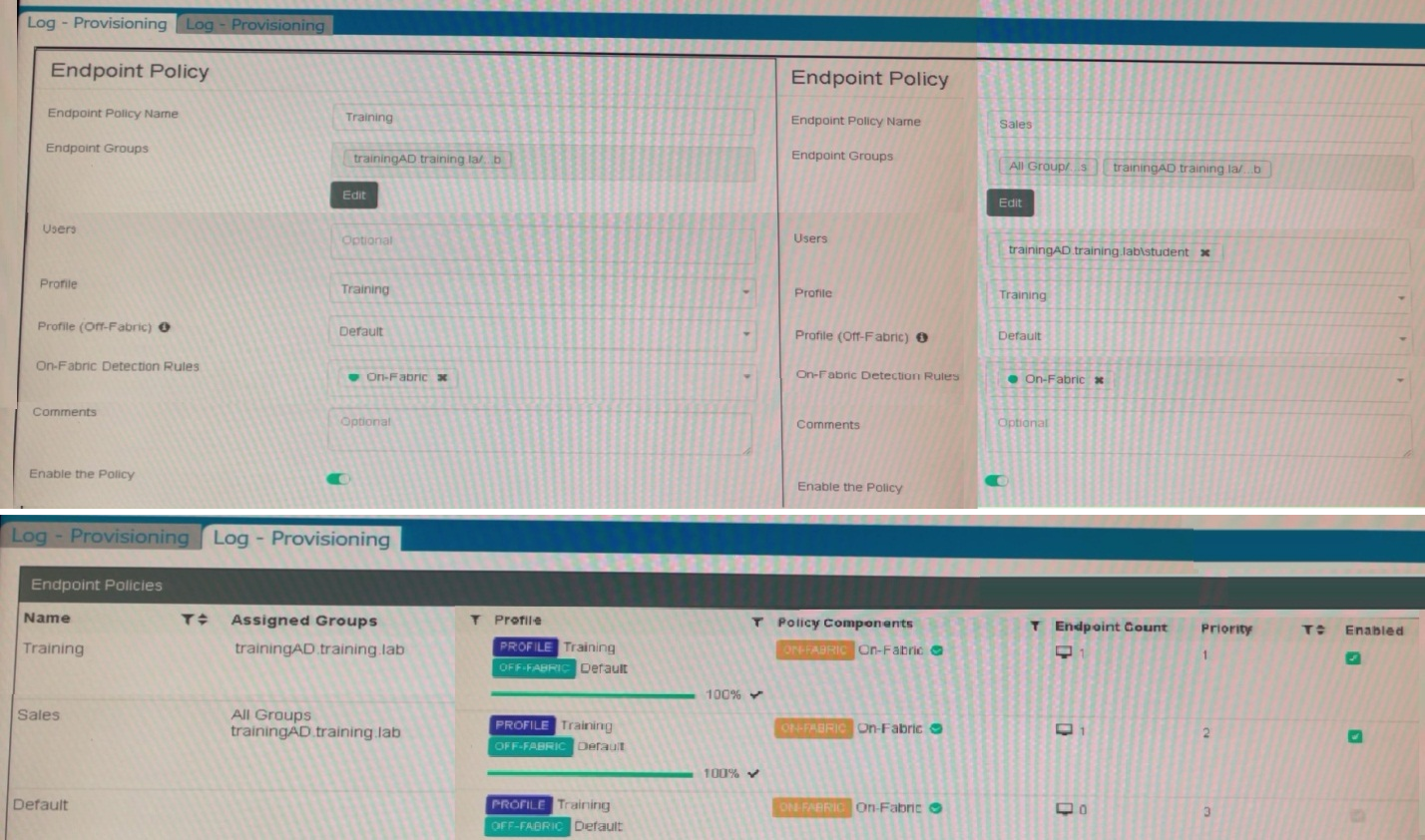
Refer to the exhibits.

Which shows the configuration of endpoint policies.
Based on the configuration, what will happen when someone logs in with the user account student on an endpoint in the trainingAD domain?
Show answerHide answer

Correct answer: B FortiClient EMS will assign the Training policy

Explanation

Explanation:

📘 Question Summary:
This question evaluates comprehension of FortiClient EMS endpoint policy assignment logic, specifically how user and group membership intersect with policy priority and on-fabric detection rules. It tests the candidate’s ability to interpret configuration exhibits to determine which policy is applied under specified conditions, reflecting real-world deployment scenarios in domain-integrated environments.

🟢 Correct Answer:

B. FortiClient EMS will assign the Training policy
The Training policy explicitly includes the trainingAD domain group and has a higher priority (1) than the Sales policy (priority 2). Even though the Sales policy also references trainingAD\student, FortiClient EMS applies policies based on priority order when multiple policies match. Since the Training policy is prioritized and matches the user’s domain context, it takes precedence for both on- and off-fabric endpoints.

🔴 Incorrect Answer:

A. FortiClient EMS will assign the Sales policy
Although the Sales policy includes the specific user trainingAD\student, its lower priority (2) prevents it from overriding the Training policy (priority 1), which already covers the broader trainingAD group. Policy assignment follows strict priority ranking; specificity alone does not supersede configured precedence in FortiClient EMS.

C. FortiClient EMS will assign the Default policy
The Default policy, while present, has the lowest priority (3) and is only applied if no higher-priority policies match. In this scenario, both Training and Sales policies match the user context, rendering the Default policy irrelevant. It serves as a fallback, not a primary assignment mechanism.

D. FortiClient EMS will assign the Training policy for on-fabric endpoints and the Sales policy for the off-fabric endpoint
This misinterprets policy behavior. Both policies define an Off-Fabric profile (Default), but assignment is determined by policy priority, not fabric status. The Training policy applies universally to matching users regardless of fabric connectivity because it holds higher priority and encompasses the required group membership.

🔧 Conclusion:
The correct answer demonstrates that FortiClient EMS assigns endpoint policies based on priority order when multiple policies match user or group criteria. Candidates must remember that explicit user targeting does not override group-based policy priority, and fabric status affects profile selection—not policy assignment—within the same policy.

Reference:
Fortinet Documentation – “Endpoint Policy Assignment in FortiClient EMS,”
Question 14 Choose 1
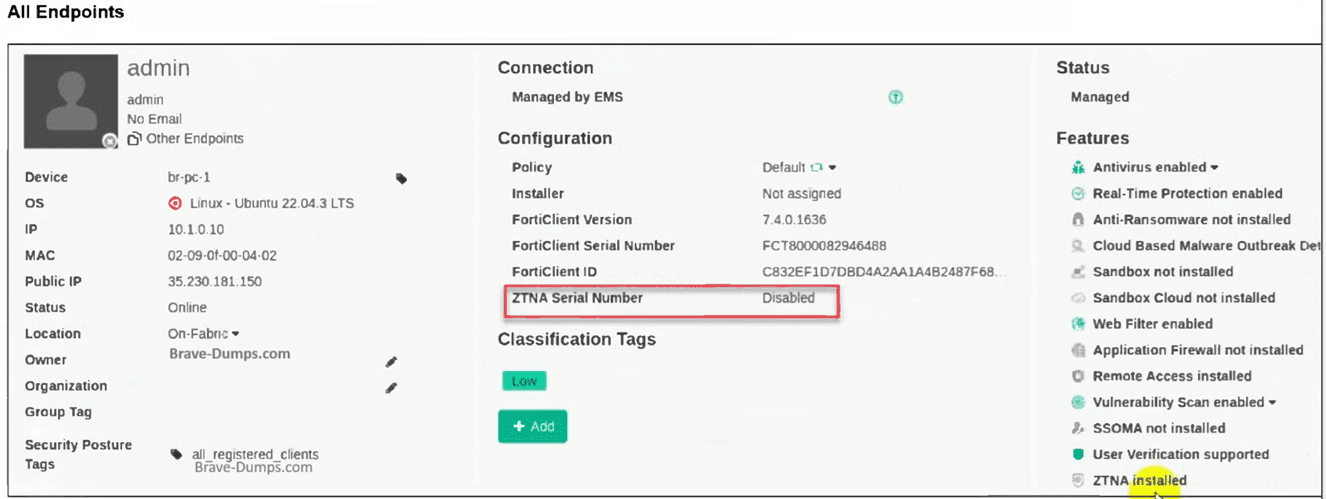
Refer to the exhibit.

The zero trust network access (ZTNA) serial number on endpoint br-pc-1 is in a disabled state.
What is causing the problem? (Choose one answer)
Show answerHide answer

Correct answer: C The ZTNA is disabled due to FortiClient disconnected from FortiClient EMS.

Explanation

Explanation:

This question checks the reason behind the ZTNA Serial Number appearing as “Disabled” in the FortiClient EMS endpoint details pane for a managed Linux device. It evaluates knowledge of ZTNA certificate lifecycle and the strict dependency on active, ongoing connectivity between the FortiClient endpoint and EMS in version 7.4.

✅ Correct Option:

C. The ZTNA is disabled due to FortiClient disconnected from FortiClient EMS.
When FortiClient loses connection to EMS, the endpoint can no longer maintain its managed state. As a result, EMS marks the ZTNA feature status as Disabled and the ZTNA Serial Number field shows “Disabled” because the certificate cannot be kept active or refreshed without continuous EMS management. This matches the exhibit behavior exactly.

❌ Incorrect options:

A. The ZTNA feature is not installed on FortiClient.
This option is wrong because the Features section in the exhibit clearly lists “ZTNA installed” at the bottom, confirming that the ZTNA module is already present and was successfully installed on this endpoint.

B. The ZTNA destinations endpoint profile is disabled.
This option does not fit because a disabled ZTNA Destinations profile would prevent initial certificate provisioning and ZTNA feature activation. Since the exhibit already shows ZTNA as installed, the profile must have been enabled at some point and the current “Disabled” status is not caused by the profile itself.

D. The ZTNA certificate has been revoked by administrator.
This option is incorrect since certificate revocation by an administrator would typically cause authentication failures, connection errors, or an “Invalid” certificate state rather than simply displaying the ZTNA Serial Number field as “Disabled” in the EMS console.

Reference:
⇒ Prepare FortiClient and FortiClient EMS for ZTNA – FortiGate / FortiOS 7.4.0
Confirms that ZTNA certificate provisioning and the display of a valid ZTNA Serial Number require the endpoint to remain connected to EMS; disconnection causes the feature to revert to Disabled status.

⇒ Endpoint profile – FortiClient EMS 7.4.0 Administration Guide
Explains that ZTNA-related settings (including certificate handling) depend on active management by EMS and that loss of connectivity affects feature status visibility in the All Endpoints view.
Question 15 Choose 3
Which three types of antivirus scans are available on FortiClient? (Choose three )
Show answerHide answer

Correct answer: B, C, E Full scanCustom scanQuick scan

Explanation

Explanation:

This question tests knowledge of FortiClient's on-demand antivirus scan types available in the EMS 7.4 Administrator context. It evaluates understanding of endpoint protection features for scheduled or manual scans targeting rootkits, system files, and specific locations.

✅Correct Option:

B. Full scan:
Performs comprehensive rootkit detection first, then scans all files, executables, DLLs, drivers, and system areas across the entire endpoint filesystem. This ensures maximum threat coverage including boot sectors and hidden malware that lighter scans might miss. Ideal for thorough periodic maintenance.

C. Custom scan:
Starts with rootkit detection, then allows administrators or users to select specific files, folders, or drives for targeted scanning. This provides precise control for investigating suspicious areas without unnecessary full-system overhead, balancing efficiency and focus.

E. Quick scan:
Begins with rootkit detection and focuses solely on running executables, DLLs, drivers, and critical system components. Designed for fast threat checks on active processes without scanning the entire disk, making it suitable for frequent, low-impact security verifications.

❌Incorrect options:

A. Proxy scan:
Not available in FortiClient antivirus features. Proxy scanning is specific to FortiGate web proxy functionality for inspecting HTTP/HTTPS traffic. It operates at the network gateway level, not endpoint AV scanning.

D. Flow scan:
Not a FortiClient endpoint scan type option. Flow-based scanning is used by FortiGate for real-time network traffic analysis on interfaces. It performs inline inspection without file storage, unlike on-demand endpoint scans.

Reference:
🔧 FortiClient EMS AntiVirus Protection - Confirms Quick, Full, and Custom as standard AV scan types with rootkit detection.
Question 16 Choose 1
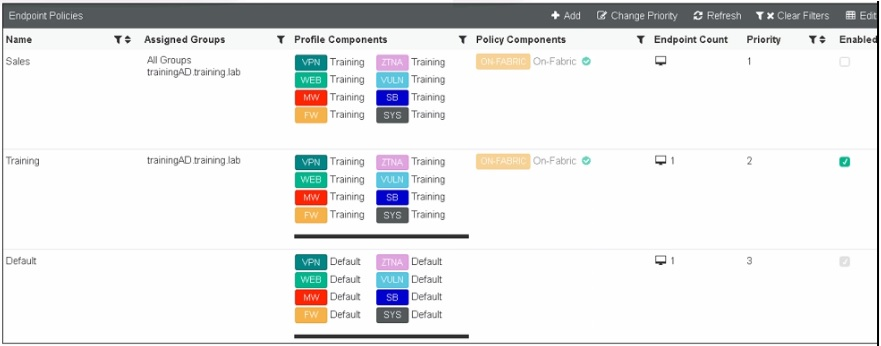
FortiClient EMS endpoint policies

Refer to the exhibit, which shows multiple endpoint policies on FortiClient EMS. Which policy is applied to the endpoint in the AD group trainingAD.
Show answerHide answer

Correct answer: A The Training policy

Explanation

Explanation:

This question tests your understanding of how FortiClient EMS applies endpoint policies based on AD group membership and policy priority. You must analyze the exhibit to determine which policy is applied to an endpoint belonging to the AD group "trainingAD".

✅Correct Option:

✅ A. The Training policy
The endpoint in the AD group "trainingAD" matches the "Assigned Groups" column of the Training policy, which shows "trainingAD_training_lab". Since the endpoint belongs to this AD group, the Training policy is applied, regardless of the Default policy's higher priority (priority 3 vs. priority 2).

❌Incorrect options:

❌ B. Both the Sales and Training policies because their priority is higher than the Default policy
Policies are not combined or cumulative. Only one policy applies to an endpoint at a time based on group matching, and the Sales policy is assigned to "All Groups" which would include this endpoint, but the Training policy takes precedence because it is a specific match.

❌ C. The Default policy because it has the highest priority
Priority determines order when multiple policies match an endpoint, but the Default policy is only applied when no other policy matches the endpoint's group. Since the endpoint matches the Training policy's assigned group, Default does not apply.

❌ D. The Sales policy
Although the Sales policy is assigned to "All Groups" (which includes trainingAD), FortiClient EMS applies the most specific policy match. The Training policy explicitly lists trainingAD as an assigned group, making it a more specific match than the broad "All Groups" assignment.

Reference:
⇒ Fortinet Documentation: FortiClient EMS 7.4 Administration Guide - Endpoint Policies
This confirms that policies are assigned based on group membership, and when multiple policies match, the system uses the most specific assignment rather than combining policies.
Question 17 Choose 1
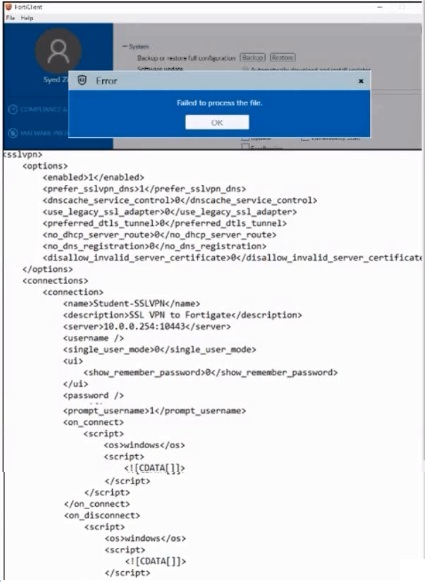
Refer to the exhibit.

An administrator has restored the modified XML configuration file to FortiClient and sees the error shown in the exhibit.
Based on the XML settings shown in the exhibit, what must the administrator do to resolve the issue with the XML configuration file?
Show answerHide answer

Correct answer: A The administrator must resolve the XML syntax error.

Explanation

Explanation:

The question presents an error message "Failed to process the file" when restoring an XML configuration to FortiClient, along with a partial XML file. The core issue lies in the malformed XML structure visible in the provided snippet.

✅Correct Option:
The XML configuration snippet shows an unclosed ksslvpn tag at the beginning and an unclosed disallow_invalid_server_certificate tag within the options. These are clear XML syntax errors that prevent the file from being parsed correctly by FortiClient, leading to the "Failed to process the file" error.

❌Incorrect options:

B. The administrator must use a password to decrypt the file.
This is incorrect because the error shown is related to file processing due to syntax issues, not encryption. XML configuration files are typically handled as plain text by FortiClient for parsing, and a decryption password is not relevant here.

C. The administrator must change the file size.
This is incorrect. The file size itself is not the cause of a "Failed to process the file" error. The problem lies with the invalid content and structure of the XML within the file, which prevents FortiClient from reading it correctly.

D. The administrator must save the file as FortiClient-config.conf.
This is incorrect. While proper naming conventions are important, the displayed error explicitly points to a processing failure, which is a content-related issue (syntax error in XML) rather than an incorrect file name or extension.

Reference:
⇒ Fortinet FortiClient XML Configuration Guide [docs.fortinet.com] This guide confirms the proper XML structure and syntax required for FortiClient configuration files, highlighting the importance of correctly closed tags and well-formed XML to avoid processing errors.
Question 18 Choose 1
An administrator is required to maintain a software vulnerability on the endpoints, without showing the feature on the FortiClient. What must the administrator do to achieve this requirement?
Show answerHide answer

Correct answer: A Select the vulnerability scan feature in the deployment package, but disable the feature on the endpoint profile

Explanation

Explanation:

This question tests your understanding of how FortiClient EMS manages features on endpoints while controlling visibility. The goal is to maintain a software vulnerability feature on endpoints without showing it in the FortiClient interface.

✅ Correct Option: A
Selecting the vulnerability scan feature in the deployment package ensures EMS can manage and update the functionality on endpoints. Disabling it in the endpoint profile hides the feature from the FortiClient console, allowing centralized control while keeping it hidden from end users.

❌ Incorrect options:

B. Disable select the vulnerability scan feature in the deployment package:
Disabling the feature in the deployment package removes it completely from EMS management. This prevents the administrator from maintaining the vulnerability scan on the endpoints, which fails to meet the requirement of keeping the feature active but hidden.

C. Click the hide icon on the vulnerability scan profile assigned to endpoint:
FortiClient EMS does not provide a “hide icon” for feature profiles. Attempting this would not hide the feature from the FortiClient interface, so it does not achieve the requirement.

D. Use the default endpoint profile:
The default endpoint profile does not hide or disable the vulnerability scan feature. Assigning this profile would leave the feature visible to end users, which conflicts with the requirement to conceal it.

Reference:
⇒ FortiClient EMS Administration Guide
– Confirms how features can be deployed and hidden using endpoint profiles.
Question 19 Choose 1
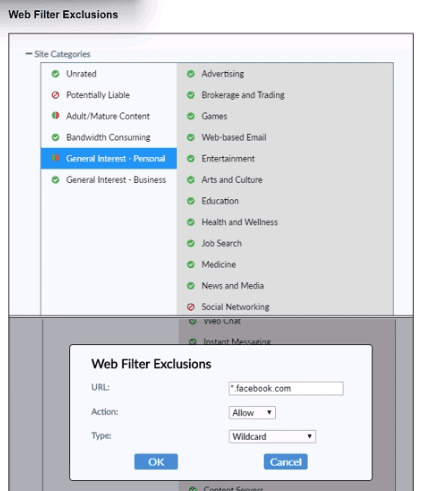
Refer to the exhibit.

Based on the settings shown in the exhibit, which action will FortiClient take when users try to access www facebook com?
Show answerHide answer

Correct answer: A FortiClient will allow access to Facebook.

Explanation

Explanation:

This question tests your understanding of FortiClient web filter exclusions and how URL filtering rules are applied. The exhibit shows a web filter exclusion configuration that specifically defines how Facebook should be handled.

✅Correct Option:

✅ A. FortiClient will allow access to Facebook.
The exhibit shows a Web Filter Exclusion configured with URL "facebook.com" and Action set to "Allow". This exclusion overrides any category-based filtering that might otherwise apply to Facebook. Since Facebook typically falls under "Social Networking" category, this explicit allow rule permits access regardless of how that category is configured.

❌Incorrect options:

❌ B. FortiClient will block access to Facebook and its subdomains.
The exclusion is configured with "Allow" action, not block. While wildcard type would cover subdomains, the action determines the result - allow in this case, not block.

❌ C. FortiClient will monitor only the user's web access to the Facebook website.
The exhibit shows a Web Filter Exclusion with Allow action, not a monitoring configuration. Monitoring would require different settings in the web filter profile.

❌ D. FortiClient will prompt a warning message to warn the user before they can access the Facebook website.
The exclusion is set to Allow, which grants access without warnings. Warning prompts would require a different action type such as "Warn" or "Authenticate" in the exclusion configuration.

Reference:
⇒ Fortinet Documentation: FortiClient 7.4 Administration Guide - Web Filter Exclusions
This confirms that web filter exclusions take precedence over category-based filtering, and the Action setting determines whether access is allowed, blocked, or monitored.
Question 20 Choose 1
An administrator has a requirement to add user authentication to the ZTNA access for remote or off-fabric users Which FortiGate feature is required m addition to ZTNA?
Show answerHide answer

Correct answer: C FortiGate explicit proxy

Explanation

Explanation:

This question tests your understanding of how user authentication is enforced for ZTNA access when users are working remotely or off-fabric. Standard ZTNA handles device identity via certificates, but adding user-level authentication requires an additional FortiGate feature to intercept and authenticate traffic before granting access.

✅ Correct Option:

C. FortiGate Explicit Proxy
FortiGate's Explicit Proxy is required to enforce user authentication on top of ZTNA for off-fabric/remote users. It acts as an intermediary that challenges users for credentials before allowing access, enabling identity-based policy enforcement alongside the existing device-based ZTNA certificate verification.

❌ Incorrect Options:

A. FortiGate FSSO
FSSO (Fortinet Single Sign-On) is used to passively collect domain login events from Active Directory environments. It is not designed to actively enforce authentication challenges for remote ZTNA users operating outside the corporate network.

B. FortiGate Certificates
Certificates are already a core component of ZTNA itself, used for device identity verification. They do not add a separate user authentication layer on top of existing ZTNA access control for remote users.

D. FortiGate Endpoint Control
Endpoint Control is used for managing FortiClient registrations and enforcing compliance posture checks. It does not provide the user authentication capability required for ZTNA access in off-fabric scenarios.

Reference:
🔧 Fortinet Docs – ZTNA User Authentication with Explicit Proxy
⇒ Confirms that FortiGate Explicit Proxy is required when adding user authentication to ZTNA access rules for remote and off-fabric users.

🔧 Fortinet ZTNA Architecture Guide – Off-Fabric Access
⇒ Explains the difference between device-based ZTNA verification and the additional user-identity layer enabled through explicit proxy configuration.
Full mock exam

Sit the FCP_FCT_AD-7.4 exam before exam day

Full-length mocks with the same number of questions and the same time limit as the real FCP_FCT_AD-7.4 exam. Every attempt draws a new set of questions from the full bank, so you can keep going until you pass comfortably.

Get full FCP_FCT_AD-7.4 mock exam
  • 40questions per mock
  • 65 mintime limit
  • 100questions in the bank
  • Newmock on every attempt