Fortinet certification · Exam FCP_FCT_AD-7.4

FCP_FCT_AD-7.4 Mock Exam

Fortinet NSE 6 FortiClient EMS 7.4 Administrator

Find out if you're ready for FCP_FCT_AD-7.4. Take the free timed mock exam and get your score in minutes, or study the free FCP_FCT_AD-7.4 questions below with answers and explanations.

20 questions · 33 minutes · free, no sign-up

Free FCP_FCT_AD-7.4 questions

1–10 of 30 free
Question 1 Choose 2
Which two third-party tools can an administrator use to deploy FortiClient? (Choose two.)
Show answerHide answer

Correct answer: B, C Microsoft SCCM Microsoft Active Directory GPO

Explanation

Explanation:

📘 Question Summary
This question evaluates administrators' understanding of enterprise-scale FortiClient deployment strategies within Fortinet's endpoint management ecosystem. It specifically tests familiarity with FortiClient EMS 7.4 integration capabilities alongside Microsoft ecosystem tools for mass distribution. Key knowledge domains encompass software packaging, policy-based installation workflows, and leveraging Active Directory infrastructure to streamline endpoint onboarding across organizational units, ensuring consistent security agent rollout without manual intervention.

✔ Correct Answer

B. Microsoft SCCM
Microsoft System Center Configuration Manager (SCCM) facilitates centralized FortiClient deployment through MSI package distribution and software update management. Fortinet documentation outlines SCCM's compatibility for pushing FortiClient installers with predefined configurations, enabling administrators to target collections, enforce compliance, and monitor installation status across thousands of endpoints efficiently.

C. Microsoft Active Directory GPO
Group Policy Objects in Active Directory enable assigned or published deployment of FortiClient MSI packages to organizational units. Fortinet design principles support GPO for automated installation during startup or logon, incorporating transform files (.mst) generated via FortiClient tools to customize settings like VPN profiles, ensuring seamless integration with domain-joined Windows environments. ​

✖ Incorrect Answer

A. Microsoft Windows Installer
Microsoft Windows Installer (MSI) represents the packaging format, not a standalone third-party deployment tool. Fortinet specifies MSI for use within management platforms like SCCM or GPO, but lacks native capabilities for enterprise-wide distribution, targeting, or reporting required for administrative deployment at scale.

D. QR code generator
QR code generators produce scannable images for manual endpoint activation or configuration import, unsuitable for automated bulk deployment. Fortinet reserves QR codes for individual user onboarding or mobile scenarios, conflicting with EMS server-driven policies that prioritize scripted, policy-enforced agent installation across networks. ​

🧩 Conclusion
The correct answers confirm that Microsoft SCCM and Active Directory GPO serve as validated third-party mechanisms for FortiClient deployment. These tools integrate directly with Fortinet's MSI packaging and EMS-generated configurations, enabling scalable, policy-driven rollout aligned with Security Fabric automation. Candidates should memorize their roles in handling organizational unit targeting and compliance enforcement for exam success. ​

Reference:
Fortinet Documentation: FortiClient 7.4 EMS Administration Guide - Initially Deploying FortiClient Software to Endpoints
Question 2 Choose 1
Refer to the exhibit.

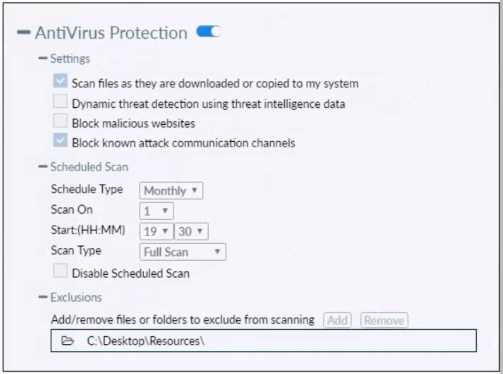
Based on the settings shown in the exhibit which statement about FortiClient behavior is true?
Show answerHide answer

Correct answer: A FortiClient quarantines infected files and reviews later, after scanning them.

Explanation

Explanation:

📘 Question Summary:
This question tests understanding of FortiClient Antivirus real-time protection behavior and how specific configuration options influence file handling during on-access scanning. It focuses on FortiClient Endpoint Protection's default action when malware is detected during real-time scans (files downloaded or copied), the role of exclusions, and the distinction between scanning, blocking, quarantining, and deletion. Candidates need to know FortiClient’s quarantine mechanism and real-time protection logic as described in FortiClient 7.4 administration documentation.

✔ Correct Answer:

A. FortiClient quarantines infected files and reviews later, after scanning them.
FortiClient’s real-time Antivirus Protection, when enabled with “Scan files as they are downloaded or copied to system,” performs on-access scanning. Upon detection of malware, the default action is to quarantine the file rather than delete it immediately. Quarantined files are moved to the FortiClient quarantine store, where they can be reviewed, restored, or deleted later by the user or administrator. This behavior aligns with Fortinet’s balanced approach to endpoint protection, allowing recovery of false positives while preventing immediate data loss.

✖ Incorrect Answer:

B. FortiClient blocks and deletes infected files after scanning them.
FortiClient does not delete infected files by default during real-time protection. Deletion is typically a configurable action in some policy profiles or EMS-managed settings, but the standard client-side Antivirus behavior quarantines rather than permanently deletes files. Immediate deletion without user/admin review would risk irrecoverable loss of legitimate files misidentified as malicious, which contradicts Fortinet’s documented default handling.

C. FortiClient scans infected files when the user copies files to the Resources folder
The exhibit shows “C:\Desktop\Resources” listed as an exclusion. Files copied to this folder (or its subfolders) are explicitly excluded from Antivirus scanning. Therefore, FortiClient does not scan any files—clean or infected—placed in this location during real-time protection. This option incorrectly assumes scanning still occurs despite a clear exclusion entry.

D. FortiClient copies infected files to the Resources folder without scanning them.
While files copied to the excluded “C:\Desktop\Resources” folder bypass scanning, FortiClient does not actively copy or move infected files into this folder. The exclusion only prevents scanning of files that the user (or another process) deliberately places there. This option misrepresents both the purpose of exclusions and FortiClient’s file-handling logic.

🧩 Conclusion:
The correct answer confirms that FortiClient’s default real-time Antivirus behavior is to quarantine detected malware rather than delete it outright. Candidates should remember that when “Scan files as they are downloaded or copied to system” is enabled, malicious files are isolated in quarantine for later review, supporting safe recovery of potential false positives while maintaining endpoint security. This is a key principle of FortiClient’s on-access protection in version 7.4.

Reference:
Fortinet Document Library – FortiClient 7.4.0 Administration Guide, “Antivirus” section; FortiClient EMS 7.4.0 Administration Guide, “Endpoint Profiles – Antivirus” chapter.
Question 3 Choose 2
Which two statements about ZTNA destinations are true? (Choose two.)
Show answerHide answer

Correct answer: C, D FortiClient ZTNA destinations do not support a wildcard FQDN. FortiClient ZTNA destination encryption is disabled by default.

Explanation

Explanation:

📘 Question Summary:
This question evaluates comprehension of FortiClient ZTNA destination configuration specifics. It tests knowledge of core attributes, including wildcard FQDN support, default security settings for encryption and authentication, and the fundamental access methodology distinct from traditional VPN tunnels.

✔ Correct Answer:

Option C is correct as ZTNA destinations require explicit, fully-qualified domain names and do not permit wildcard entries to ensure precise access control.

Option D is valid because, by default, encryption is initially disabled for a ZTNA destination and must be explicitly configured by the administrator to activate secure, encrypted communications for the protected resource.

✖ Incorrect Answer:

Option A is invalid because ZTNA destinations operate using TCP forwarding proxies over encrypted TLS tunnels, not by reusing an existing IPsec or SSL VPN tunnel.

Option B is incorrect as ZTNA destinations provide access via HTTPS forwarding, not generic TCP forwarding. Option E is false because authentication is disabled by default and must be manually enabled to enforce identity verification.

🧩 Conclusion:
The correct answers demonstrate that FortiClient ZTNA destinations are configured with explicit security postures, requiring precise FQDN definitions and having encryption disabled by default. Candidates should remember that ZTNA uses a proxy-based access model with configurable security settings, differing fundamentally from traditional VPN tunnel architectures.

Reference:
Fortinet Documentation - FortiOS 7.4 Administration Guide: ZTNA.
Question 4 Choose 2
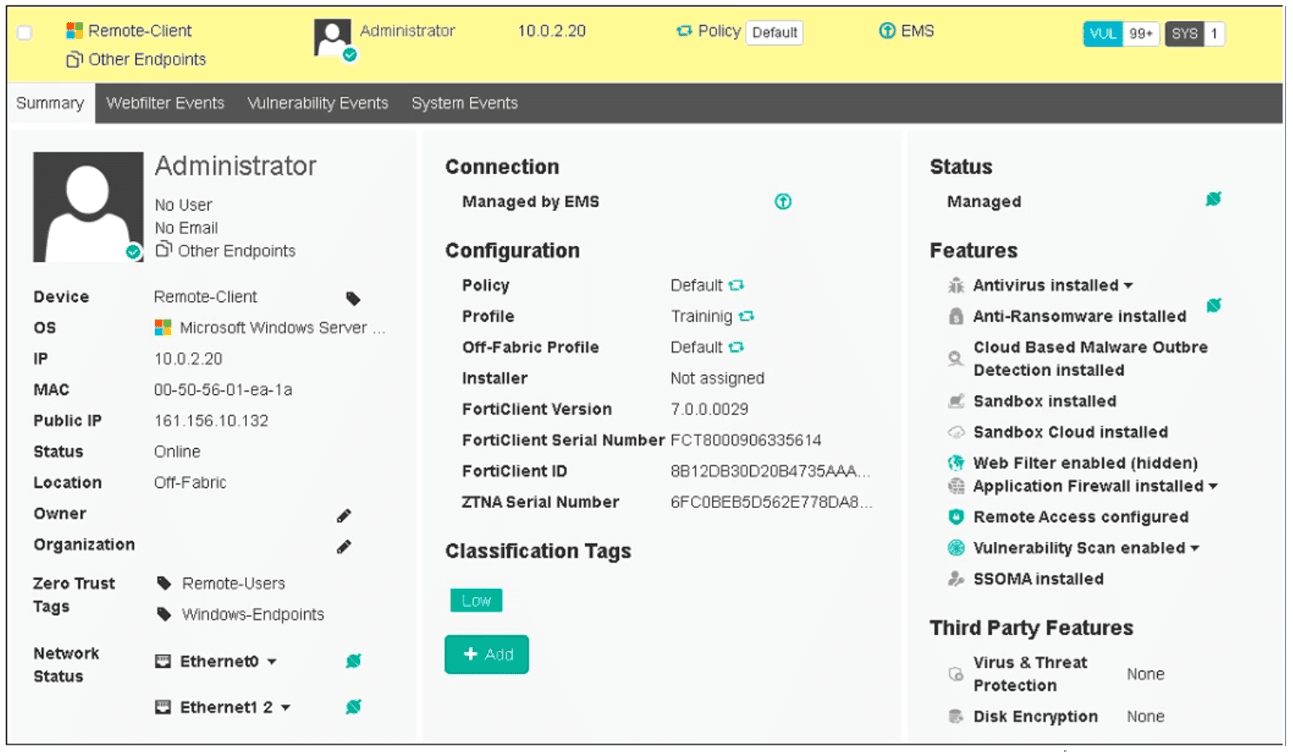
Refer to the exhibit, which shows the endpoint summary information on FortiClient EMS.

What two conclusions can you make based on the Remote-Client status shown above? (Choose two.)
Show answerHide answer

Correct answer: B, D The endpoint has been assigned the Default endpoint policy. The endpoint is currently off-net.

Explanation

Explanation:

This question requires an analysis of the provided FortiClient EMS endpoint summary to deduce key characteristics of the "Remote-Client" endpoint.

✅ Correct Option: D. The endpoint is currently off-net.
The exhibit clearly states "Location: Off-Fabric" under the "Summary" tab for the Remote-Client. In Fortinet terminology, "Off-Fabric" indicates that the endpoint is currently outside the trusted network, or "off-net."

✅ Correct Option: B. The endpoint has been assigned the Default endpoint policy.
Under the "Configuration" section, the "Policy" field for the Remote-Client is explicitly set to "Default." This directly indicates that the endpoint is currently assigned and operating under the Default endpoint policy configured in FortiClient EMS.

❌Incorrect options:

A. The endpoint is classified as at risk.
This is incorrect. While the image shows "VUL 99+" in the top right corner, which indicates many vulnerabilities, the overall "Status" for the endpoint itself is "Online," and there is no explicit "at risk" classification shown for the endpoint's compliance or health state in the visible summary.

C. The endpoint is configured to support FortiSandbox.
This is incorrect. Under "Features," "Sandbox installed" and "Sandbox Cloud installed" are listed. However, "configured to support" implies active integration or utilization for this specific endpoint's traffic, which cannot be concluded solely from the presence of the installed features. It only confirms the capability is present on the endpoint.

Reference:
⇒ FortiClient EMS Administration Guide - Endpoint Monitoring and Management [docs.fortinet.com] This documentation provides context on interpreting endpoint summary information within FortiClient EMS, including location status ("Off-Fabric") and policy assignments, enabling these conclusions.
Question 5 Choose 1
In a ForliSandbox integration, what does the remediation option do?
Show answerHide answer

Correct answer: B Alert and notify only

Explanation

Explanation:

📘 Question Summary:
This question evaluates understanding of FortiSandbox integration capabilities within the Fortinet Security Fabric, specifically focusing on remediation action configurations. Candidates must distinguish between different response behaviors when FortiSandbox analyzes suspicious files. The assessment tests knowledge of how security appliances handle file inspection workflows, notification mechanisms, and the distinction between blocking actions versus passive monitoring approaches during sandbox analysis integration.

✔ Correct Answer:

Option B is accurate because the remediation option in FortiSandbox integration configures the system to generate alerts and send notifications when threats are identified without implementing blocking measures. This passive approach allows security teams to maintain visibility into suspicious file activity while permitting file transmission to continue uninterrupted. Organizations use this mode during initial deployment phases or when business requirements prioritize availability over immediate threat containment, ensuring analysts receive comprehensive threat intelligence for investigation and response planning.

✖ Incorrect Answer:

Option A is invalid because denying access based on absent results contradicts FortiSandbox operational logic. The system requires explicit threat verdicts to trigger blocking actions, not the absence of analysis outcomes. This approach would create operational disruptions by blocking legitimate files experiencing processing delays or connectivity issues, fundamentally misrepresenting how sandbox integrations handle incomplete or pending inspection results within the Security Fabric architecture.

Option C is incorrect because file exclusion represents a separate configuration mechanism unrelated to remediation actions. Exclusions are typically managed through allowlists, filter policies, or exception rules that prevent specific files from entering the sandbox inspection pipeline altogether. The remediation option governs response behaviors after analysis completion, whereas exclusion configurations determine which objects undergo examination, representing distinct functional categories within FortiSandbox deployment architecture.

Option D is inaccurate because waiting for results before permitting files describes an inline blocking or hold mode rather than a remediation configuration. This behavior characterizes flow-based inspection where files remain quarantined pending sandbox verdicts. The remediation option specifically addresses post-analysis response actions—what happens after FortiSandbox completes its evaluation. Confusing inspection timing controls with remediation responses demonstrates misunderstanding of the sequential stages in sandbox-integrated file security workflows.

🧩 Conclusion:
The correct answer confirms that remediation in FortiSandbox integration operates as an alerting and notification mechanism rather than an enforcement control. This configuration enables organizations to gather threat intelligence and maintain security visibility while allowing file operations to proceed without interruption. Candidates should recognize that remediation settings determine whether the system takes passive monitoring approaches or active blocking measures following sandbox analysis, with alert-only modes supporting gradual deployment strategies and comprehensive threat awareness without impacting business continuity.

📚 Reference:
FortiSandbox Administration Guide - Fortinet Documentation Library
FortiGate and FortiSandbox Integration Guide - Fortinet Technical Documentation
Question 6 Choose 1
Which security fabric component sends a notification to quarantine an endpoint after IOC detection in the automation process?
Show answerHide answer

Correct answer: D Forti Gate

Explanation

Explanation:

📘 Question Summary:
This question evaluates the candidate’s understanding of Fortinet Security Fabric automation workflows, specifically the component responsible for enforcing endpoint quarantine following an Indicator of Compromise (IOC) detection. It assesses knowledge of how threat intelligence triggers automated responses across integrated Fortinet products, particularly within endpoint and network security layers.

✔ Correct Answer:

D. FortiGate
FortiGate serves as the enforcement point in the Security Fabric automation chain. Upon receiving IOC-based alerts—often relayed via FortiAnalyzer or FortiClient EMS—it executes predefined response actions such as quarantining compromised endpoints. This aligns with Fortinet’s design principle where FortiGate acts as the policy enforcement engine, applying dynamic firewall policies or interface-level restrictions to isolate threats in real time.

✖ Incorrect Answer:

A. FortiAnalyzer
FortiAnalyzer functions primarily as a logging, analytics, and reporting platform. While it can correlate IOC data and trigger automation stitches, it does not directly enforce endpoint quarantine actions. Its role is observational and orchestration-oriented, not enforcement-based, making it unsuitable as the component that applies network-level isolation.

B. FortiClient
FortiClient is an endpoint agent that provides host-based protection and telemetry. Although it can detect local threats and report them, it lacks the authority to unilaterally quarantine itself or other endpoints via network policy changes. Quarantine enforcement requires coordination with a central enforcement point like FortiGate.

C. FortiClient EMS
FortiClient EMS centrally manages endpoint policies and collects telemetry but does not directly enforce network-level quarantine. While it may initiate automation workflows upon IOC detection, actual isolation is carried out by FortiGate through integration with the Security Fabric.

🧩 Conclusion:
The correct answer confirms that FortiGate is the designated enforcement component within the Security Fabric automation framework. It executes quarantine actions by dynamically adjusting access policies based on threat intelligence, ensuring rapid containment of compromised endpoints in alignment with Fortinet’s integrated security architecture.

Reference:
Fortinet Documentation – “Security Fabric Automation Stitches,”
Question 7 Choose 1
Refer to the exhibit.

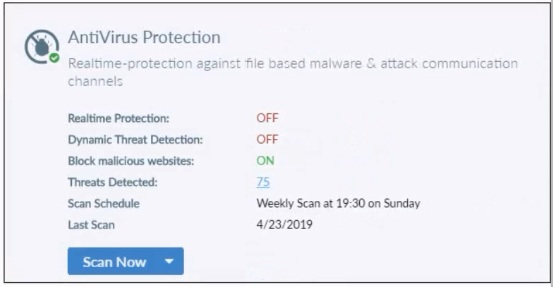
Based on the settings shown in the exhibit what action will FortiClient take when it detects that a user is trying to download an infected file?
Show answerHide answer

Correct answer: D Allows the infected file to download without scan

Explanation

Explanation:

The exhibit from FortiClient shows Antivirus Protection with Realtime Protection set to OFF. This question checks your understanding that real-time (on-access) scanning is the only mechanism that can detect and respond to malware during file downloads. When it is disabled, FortiClient provides no protection at the moment of download.

✔️Correct Option:

D. Allows the infected file to download without scan
Realtime Protection being OFF means FortiClient does not perform any scanning when files are being downloaded or accessed. As a result, the infected file is permitted to download completely without interruption, blocking, quarantine, logging, or any antivirus intervention.

❌Incorrect options:

A. Blocks the infected files as it is downloading
This action requires Realtime Protection to be enabled so FortiClient can scan the file during the download process and deny access if malware is detected. With Realtime Protection turned OFF, no scanning takes place and therefore no blocking can occur at any point during the download.

B. Quarantines the infected files and logs all access attempts
Quarantine and detailed logging of access attempts are remedial actions that FortiClient only executes after successfully detecting a threat. Detection itself depends on Realtime Protection being active to inspect files on access or download; since it is OFF, no threat is ever identified and no quarantine or logging happens.

C. Sends the infected file to FortiGuard for analysis
Submission of suspicious files to FortiGuard for cloud-based analysis typically occurs only after an initial detection is made by the local AV engine (via Realtime Protection or scheduled/on-demand scan). Because Realtime Protection is disabled, the file is never scanned or flagged locally, so FortiClient has no reason or mechanism to forward it for further analysis.

Reference:
⇒ Malware Protection – FortiClient 7.4.5 Administration Guide
Explains that Realtime Protection must be enabled to provide on-access scanning and take protective actions (such as block or quarantine) when malware is detected during file download or execution.

⇒ Real-time protection – FortiClient XML Reference Guide 7.4
States that when realtime protection is disabled, FortiClient does not scan files being accessed or downloaded and performs no remedial actions on detected threats.
Question 8 Choose 2
Which two statements about FortiClient EMS integration with Active Directory (AD) are true? (Choose two answers)
Show answerHide answer

Correct answer: B, C FortiClient installations on domain endpoints can deployed from FortiClient EMS. Endpoint profiles can be assigned to endpoints based on domain groups.

Explanation

Explanation:

📘 Question Summary:
This question evaluates knowledge of FortiClient EMS integration with Microsoft Active Directory, focusing on how EMS leverages AD for endpoint management, deployment, and policy assignment. It assesses understanding of EMS’s AD connector behavior, including LDAP read-only access, dynamic group-based profile assignment, automated deployment capabilities for domain-joined devices, and restrictions on managing imported AD objects directly in the EMS console. Core concepts come from FortiClient EMS administration and AD synchronization features in version 7.4.

🟢 Correct Answer: B. FortiClient installations on domain endpoints can be deployed from FortiClient EMS.
FortiClient EMS supports automated deployment of FortiClient agents to Windows domain endpoints using Active Directory integration. Once EMS is connected to AD via LDAP, administrators can use the “Deploy” feature to push FortiClient installers silently to selected AD users, groups, or OUs. This method relies on domain credentials with sufficient rights to perform remote installations, making large-scale rollout efficient without manual intervention on each endpoint.

🟢 Correct Answer: C. Endpoint profiles can be assigned to endpoints based on domain groups.
After successful AD synchronization, FortiClient EMS imports AD users, groups, and organizational units. Administrators can then assign endpoint profiles dynamically based on AD group membership. Endpoints that belong to a specific AD security group automatically receive the corresponding profile, enabling centralized and scalable policy application without manually tagging individual devices.

🔴 Incorrect Answer: A. FortiClient EMS has full read-write access on the AD server.
FortiClient EMS connects to Active Directory using LDAP with read-only privileges. The integration is designed solely for querying and importing user, group, and computer objects. EMS never requires or uses write permissions on the AD server, as it does not modify AD attributes, create objects, or alter group memberships. Any write operations would violate security best practices and are not supported.

🔴 Incorrect Answer: D. Imported AD endpoints cannot be directly deleted on FortiClient EMS.
Imported AD endpoints can be deleted directly from the FortiClient EMS console. While AD synchronization periodically re-imports missing or changed objects, manual deletion of an AD-imported endpoint is allowed and removes it from the EMS database until the next sync cycle brings it back (if still present in AD). This differs from some other directory-integrated platforms that lock imported objects against deletion.

🧩 Conclusion:
Options B and C are correct because FortiClient EMS uses Active Directory integration to enable automated FortiClient deployment to domain-joined endpoints and to dynamically assign endpoint profiles according to AD group membership. Candidates should remember that these features allow efficient, group-based management of large endpoint fleets while relying on read-only LDAP access to AD, a key design principle in FortiClient EMS 7.4 architecture.

Reference:
Fortinet Document Library – FortiClient EMS 7.4.0 Administration Guide, “Active Directory Integration” and “Endpoint Deployment” sections; FortiClient EMS 7.4.0 Administration Guide, “Endpoint Profiles” chapter.
Question 9 Choose 1
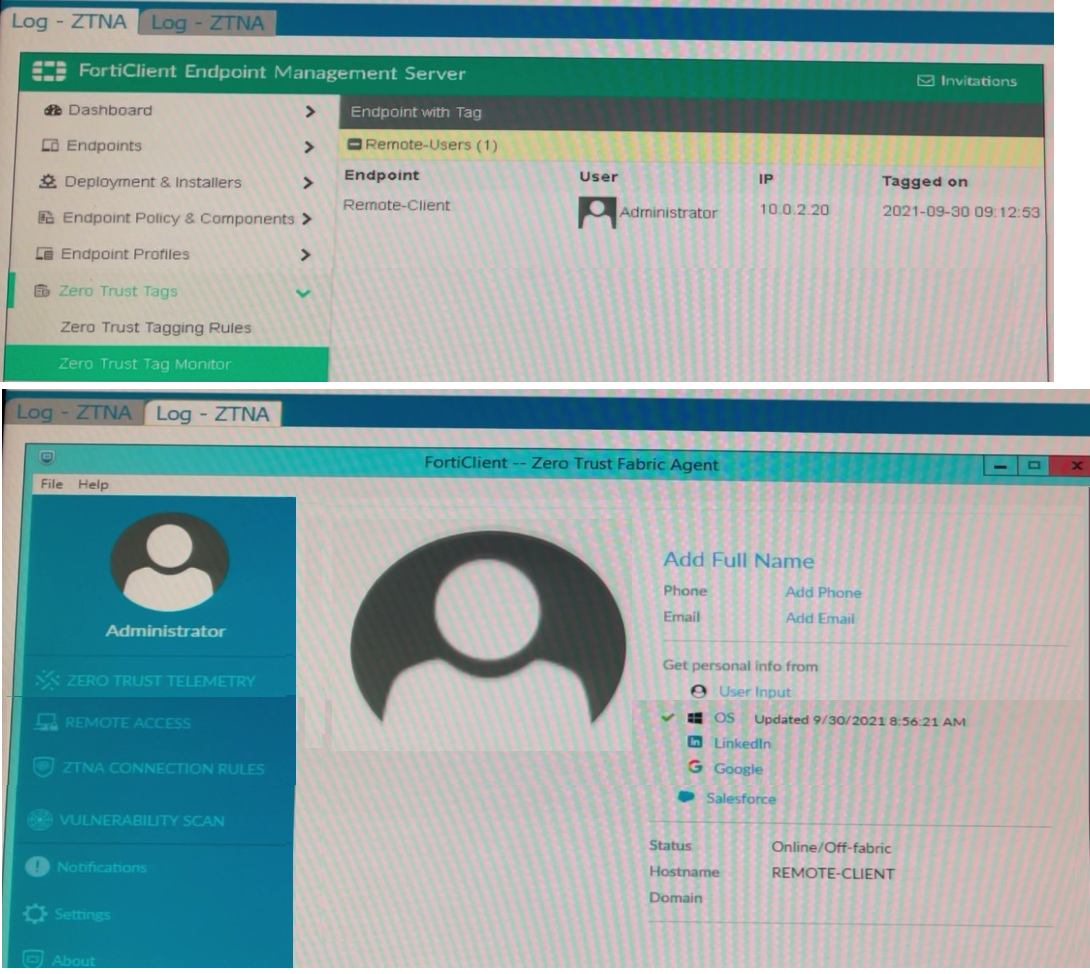
Refer to the exhibits.

Which show the Zero Trust Tag Monitor and the FortiClient GUI status.
Remote-Client is tagged as Remote-Users on the FortiClient EMS Zero Trust Tag Monitor.
What must an administrator do to show the tag on the FortiClient GUI?
Show answerHide answer

Correct answer: B Change the FortiClient system settings to enable tag visibility

Explanation

Explanation:

This question tests the understanding of how Zero Trust Tags assigned by FortiClient EMS are displayed on the FortiClient GUI. Even though EMS successfully tags the endpoint (visible in Zero Trust Tag Monitor), the tag won't automatically appear on the FortiClient GUI unless a specific system-level setting is enabled on the client side.

✔️ Correct Answer:

B. Change the FortiClient system settings to enable tag visibility
In FortiClient, the Zero Trust tag visibility on the GUI is controlled under System Settings. By default, assigned tags from EMS are not displayed to the endpoint user. An administrator must explicitly enable the "Show Zero Trust Tags" option within FortiClient's system settings to make the tag visible on the client interface.

❌ Incorrect Answers:

A. Update tagging rule logic to enable tag visibility
Tagging rule logic in EMS defines the conditions under which a tag is applied — not whether the tag is displayed on the FortiClient GUI. Since the tag is already applied (confirmed in EMS monitor), modifying tagging rules is unnecessary and irrelevant here.

C. Change the endpoint control setting to enable tag visibility
Endpoint control settings govern how EMS manages and communicates with endpoints (e.g., compliance enforcement, telemetry). They do not include options to control the display of Zero Trust tags on the FortiClient GUI.

D. Change the user identity settings to enable tag visibility
User identity settings relate to how users authenticate and are identified within FortiClient/EMS. These settings have no bearing on whether Zero Trust tags are visually displayed on the FortiClient GUI dashboard.

🔧 Reference:
⇒ FortiClient EMS 7.4 Administration Guide – Zero Trust Tagging
Confirms how Zero Trust Tags are assigned by EMS and how tag visibility is managed on the FortiClient GUI through system-level settings.

⇒ FortiClient 7.4 Administration Guide – System Settings
Confirms that tag display options are configured under FortiClient System Settings on the endpoint.
Question 10 Choose 1
A FortiClient EMS administrator has enabled the compliance rule for the sales department. Which Fortinet device will enforce compliance with dynamic access control?
Show answerHide answer

Correct answer: C FortiGate

Explanation

Explanation:

📘 Question Summary:
This question assesses understanding of the roles within the Fortinet Security Fabric, specifically the interaction between FortiClient, FortiClient EMS, and FortiGate for endpoint compliance enforcement. It examines knowledge of dynamic access control flow and policy enforcement points.

🟢 Correct Answer:

C: FortiGate is the correct device. As the network enforcement point, FortiGate receives endpoint compliance status from FortiClient EMS via the Security Fabric. It then dynamically applies access control policies, such as network quarantine or VLAN assignment, based on that compliance information to regulate the endpoint's network access.

🔴 Incorrect Answer:

A: FortiClient is incorrect; while it runs on the endpoint and reports its status, it does not enforce network-wide access control.

B: FortiClient EMS is incorrect as it acts as the central management server to define rules and aggregate status but does not perform inline traffic enforcement.

D: FortiAnalyzer is incorrect as its primary role is logging and analysis, not real-time policy enforcement.

🧩 Conclusion:
The correct answer confirms that the FortiGate firewall functions as the central policy enforcement point within the Fabric. Candidates should remember that while EMS manages and distributes compliance policy, the FortiGate is responsible for applying dynamic network-level access control based on endpoint posture.

Reference:
Fortinet Documentation - FortiOS 7.4 Administration Guide: Endpoint Compliance and FortiClient EMS Administration Guide.
Full mock exam

Sit the FCP_FCT_AD-7.4 exam before exam day

Full-length mocks with the same number of questions and the same time limit as the real FCP_FCT_AD-7.4 exam. Every attempt draws a new set of questions from the full bank, so you can keep going until you pass comfortably.

Get full FCP_FCT_AD-7.4 mock exam
  • 40questions per mock
  • 65 mintime limit
  • 100questions in the bank
  • Newmock on every attempt

Skyrocket Your FCP_FCT_AD-7.4 Exam Success: Your Ultimate Prep Guide


Your Exam Blueprint


The FCP_FCT_AD-7.4 exam validates your ability to deploy, configure, and manage FortiClient EMS. To earn your Fortinet NSE 6 FortiClient EMS 7.4 Administrator certification, you will need to answer 30 multiple-choice questions within 60 minutes, achieving a passing score of 70%.

Focus on the Core Objectives


Dont get lost in the details. The Fortinet NSE 6 FortiClient EMS 7.4 Administrator exam heavily tests practical skills in four key areas: initial EMS deployment and topology, endpoint telemetry and vulnerability management, ZTNA agent and configuration, and ongoing administration and troubleshooting. Prioritize hands-on experience with these core workflows.

From Theory to Practical Mastery


Reading alone wont cut it. The best way to internalize concepts like EMS server high availability or managing FortiClient profiles is to work directly with the software. Use Fortinet official lab guides or a demo environment to click through the interface and perform key tasks—this builds the muscle memory needed for the test.

Simulate the Real Challenge


Knowing the material is one thing; applying it under timed pressure is another. This is where the Fortinet NSE 6 FortiClient EMS 7.4 Administrator practice test becomes essential. They condition you for the actual exams pace and exam question structure, highlighting exactly where you need to focus your final review.

Execute Your Exam Strategy


On exam day, manage your time wisely. Give yourself a hard stop at 50 minutes to review flagged questions. Look for specific keywords in each scenario that point to the correct solution.

Trusted by Customers


"The labs on ZTNA agent deployment and telemetry collection were invaluable. Moving beyond just installing FortiClient to truly managing endpoints at scale was the game-changer. The exams deep focus on fabric agent and EMS connector issues, as highlighted here, was accurate. This prep is essential for modern endpoint security."
- Ethan Gabriel

“Prepforti FCP_FCT_AD-7.4 tests helped me master EMS configuration and troubleshooting. The explanations were clear and saved me from guessing. The real exam felt straightforward, and I passed first attempt.”
- Hannah Lewis

Endpoint security starts with FortiClient. Prepforti provided excellent FCP_FCT_AD-7.4 practice test covering EMS deployment, zero trust fabric, and endpoint compliance. I passed the admin exam easily and now manage endpoints with confidence.
Stephanie Clark, Endpoint Security Admin | Portland, OR