Microsoft certification · Exam AZ-120

AZ-120 Mock Exam Page 2

Planning and Administering Microsoft Azure for SAP Workloads (beta)

Free AZ-120 questions on Topic 2: Misc. Questions, each with the answer and an explanation.

20 questions · 33 minutes · free, no sign-up

Topic 2: Misc. Questions questions

11–20 of 60 free
Question 11 Choose 1
You have an SAP ERP Central Component (SAP ECQ) environment on Azure. You need to add an additional SAP application server to meet the following requirements:

• Provide the highest availability.

• Provide the fastest speed between the new server and the database.

What should you do?
Show answerHide answer

Correct answer: C Place the new server in the same Azure Availability Zone as the database and the other application servers.

Explanation

Explanation:
This question presents a classic trade-off between maximum fault tolerance (highest availability) and lowest network latency (fastest speed). For SAP, the application server (AS) to database (DB) latency is critical for performance. Availability Zones provide protection against datacenter failure but introduce inter-zone network latency. Availability Sets provide protection against rack/hardware failure within a single datacenter, keeping VMs in close network proximity.

Correct Option:

C. Place the new server in the same Azure Availability Zone as the database and the other application servers.
This is the only option that satisfies both requirements.

Fastest Speed:
VMs within the same Availability Zone reside in the same physical datacenter with a direct, low-latency network path (<2ms), meeting the "fastest speed" requirement for AS-to-DB communication.

Highest Availability (within the defined context):
Placing the new AS in the same Zone as the existing AS and DB does not protect against a Zone failure. However, the requirement is to add an additional server to an existing environment. The highest availability for the entire multi-server system is already achieved by distributing the primary DB and other critical tiers across Zones (which is the standard recommendation). The new AS should be added to the Zone where its latency-sensitive partner (the DB) resides to optimize performance, which is the correct implementation of an Active/Active AS setup within a Zone.

Incorrect Option:

A. Place the new server in a different Azure Availability Zone than the database.
This maximizes fault tolerance for the new server itself (Zone-level resilience) but violates the "fastest speed" requirement. Network latency between Availability Zones is significantly higher (typically 1-2ms+ additional round-trip time) than within a zone, which is detrimental to SAP application performance. It provides high availability but at the cost of performance.

B. Place the new server in the same Azure Availability Set as the database and the other application servers.
This is technically impossible and invalid. A VM can only belong to one Availability Set. More critically, the Database tier (e.g., HANA) and Application Servers should never be placed in the same Availability Set. Availability Sets are for distributing identical roles (e.g., multiple ASCS instances, multiple App Servers) across fault domains. Mixing DB and AS roles in one set breaks the update and fault domain separation logic for each tier.

Reference:
Microsoft Learn, "SAP NetWeaver on Azure: Planning and Deployment Guide," states that for optimal performance, SAP application servers should be deployed in the same Azure region and, where possible, the same network zone (i.e., Availability Zone) as the database to minimize latency. High availability for the system is achieved by placing the primary DB and ASCS/ERS in different Zones, not by spreading each individual application server across Zones.
Question 12 Choose 1
Note: This question is part of a series of questions that present the same scenario. Each question in the series contains a unique solution that might meet the stated goals. Some question sets might have more than one correct solution, while others might not have a correct solution. After you answer a question in this section, you will NOT be able to return to it. As a result, these questions will not appear in the review screen. You have a complex SAP environment that has both ABAP- and Java-based systems. The current on-premises landscapes are based on SAP NetWeaver 7.0 (Unicode and Non- Unicode) running on Windows Server and Microsoft SQL Server. You need to migrate the SAP environment to an Azure environment.

Solution: You migrate the SAP environment as is to Azure by using Azure Site Recovery. Does this meet the goal?
Show answerHide answer

Correct answer: B No

Explanation

Explanation:
The goal is to migrate a complex SAP environment (ABAP & Java, Unicode & Non-Unicode) from on-premises Windows/SQL Server to Azure. Using Azure Site Recovery (ASR) alone performs a lift-and-shift replication of the existing virtual machines, meaning the operating system, database, and SAP stack remain exactly the same.

Correct Option:

B. No. This solution does not meet the goal.
Azure Site Recovery is a disaster recovery (DR) tool, not a migration enabler for complex transformations. While ASR can replicate VMs to Azure, the scenario implicitly involves a heterogeneous migration (changing the underlying platform or DB) or at least a significant re-architecture for the cloud. ASR would merely recreate the same Windows/SQL Server VMs in Azure, which does not leverage Azure-native SAP benefits (like HANA) and fails to address potential incompatibilities or optimization needs.

Critical Reason:
The mention of "Unicode and Non-Unicode" systems is a key detail. Migrating "as is" with ASR would perpetuate the technical debt of Non-Unicode systems, which are outdated. A proper migration project would include a Unicode conversion, which ASR cannot perform.

Why the other option is incorrect:

A. Yes:
This would only be correct if the goal was a simple disaster recovery setup or a literal "lift-and-shift" with no changes required. For a planned, complex migration with diverse systems, ASR is not the appropriate primary tool. The migration requires tools like SAP DMO (Database Migration Option), SWPM (Software Provisioning Manager), or R3load for system conversions, copy, or Unicode transformation, which are outside ASR's scope.

Reference:
Microsoft Learn, "Migration options for SAP on Azure," clearly distinguishes between Disaster Recovery (using ASR) and Migration & Transformation projects. For migrating complex SAP landscapes involving different SAP kernels, Unicode conversion, or database changes, the recommended path uses SAP migration tools (SUM/DMO) and not a pure infrastructure replication tool like ASR.
Question 13 Choose 1
You have an on-premises SAP NetWeaver landscape that contains an IBM DB2 database. You need to migrate the database to a Microsoft SQL Server instance on an Azure virtual machine.

Which tool should you use?
Show answerHide answer

Correct answer: B SQL Server Migration Assistant (SSMA)

Explanation

Explanation:
You are performing a heterogeneous database migration, changing both the database platform (IBM DB2 to Microsoft SQL Server) and the location (on-premises to Azure VM). The tool must handle schema conversion (DDL), data migration, and often business logic (stored procedures) translation between two fundamentally different database systems.

Correct Option:

B. SQL Server Migration Assistant (SSMA) for DB2 is the correct answer.
SSMA is the official, purpose-built Microsoft tool for migrating from competing databases (like Oracle, MySQL, Sybase, and DB2) to SQL Server or Azure SQL. It connects to the source DB2 database, assesses it, converts the schema and objects to T-SQL, migrates the data, and validates the results. It is the mandatory tool for this exact migration scenario.

Incorrect Option:

A. Data Migration Assistant (DMA):
This tool is designed for upgrading and migrating between versions of SQL Server (e.g., SQL Server 2008 to 2019) or migrating to Azure SQL Database. It does not support IBM DB2 as a source database. It is for homogenous or SQL-to-SQL migrations.

C. Azure Migrate:
This is a central discovery, assessment, and infrastructure migration hub. It helps migrate entire servers/VMs (using Azure Site Recovery) or databases (via integration with DMS), but it is not the tool that performs the actual database schema and data conversion from DB2 to SQL Server. It would orchestrate the use of another tool in the background.

D. Azure Database Migration Service (DMS):
While DMS can perform online migrations with minimal downtime, its primary strength is moving data between supported source/target pairs (e.g., SQL Server to Azure SQL, Oracle to Azure). Its support for DB2 as a source is limited or non-existent for complex SAP migrations. For a full SAP system migration involving DB2, SSMA is the required conversion tool, after which DMS might be used for data synchronization.

Reference:
Microsoft Learn documentation, "Migrate from IBM DB2 to SQL Server," explicitly states that SQL Server Migration Assistant (SSMA) for DB2 is the primary tool for converting the database schema and data when migrating SAP workloads from IBM DB2 to SQL Server running on Azure VMs.
Question 14
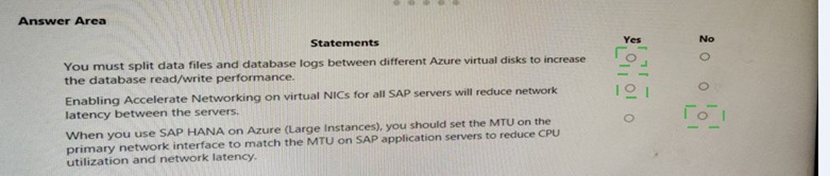
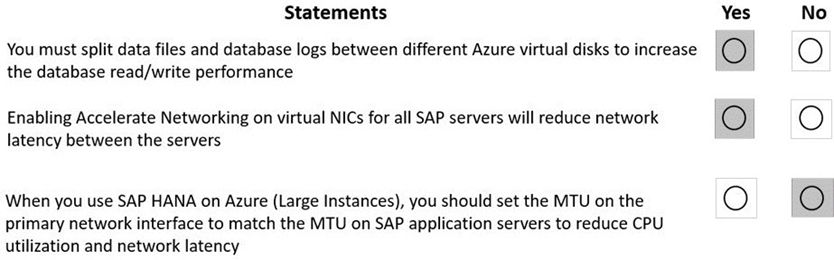
For each of the following statements, select Yes if the statement is true. Otherwise, select No. NOTE: Each correct selection is worth one point.

Show answerHide answer

Explanation


Explanation:
These statements cover critical performance best practices for deploying SAP databases (like HANA) and application servers on Azure. You must evaluate each based on Azure-specific configurations for disk, networking, and the unique SAP HANA on Azure (Large Instances) deployment model.

Correct Option:

Statement 1 (You must split data files and database logs between different Azure virtual disks...): Yes.
This is a fundamental performance and availability best practice for any database, especially SAP HANA and SQL Server on Azure VMs. Separating data and log files onto independent, premium-managed disks (or ultra disks) prevents I/O contention, allows for independent performance tuning (e.g., logs need lower latency, data needs higher throughput), and is a prerequisite for using Azure Write Accelerator for HANA log volumes.

Statement 2 (Enabling Accelerate Networking on virtual NICs for all SAP servers...): Yes.
Accelerated Networking is a mandatory recommendation for all SAP VMs. It enables Single Root I/O Virtualization (SR-IOV), bypassing the hypervisor for network traffic. This directly results in significantly lower and more consistent network latency, higher throughput, and reduced CPU utilization on the VM—all critical for communication between SAP application servers and the database.

Statement 3 (When you use SAP HANA on Azure (Large Instances), you should set the MTU...): No.
This statement is false. For SAP HANA on Azure (Large Instances), Microsoft and SAP provide a specific, mandatory configuration. The MTU on your application servers' operating systems must be increased to 9000 (Jumbo Frames) to match the pre-configured, low-latency ExpressRoute circuit between your Azure VNet and the Large Instance stamp. Leaving it at the default 1500 would cause fragmentation, increased CPU load, and higher latency.

Incorrect Option:

Incorrect for Statement 1:
Selecting "No" ignores a core SAP on Azure deployment rule. Combining all I/O on a single disk creates a performance bottleneck and a single point of failure, violating SAP and Microsoft performance benchmarks.

Incorrect for Statement 2:
Selecting "No" would be a major oversight. Accelerated Networking is a free, performance-critical feature. Not enabling it would leave significant latency and CPU overhead on the table, negatively impacting SAP tier communication.

Incorrect for Statement 3:
Selecting "Yes" gets the action backward. The goal is not to match the Large Instance's MTU to the app servers (it's already set correctly). The correct action is to increase the app server MTU to match the Large Instance network (to 9000).

Reference:
Statement 1 & 2: Microsoft Learn, "Storage configurations for SAP HANA Azure virtual machine deployments" and "Azure Virtual Machine network configuration for SAP," explicitly mandate separate disks for data/logs and enabling Accelerated Networking.

Statement 3: Microsoft Learn, "Networking architecture for SAP HANA on Azure (Large Instances)," specifies the requirement to configure the MTU to 9000 bytes on the OS of Azure VMs connecting to HANA Large Instances.
Question 15 Choose 1
You have an SAP HANA on Azure (Large Instances) deployment that has two Type II SKU nodes. Each node is provisioned in a separate Azure region. You need to monitor storage replication for the deployment. What should you use?
Show answerHide answer

Correct answer: A xfsdump

Explanation

Explanation:
This scenario involves a cross-region disaster recovery setup for HANA Large Instances (Type II SKUs). The storage replication in this context refers to the built-in, storage-level snapshot replication performed by the underlying infrastructure from the primary region's LUNs to the secondary region. You need a tool provided by Microsoft/HPE that interacts with this storage system to monitor the status and health of this replication.

Correct Option:

B. azacsnap is the correct answer.
azacsnap (Azure Application Consistent Snapshot tool) is the official Microsoft-recommended command-line interface for managing and monitoring storage operations on HANA Large Instances. Its primary functions include taking application-consistent storage snapshots, but it also provides critical commands to monitor the status of snapshot replication to the DR site. For example, azacsnap -c details --details replication shows the replication status, lag, and health between the primary and secondary storage systems.

Incorrect Option:

A. xfsdump:
This is a standard Linux utility for backing up XFS filesystems. It creates a file-based backup archive. It has no capability to interface with the proprietary storage hardware of HANA Large Instances to monitor the low-level, block-based replication between regions.

C. rear (Relax-and-Recover):
This is an open-source disaster recovery and system migration framework for Linux. It is used to create a bootable system image for bare-metal recovery. It is not a monitoring tool and does not interact with the HLI storage replication.

D. tar:
This is the classic Unix tape archiver utility for combining files into an archive. Like xfsdump, it is a file-level backup tool and is completely unrelated to monitoring storage hardware replication status.

Reference:
The Microsoft Learn documentation for SAP HANA on Azure (Large Instances) disaster recovery explicitly references using the azacsnap tool to manage and monitor storage snapshots and replication. The tool is provided as part of the HLI service for customer operations.
Question 16 Choose 1
This question requires that you evaluate the underlined BOLD text to determine if it is correct. You have an Azure resource group that contains the virtual machines for an SAP environment. You must be assigned the Contributor role to grant permissions to the resource group. Instructions: Review the underlined text. If it makes the statement correct, select “No change is needed”. If the statement is incorrect, select the answer choice that makes the statement correct.
Show answerHide answer

Correct answer: B User Access Administrator

Explanation

Explanation:
The statement is about the required role to grant permissions to a resource group. The key distinction is that the Contributor role allows a user to manage all resources within a scope (like a resource group) but does NOT allow them to manage Azure role assignments (i.e., grant permissions to others). To grant permissions, you need the specific role that includes the Microsoft.Authorization/roleAssignments/write permission.

Correct Option:

B. User Access Administrator is the correct choice.
The User Access Administrator role is a built-in Azure role that grants the user the ability to manage user access to Azure resources. This includes the specific permission to assign roles (like Contributor, Reader, etc.) to other users, groups, or service principals on a resource group, subscription, or management group. This is precisely the action described in the question.

Why the other options are incorrect:

A. No change is needed / Contributor:
This is incorrect. As explained, a Contributor can create and manage resources but cannot modify role assignments. Granting permissions is a separate administrative function.

C. Managed Identity Contributor:
This role specifically allows a user to create, read, update, and delete user-assigned managed identities. It is unrelated to granting general RBAC permissions on a resource group.

D. Security Admin:
This is a role typically used in Microsoft Defender for Cloud (formerly Azure Security Center) and Azure Sentinel. It allows viewing security policies, states, and alerts, and can dismiss alerts. It does not grant the permission to assign roles on resource groups.

Reference:
Microsoft Learn, "Azure built-in roles," explicitly lists the permissions for each role. The Contributor role's JSON definition shows it has Actions with * but NotActions that include Microsoft.Authorization/*/Delete and Microsoft.Authorization/*/Write, meaning it cannot write authorization assignments. The User Access Administrator role specifically includes Microsoft.Authorization/*/Write to manage role assignments.
Question 17 Choose 1
You have an on-premises SAP NetWeaver deployment that uses Windows Server 2016 and Microsoft SQL Server 2016. You need to migrate the deployment to an Azure virtual machine that runs Windows Server 2016 and has Microsoft SQL Server 2019 installed. Which migration method should you use?
Show answerHide answer

Correct answer: B classical SAP Database Migration Option (DMO)

Explanation

Explanation:
You are performing a homogeneous migration for the OS (Windows Server 2016 to Windows Server 2016) but a heterogeneous database migration (SQL Server 2016 to SQL Server 2019, which is a different version of the same DB platform). Crucially, the SAP NetWeaver application layer will also be relocated. The standard SAP tool for migrating the database and the application server together during a database upgrade/change is the Database Migration Option (DMO).

Correct Option:

B. Classical SAP Database Migration Option (DMO) is the correct answer.
SAP DMO is the primary SAP tool designed for combined system and database migrations. It allows you to upgrade the database (in this case, from SQL 2016 to 2019) and move the entire SAP system to a new target location (Azure VM) in a single maintenance window. It uses the SUM (Software Update Manager) tool to orchestrate the process, migrating the ABAP/Java stack and converting/transferring the database data.

Incorrect Option:

A. Heterogeneous SAP classical migration:
This typically refers to using SWPM (Software Provisioning Manager) with export/import (R3load) for a full system copy, often for a true heterogeneous DB change (e.g., Oracle to HANA). It is more complex and would also work, but DMO is the more streamlined and recommended tool for this specific SQL Server version upgrade within a migration.

C. Lift-and-shift:
This implies using a tool like Azure Site Recovery (ASR) to replicate the VMs. This would fail because it would copy the existing SQL Server 2016 installation to Azure. It would not upgrade the database to SQL Server 2019, which is a requirement stated in the question.

D. Azure Migrate:
This is a central hub for discovery, assessment, and infrastructure migration. While it can orchestrate the server replication (via Azure Site Recovery) or database migration (via Database Migration Service), it is not the specific SAP tool that performs the application-consistent database upgrade and system move. DMO is the SAP-native tool that fulfills the requirement.

Reference:
SAP Note 2630416 (DMO of SAP NetWeaver-based systems) describes DMO as the method for performing a database migration (including version upgrades) combined with a system relocation to a new host, which is the exact scenario. The Microsoft SAP on Azure migration guide lists DMO as a key method for database upgrades during a migration to Azure.
Question 18
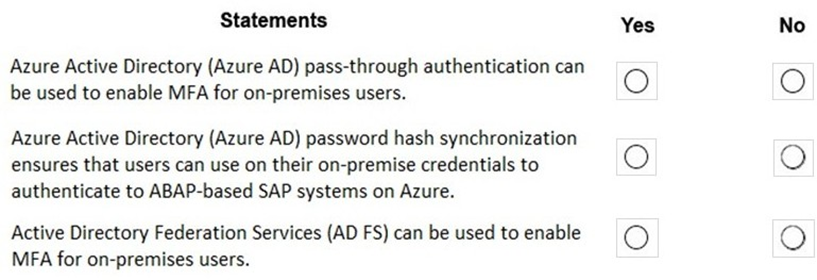
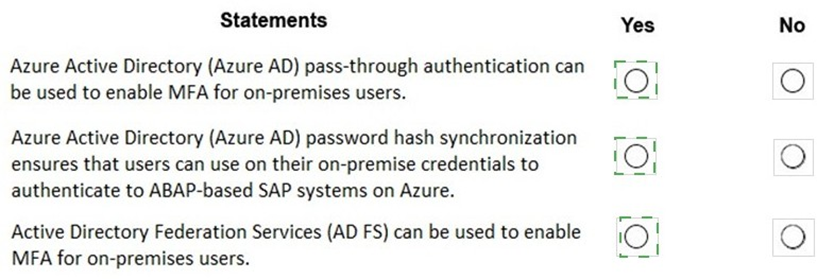
Your on-premises network contains SAP and non-SAP applications. You have JAVA-based SAP systems that use SPNEGO for single-sign on (SSO) authentication. Your external portal uses multi-factor authentication (MFA) to authenticate users. You plan to extend the on-premises authentication features to Azure and to migrate the SAP applications to Azure. For each of the following statements, select Yes if the statement is true. Otherwise, select No. NOTE: Each correct selection is worth one point.
Show answerHide answer

Explanation


Explanation:
This question assesses whether specific Azure AD hybrid identity methods can enable Multi-Factor Authentication (MFA) for on-premises users and whether they are valid for SAP ABAP authentication. The key is understanding that MFA is a feature of Azure AD, not of traditional on-premises Active Directory. Therefore, authentication methods that funnel user logins through Azure AD can leverage its MFA capabilities.

Correct Option:

Statement 1 (Azure AD pass-through authentication can be used to enable MFA for on-premises users.): Yes.
This is true. Azure AD Pass-Through Authentication (PTA) validates passwords against on-premises AD, but the authentication request is processed by Azure AD. Since the user is authenticating to Azure AD (even though the password is verified on-premises), you can apply Azure AD Conditional Access policies, including requiring MFA, to that login event. PTA is a supported method for enabling cloud MFA.

Statement 2 (Azure AD password hash synchronization ensures that users can use their on-premise credentials to authenticate to ABAP-based SAP systems on Azure.): No.
This is false and repeats the key concept from the earlier question. Password hash sync populates Azure AD with credential hashes for authentication to Azure AD services only (Microsoft 365, Azure portal, other SaaS apps). ABAP-based SAP systems do not natively use Azure AD for SAP GUI logon authentication. They require direct Kerberos/SPNEGO or SAP logon ticket validation against an Active Directory domain controller accessible from the Azure VNet.

Statement 3 (Active Directory Federation Services (AD FS) can be used to enable MFA for on-premises users.): Yes.
This is true. AD FS can be configured with additional authentication providers (e.g., Azure MFA server, third-party MFA) to require a second factor during the federation process. When a user attempts to access a cloud application (federated via AD FS), the authentication request can be routed through AD FS, which can then trigger the configured MFA before issuing a token.

Incorrect Option:

Incorrect for Statement 1:
Selecting "No" would misunderstand the architecture. With PTA, the user signs into Azure AD, which is the entity that can enforce MFA before allowing the PTA agent to validate the password on-premises.

Incorrect for Statement 2:
Selecting "Yes" is the most common error, conflating Azure AD authentication with SAP application authentication. They are separate identity planes.

Incorrect for Statement 3:
Selecting "No" would ignore AD FS's extensible claims pipeline, which is commonly used to integrate on-premises MFA solutions for federated applications.

Reference:
Microsoft Learn, "Azure AD Multi-Factor Authentication," documents that MFA can be applied to users authenticating via Password Hash Synchronization, Pass-Through Authentication, and Federation (AD FS). For SAP ABAP systems, the documentation on identity integration clarifies that native Azure AD authentication methods are not used for SAP GUI; domain join and Kerberos are required.
Question 19 Choose 1
You plan to deploy an SAP landscape on Azure that will use SAP HANA on Azure (Large Instances). You need to ensure that outbound traffic from the application tier can flow network virtual appliances (NVAs)only to the database tier. What should you use?
Show answerHide answer

Correct answer: C application security groups

Explanation

Explanation:
The requirement is to enforce a micro-segmentation rule where traffic from all VMs in the "application tier" is allowed only to the "database tier," and must flow through Network Virtual Appliances (NVAs) for inspection. The key is to create a rule that automatically applies to any VM based on its application role, not its specific IP address, and to direct that traffic through a specific network path (the NVA). This requires a combination of two features.

Correct Option:

C. Application Security Groups (ASGs) are a critical component of the solution, but alone they are not sufficient.
Analysis: ASGs allow you to group VMs by their application role (e.g., "SAP-AppServers", "SAP-HANA-DB"). You can then use these ASGs as the source or destination in Network Security Group (NSG) rules. This fulfills the "ensure traffic can flow... only to the database tier" part in a scalable, IP-agnostic way.

However, forcing traffic through an NVA requires User-Defined Routes (UDRs). A UDR on the application tier's subnet with a next-hop to the NVA's IP would direct all traffic (including that destined for the DB tier) to the NVA first.

Therefore, the complete solution requires B (NSGs with ASGs) and A (UDRs directing traffic to NVAs). Since the question asks for a single answer and Application Security Groups are the specific feature that enables the identity-based rule for the application tier, it is the best choice among the options, though the full implementation requires NSGs and UDRs as well.

Incorrect Option:

A. Network Virtual Appliances (NVAs):
NVAs are the device that inspects the traffic, but they do not, by themselves, ensure that all outbound app tier traffic flows through them. That enforcement is done via User-Defined Routes (UDRs) applied to the subnet.

B. Network Security Groups (NSGs):
NSGs are for allow/deny traffic rules (stateful firewall). While you need NSGs to create the allow rule from the app tier ASG to the DB tier ASG, NSGs cannot force traffic to take a specific route through an NVA. Route enforcement is the function of UDRs.

D. Azure Firewall:
This is a managed NVA and could serve as the central inspection point. However, similar to option A, simply deploying Azure Firewall does not ensure traffic is routed through it; you still need UDRs. Furthermore, it is not the specific feature that enables grouping VMs by application role for rule creation.

Reference:
Microsoft Learn, "Best practices for network security," recommends using Application Security Groups to define fine-grained network security policies based on workloads, combined with User-Defined Routes for forced tunneling and traffic inspection scenarios—exactly the pattern for a secure SAP tiered architecture.
Question 20
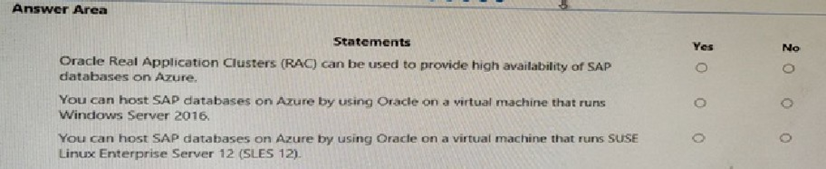
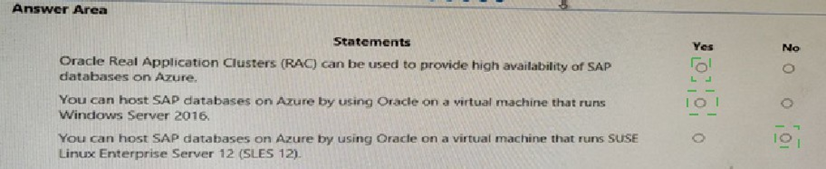
For each of the following statements, select Yes if the stamen is true. Otherwise, select No. NOTE: Each correct selection is worth one point.

Show answerHide answer

Explanation


Explanation:
These statements evaluate the SAP-certified configurations for running SAP with Oracle Database on Azure. Certification by SAP is strict, and only specific OS/database combinations listed in the SAP Product Availability Matrix (PAM) and corresponding Microsoft documentation are supported for production.

Correct Option:

Statement 1 (Oracle Real Application Clusters (RAC) can be used...): No.
Oracle RAC is NOT certified or supported for SAP workloads on Azure. The certified high-availability solution for Oracle on Azure VMs is Oracle Data Guard for disaster recovery, combined with Azure Availability Sets or Zones for local VM-level fault tolerance. RAC's shared-disk architecture has dependencies on specific cluster filesystems and network latency that are not supported in the Azure IaaS environment for SAP.

Statement 2 (You can host SAP databases... using Oracle on a VM that runs Windows Server 2016.): No.
This is a critical certification fact. SAP does NOT certify or support the Oracle Database on the Windows Server operating system for deployments on Azure Virtual Machines. The only certified OS platforms for Oracle Database with SAP on Azure are SUSE Linux Enterprise Server (SLES) and Red Hat Enterprise Linux (RHEL).

Statement 3 (You can host SAP databases... using Oracle on a VM that runs SLES 12.): Yes.
This is true and is the primary certified configuration. SUSE Linux Enterprise Server (SLES) is a fully SAP-certified and supported operating system for running the Oracle Database with SAP NetWeaver (like SAP ECC or S/4HANA) on Azure VMs. Specific versions (like SLES 12 SPx) are listed in the SAP PAM.

Incorrect Option:

Incorrect for Statement 1:
Selecting "Yes" would incorrectly assume that all on-premises Oracle HA technologies are portable to Azure. RAC is explicitly excluded from SAP support on Azure.

Incorrect for Statement 2:
Selecting "Yes" is a common mistake. While Windows + SQL Server is a dominant SAP-on-Azure combination, the Oracle database is certified only on Linux in the Azure IaaS environment.

Incorrect for Statement 3:
Selecting "No" would contradict the official SAP and Microsoft documentation, which explicitly lists SLES and RHEL as the supported OSes for Oracle with SAP on Azure.

Reference:
The SAP Note 1380654 (SAP support in Azure) and the SAP Product Availability Matrix (PAM) under the database section for Oracle list the supported operating systems. The Microsoft Learn document "Oracle database deployments for SAP workload on Azure" explicitly states that Oracle Database is supported only on SUSE Linux Enterprise Server and Red Hat Enterprise Linux and that Oracle RAC is not supported.
Full mock exam

Sit the AZ-120 exam before exam day

Full-length mocks with the same number of questions and the same time limit as the real AZ-120 exam. Every attempt draws a new set of questions from the full bank, so you can keep going until you pass comfortably.

Get full AZ-120 mock exam
  • 65questions per mock
  • 105 mintime limit
  • 218questions in the bank
  • Newmock on every attempt