Microsoft certification · Exam AB-620

AB-620 Mock Exam

Designing and Building Integrated AI Agent Solutions in Copilot Studio

Free AB-620 questions on Topic 3, Mix Questions, each with the answer and an explanation.

20 questions · 30 minutes · free, no sign-up

Topic 3, Mix Questions questions

1–10 of 22 free
Question 1
A company is designing an agent flow that includes human in the loop stages during execution. The company requires that the agent flow perform the following actions: Must wait for a human decision before it resumes. Must collect information and then continue execution. You need to configure the flow behavior.

Show answerHide answer

Explanation

 
Explanation:

Agent flows in Copilot Studio can include human-in-the-loop stages where the flow pauses and waits for human input before proceeding. The correct flow behavior depends on whether the stage requires a decision (approval) or data collection (information).

Approval → Wait for a response and branch based on the decision – When the human-in-the-loop stage is an approval, the flow must pause and wait for the approver's decision (e.g., Approve or Reject). Based on that decision, the flow branches into different paths (e.g., continue if approved, stop or escalate if rejected). This behavior ensures the flow resumes only after a human decision is received, and it routes execution according to the outcome.

Information collection → Wait for a response and capture inputs – When the human-in-the-loop stage is information collection, the flow must pause and wait for the human to provide the required data. The flow captures the inputs (e.g., form fields, text responses) and then continues execution using that data. This behavior ensures the flow resumes only after the necessary information is collected.

❌ Why Other Flow Behaviors Are Incorrect:

Send a request and continue immediately – This behavior does not wait for a human response. It sends the request and proceeds without pausing, which violates the requirement that the flow must wait for a human decision or input before resuming.

Send a notification for approval and continue – This behavior sends a notification but does not wait for a response or capture inputs. It is a non-blocking notification, not a human-in-the-loop pause. It does not satisfy either requirement.

📚 References:

* Microsoft Learn – Human in the loop in agent flows – Explains flow behaviors for approval and information collection stages.
Question 2
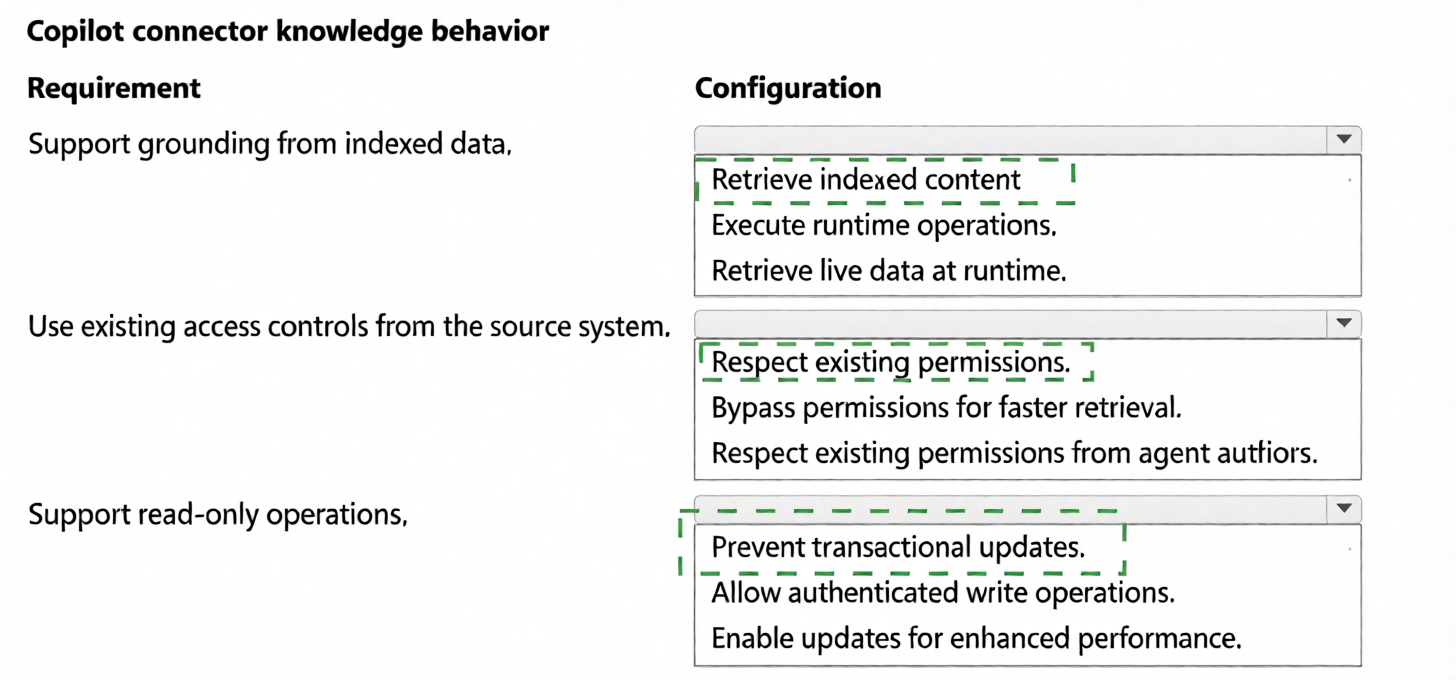
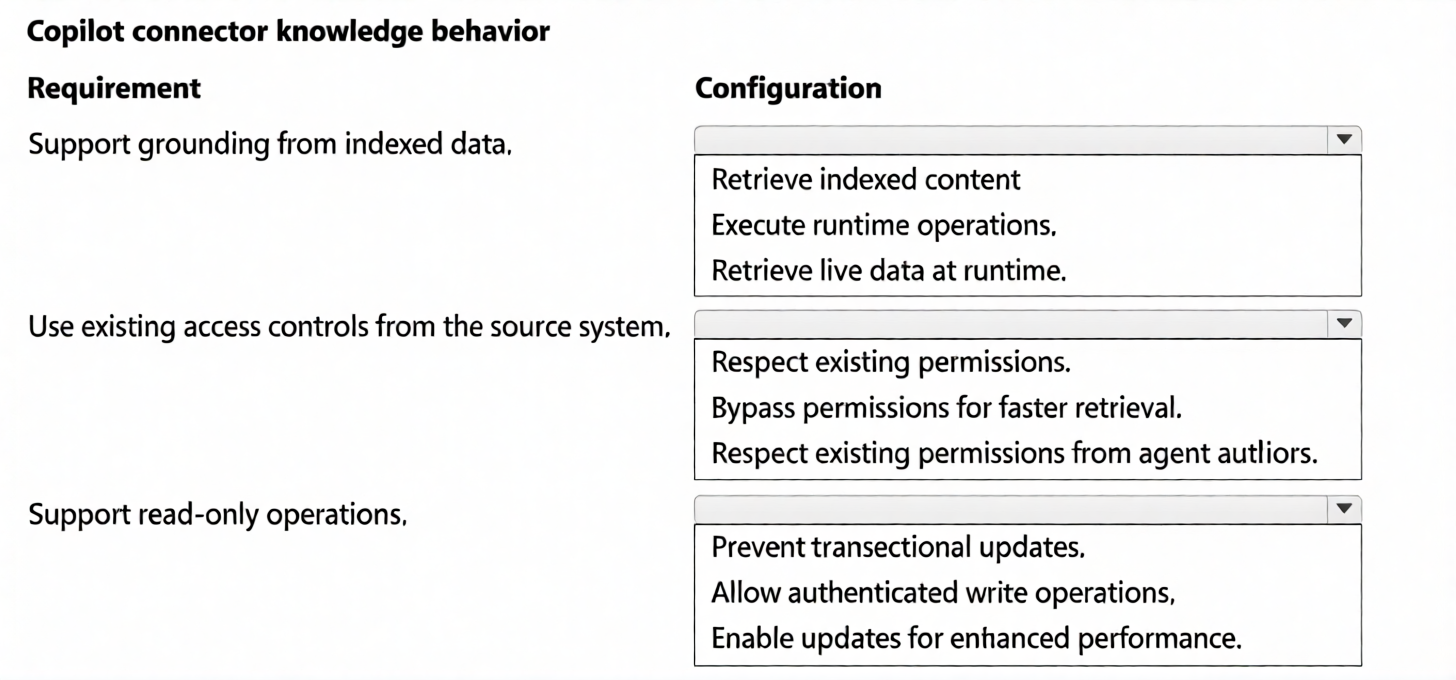
A company wants to use content from a non-Microsoft enterprise knowledge base to ground agent responses. To meet the business needs, the knowledge source must meet the following requirements: Support grounding from indexed data. Use existing access controls from the source system. Support read-only operations. You need to determine the correct behavior to meet the requirements. Which behavior meets each requirement? To answer, select the appropriate options in the answer area. NOTE: Each correct selection is worth one point.
Show answerHide answer

Explanation


Explanation:

When grounding agent responses in a non-Microsoft enterprise knowledge base, you must use a Microsoft Graph connector (also known as a Copilot connector) to index the external content into Microsoft Graph. This approach meets all three requirements.

Support grounding from indexed data → Index the content using a Microsoft Graph connector (Copilot connector) – A Microsoft Graph connector indexes external content into Microsoft Graph, making it searchable and available as a knowledge source for Copilot Studio agents. This provides the indexed data needed for grounding responses without requiring manual uploads or duplication.

Use existing access controls from the source system → Honor the source system's permissions via the connector's authentication and ACL trimming – Microsoft Graph connectors support ACL (Access Control List) trimming, which preserves the source system's permissions. When the agent retrieves content, it respects the original access controls, ensuring users only see content they are authorized to access. This satisfies the requirement to use existing access controls.

Support read-only operations → Configure the connector for read-only access – Microsoft Graph connectors are inherently read-only for external content. They index and retrieve data but do not modify the source system. This ensures that operations remain read-only, preserving data integrity and complying with the requirement.

❌ Why Other Behaviors Are Incorrect:

Manual upload of documents – Does not support automatic indexing, does not preserve source ACLs, and is not scalable for enterprise knowledge bases.

Unrestricted web search – Does not honor source access controls, is not read-only, and may return unverified content.

Transactional tool invocation – Violates the read-only requirement and treats the knowledge base as a transactional system, which is not the intent.

📚 References:

Microsoft Learn – Microsoft Graph connectors for Copilot Studio – Explains indexing external content and ACL trimming.
Question 3
A company builds agents in Copilot Studio in a development environment. The agents are packaged inside a solution and deployed by using Power Platform Pipelines to test and production environments. The company has the following requirements: Production deployments must be limited to a defined set of users who are responsible for that stage. The same solution must be reused across all environments without editing its components. The production environment must always receive a locked-down version of the solution. You need to configure the pipeline and solution behavior to meet the requirements. What should you configure for each requirement? To answer, move the appropriate configurations to the correct requirements. You may use each configuration once, more than once, or not at all. NOTE: Each correct selection is worth one point.
Show answerHide answer

Explanation


Explanation:

Power Platform Pipelines automate the deployment of solutions across environments (development → test → production). Each requirement maps to a specific configuration.

Limit users who can deploy to production → Configure stage access for the production stage – Power Platform Pipelines allow you to define stage access for each pipeline stage. By configuring stage access for the production stage, you restrict deployment permissions to a specific set of users (e.g., release managers or production administrators). This ensures that only authorized users can deploy to production, meeting the governance requirement.

Reuse the same solution across environments without modifying its components → Use environment variables in the solution – Environment variables allow you to parameterize environment-specific values (e.g., URLs, connection strings, API endpoints) without modifying the solution's components. The same solution can then be deployed across development, test, and production environments, with each environment supplying its own values. This satisfies the requirement to reuse the solution without editing its components.

Ensure production receives a locked-down version of the solution → Deploy the solution as managed – Managed solutions are locked down and cannot be modified directly in the target environment (except through managed properties and configuration). Deploying as managed ensures that the production environment receives a version of the solution that is protected from unauthorized or accidental changes, meeting the locked-down requirement.

❌ Why Other Configurations Are Incorrect:

Deploy the solution as unmanaged – Unmanaged solutions allow full customization and modification in the target environment. This does not provide a locked-down version and violates the production governance requirement.

📚 References:

* Microsoft Learn – Power Platform Pipelines – Explains how to configure stage access and deployment settings.
Question 4 Choose 1
A company has agents in Copilot Studio. The company needs to prevent the agents from using disallowed connectors and insecure data flows. Administrators must be able to enforce the governance controls to prevent and report violations. You need to enforce governance controls for agents. What should you do?
Show answerHide answer

Correct answer: D Configure data policies.

Explanation

Explanation:

To prevent agents in Copilot Studio from using disallowed connectors and insecure data flows, and to enforce governance controls that prevent and report violations, you must configure  data policies (also known as Data Loss Prevention or DLP policies) in the Power Platform admin center.

D. Configure data policies – Data policies allow administrators to classify connectors into groups such as  Business,  Non-Business, and  Blocked. Connectors in the Blocked group cannot be used by agents or flows. This prevents agents from using disallowed connectors and enforces secure data flow boundaries. Administrators can also monitor and report on policy violations through the Power Platform admin center, ensuring governance controls are enforced across the tenant.

❌ Why Other Options Are Incorrect:

A. Configure Application Insights to collect runtime telemetry – Application Insights is used for monitoring performance, errors, and usage telemetry. It does not enforce governance controls or prevent the use of disallowed connectors.

B. Review security FAQs to understand default protections – Reviewing documentation helps you understand default protections, but it does not enforce governance controls or prevent violations. It is informational, not actionable for enforcement.

C. Review agent analytics to detect risky connector usage – Agent analytics can help you detect risky usage after the fact, but it does not prevent agents from using disallowed connectors. Prevention requires data policies, not analytics.

📚 References:

Microsoft Learn – Data policies in Power Platform – Explains how to configure DLP policies to block connectors and enforce governance.
Question 5 Choose 1
An agent uses a flow that calls an external service which can occasionally fail or time out. When a failure occurs, the agent must meet the following requirements:
Must not terminate silently.
Must send a notification containing the error details.
You need to configure the agent flow so that failures are handled in a controlled and predictable way.
Solution: Configure run after conditions for failure paths.
Does the solution meet the goal?
Show answerHide answer

Correct answer: A Yes

Explanation

Explanation:

The solution meets the goal. Configuring un after conditions for failure paths in an agent flow (Power Automate) allows you to handle failures and timeouts in a controlled and predictable way.

A. Yes – By configuring the "Configure run after" setting on a subsequent action, you can specify that the action should run only when the preceding action fails, times out, or is skipped. This ensures that when the external service call fails, the flow does not terminate silently. Instead, it branches to a failure-handling path that can send a notification containing the error details (e.g., using the "Send an email" or "Post a message" action with dynamic content from the failed action). This satisfies both requirements: the failure is not silent, and the notification includes error details.

❌ Why Option B Is Incorrect:

B. No – The solution does meet the goal. Run after conditions are the standard, supported mechanism in Power Automate for handling failures, timeouts, and skipped actions. Without configuring these conditions, the flow would terminate on failure without notification. With them, the flow handles errors gracefully and predictably. Therefore, "No" is incorrect.

📚 References:

Microsoft Learn – Configure run after for error handling – Explains how to use run after conditions to handle failures, timeouts, and skipped actions.
Question 6 Choose 2
An agent calls a flow that intermittently produces unexpected results during execution. The agent behaves inconsistently. You need to investigate agent flow executions to diagnose the issue. Which two actions should you use? Each correct answer presents a complete solution. Choose two. NOTE: Each correct selection is worth one point.
Show answerHide answer

Correct answer: C, E Review flow run history. Review flow analytics summary.

Explanation

Explanation:

To diagnose intermittent issues with an agent flow that produces unexpected results and causes inconsistent agent behavior, you need visibility into how the flow has executed over time. The two most effective actions are:

C. Review flow run history – The flow run history provides a detailed record of each flow execution, including success/failure status, duration, inputs, outputs, and error messages. By reviewing the run history, you can identify patterns in failures, timeouts, or unexpected results across multiple runs. This is essential for diagnosing intermittent issues.

E. Review flow analytics summary – The flow analytics summary provides aggregated metrics such as success rate, failure rate, average duration, and trends over time. This helps you identify whether the issue is systemic, intermittent, or correlated with specific conditions (e.g., time of day, connector load). It is useful for spotting patterns that may not be obvious from individual run details.

❌ Why Other Options Are Incorrect:

A. Update the flow trigger definition – Changing the trigger definition is a remediation action, not a diagnostic step. You should first diagnose the issue before modifying the trigger.

B. Inspect failed run details – While this is useful, it is a subset of reviewing flow run history. The question asks for two actions, and "Review flow run history" encompasses inspecting failed run details. Additionally, since the issue is "unexpected results" rather than outright failures, inspecting only failed runs may miss successful runs that produced incorrect outputs.

D. Increase the connector timeout – Increasing the timeout is a remediation action, not a diagnostic step. It also does not address unexpected results—it only addresses timeouts.

F. Check the Error column in the Activity tab – The Activity tab in Copilot Studio shows agent-level activity, but flow execution details are best reviewed in Power Automate's run history and analytics. The Error column may provide a summary but lacks the depth needed to diagnose intermittent flow issues.

📚 References:

Microsoft Learn – Monitor flow run history – Explains how to review individual flow runs and their details.
Question 7
A company is extending agents in Copilot Studio with both external capabilities and enterprise content access. Some user requests require grounded answers, while other requests require executing actions. To meet the business needs, the agent must meet the following requirements: Ground answers using results from enterprise data. Invoke callable functions exposed through a standardized tool interface. Write an update to a system by using an authenticated action during the conversation. You need to integrate the correct approach to meet the requirements.
Show answerHide answer

Explanation


Explanation:

Each requirement maps to a specific integration approach in Copilot Studio based on whether the goal is grounding, standardized tool invocation, or authenticated write actions.

Ground answers using results from enterprise data → Add a Copilot connector knowledge source for indexed content – Copilot connectors (Microsoft Graph connectors) index enterprise content into Microsoft Graph, making it available as a knowledge source. This allows the agent to ground its answers in authoritative, indexed enterprise data while respecting the source system's access controls.

Invoke callable functions exposed through a standardized tool interface → Connect to an MCP server and add its tools to the agent – The Model Context Protocol (MCP) provides a standardized interface for exposing callable functions and tools to agents. By connecting to an MCP server, the agent can discover and invoke external tools through a consistent, vendor-neutral protocol.

Write an update to a system by using an authenticated action during the conversation → Add a Power Platform connector tool and call it from a topic – Power Platform connectors provide authenticated actions (e.g., create, update, delete) to external systems such as SharePoint, Dynamics 365, SQL, or third-party APIs. Adding a connector tool and invoking it from a topic allows the agent to perform write operations securely during the conversation.

❌ Why Other Integrations Are Incorrect:

Add Dataverse tables as a structured data knowledge source – This is a valid knowledge source for grounding, but it is limited to Dataverse. The requirement specifies "enterprise data" broadly, and Copilot connectors are the recommended approach for indexing external enterprise content.

Add a Copilot connector knowledge source for indexed content – This is correct for grounding (already mapped above). It is not used for MCP tool invocation or authenticated write actions.

Connect to an MCP server and add its tools to the agent – This is correct for standardized tool invocation (already mapped above). It is not used for grounding or write actions.

Add a Power Platform connector tool and call it from a topic – This is correct for authenticated write actions (already mapped above). It is not used for grounding or MCP tool invocation.

📚 References:

Microsoft Learn – Copilot connectors as knowledge sources – Explains how to ground answers using indexed enterprise content.
Question 8
A company uses an agent flow that occasionally requires human input before continuing execution. Some automated actions must pause until a human provides a decision or additional information. The flow must be configured to:

• Capture a human response for use in later steps.
• Continue processing within the same flow run after the response is submitted.
• Wait for a manual decision before proceeding.
You need to configure a human-in-the-loop agent flow.

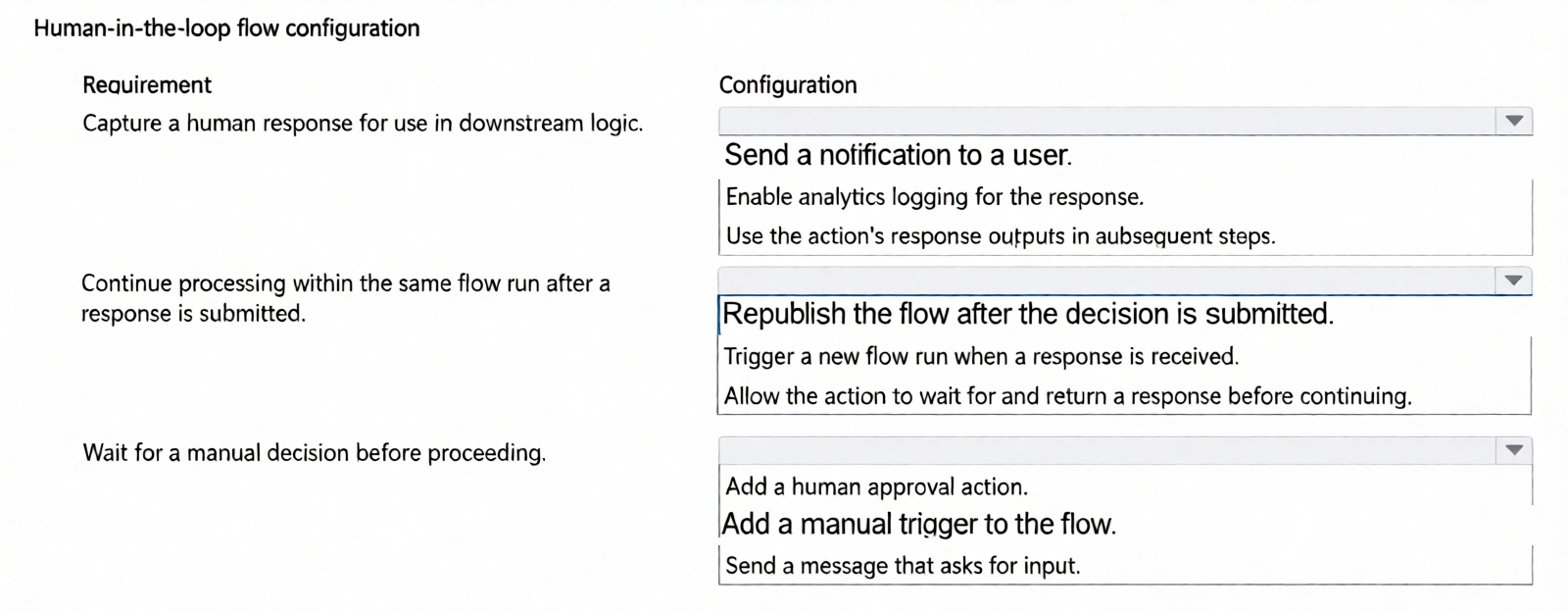
Which setting should you configure for each requirement? To answer, select the appropriate options in the answer area.
NOTE: Each correct selection is worth one point.
Show answerHide answer

Explanation


Explanation:

Human-in-the-loop agent flows in Copilot Studio require specific configurations to pause execution, capture human input, and resume processing within the same flow run.

Capture a human response for use in downstream logic → Use the action's response outputs in subsequent steps – When a human-in-the-loop action (such as an approval or information collection action) returns a response, that response is available as dynamic content in the flow. To use the human's input in later steps—such as branching logic, updating records, or sending notifications—you must reference the action's response outputs in subsequent steps. This ensures the captured data drives downstream processing.

Continue processing within the same flow run after a response is submitted → Allow the action to wait for and return a response before continuing – This setting ensures that the flow pauses at the human-in-the-loop action and waits for the human to submit a response. Once the response is received, the flow resumes within the same run rather than triggering a new run. This is critical for maintaining context and state throughout the flow execution.

Wait for a manual decision before proceeding → Add a human approval action – A human approval action (such as "Start and wait for an approval") pauses the flow and waits for a designated approver to make a decision (e.g., Approve or Reject). The flow does not proceed until the decision is received, and the outcome can be used to branch the flow accordingly.

❌ Why Other Configurations Are Incorrect:

Send a notification to a user – Notifications are informational and do not pause the flow or capture a response. They do not satisfy the requirement to wait for human input.

Enable analytics logging for the response – Logging is for monitoring and diagnostics. It does not capture responses for downstream logic or control flow execution.

Republish the flow after the decision is submitted – Republishing is a deployment action, not a runtime configuration. It does not affect how the flow handles human input.

Trigger a new flow run when a response is received – This would start a new flow run, breaking continuity and losing the state of the original run. The requirement is to continue within the same flow run.

Add a manual trigger to the flow – A manual trigger initiates a flow by user action, but it does not pause mid-execution or wait for a human decision. It is not a human-in-the-loop mechanism.

Send a message that asks for input – While this prompts the user, it does not itself pause the flow, capture the response, or resume execution. It is a notification, not a blocking action.

📚 References:

* Microsoft Learn – Human-in-the-loop in agent flows – Explains how human responses are captured and how agent flows pause and resume processing.
Question 9 Choose 1
Users can add content to a paragraph field in a team-managed project, but they cannot @mention other users. Identify the cause.
Show answerHide answer

Correct answer: B Field settings

Explanation

Explanation:

In Jira, the ability to  @mention other users in a paragraph field (such as a custom text field or the description field) is controlled by the  field settings. Specifically, Jira has a setting called  "Enable @mentions" (or similar) that can be enabled or disabled for individual fields. If this setting is turned off for the paragraph field, users can still type content but cannot @mention other users.

B. Field settings – The @mention capability is a field-level configuration. If @mentions are disabled in the field settings for that specific paragraph field, users will not be able to mention others, even though they can still add content. This is the most direct cause of the issue.

❌ Why Other Options Are Incorrect:

A. Global permissions – Global permissions control broad access to Jira features (e.g., who can log in, create projects). They do not control field-level @mention behavior.

C. Issue-level security settings – Issue-level security restricts who can view or edit specific issues. It does not control @mention functionality within a field.

D. Notification settings – Notification settings determine who receives emails or alerts about issue changes. They do not affect whether users can @mention others in a field.

E. Screen settings – Screen settings control which fields appear on which screens (e.g., create, edit, view). They do not control @mention behavior within a field.

F. Project permissions – Project permissions control actions like creating issues, editing issues, or transitioning workflows. They do not control @mention functionality in a specific field.

📚 References:

* Atlassian Documentation – Configure field settings – Explains that @mentions can be enabled or disabled at the field level for paragraph fields.
Question 10 Choose 1
A company is configuring an agent in Copilot Studio that uses a generative answers node inside multiple topics.
The company requires responses to meet the following requirements:
Must use an executive summary format.
Must apply only within a specific topic.
Must continue using configured knowledge sources.
Must comply with connector security controls.
You need to configure a custom prompt to meet the formatting requirements.Solution: Remove the generative answers node and rely only on the custom prompt to produce formatted responses.
Does the solution meet the goal?
Show answerHide answer

Correct answer: B No

Explanation

Explanation:

The proposed solution does < not meet the goal because removing the generative answers node eliminates the knowledge grounding capability, which is a required behavior.

The requirements state that the agent must:

1. Use an executive summary format.
2. Apply the formatting only within a specific topic.
3. Continue using configured knowledge sources.
4. Comply with connector security controls.

By removing the generative answers node and relying solely on a custom prompt, the agent would lose its ability to retrieve and ground responses in the configured knowledge sources. A custom prompt alone cannot access or query the knowledge sources—the generative answers node is the component that performs knowledge retrieval and grounding. Without it, responses would be generated purely by the language model, which may produce ungrounded, inaccurate, or non-compliant content.

The correct approach is to add a prompt modification within the generative answers node settings for the specific topic. This allows you to:

* Enforce the executive summary format via prompt instructions.
* Scope the modification to the specific topic.
* Preserve knowledge source grounding.
* Maintain connector security controls.

❌ Why Option A Is Incorrect:

A. Yes – The solution does not meet the goal. Removing the generative answers node breaks the requirement to continue using configured knowledge sources. The custom prompt alone cannot perform grounded retrieval, so the solution fails to satisfy all requirements.

📚 References:

* Microsoft Learn – Prompt modifications in Copilot Studio – Explains how to add custom prompt instructions to generative answers nodes while preserving knowledge grounding.
Full mock exam

Sit the AB-620 exam before exam day

Full-length mocks with the same number of questions and the same time limit as the real AB-620 exam. Every attempt draws a new set of questions from the full bank, so you can keep going until you pass comfortably.

Get full AB-620 mock exam
  • —questions per mock
  • —time limit
  • 93questions in the bank
  • Newmock on every attempt