Microsoft certification · Exam AB-210

AB-210 Mock Exam

Accelerating Sales Pipelines with AI in Dynamics 365

Free AB-210 questions on Topic 3, Stand Alone Questions, each with the answer and an explanation.

19 questions · 38 minutes · free, no sign-up

Topic 3, Stand Alone Questions questions

1–10 of 17 free
Question 1
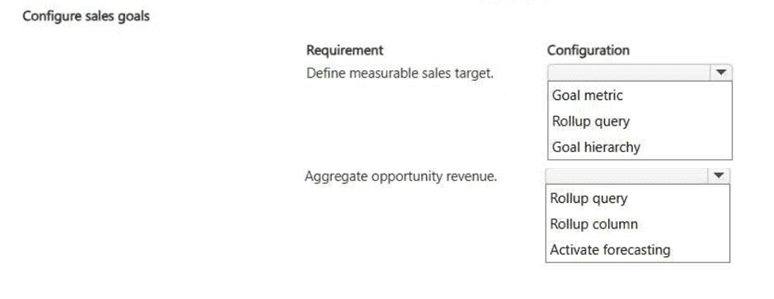
You are configuring Dynamics 365 Sales for a company.
Sales leadership wants to track monthly revenue targets for each seller and evaluate whether targets are achieved.
The configuration must include the following:
· Define measurable sales targets.
. Aggregate opportunity revenue.
You need to configure the system so that the sales performance can be measured using defined targets.
What should you configure for each requirement? To answer, select the appropriate options in the answer area.
NOTE: Each correct selection is worth one point.
Show answerHide answer

Explanation


✅ Explanation:

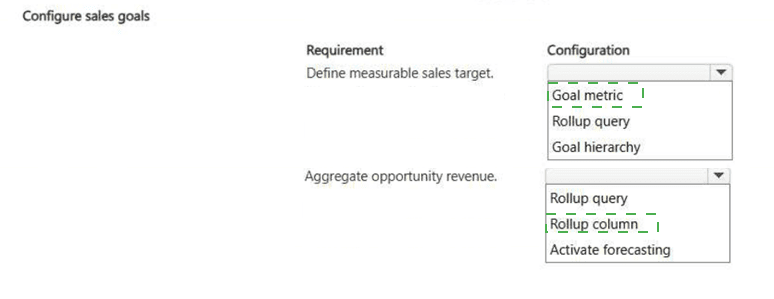
Define measurable sales target → Goal metric – A goal metric defines the type of target being tracked and how it is measured. In this scenario, sales leadership wants to track monthly revenue targets. The goal metric specifies the entity (e.g., Opportunity), the metric type (e.g., Revenue), and the time period (e.g., Monthly). It also defines whether the goal is a monetary amount, count, or custom calculation. Without a goal metric, you cannot define a measurable sales target because it establishes the foundation for what is being measured and how.

Aggregate opportunity revenue → Rollup column – A rollup column aggregates data from related child records (such as opportunities) to the parent record (such as a user or territory). To track the total opportunity revenue achieved by a seller toward their goal, you need a rollup column that sums the actual revenue of all closed won opportunities associated with that seller within the specified time period. This aggregated value is then compared against the goal target to evaluate performance.

❌ Why Other Configurations Are Incorrect:

Rollup query – A rollup query defines the criteria for which records should be included in the aggregation. For example, it filters opportunities by status (e.g., Closed Won) and date range. However, the actual aggregation of data values (like summing revenue) is performed by the rollup column. The query provides the scope, but the column performs the math.

Goal hierarchy – A goal hierarchy is used to roll up goals from individual contributors to managers and executives. It defines the parent-child relationship between goals. While important for reporting across the organization, it does not define the measurable target itself (that's the metric) nor aggregate revenue (that's the column). This is relevant but not the primary answer for either requirement.

Activate forecasting – Forecasting is a separate capability in Dynamics 365 Sales that predicts future revenue based on pipeline data. It is not used to define measurable targets or aggregate revenue for goal tracking. Goals and forecasts are complementary but serve different purposes.

📚 References:

Microsoft Learn – Goal metrics in Dynamics 365 Sales – Explains how goal metrics define measurable targets, including revenue-based goals.

Question 2
A company uses AI agents to support opportunity management. Sales managers require sellers to collaborate with the Dynamics 365 Sales AI agent for the following scenarios:

. Assessing opportunity risk.
. Recommending opportunity products to clients automatically.
. Prioritizing opportunities that are gaining traction.

You need to determine the AI agent that should be used for each scenario.
Which agent should you use for each? To answer, move the appropriate agents to the correct scenarios. You may use each agent once, more than once, or not at all. You may need to move the split bar between panes or scroll to view content.
NOTE: Each correct selection is worth one point.

Show answerHide answer

Explanation


✅ Explanation:

Assess opportunity risk → Sales Close Agent in Research mode – The Sales Close Agent in Research mode is designed to provide sellers with deep intelligence and insights about opportunities. This mode analyzes historical data, competitor activity, and deal dynamics to assess opportunity risk. It helps sellers identify potential deal risks such as stalled engagement, competitor presence, or internal blockers. Research mode is focused on gathering and analyzing information, making it the correct choice for assessing risk.

Recommend opportunity products to clients → Sales Close Agent in Engage mode – The Sales Close Agent in Engage mode is focused on proactive, action-oriented recommendations to help sellers close deals faster. One of its key capabilities is recommending products to clients based on the opportunity context, buyer needs, and historical buying patterns. Engage mode provides actionable suggestions and next-best actions, making it the correct choice for product recommendations.

Prioritize opportunities that are gaining traction → Sales Close Agent in Engage mode – Engage mode also helps sellers prioritize opportunities by identifying which deals are gaining traction and are most likely to close. It surfaces insights about positive deal momentum, buyer engagement signals, and priority recommendations. This enables sellers to focus their time on the most promising opportunities, making Engage mode the correct choice for this scenario.

❌ Why Other Agent Is Incorrect:

Sales Qualification Agent – The Sales Qualification Agent is specifically focused on the lead qualification process, not opportunity management. It automatically qualifies or disqualifies leads based on predefined criteria. It does not assess opportunity risk, recommend products, or prioritize opportunities in the deal-closing phase. This agent is used earlier in the sales cycle and is not applicable to these scenarios.

📚 References:

Microsoft Learn – Sales Close Agent overview – Explains the difference between Research mode (insights and risk assessment) and Engage mode (actionable recommendations and prioritization).
Question 3 Choose 1
A company is implementing the Dynamics 365 Sales mobile app. The company requires setup of several push notifications for sellers who use the app. You need to create the push notifications. Which feature should you use?
Show answerHide answer

Correct answer: A Cloud flow

Explanation

✅ Explanation:

In Dynamics 365 Sales, push notifications for the mobile app are created and managed using Power Automate cloud flows. Cloud flows provide a low-code, no-code way to automate workflows and send notifications to users based on specific events or conditions.

A. Cloud flow
– To send push notifications to the Dynamics 365 Sales mobile app, you create a cloud flow in Power Automate that triggers on a Dataverse event (e.g., when a lead is assigned, when an opportunity is updated, or when a task is due). The flow uses the "Send a push notification to Dynamics 365" action (or similar connector) to deliver notifications directly to the mobile app. This is the recommended and supported method for configuring mobile push notifications.

❌ Why Other Options Are Incorrect:

B. Classic flow
– "Classic flow" is not a supported or recognized feature name in Power Automate or Dynamics 365. This term may refer to the deprecated classic workflow engine (which uses XAML-based workflows), but classic workflows do not support push notifications to the mobile app. Push notifications require modern connectors and actions available only in cloud flows.

C. Plug-in
– Plug-ins are custom .NET assemblies that extend the Dataverse event execution pipeline. While they can perform server-side logic, they are not designed to send push notifications to the mobile app. Plug-ins require custom coding and are more complex to implement. They do not have built-in actions for mobile push notifications, whereas cloud flows provide a dedicated action for this purpose.

📚 References:

Microsoft Learn – Send push notifications using Power Automate – Explains how to create cloud flows to send push notifications to the Dynamics 365 Sales mobile app.
Question 4 Choose 1
Note: This question is part of a series of questions that present the same scenario. Each question in the series contains a unique solution that might meet the stated goals. Some question sets might have more than one correct solution, while others might not have a correct solution.
After you answer a question in this section, you will NOT be able to return to it. As a result, these questions will not appear on the review screen.
A company is evaluating AI agent capabilities for opportunity management.
Sales managers require insights about deals. You must ensure that the system does not perform automatic outreach to buyers.
You need to determine whether proposed solutions meet the requirements.
Solution: Use Research mode and allow sellers to review insights manually.
Does the solution meet the goal?
Show answerHide answer

Correct answer: A Yes

Explanation

✅ Explanation:

The solution meets the goal because Research mode is specifically designed to provide sellers with actionable insights about deals without performing any automatic outreach to buyers.

Research mode is a capability of the Sales Close Agent that focuses on gathering, analyzing, and presenting intelligence to sellers. It provides insights such as:

Opportunity risk assessment
Competitor analysis
Deal health indicators
Engagement trends

However, Research mode is strictly informational. It does not initiate any automatic communication, emails, or outreach to buyers. All insights are presented to the seller for manual review and action. This aligns perfectly with the requirement that the system must not perform automatic outreach to buyers while still delivering the required deal insights.

In contrast, Engage mode is the mode that includes proactive, action-oriented features—including automated outreach and next-best actions. Since the solution explicitly uses Research mode, it safely avoids any automatic buyer engagement.

📚 References:

Microsoft Learn – Sales Close Agent Research mode – Clearly states that Research mode provides insights and intelligence without performing automatic outreach.
Question 5 Choose 1
A company uses the Sales Qualification Agent to analyze leads and determine qualification probability. The Sales Qualification Agent is configured in Research-only mode. The agent processes a lead and determines the lead's target customer profile suitability is Low. You need to determine the outcome of the agent's action. What should you infer about the agent?
Show answerHide answer

Correct answer: A Always transfers the lead to a seller for outreach and does not disqualify leads in Research-only mode.

Explanation

✅ Explanation:

The Sales Qualification Agent in Dynamics 365 Sales has two modes: Research-only mode and Auto-qualify mode. The behavior of the agent is fundamentally different depending on which mode is configured.

A. Always transfers the lead to a seller for outreach and does not disqualify leads in Research-only mode
– This is correct. In Research-only mode, the Sales Qualification Agent is designed to analyze leads and provide insights, but it does not take any automated actions such as qualifying, disqualifying, or sending outreach. The agent evaluates the lead against criteria like target customer profile suitability, engagement signals, and fit. Regardless of the outcome (even if suitability is Low), the agent does not disqualify the lead. Instead, it transfers the lead to a seller for manual outreach and follow-up. This ensures that sellers retain full control over lead disposition while still benefiting from AI-powered insights.

❌ Why Other Options Are Incorrect:

B. Disqualifies the lead, notifies the supervisor, and the lead continues to be assigned to the agent
– This describes behavior that occurs only in Auto-qualify mode, not Research-only mode. In Auto-qualify mode, the agent can disqualify leads that do not meet the criteria. In Research-only mode, disqualification does not occur.

C. Sends a personalized outreach email automatically and transfers the lead only when it detects positive intent
– The Sales Qualification Agent does not send automated emails in any mode. Automated outreach is a capability of the Sales Close Agent in Engage mode, not the Sales Qualification Agent. Additionally, in Research-only mode, the agent does not transfer leads based on intent; it transfers all leads for manual review.

D. Evaluates the Budget, Authority, Need, and Timeline criteria
– While BANT criteria are part of lead qualification, this describes the evaluation criteria used by the agent, not the outcome of the agent's action. The question asks about what happens after the agent processes the lead, not what the agent evaluates. This option does not address the outcome or action taken.

📚 References:

Microsoft Learn – Sales Qualification Agent modes – Explains that in Research-only mode, the agent provides insights and transfers leads to sellers without disqualifying them.
Question 6
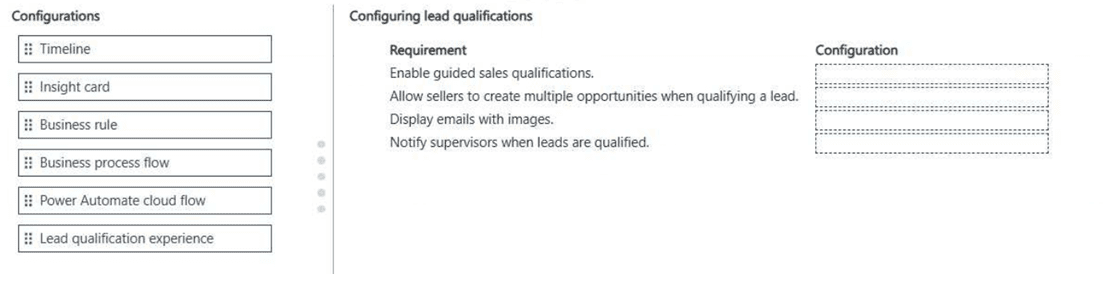
You are configuring a Dynamics 365 Sales implementation for a company.

The company has the following requirements:

. Must enable guided sales qualifications.
Must allow sellers to create multiple opportunities when qualifying a lead.
. Must display full related emails with images on opportunities.
. Must notify supervisors when leads are qualified. You need to configure the lead-to-opportunity qualificat

ion process based on the company's requirements.
What should you configure? To answer, move the appropriate configurations to the correct requirements. You may use each configuration once, more than once, or not at all. You may need to move the split bar between panes or scroll to view content.
NOTE: Each correct selection is worth one point.

Show answerHide answer

Explanation


✅ Explanation:

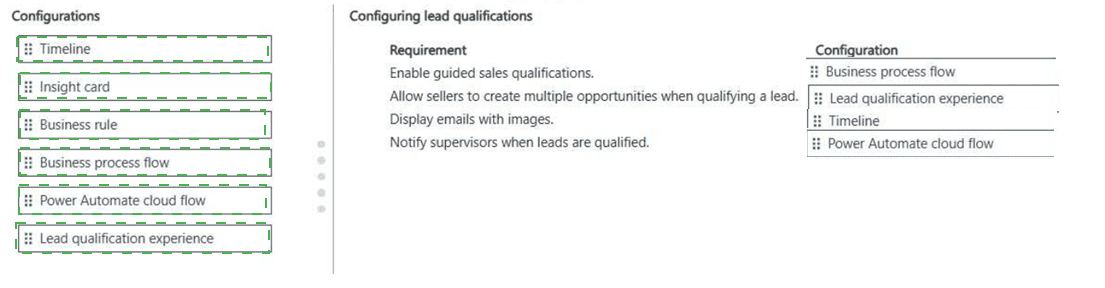
Enable guided sales qualifications → Business process flow – A business process flow (BPF) provides a guided, step-by-step experience for sellers to follow during lead qualification. It defines stages (e.g., Qualify, Develop, Propose, Close) and required steps, ensuring consistency across the sales team. This is the primary tool for enabling guided sales qualifications.

Allow sellers to create multiple opportunities when qualifying a lead → Lead qualification experience – The lead qualification experience in Dynamics 365 Sales includes settings that control how opportunities are created during qualification. When configured with the "Allow multiple opportunities per lead" option, sellers can create more than one opportunity from a single lead. This setting is part of the modern lead qualification experience configuration.

Display full related emails with images on opportunities → Timeline – The Timeline control displays all activities and communications related to a record, including emails, appointments, tasks, and notes. When configured properly, the Timeline shows full email content, including embedded images, directly on the opportunity form. This provides sellers with complete context without leaving the record.

Notify supervisors when leads are qualified → Power Automate cloud flow – To send automated notifications to supervisors when a lead is qualified, you use a Power Automate cloud flow. The flow triggers on the qualification event (e.g., when a lead's status changes to Qualified) and sends an email, Teams message, or push notification to the supervisor. Business rules cannot send notifications, making Power Automate the correct choice.

❌ Why Other Configurations Are Incorrect:

Insight card – Insight cards provide AI-driven recommendations and alerts within the sales experience (e.g., "This lead is at risk"). They do not enable guided qualifications, multiple opportunities, email display, or notifications, so they do not apply to any requirement.

Business rule – Business rules enforce field-level logic (e.g., making a field required or hiding a field). While useful for data validation, they cannot guide a multi-stage process, create multiple opportunities, display emails, or send notifications. They are not applicable to any of these requirements.

📚 References:

Microsoft Learn – Business process flows overview – Explains how BPFs guide sellers through qualification stages.

Microsoft Learn – Lead qualification experience – Covers settings for creating multiple opportunities per lead. .
Question 7 Choose 1
You are creating a pricing list in Dynamics 365 Sales. All prices must end in $.98. You need to select the function that establishes this pricing requirement. What should you use?
Show answerHide answer

Correct answer: D Rounding Policy

Explanation

✅ Explanation:

In Dynamics 365 Sales, when creating a price list, you can define how prices are rounded to meet specific business requirements. The Rounding Policy establishes the mathematical rule applied to prices—such as rounding up, down, or to the nearest specified increment.

D. Rounding Policy
– The Rounding Policy determines how calculated prices are rounded. To ensure all prices end in ** .98 ∗ ∗ , y o u w o u l d c o n f i g u r e t h e R o u n d i n g P o l i c y a s ∗ ∗ R o u n d i n g U p ∗ ∗ o r ∗ ∗ R o u n d i n g D o w n ∗ ∗ ( o r a c u s t o m r u l e ) t o f o r c e t h e f i n a l p r i c e t o e n d w i t h t h e r e q u i r e d v a l u e . H o w e v e r , t o a c h i e v e a n e x a c t e n d i n g o f .98∗∗,youwouldconfiguretheRoundingPolicyas∗∗RoundingUp∗∗or∗∗RoundingDown∗∗(oracustomrule)toforcethefinalpricetoendwiththerequiredvalue.However,toachieveanexactendingof.98, you would typically combine the Rounding Policy with the Rounding Amount set to a specific value that achieves that outcome. The policy itself defines the method of rounding (e.g., nearest, up, down), which is the primary setting that establishes this pricing requirement.

In the context of this question, the function that establishes the requirement is the Rounding Policy, as it defines how prices should be rounded to meet business rules.

❌ Why Other Options Are Incorrect:
A. Percentage
– Percentage is a discount or markup type, not a rounding function. It defines a percentage-based adjustment to the list price (e.g., 10% discount) and does not control how prices are rounded to specific endings.

B. Pricing Method
– Pricing Method defines the base calculation rule for the price list item, such as Cost plus Percentage, Fixed Price, or Markup. It determines how the base price is calculated, but it does not control rounding to specific endings like $.98.

C. Rounding Amount – The Rounding Amount specifies the increment to which prices are rounded (e.g., $0.01, $0.05, $1.00). While it works with the Rounding Policy to achieve the final price, the Rounding Amount alone does not define the mathematical rule. The Rounding Policy is the function that establishes the rounding requirement; the amount is the value used to execute that policy.

📚 References:

Microsoft Learn – Create a price list – Explains the use of Rounding Policy and Rounding Amount in price list configuration.

Microsoft Learn – Define price list items – Describes how Rounding Policy determines the final price rounding behavior.
Question 8
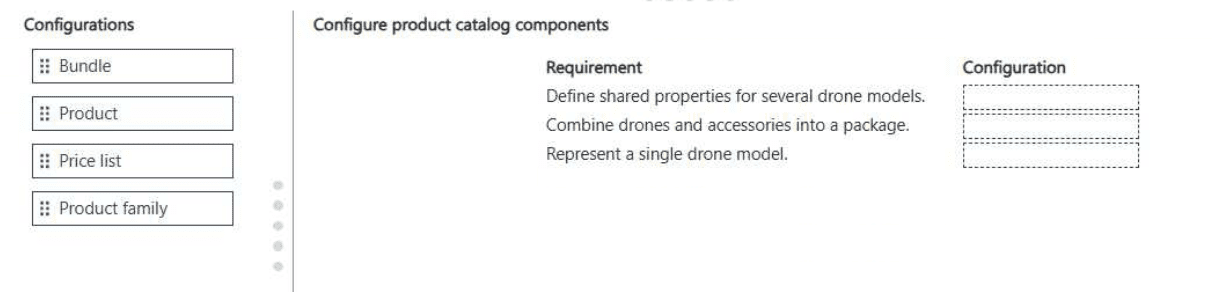
You configure the product catalog for a company. The company sells drones, spare batteries, and accessories.

The company has the following requirements:

Must define shared properties for several drone models.
Must combine drones and accessories into a package.
Must represent a single drone model.

You need to determine how product catalog elements should be configured.
Which catalog component should you use for each requirement? To answer, move the appropriate configurations to the correct requirements. You may use each configuration once, more than once, or not at all. You may need to move the split bar between panes or scroll to view content.
NOTE: Each correct selection is worth one point.

Show answerHide answer

Explanation


✅ Explanation:

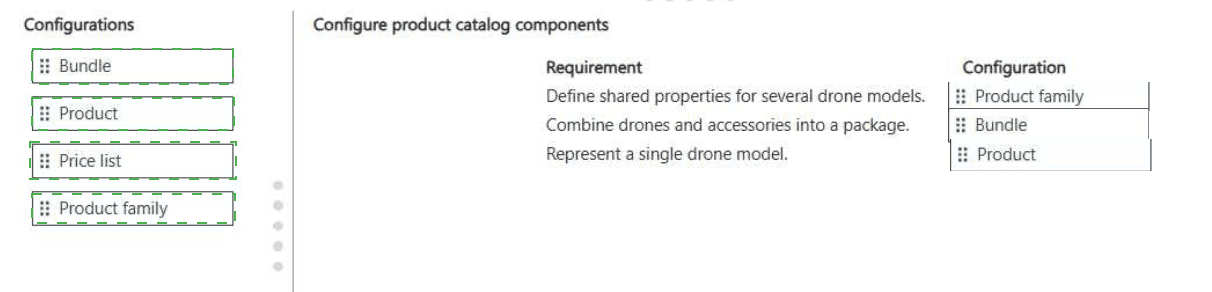
Define shared properties for several drone models → Product family – A product family is used to group related products that share common characteristics and properties. When you have several drone models, you can create a single product family (e.g., "Drones") and define shared properties at the family level—such as battery life, camera resolution, and flight range. These properties are inherited by all child products within the family, ensuring consistency and reducing configuration effort.

Combine drones and accessories into a package → Bundle – A bundle is a collection of individual products (including products and/or other bundles) that are sold together as a single package. To combine drones, spare batteries, and accessories into a package, you create a product bundle. This allows sellers to sell the entire package with a single price, while still tracking the individual components for inventory and fulfillment.

Represent a single drone model → Product – A product represents an individual sellable item. To represent a single drone model (e.g., "Drone X1000"), you create a product record. This is the lowest level of the product catalog hierarchy and represents the actual item that is stocked, priced, and sold.

📚 References:

Microsoft Learn – Product families in Dynamics 365 Sales – Explains how product families group related products and define shared properties.

Microsoft Learn – Product bundles – Describes how bundles combine multiple products into a single package.
Question 9 Choose 2
You configure Dynamics 365 Sales for a company.
The company plans to implement the Sales Close Agent in Research mode.
You need to identify the capabilities of the agent.
Which two capabilities should you identify? Each correct answer presents a complete solution. Choose two.
NOTE: Each correct selection is worth one point.
Show answerHide answer

Correct answer: C, D Analyze historical interaction data and generate opportunity insights. Review deal signals, then record next actions based on risks and recommended mitigations.

Explanation

✅ Explanation:

The Sales Close Agent in Research mode is designed to provide sellers with deep intelligence and actionable insights about opportunities without performing any automatic outreach or engagement. It focuses on analyzing data and surfacing recommendations for sellers to review and act upon manually.

C. Analyze historical interaction data and generate opportunity insights
– Research mode analyzes historical interaction data, such as emails, meetings, and activities, to generate insights about the opportunity. It identifies patterns, engagement trends, and relationship health, providing sellers with a comprehensive view of deal dynamics. This is a core capability of Research mode.

D. Review deal signals, then record next actions based on risks and recommended mitigations
– Research mode surfaces deal signals (e.g., stalled engagement, competitor activity, risk indicators) and provides recommended next actions and mitigations. Sellers can review these signals and record their next steps directly within the agent interface. This empowers sellers with intelligence while keeping control over execution.

❌ Why Other Options Are Incorrect:

A. Guide customers through the sales funnel by running engagement sequences across the sales process
– Running engagement sequences (automated cadences of emails and tasks) is a capability of the Sales Close Agent in Engage mode, not Research mode. Research mode does not guide customers or run sequences; it only provides insights.

B. Initiate follow-up communication with customer contacts using templates and customer data
– Initiating follow-up communication automatically is an Engage mode capability. Research mode does not send any emails or initiate communication; it is strictly informational.

E. Generate outreach tasks for sellers based on interaction signals and deal status changes
– Generating outreach tasks is also associated with Engage mode, where the agent proactively creates tasks and recommends actions. In Research mode, sellers review insights and manually decide on tasks; the agent does not generate them automatically.

📚 References:

Microsoft Learn – Sales Close Agent Research mode – Covers the capabilities of Research mode, including historical analysis, deal signals, and risk assessment.
Question 10
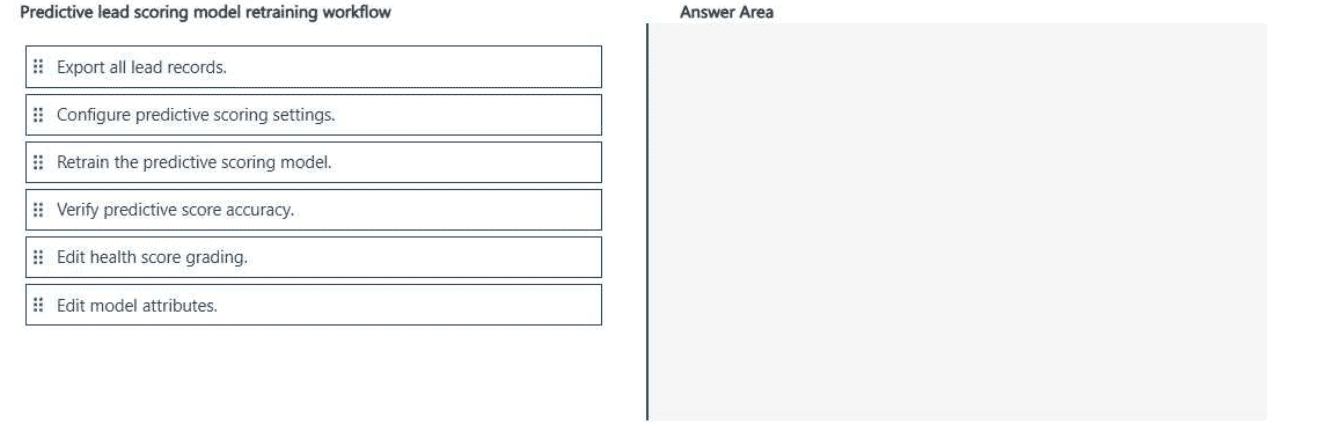
You are responsible for improving lead prioritization in Dynamics 365 Sales.
Sales managers report that predictive scores do not match current conversion trends.
You need to edit the predictive lead scoring model to improve accuracy based on recent lead data.
Which four actions should you perform in sequence? To answer, move the appropriate actions from the list of actions to the answer area and arrange them in the correct order.

Show answerHide answer

Explanation


✅ Explanation:

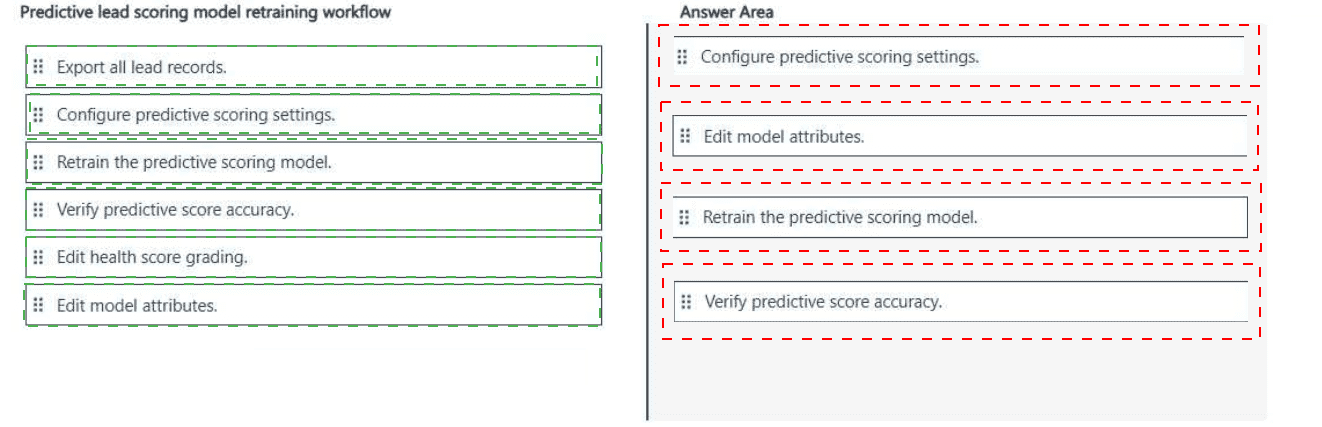
When predictive scores do not match current conversion trends, you need to edit the predictive lead scoring model to improve accuracy. The correct sequence follows the standard workflow for updating and retraining the AI model:

1. Configure predictive scoring settings – Before making any changes, you must first access and configure the predictive scoring settings. This is where you define the overall parameters for the model, including the scoring frequency, data filters, and the attributes that influence the score. This step prepares the environment for editing.

2. Edit model attributes – Model attributes are the specific lead fields (e.g., industry, job title, budget, engagement activities) that the AI uses to calculate the predictive score. If conversion trends have changed, you need to edit the model attributes to add, remove, or adjust the weight of these attributes. This ensures the model reflects the most relevant factors driving current conversions.

3. Retrain the predictive scoring model – After editing the attributes, you must retrain the model to apply the changes. Retraining forces the AI to rebuild its scoring algorithm using the updated attributes and the latest historical lead data. This step is essential for the model to adapt to recent conversion trends and improve accuracy.

4. Verify predictive score accuracy – Once the model is retrained, the final step is to verify predictive score accuracy. You should review the model's performance metrics, such as the score distribution and prediction confidence, to confirm that the changes have improved alignment with actual conversion outcomes. This validation ensures the model is now performing as expected.

❌ Why Other Actions Are Not in Sequence:

Export all lead records – This is not required for editing or retraining the predictive scoring model. The model automatically uses lead data already in the Dataverse; exporting leads is unnecessary and does not contribute to the retraining process.

Edit health score grading – Health score grading is a separate feature in Dynamics 365 Sales that measures the health of an opportunity. It is unrelated to predictive lead scoring and should not be edited as part of this workflow.

📚 References:

Microsoft Learn – Edit predictive lead scoring model – Explains how to configure settings, edit attributes, and retrain the model.

Microsoft Learn – Retrain predictive lead scoring model – Covers the retraining process and verifying accuracy after changes.
Full mock exam

Sit the AB-210 exam before exam day

Full-length mocks with the same number of questions and the same time limit as the real AB-210 exam. Every attempt draws a new set of questions from the full bank, so you can keep going until you pass comfortably.

Get full AB-210 mock exam
  • 60questions per mock
  • 120 mintime limit
  • 69questions in the bank
  • Newmock on every attempt