You are designing a testing solution for a Microsoft Copilot Studio agent that integrates with
Microsoft Dynamics 365 Customer Service and Dynamics 365 Sales.
You need to design end-to-end scenarios to test the agent's ability to perform the following actions:
Coordinate tasks and data interactions across both Dynamics 365 apps.
Interpret user input and provide contextually relevant outputs.
Which test scenario and metric should you include in the design? To answer, select the appropriate options in the answer area.
NOTE: Each correct selection is worth one point.
You need to design end-to-end scenarios to test the agent's ability to perform the following actions:
Coordinate tasks and data interactions across both Dynamics 365 apps.
Interpret user input and provide contextually relevant outputs.
Which test scenario and metric should you include in the design? To answer, select the appropriate options in the answer area.
NOTE: Each correct selection is worth one point.
Show answerHide answer
Explanation
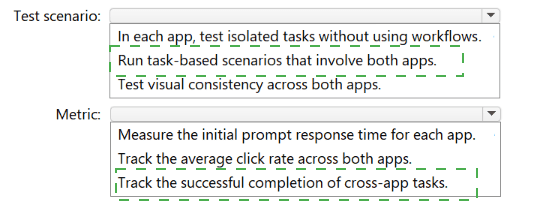
Explanation:
This AB-100 question evaluates testing strategy for a Copilot Studio agent integrated with multiple Dynamics 365 applications (Customer Service and Sales). The focus is on end-to-end capabilities, specifically the agent’s ability to coordinate tasks and data across apps while providing relevant responses. Proper testing must validate cross-application functionality rather than isolated or superficial checks.
Correct Option:
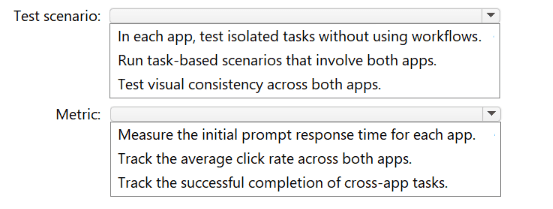
Test scenario: Run task-based scenarios that involve both apps.
End-to-end testing requires creating realistic business scenarios where the agent must interact with both Dynamics 365 Customer Service and Sales simultaneously (e.g., creating a case from a sales opportunity or updating customer data across modules). This validates the agent’s coordination and data interaction capabilities.
Correct Option:
Metric: Track the successful completion of cross-app tasks.
This metric directly measures whether the agent successfully completes workflows that span both applications, including correct data flow, context retention, and accurate outcomes. It confirms the agent’s effectiveness in real business processes involving multiple Dynamics 365 apps.
Incorrect Option:
Test scenario: In each app, test isolated tasks without using workflows.
Isolated testing per app does not validate the required cross-app coordination and integration, making it insufficient for end-to-end scenario testing.
Incorrect Option:
Test scenario: Test visual consistency across both apps.
Visual consistency is a UI/UX concern and does not address the functional requirements of task coordination and contextual response generation across applications.
Incorrect Option:
Metric: Measure the initial prompt response time for each app.
Response time is a performance metric but does not evaluate the quality or success of cross-app task coordination and data interactions.
Incorrect Option:
Metric: Track the average click rate across both apps.
Click rate is more relevant to web analytics or user engagement and is not meaningful for measuring AI agent task completion success in Dynamics 365 integrations.
Reference:
Microsoft Learn: Test and validate agents in Copilot Studio
Microsoft Learn: ALM and testing for Power Platform + Dynamics 365 solutions