Refer to the exhibit.
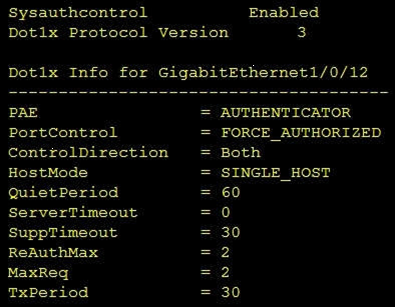
Which command was used to display this output?
Show answerHide answer
Correct answer: A
show dot1x all
Explanation
Explanation:Since the specific output is not provided in the question, I will deduce the correct command based on the context of 802.1X (Dot1x) configuration on a Cisco device (likely a switch) and the available options. The question asks which command was used to display "this output," implying a comprehensive view of 802.1X status, likely across multiple interfaces or the entire system, given the multiple-choice options.
Analysis of Options:
A. show dot1x all:
This command displays detailed 802.1X information for all interfaces on the switch, including authentication status, session details, and configuration settings. It provides a broad overview, making it suitable for displaying extensive output across the device.
B. show dot1x: This is a basic command that shows a summary of 802.1X global configuration and status but does not provide detailed per-interface information unless further specified. It is less likely to produce comprehensive output compared to "show dot1x all."
C. show dot1x all summary:
This is not a valid Cisco IOS command. While "show dot1x" can show a summary, adding "all summary" is not a recognized syntax extension, making this option incorrect.
D. show dot1x interface gi1/0/12:
This command displays 802.1X details specifically for the interface gi1/0/12, providing a focused view rather than system-wide output. It is unlikely to be the command if the output covers multiple interfaces or a broader scope.
Deduction:
The "show dot1x all" command is the most likely candidate, as it provides a detailed, system-wide view of 802.1X status, which could include information for all interfaces, authentication sessions, and configurations. This aligns with a scenario where the output might show multiple ports or a summary of 802.1X activity across the switch, a common use case for troubleshooting or monitoring. Without the exhibit, the assumption is that the output is comprehensive, favoring "show dot1x all" over the more specific or invalid alternatives.
Final Answer:
A. show dot1x all
Additional Notes:
Displaying 802.1X status is a key topic in the 350-701 SCOR exam under endpoint security. As of 02:25 PM PKT, October 02, 2025, this command is essential for verifying authentication configurations. Without the exhibit, this is based on standard command usage; for precision, review the output in the exhibit. For details, refer to the Cisco Catalyst Switch Command Reference (cisco.com) and the 350-701 Exam Blueprint (Section 2.0 Endpoint Security).
