Show answerHide answer
Correct answer: D Option D
Explanation
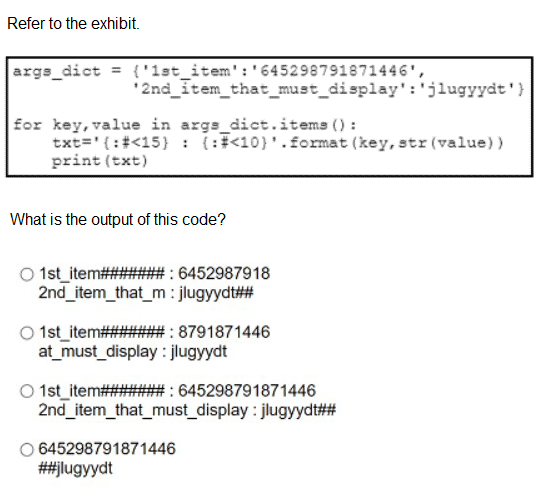
Explanation:The provided Python code contains two fatal syntax errors that prevent execution:
Missing format string: The line .{format(key,str(value))} has no string literal before the dot operator. The .format() method must be called on a valid string object (e.g., '{}'.format()). Without a base string, Python raises a SyntaxError.
Unbalanced braces: The dictionary txt has two opening braces { but only one closing brace }. This mismatched bracket causes another SyntaxError.
Because the interpreter cannot parse the code, no output is generated. The script terminates immediately with an error message, so none of the visual outputs (Options A–D) can appear.
Why Other Options Are Incorrect:
Option A assumes the code truncates the value to the first 10 characters (6452987918) and left-pads the key with #. This logic would require '{:#<15}'.format(key[:10]) or similar slicing—not present.
Option B assumes the code takes the last 10 characters of the value (8791871446) and incorrectly wraps the second key. There is no slicing or negative indexing in the snippet.
Option C assumes the code prints the full value without truncation and adds ## padding. However, the code never applies any formatting to the value itself—only the key is referenced in the format placeholder.
Option D assumes the code prints only the values, omitting keys entirely. This contradicts the for key, value in args_dict.items() loop, which clearly iterates over both.
All four options are speculative interpretations of intended formatting behavior, but the actual code is not syntactically valid—making all of them incorrect.
References:
Python Official Documentation – str.format(): States that the method must be called on a format string containing replacement fields.