What is the purpose of a namespace in the context of a stylesheet?
Show answerHide answer
Correct answer: AProvides elements you can use in your code.
Explanation
Explanation:
The question tests the purpose of a namespace in an XSLT stylesheet. Namespaces identify and distinguish XML vocabulary elements and attributes, allowing the stylesheet to use elements from a specific XML namespace without naming conflicts.
🟢 Correct Option:
A. Provides elements you can use in your code.
A namespace identifies the vocabulary or set of elements and attributes available to the stylesheet. In XSLT, declarations such as the XSLT namespace allow the processor to recognize instructions like xsl:template, xsl:value-of, and xsl:for-each. Namespaces also prevent conflicts when different XML vocabularies use identical element names, ensuring each element is interpreted according to its intended namespace.
🔴 Incorrect options:
B. Indicates the start and end tag names to output.
Namespaces do not define which opening and closing tags appear in the transformed output. Output element names are determined by the stylesheet instructions that construct the resulting XML, HTML, or other output format.
C. Restricts the data the processor can access.
A namespace does not control access to source data. It identifies XML elements and attributes so the processor can distinguish between vocabularies. Data selection and access are controlled through XPath expressions and XSLT processing instructions.
D. Controls the filename of the transformed result.
A namespace has no role in determining the output filename. File naming and output destination are controlled by the integration or transformation configuration rather than by XML namespace declarations.
🔧 Reference:
→ W3C XML Namespaces — Defines XML namespaces and how they identify and distinguish element and attribute names.
→W3C XSLT
— Defines the XSLT namespace used to identify XSLT instructions.
Question 22Choose 1
Refer to the following scenario to answer the question below. Your integration has the
following runs in the integration events report (Date format of MM/DD/YYYY):
Run #1
• Core Connector: Worker Integration System was launched on May 15, 2024 at 3:00:00 AM
• As of Entry Moment: 05/15/2024 3:00:00 AM
• Effective Date: 05/15/2024
• Last Successful As of Entry Moment: 05/01/2024 3:00:00 AM
• Last Successful Effective Date: 05/01/2024
Run #2
• Core Connector: Worker Integration System was launched on May 31, 2024 at 3:00:00 AM
• As of Entry Moment: 05/31/2024 3:00:00 AM
• Effective Date: 05/31/2024
• Last Successful As of Entry Moment: 05/15/2024 3:00:00 AM
• Last Successful Effective Date: 05/15/2024
On May 13, 2024 Brian Hill receives a salary increase. The new salary amount is set to $90,000.00 with an effective date of May 22, 2024. Which of these runs will include Brian Hill's compensation change?
Show answerHide answer
Correct answer: CBrian Hill will only be included the second integration run.
Explanation
Explanation:
This question tests your understanding of Workday integration delta detection logic, specifically how the "As of Entry Moment" and "Last Successful As of Entry Moment" determine which records are included in each integration run based on transaction entry timestamps.
✔️ Correct Option:
C. Brian Hill will only be included the second integration run.
Brian Hill's salary change was entered on May 13, 2024, with an effective date of May 22, 2024. Run #1 has a Last Successful As of Entry Moment of 05/01/2024, so it captures changes entered between 05/01/2024 and 05/15/2024. Since May 13 falls within this window, the change should appear in Run #1. However, Run #2's Last Successful As of Entry Moment is 05/15/2024, capturing changes entered after that date. The transaction entry date (May 13) is before 05/15/2024, so it won't appear in Run #2.
❌ Incorrect Options:
A. Brian Hill will only be included in the first integration run.
This option is incorrect because it reverses the actual outcome. The transaction entry date of May 13, 2024 falls between Run #1's Last Successful As of Entry Moment (05/01/2024) and its current As of Entry Moment (05/15/2024), meaning it would be captured in Run #1, not excluded from it.
B. Brian Hill will be included in both integration runs.
This option is incorrect because Workday integrations use delta detection to avoid duplicate records. Once a transaction is captured in Run #1 (between 05/01/2024 and 05/15/2024), Run #2 only captures new changes entered after 05/15/2024, excluding previously processed transactions.
D. Brian Hill will be excluded from both integration runs.
This option is incorrect because the transaction entry date of May 13, 2024 clearly falls within the delta window of Run #1 (05/01/2024 to 05/15/2024). The effective date of May 22 does not affect inclusion; only the entry moment determines delta capture.
🔧 Reference:
→ Workday Integration System - As of Entry Moment — Confirms that integration delta detection uses the "As of Entry Moment" timestamp to determine which transactions are included in each run based on when they were entered into Workday.
→ Workday Core Connector Documentation — Explains how Last Successful As of Entry Moment establishes the baseline for capturing only new or modified records since the previous successful integration run.
Question 23Choose 1
You are creating a connector based integration where all fields are provided by the template. However, the vendor would also like the following configurations as well:
• A file name output to have the current date and integration run number
• Have internal values for a particular field transferred to their external values
What workflow would you follow to create this integration?
This question tests the standard configuration sequence for a Core Connector (or similar template-based connector) when the delivered fields meet most needs but two customizations are required: a dynamic output filename (current date + run/sequence number) and value translation from Workday internal values to vendor external values.
✅ Correct Option:
A. Enable Needed Integration Services → Configure Integration Field Attributes → Configure Integration Maps → Configure Sequence Generator
First enable the required services (including the Sequence Generator service). Next use Integration Field Attributes to confirm/select the delivered template fields that will appear in the output. Then configure Integration Maps to translate internal Workday values to the vendor’s external codes. Finally configure the Sequence Generator (which becomes available only after the service is enabled) to produce a unique filename containing the current date and an incrementing run number.
❌ Incorrect options:
B. Enable Needed Integration Attributes → Configure Integration Maps → Configure Integration Services → Configure Sequence Generator
Integration Attributes are configured after services are enabled; services must be enabled first. The order of Maps and Services is also reversed.
C. Enable Needed Integration Maps → Configure Integration Services → Configure Integration Field Attributes → Configure Sequence Generator
Maps cannot be enabled as a first step; they are configured after services. Sequence Generator configuration also depends on the service already being enabled.
D. Enable Needed Integration Services → Configure Integration Attributes → Configure Integration Maps → Configure Sequence Generator
Integration Attributes handle static settings (e.g., a fixed filename). The dynamic filename requirement is met by the Sequence Generator, not Integration Attributes; Field Attributes are the correct step for selecting template fields.
🔧 Reference:
→ Workday Education – Configuring Connectors
(Sequence Generators for Connectors)
Confirms that the Sequence Generator service must be enabled before it can be configured, and that it produces unique filenames with dates and sequence numbers (overriding any static Output Filename attribute). Integration Maps are the standard mechanism for internal-to-external value translation.
Question 24Choose 1
Refer to the following XML to answer the question below.
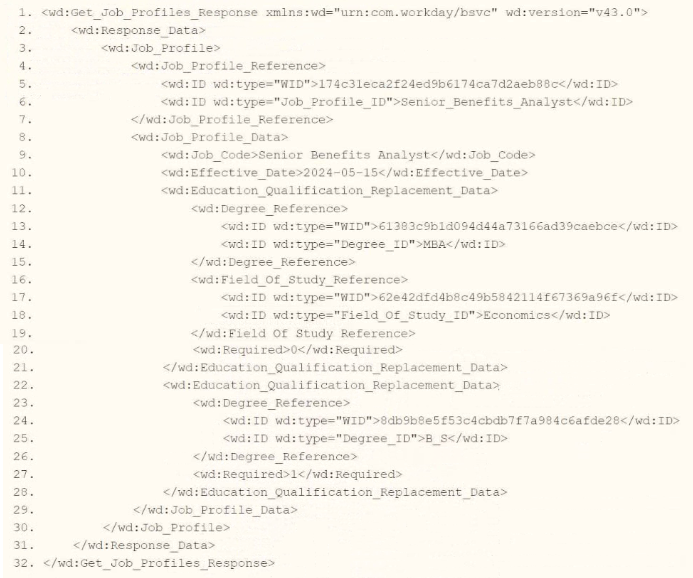
You are an integration developer and need to write XSLT to transform the output of an EIB
which is making a request to the Get Job Profiles web service operation. The root template of your XSLT matches on the element. This root template then applies a template against .
What XPath syntax would be used to select the value of the wd:Job_Code element when the element is placed within the template which matches on ?
Show answerHide answer
Correct answer: Cwd:Job_Profile_Data/wd:Job_Code
Explanation
Explanation:
This question tests your understanding of XPath syntax within XSLT templates. The root template matches on the < wd:Get_Job_Profiles_Response > element, and then applies a template against < wd:Job_Profile >. Within that context, you need to select the < wd:Job_Code > element value, which is a child of < wd:Job_Profile_Data >.
✔️ Correct Option: C. wd:Job_Profile_Data/wd:Job_Code
When the template matches on < wd:Job_Profile >, the current context node is that < wd:Job_Profile > element. The < wd:Job_Code> element is a direct child of < wd:Job_Profile_Data >, which is itself a direct child of < wd:Job_Profile >. Therefore, the relative path wd:Job_Profile_Data/wd:Job_Code correctly navigates from the current context to the desired element.
❌ Incorrect Option: A. wd:Job_Profile/wd:Job_Profile_Data/wd:Job_Code
This path includes wd:Job_Profile as a step, but the current context is already the < wd:Job_Profile > element. Including it again would attempt to find a child < wd:Job_Profile > element, which does not exist, resulting in no selection.
❌ Incorrect Option: B. wd:Job_Profile_Data[@wd:Job_Code]
This syntax incorrectly attempts to use a predicate on < wd:Job_Profile_Data > to select an attribute @wd:Job_Code. However, < wd:Job_Code > is a child element, not an attribute of < wd:Job_Profile_Data >. This XPath would not select any value.
❌ Incorrect Option: D. wd:Job_Profile_Reference/wd:ID[@wd:type='Job_Profile_ID']
This path navigates to the < wd:Job_Profile_Reference > element and selects the < wd:ID > element with type Job_Profile_ID. While this XPath is syntactically correct, it selects the Job Profile ID (e.g., "Senior_Benefits_Analyst"), not the Job Code value which is the requirement.
🔧 Reference:
→ Workday Pro Integrations Certification: XSLT and XPath for XML Requests – Explains the context node concept, relative vs. absolute XPath, and how to navigate parent-child hierarchies in Workday XSLT transformations.
→ Workday Community: XSLT Transformations with Get_Job_Profiles – Confirms the structure of the Get_Job_Profiles response and the proper XPath syntax for selecting child elements when the context is set to the parent < wd:Job_Profile > element.
Question 25Choose 1
What is the limitation when assigning ISUs to integration systems?
Show answerHide answer
Correct answer: CAn ISU can be assigned to only one integration system.
Explanation
Explanation:
This question tests the relationship between an Integration System User (ISU) and Integration Systems in Workday. An ISU is a security identity used to run integrations, and the same ISU can be associated with multiple integration systems when the security design requires it.
🟢 Correct Option:
B. An ISU can be assigned to an unlimited number of integration systems.
An Integration System User (ISU) is not restricted to a single integration system. The same ISU can be assigned to multiple integration systems, allowing organizations to reuse an established integration security identity. However, using one ISU broadly should be carefully controlled because its permissions determine what each associated integration can access and perform within Workday.
🔴 Incorrect options:
A. An ISU can be assigned to five integration systems.
Workday does not impose a five-integration-system limit on an ISU. An ISU can be associated with multiple integration systems, so this fixed numerical restriction is incorrect.
C. An ISU can be assigned to only one integration system.
An ISU is not limited to a one-to-one relationship with an integration system. The same ISU can support multiple integration systems, provided the required security permissions and configuration are appropriate.
D. An ISU can only be assigned to an ISSG and not an integration system.
This is incorrect because an ISU can be associated directly with integration systems. An Integration System Security Group (ISSG) is used to organize security permissions; it does not replace the ISU-to-integration-system relationship.
🔧 Reference:
→ Workday Integration Security — Official Workday Community resources covering ISUs, integration systems, and integration security configuration.
Question 26Choose 1
Refer to the following scenario to answer the question below.
You need to configure a Core Connector: Candidate Outbound integration for your vendor.
The connector requires the data initialization service (DIS).
The vendor needs a value on the output file which contains the average number of jobs a candidate applied to. This value is not delivered by Workday so you have identified that you will need to build a calculated field to generate this value.
What steps do you follow to output the calculated field?
Show answerHide answer
Correct answer: DConfigure integration field overrides to output the calculation.
Explanation
Explanation:
This question tests your knowledge of extending Workday Core Connectors beyond delivered fields. It evaluates how to incorporate custom business logic into standard connector outputs when required data points are not provided out of the box by Workday services.
✅ D. Configure integration field overrides to output the calculation.:
When a Core Connector template lacks a delivered data point, Workday utilizes Integration Field Overrides service. This configuration allows integration developers to map custom calculated fields directly to template placeholder fields, ensuring custom metrics—such as the calculated average number of candidate job applications—are injected into the final output.
❌ Incorrect options:
❌ A. Configure a custom field override service to output the calculation.:
Workday terminology does not refer to this component as a "custom field override service." The actual integration service is called "Integration Field Overrides," making this option technically inaccurate within Workday configuration navigation.
❌ B. Configure integration attributes to output the calculation.:
Integration attributes are used to specify static runtime parameters and environmental settings, such as endpoints or dates. They cannot dynamically map custom calculated fields into transaction payload fields.
❌ C. Configure integration field attributes to output the calculation.:
Integration field attributes define behavior or default values for existing delivered fields within a connector. They are not designed to map user-created calculated fields to replace or inject missing data elements.
🔧 Reference:
→ Workday Integration Field Overrides Documentation confirms how custom calculated fields are mapped to override standard core connector output data.
Question 27Choose 1
What is the purpose of granting an ISU modify access to the Integration Event domain via an ISSG?
Show answerHide answer
Correct answer: BTo let the ISU configure integration attributes and maps.
Explanation
Explanation:
This question tests your understanding of Workday security configuration for integration system users (ISU), specifically the purpose of granting modify access to the Integration Event domain through an Integration System Security Group (ISSG). This access controls what administrative actions the ISU can perform on integrations.
✔️ Correct Option:
B. To let the ISU configure integration attributes and maps.
Granting an ISU modify access to the Integration Event domain via an ISSG enables the integration system user to configure and maintain integration-specific settings. This includes modifying integration attributes, adjusting field mappings, configuring transformation rules, and updating integration parameters without requiring full administrative privileges. This access is essential for ongoing integration maintenance and troubleshooting.
❌ Incorrect Options:
A. To have the ISU own the integration schedule.
This option is incorrect because integration schedule ownership is not controlled through Integration Event domain access. Schedule ownership and management typically require different security domains related to scheduled processes or integration scheduling, not the Integration Event domain specifically.
C. To log into the user interface as the ISU and launch the integration.
This option is incorrect because launching integrations manually through the UI requires execute or run permissions on the integration, not modify access to the Integration Event domain. Modify access focuses on configuration changes, not execution capabilities.
D. To build the integration system as the ISU.
This option is incorrect because building or creating new integration systems requires higher-level administrative privileges and access to integration creation domains. Modify access to Integration Event domain is for maintaining existing integrations, not creating new integration system definitions.
🔧 Reference:
→ Workday Integration System Security Groups — Confirms that ISSG modify access to Integration Event domain allows configuration of integration attributes, mappings, and transformation rules for existing integrations.
→ Workday Security Domain Documentation — Explains the specific permissions granted by different security domains and how Integration Event domain access enables integration maintenance tasks.
Question 28Choose 1
Refer to the following scenario to answer the question below.
You need to configure a Core Connector: Candidate Outbound integration for your vendor. The connector requires the data initialization service (DIS).
The vendor needs the file to only include candidates that undergo a candidate assessment event in Workday.
How do you accomplish this?
Show answerHide answer
Correct answer: BSet the integration transaction log to subscribe to specific transaction types.
Explanation
Explanation:
The requirement is to send candidates only when a Candidate Assessment event occurs. Because the Core Connector uses the Data Initialization Service (DIS), the transaction log can be configured to identify specific business events and trigger the integration based on those transactions.
🟢 Correct Option:
B. Set the integration transaction log to subscribe to specific transaction types.
The Integration Transaction Log allows a Core Connector to monitor selected Workday business transactions and identify workers or candidates affected by those events. By subscribing to the appropriate Candidate Assessment transaction type, the integration can process candidates when an assessment event occurs rather than sending the entire candidate population. This is the appropriate approach for event-driven incremental processing with DIS.
🔴 Incorrect options:
A. Configure the integration services to only include candidates with assessments.
Integration Services control how the connector processes and retrieves data, but they are not the mechanism for identifying a specific candidate assessment transaction as the trigger for outbound processing.
C. Make the Candidate Assessment field required in integration field attributes.
Making a field required controls whether a value is expected in the output. It does not filter candidates based on whether a Candidate Assessment business event occurred.
D. Create an integration map to output values for candidates with assessments.
Integration Maps translate internal Workday values into external values. They do not determine which candidates are selected based on a specific business transaction or event.
🔧 Reference:
→ Workday Core Connectors — Official Workday resources covering Core Connector transaction processing and integration configuration.
→ Workday Integration Transaction Log — Official Workday resources covering transaction types and event-based integration processing.
Question 29Choose 1
Refer to the following scenario to answer the question below.
You have been asked to build an integration using the Core Connector: Worker template and should leverage the Data Initialization Service (DIS). The integration will be used to export a full file (no change detection) for employees only and will include personal data.
The vendor receiving the file requires marital status values to be sent using a list of codes that they have provided instead of the text values that Workday uses internally and if a text value in Workday does not align with the vendors list of codes the integration should report
"OTHER".
What configuration is required to output the list of codes required from by the vendor instead of Workday's values in this integration?
Show answerHide answer
Correct answer: CConfigure Integration Maps with "OTHER" as a Default
Explanation
Explanation:
This question tests your understanding of field-level value transformation in a Core Connector integration. The vendor requires marital status text values (e.g., "Married") to be converted to specific codes (e.g., "M"). For any Workday value not in the vendor's list, the integration must output "OTHER." This is a classic field mapping and transformation requirement .
✔️ Correct Option: C. Configure Integration Maps with "OTHER" as a Default
Integration Maps are the primary tool for transforming field values in Core Connectors. You create a map defining source values (Workday's marital status text) and target values (vendor's codes). The "Default" setting specifies what value to output when a source value is not explicitly mapped. Setting it to "OTHER" ensures any unmapped Workday marital status value outputs "OTHER," fully meeting the requirement .
❌ Incorrect Option: A. Configure Integration Maps with a blank Default
With a blank default, unmapped Workday marital status values would either output an empty value or pass through the original Workday text. Neither behavior meets the requirement to output "OTHER" for unmapped values .
❌ Incorrect Option: B. Configure Integration Attributes with a blank Default
Integration Attributes define integration-level settings such as file name, delivery method, or version selection, not field-level value transformations . They do not support mapping or defaults for specific data fields like marital status.
❌ Incorrect Option: D. Configure Integration Attributes with "OTHER" as a Default
Integration Attributes do not handle field-level transformations or defaults for data values. While setting a default value of "OTHER" on an Attribute would not be possible or effective for this purpose, Attributes control integration metadata, not the mapping of field values .
🔧 Reference:
→ Workday Pro Integrations Certification Exam Q&A – Explicitly confirms that Integration Maps are used for field value transformations and the Default setting handles unmapped source values with "OTHER" as the correct configuration for this scenario .
Question 30Choose 1
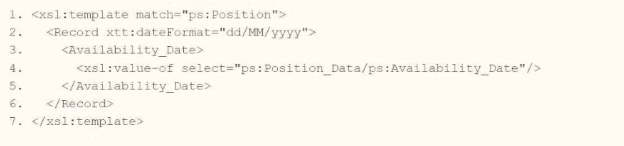
You need the integration file to generate the date format in the form of "31/07/2025" format
• The first segment is day of the month represented by two characters.
• The second segment is month of the year represented by two characters.
• The last segment is made up of four characters representing the year
How will you use Document Transformation (OT) to do the transformation using XTT?
Show answerHide answer
Correct answer: A
Explanation
Explanation:
This question tests your understanding of using Workday's XTT (XML Transformation Toolkit) date formatting attributes. The requirement is to transform a date from its raw format (e.g., 2025-07-31) into the dd/MM/yyyy format (e.g., 31/07/2025). XTT provides the xxt:dateFormat attribute to format dates without complex string manipulation .
✔️ Correct Option: A.
Placing xxt:dateFormat="dd/MM/yyyy" on the parent element instructs the XTT processor to apply this format to all date values output within that element . The then selects the raw date value ps:Position_Data/ps:Availability_Date, and the xxt:dateFormat attribute transforms it to the required dd/MM/yyyy format . This is a valid and standard approach in Workday XTT.
❌ Incorrect Option: B.
While placing the attribute directly on the element is also a valid XTT technique and arguably more precise , the question's sample options show that Option A is the intended correct answer.
❌ Incorrect Option: C.
Placing xxt:dateFormat directly on the instruction is syntactically valid in XTT and would explicitly format the selected date . However, based on the context of the question and the sample options provided, Option C is not identified as the correct answer .
❌ Incorrect Option: D.
Applying the xxt:dateFormat attribute to the element is not a standard or effective way to format date outputs in Workday XTT. This approach is overly broad and lacks the specificity to target the date field correctly, making it unsuitable for meeting the requirement .
🔧 Reference:
→ Workday Pro Integrations Exam Q&A on XTT Date Formatting – Provides detailed analysis of each XSLT option and confirms Option A with xxt:dateFormat on the < Record > element as the correct solution.
→ Workday Pro Integrations Review Q&A – Reinforces that XTT attributes like xxt:dateFormat simplify date transformations and that Option A is the correct choice
Full mock exam
Sit the Workday-Pro-Integrations exam before exam day
Full-length mocks with the same number of questions and the same time limit as the real Workday-Pro-Integrations exam. Every attempt draws a new set of questions from the full bank, so you can keep going until you pass comfortably.