This question tests the security activation step required after configuring an Integration System User (ISU), Integration System Security Group (ISSG), and their related security policies. Even when the correct security is configured and assigned to an EIB, pending security policy changes must be activated before the integration can run successfully.
🟢 Correct Option:
A. Activate Pending Security Policy Changes
After configuring security policies for the ISU and ISSG, Workday keeps those changes in a pending state until they are activated. Running Activate Pending Security Policy Changes applies the updated permissions to the tenant. This activation is required before launching the EIB so that the integration runs with the newly configured security settings and access permissions.
🔴 Incorrect options:
B. View Security for Securable Item
This task is used to review security information associated with a securable item. It helps administrators understand which security groups or policies have access, but it does not activate pending security changes. Therefore, viewing security alone will not make the EIB ready to launch.
C. Assign the ISSG to only one security policy
An ISSG may be associated with the security policies required for its integration access. There is no general requirement that an ISSG be assigned to only one security policy before launching an EIB. The critical step is activating the pending security policy changes.
D. Maintain Integration Security Policies
This task is used to configure or maintain integration security policies. However, configuring the policies does not automatically apply pending changes. Once the required policies have been configured, the pending changes must be activated before the EIB can use the updated security configuration.
🔧 Reference:
→ Workday Integration Security Documentation — Official Workday Community documentation covering integration security configuration and activation of security policy changes.
Question 12Choose 1
Refer to the following scenario to answer the question below. Your integration has the
following runs in the integration events report (Date format of MM/DD/YYYY):
Run #1
• Core Connector: Worker Integration System was launched on May 15, 2024 at 3:00:00
AM.
• As of Entry Moment: 05/15/2024 3:00:00 AM
• Effective Date: 05/15/2024
• Last Successful As of Entry Moment: 05/01/2024 3:00:00 AM
• Last Successful Effective Date: 05/01/2024
Run #2
• Core Connector: Worker Integration System was launched on May 31, 2024 at 3:00:00
AM.
• As of Entry Moment: 05/31/2024 3:00:00 AM
• Effective Date: 05/31/2024
• Last Successful As of Entry Moment: 05/15/2024 3:00:00 AM
• Last Successful Effective Date: 05/15/2024 On May 13, 2024 Brian Hill receives a salary increase. The new salary amount is set to $90,000.00 with an effective date of April 30,2024. Which of these runs will include Brian Hill's compensation change?
Show answerHide answer
Correct answer: CBrian Hill will only be included in the first integration run.
Explanation
Explanation:
This question tests your knowledge of change detection parameters in Workday Core Connectors. It evaluates whether you understand how "As of Entry Moment" and "Effective Date" work together to extract transaction updates.
✅ Correct Option:
Option C:
Option C is correct because the change was entered on May 13, 2024, with an effective date of April 30, 2024. In Run #1, the entry window (May 1 to May 15) and effective date window (April 30 to May 15) capture this update.
❌ Incorrect options:
Option A:
Option A is incorrect because Core Connectors utilize delta tracking, meaning once a transaction is successfully processed in Run #1, it will not be re-extracted in Run #2.
Option B:
Option B is incorrect because the entry moment (May 13) falls before the last successful entry moment of Run #2 (May 15), so Run #2 misses the change.
Option D:
Option D is incorrect because the transaction falls within the parameter windows of Run #1, ensuring that the compensation change is captured rather than completely excluded.
🔧 Reference:
→ Workday Community Core Connectors Guide confirms that change detection filters transactions using entry moment and effective date ranges to avoid duplicate processing.
Question 13Choose 1
Refer to the following scenario to answer the question below. You have configured a Core
Connector: Worker integration, which utilizes the following basic configuration:
• Integration field attributes are configured to output the Position Title and Business Title fields from the Position Data section.
• Integration Population Eligibility uses the field Is Manager which returns true if the worker holds a manager role.
• Transaction Log service has been configured to Subscribe to specific Transaction Types:
Position Edit Event. You launch your integration with the following date launch parameters (Date format of MM/DD/YYYY):
• As of Entry Moment: 05/25/2024 12:00:00 AM
• Effective Date: 05/25/2024
• Last Successful As of Entry Moment: 05/23/2024 12:00:00 AM
• Last Successful Effective Date: 05/23/2024
To test yourintegration,you made a change to a worker named Jared Ellis who is assigned to the manager role for the IT Help Desk department. You perform an Edit Position on Jared and update their business title to a new value. Jared Ellis' worker history shows the Edit Position Event as being successfully completed with an effective date of 05/27/2024 and an Entry Moment of 05/24/2024 07:58:53 AM however Jared Ellis does not show up in your output. What configuration element would have to be modified for the integration to include Jared Ellis in the output?
Show answerHide answer
Correct answer: BDate launch parameters
Explanation
Explanation:
This question tests your understanding of Workday Core Connector: Worker change detection logic, specifically how date launch parameters (As of Entry Moment and Effective Date) determine which transactions are included in the integration output.
✔️ Option B: Date launch parameters
The integration is configured to capture changes where the Entry Moment falls between 05/23/2024 12:00:00 AM and 05/25/2024 12:00:00 AM, AND the Effective Date falls between 05/23/2024 and 05/25/2024. Jared Ellis's Edit Position event has an Entry Moment of 05/24/2024 07:58:53 AM (within range) but an Effective Date of 05/27/2024, which exceeds the Effective Date parameter of 05/25/2024.
doc.workday.com: Change Detection
confirms that the Effective Date parameter defines the end of the date range the integration considers, excluding changes with effective dates beyond this value.
❌ Option A: Integration Population Eligibility
This option is incorrect because Jared Ellis is assigned as a manager for the IT Help Desk department, satisfying the "Is Manager = true" eligibility criterion. The integration population eligibility is correctly configured and not the cause of exclusion.
❌ Option C: Integration Field Attributes
This option is incorrect because the Integration Field Attributes are configured to output Position Title and Business Title fields, which are present in the Position Data section. The field configuration is correct, and the issue lies in date filtering, not field selection.
❌ Option D: Transaction log subscription
This option is incorrect because the Transaction Log is subscribed to "Position Edit Event," which matches the Edit Position transaction performed on Jared Ellis. The subscription is correctly configured, and the event type is being captured.
🔧 Reference:
→
Change Detection – doc.workday.com
— Confirms that the Effective Date parameter defines the end of the date range, and changes with effective dates beyond this value are excluded from output.
— Explains the four-step change detection process, including how launch date conditions filter newly entered or newly effective data.
Question 14Choose 1
Refer to the following scenario to answer the question below.
You have configured a Core Connector: Worker integration, which utilizes the following basic configuration:
• Integration field attributes are configured to output the Position Title and Business Title fields from the Position Data section.
• Integration Population Eligibility uses the field Is Manager which returns true if the worker holds a manager role.
• Transaction Log service has been configured to Subscribe to specific Transaction Types:
Position Edit Event. You launch your integration with the following date launch parameters (Date format of MM/DD/YYYY):
• As of Entry Moment: 05/25/2024 12:00:00 AM
• Effective Date: 05/25/2024
• Last Successful As of Entry Moment: 05/23/2024 12:00:00 AM
• Last Successful Effective Date: 05/23/2024
To test your integration you made a change to a worker named Jared Ellis who is assigned to the manager role for the IT Help Desk department. You perform an Edit Position on Jared and update the Job Profile of the position to a new value. Jared Ellis' worker history shows the Edit Position Event as being successfully completed with an effective date of 05/24/2024 and an Entry Moment of 05/24/2024 07:58:53 AM however Jared Ellis does not show up in your output.
What configuration element would have to be modified for the integration to include Jared
Ellis in the output?
Show answerHide answer
Correct answer: CDate launch parameters
Explanation
Explanation:
This question tests how Core Connector: Worker uses effective dates and entry moments to determine which transactions are included. Jared's Position Edit has an effective date of 05/24/2024, but the integration's Effective Date is 05/25/2024, so the transaction is excluded from the output.
🟢 Correct Option:
C. Date launch parameters
The Date launch parameters must be modified because Jared's Position Edit has an effective date of 05/24/2024, while the integration is configured with an Effective Date of 05/25/2024. Although his Entry Moment of 05/24/2024 07:58:53 AM falls after the last successful Entry Moment, the effective-date setting prevents the transaction from being selected for processing.
🔴 Incorrect options:
A. Integration Population Eligibility
This is incorrect because Jared satisfies the configured Is Manager eligibility condition. He holds a manager role, so the population criteria already include him. Changing the eligibility configuration would not resolve the issue because his transaction is being excluded based on the integration's date parameters.
B. Integration Field Attributes
This is incorrect because the field attributes only determine which worker information is returned in the output. Position Title and Business Title are already configured. The problem occurs when the transaction is selected for processing, before these output fields become relevant.
D. Transaction log subscription
This is incorrect because the integration is already subscribed to the Position Edit Event, which is exactly the transaction generated by Jared's Edit Position. Therefore, the transaction type is correctly configured. Changing the subscription would not address the effective-date mismatch.
🔧 Reference:
→ Workday Community — Integration Documentation — Official Workday documentation covering Core Connector configuration, transaction processing, and integration date parameters.
Question 15Choose 1
You are configuring integration security for a Core Connector integration system. How do you find the web service operation used by the connector template?
Show answerHide answer
Correct answer: DRun the Integration Template Catalog report in the tenant
Explanation
Explanation:
This question tests your knowledge of how to inspect integration templates and determine their underlying web service operations in Workday. It evaluates whether you know how to identify specific security requirements for Core Connector templates.
✅ Correct Option:
Option D:
Option D is correct because the "Integration Template Catalog" report in Workday details all delivered integration templates along with their associated web service operations, endpoints, and security requirements needed to configure Integration System Users (ISUs).
❌ Incorrect options:
Option A:
Option A is incorrect because the integration creation wizard displays template names and descriptions, but does not explicitly show the detailed list of underlying web service operations.
Option B:
Option B is incorrect because running an integration that lacks proper security permissions will result in failure rather than generating the required web service request details in the message audit.
Option C:
Option C is incorrect because while Workday Community lists SOAP API references generally, it does not show the precise mapping of web service operations embedded inside a specific tenant's Core Connector template.
🔧 Reference:
→ Workday Community Documentation confirms that the Integration Template Catalog report provides complete administrative details and web service dependencies for delivered integration templates.
Question 16Choose 1
You have been asked to refine a report which outputs one row per worker and is being used in an integration that sends worker data to one of your third-party systems. The integration should only send workers who have been hired in the last 30 days. Where in the custom report definition can you specify a condition that would include only workers who have been hired in the last 30 days?
Show answerHide answer
Correct answer: DFilter
Explanation
Explanation:
This question tests your understanding of Workday custom report structure and where to apply conditions that filter the primary business object (Worker). The scenario requires limiting output to workers hired within the last 30 days, which is a condition on the Worker's Hire Date field.
✔️ Option D: Filter
The Filter tab in a custom report definition is used to add conditions that restrict data from the primary business object (PBO). Since the report outputs one row per worker and the Hire Date field belongs to the Worker business object (the PBO), the condition "Hire Date within the last 30 days" must be specified in the Filter tab.
doc.workday.com: Building Custom Reports
confirms that filters add conditions to filter the primary business object, and you can filter on any field from the PBO or Global business object.
❌ Option A: Subfilter
This option is incorrect because Subfilters are used to add conditions that filter related business objects (RBOs), not the primary business object. Since Hire Date is a field on the Worker (PBO), not a related object, a subfilter would not be the appropriate location for this condition.
❌ Option B: Output
This option is incorrect because the Output tab controls which fields are displayed in the report results, not which rows are included. The Output tab determines column selection and field visibility, not row-level filtering logic.
❌ Option C: Columns
This option is incorrect because the Columns tab defines the structure and selection of fields to display as columns in the report output. It does not provide filtering capabilities to restrict which worker instances appear in the results.
🔧 Reference:
→
Building Custom Reports – doc.workday.com
— Confirms that the Filter tab adds conditions to filter the primary business object, and filters can be applied to any PBO or global field.
→
Report Writer and Custom Reports
– doc.workday.com
— Explains that filters apply to the primary business object, while subfilters apply to related business objects.
Question 17Choose 1
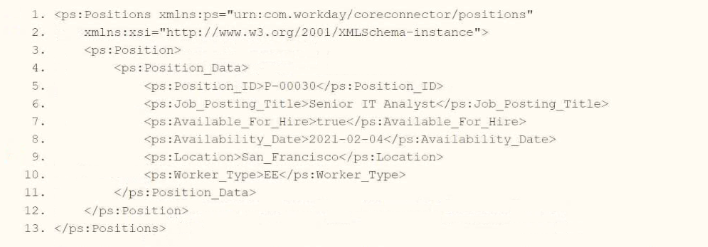
Refer to the following XML data source to answer the question below.
You need the integration file to format the ps:Position_ID field to 10 characters, truncate the value if it exceeds, and align everything to the left.
How will you start your template match on ps:Position to use Document Transformation (DT) to do the transformation using XTT?
Show answerHide answer
Correct answer: A
Explanation
Explanation:
This question tests the correct placement of Workday XTT (XML-to-Text) attributes when performing fixed-length formatting in a Document Transformation. The requirement is to force the Position_ID value to exactly 10 characters (truncating if longer) and left-align the content.
✅ Correct Option:
A.
The template matches on ps:Position, places xtt:align="left" on the element, and places xtt:fixedLength="10" on the element that contains the xsl:value-of.
XTT attributes must be applied to the result elements that control the text output. Placing xtt:fixedLength="10" on the element that wraps the Position_ID value causes truncation/padding to 10 characters, while xtt:align="left" ensures left alignment. The XPath correctly navigates to ps:Position_Data/ps:Position_ID.
❌ Incorrect options:
B.
Places xtt:align on the itself and xtt:fixedLength on the xsl:value-of. XTT formatting attributes belong on the output elements, not the template or the value-of instruction.
C.
Places xtt:fixedLength on the parent and xtt:align on the value-of. Fixed-length control must be on the specific field element being formatted.
D.
Places xtt:fixedLength on the template and has invalid syntax on the closing tag. Attributes cannot be applied this way and the markup is not well-formed.
🔧 Reference:
→ Workday Document Transformation / XTT attribute documentation and Core Connectors training materials
Confirms that xtt:fixedLength and xtt:align are applied as attributes on the result elements that produce the fixed-length text fields.
Question 18Choose 1
Refer to the following scenario to answer the question below.
You have been asked to build an integration using the Core Connector: Worker template and should leverage the Data Initialization Service (DIS). The integration will be used to export a full file (no change detection) for employees only and will include personal data.
What configuration is required to ensure that when outputting phone number only the home phone number is included in the output?
Show answerHide answer
Correct answer: BInclude the phone type integration field attribute.
Explanation
Explanation:
This question tests your understanding of configuring Core Connector: Worker integrations to filter multi-instance fields like Phone Data. Since workers can have multiple phone numbers (Home, Work, Mobile, etc.), you must specify which instance to include. For Core Connectors, this is achieved using Integration Field Attributes, which allow you to configure field-level settings to filter multi-instance data . The "phone type" attribute controls which phone number instances are output.
✔️ Correct Option: B
Include the phone type integration field attribute. In a Core Connector: Worker integration, integration field attributes are used to filter multi-instance fields like Phone Data . For the Phone Number field, you can configure the "Phone Type" attribute set to "Home". This ensures only the home phone number instance is included in the output without needing custom overrides or complex mappings . This is the standard configuration method for controlling multi-instance fields in Core Connectors.
❌ Incorrect Option: A
Configure an integration map to map the phone type. Integration maps are used to transform or convert field values (e.g., mapping "United States" to "USA"), not to filter multi-instance data by a specific type. They do not select which instance of a repeating field is output .
❌ Incorrect Option: C
Configure the phone type integration attribute. This phrasing is incorrect because "Integration Attributes" refer to integration-level settings like file format, not field-specific filters. The correct terminology for field-level filtering is "Integration Field Attributes" .
❌ Incorrect Option: D
Configure an integration field override to include phone type. Field overrides are used to replace a field's value with a calculated field or custom value . They are not designed for filtering multi-instance data by type—that is the purpose of Integration Field Attributes .
🔧 Reference:
→ Workday Community: Core Connector Worker Integration Field Attributes - Confirms that Integration Field Attributes are used to filter multi-instance fields like Phone Number by specifying criteria such as phone type .
Question 19Choose 1
An external system needs a file containing data for recent compensation changes. They would like to receive a file routinely at 5 PM eastern standard time, excluding weekends.
The file should show compensation changes since the last integration run.
What is the recurrence type of the integration schedule?
Show answerHide answer
Correct answer: BRecurs every weekday
Explanation
Explanation:
This question tests your understanding of Workday integration schedule recurrence types. The requirements specify a file must be sent routinely at 5 PM EST, excluding weekends, meaning the schedule must run on weekdays only. Recurrence type defines the frequency pattern for scheduled integrations.
✔️ Correct Option: B. Recurs every weekday
This recurrence runs Monday through Friday at the specified time, automatically excluding weekends. This matches the requirement of delivering the file at 5 PM EST on business days only, ensuring the integration executes consistently during the workweek.
❌ Incorrect Option: A. Recurs every 12 hours
This schedule would deliver files twice daily (e.g., 5 AM and 5 PM EST), resulting in extra, unwanted file deliveries. The requirement specifies a single daily delivery at 5 PM EST, making this option unsuitable.
❌ Incorrect Option: C. Dependent recurrence
A dependent schedule runs only after another Prism scheduled process completes at a specified status. This is event-driven, not time-based, and cannot guarantee a fixed 5 PM EST delivery schedule on weekdays.
❌ Incorrect Option: D. Recurs every 1 day(s)
This recurrence runs daily at the specified time, including Saturdays and Sundays. Since the requirement explicitly excludes weekends, this option fails to meet the business need for weekday-only file delivery.
🔧 Reference:
→ Workday Prism Analytics: Dataset Integration Schedules – Defines recurring schedules as running at specified intervals like daily, weekly, or monthly.
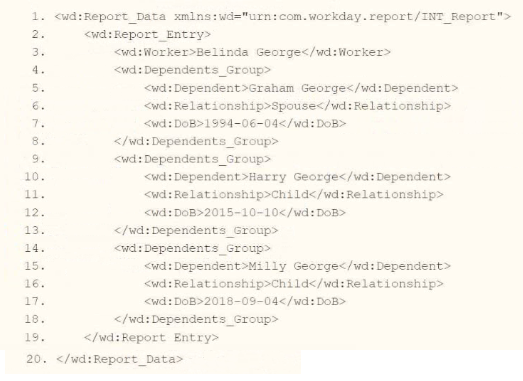
Refer to the following XML to answer the question below.
You are an integration developer and need to write XSLT to transform the output of an EIB
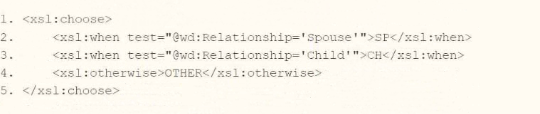
which is using a web service enabled report to output worker data along with their dependents. You currentlyhave a template which matches on wd:Dependents_Group to iterate over each dependent. Within the template which matches on wd:Dependents_Group you would like to output a relationship code by using an statement.
What XSLT syntax would be used to output SP when the dependent relationship is spouse, output CH when the dependent relationship is child, otherwise output OTHER?
Show answerHide answer
Correct answer: C
Explanation
Explanation:
This question tests your ability to write correct XSLT conditional logic using and relative XPath syntax to evaluate child elements within a specific node context. It evaluates how to match element names and output mapped values based on XML input.
✅ A. (wd:Relationship='Spouse'):
Option A uses the correct XSLT syntax with relative path expressions (wd:Relationship='Spouse'). Since the context is already matching wd:Dependents_Group, direct element evaluation correctly inspects the child node value. evaluates standard XPath strings without curly braces, making this the fully valid statement for mapping relationship codes.
❌ Incorrect options:
❌ B. ({wd:Relationship='Spouse'}):
Option B incorrectly wraps the XPath expression inside attribute value templates (curly braces {}). In XSLT, the test attribute of automatically expects an XPath expression and does not accept curly brace syntax, resulting in an XSLT compilation error.
❌ C. (@wd:Relationship='Spouse'):
Option C places an @ symbol before the node name (@wd:Relationship). In XPath, @ is used exclusively to select XML attributes, but wd:Relationship in the source document is an XML element. This syntax causes the expression to fail to match.
❌ D. (/wd:Relationship='Spouse'):
Option D uses an absolute path starting with a forward slash (/wd:Relationship). This breaks execution because it looks for wd:Relationship at the root of the XML document rather than evaluating the current wd:Dependents_Group context, returning no matches.
🔧 Reference:
→ W3C XSL Transformations (XSLT) Conditional Processing confirms standard syntax rules for and relative XPath evaluation within templates.
Full mock exam
Sit the Workday-Pro-Integrations exam before exam day
Full-length mocks with the same number of questions and the same time limit as the real Workday-Pro-Integrations exam. Every attempt draws a new set of questions from the full bank, so you can keep going until you pass comfortably.