Find out if you're ready for SPLK-1003. Take the free timed mock exam and get your score in minutes, or study the free SPLK-1003 questions below with answers and explanations.
An admin oversees an environment with a 1000 GBI day license. The configuration file
server.conf has strict pool quota=false set. The license is divided into the following three pools, and today's usage is shown on the right-hand column:
PoolLicense SizeToday's usage
X500 GB/day100 GB
Y350 GB/day400 GB
Z150 GB/day300 GB
Given this, which pool(s) are issued warnings?
Show answerHide answer
Correct answer: DY and Z
Explanation
Explanation:
The outcome of this scenario is determined by how Splunk handles License Pool quotas versus the Total License Stack.
Logic of strict_pool_quota = false: In server.conf, setting this to false (the default) allows indexing to continue even if a pool is full, provided the total stack has remaining capacity. However, Splunk still triggers a warning for the specific pool(s) that exceeded their assigned quota.
Why D is Correct: Pool Y (400 used vs. 350 limit) and Pool Z (300 used vs. 150 limit) have both surpassed their defined boundaries. Even though the overall stack is healthy ($800/1000$ GB), the License Manager flags Y and Z for exceeding their individual allocations.
Why other options are incorrect:
A (All pools): Pool X is well under its 500 GB limit (only 100 GB used), so it remains in a healthy state without warnings.
B (Z only): This ignores Pool Y, which has also exceeded its 350 GB limit. Both Y and Z are over-quota.
C (None): This would only be true if all pools were under their limits. Exceeding a pool limit always generates a warning notification, even if indexing isn't blocked.
References
Splunk Documentation: Admin Manual > Manage License Pools. It specifies that pool warnings occur when a pool's quota is reached, regardless of the strict_pool_quota setting.
Configuration Files: server.conf documentation under the [license] stanza defines how strict_pool_quota influences behavior but confirms it does not suppress the warning itself.
Question 2Choose 1
Which of the following CLI commands removes a search peer from Distributed Search?
When configuring distributed search, a Search Head routes search requests to various Search Peers (Indexers). If you need to remove an indexer from the Search Head's peering list via the Command Line Interface (CLI), you must use the specific object syntax recognized by the Splunk engine.
Why A is Correct: In the Splunk CLI syntax, the object being added or removed from a Search Head is technically designated as a search-server. The correct command structure requires the action verb (remove), the object class (search-server), the administrative credentials flag (-auth), and the target peer's management URI and port (IP:8089).
Alternative Method:This action can also be completed through the Splunk Web UI by navigating to Settings > Distributed Search > Search Peers and clicking "Delete" next to the target instance.
Why other options are incorrect:
B & C (clear): The verb clear is not a valid Splunk CLI command for modifying distributed search topologies. Splunk uses add to connect a peer and remove to disconnect one.
D (search-peer): While the UI and general documentation frequently refer to these target instances as "Search Peers," the underlying CLI command string strictly uses the term search-server. Using search-peer will result in a syntax error ("Cloning/Distributed search command failed: unknown command").
References
Splunk Documentation: Distributed Search > Distributed search CLI commands. This page explicitly maps the command splunk remove search-server to the task of deleting a peer from a search head.
Question 3Choose 2
What is a role in Splunk? (select all that apply)
Show answerHide answer
Correct answer: A, DA classification that determines what capabilities a user has. A classification that determines what indexes a user can search.
Explanation
Explanation: A role in Splunk is a classification that determines what capabilities and indexes a user has.A capability is a permission to perform a specific action or access a specific feature on the Splunk platform1.An index is a collection of data that Splunk software processes and stores2. By assigning roles to users, you can control what they can do and what data they can access on the Splunk platform.
Therefore, the correct answers are A and D. A role in Splunk determines what capabilities and indexes a user has. Option B is incorrect because Splunk servers do not use roles to remotely control each other.Option C is incorrect because Splunk servers use instances and components to determine what functions they control.
References 1: Define roles on the Splunk platform with capabilities - Splunk Documentation
About indexes and indexers - Splunk Documentation
Splunk Enterprise components - Splunk Documentation
Question 4Choose 1
Seven different network switches are sending traffic to a server hosting a Universal Forwarder. Three of the
devices are sending TCP data and four of the devices are sending UDP data.
What is the minimum number of input stanzas that must be created on the Universal Forwarder to
successfully capture data from all seven sources?
Show answerHide answer
Correct answer: DTwo
Explanation
Explanation:
A Universal Forwarder (UF) captures data from network inputs using [tcp://] and [udp://] stanzas in inputs.conf. The minimum number of stanzas required is determined by the protocol, not the number of source devices.
Why two stanzas are sufficient:
All TCP devices can send data to a single TCP input stanza on the same port (e.g., [tcp://9997]). The UF listens once, and multiple TCP senders connect to that same port.
All UDP devices can send data to a single UDP input stanza on a single port (e.g., [udp://514]). UDP is connectionless, so multiple senders can target the same port without additional stanzas.
Therefore, one TCP stanza + one UDP stanza = two total stanzas capture all seven sources.
Why more than two are not required:
You do not need separate stanzas per device. Splunk does not distinguish sources by IP at the stanza level; it listens on a port and accepts from any sender.
If needed, you can later filter by source IP using props.conf or source:: metadata, but the input stanza itself is shared.
Why other options are incorrect:
A – One stanza:Impossible because a single [tcp://] cannot receive UDP, and a single [udp://] cannot receive TCP. Protocols are not interchangeable.
B – Seven stanzas: Unnecessary and incorrect. This would imply one stanza per device, which is wasted configuration and not the "minimum."
C – Four stanzas: Also unnecessary. You might use four if you separated TCP and UDP across multiple ports for organizational reasons, but the question asks for the minimum — which is two.
Edge case note:
If all seven used the same protocol (e.g., all TCP or all UDP), the answer would be one. But with mixed protocols, the minimum is always two — one per protocol.
References:
Splunk Docs: inputs.conf spec – [tcp://] and [udp://] – "Multiple clients can connect to a single TCP port. Multiple UDP senders can send to a single UDP port."
Splunk Forwarding Data Manual – "Use separate stanzas for TCP and UDP inputs. One stanza per protocol is sufficient for unlimited senders."
Question 5Choose 1
Which Splunk component would one use to perform line breaking prior to indexing?
Show answerHide answer
Correct answer: AHeavy Forwarder
Explanation
Explanation: According to the Splunk documentation1, a heavy forwarder is a Splunk Enterprise instance that can parse and filter data before forwarding it to an indexer. A heavy forwarder can perform line breaking, which is the process of splitting incoming data into individual events based on a set of rules2. A heavy forwarder can also apply other transformations to the data, such as field extractions, event type matching, or masking sensitive data.
Question 6Choose 1
There is a file with a vast amount of old data. Which of the following inputs.conf attributes would allow an
admin to monitor the file for updates without indexing the pre-existing data?
Show answerHide answer
Correct answer: AIgnoreOlderThan
Explanation
Explanation:
The requirement is to monitor a large file containing old data for new updates without indexing the pre-existing content. Splunk’s IgnoreOlderThan attribute in inputs.conf achieves this by comparing each event's timestamp to the current time. Events older than the specified threshold (e.g., IgnoreOlderThan = 30d) are skipped during indexing. When first applied to a file with old data, all existing lines are ignored, while newly appended lines (with recent timestamps) are indexed normally. This prevents license overuse and reduces resource waste.
Why other options are incorrect:
D – followTail (deprecated): Starts reading from the end of the file only on the first read, but does not filter events by timestamp. Old data appearing later (e.g., after a log roll) would still be indexed. Does not solve the problem of skipping historical data.
B – allowList: Used for whitelisting file paths or patterns in the monitor:// stanza. It has no effect on timestamp-based filtering or ignoring old content.
C – monitor: Defines the file or directory to monitor but lacks any mechanism to skip pre-existing or old data. Without additional attributes like IgnoreOlderThan, Splunk will index every line, including ancient events.
Reference:
Splunk Documentation: inputs.conf spec – IgnoreOlderThan =
“Events with timestamps older than this value are not indexed.”
Splunk Enterprise Getting Data In Manual – “Control what data you index from files using IgnoreOlderThan to skip old events and avoid license violations.”
Question 7Choose 1
Which network input option provides durable file-system buffering of data to mitigate data loss due to network outages and splunkd restarts?
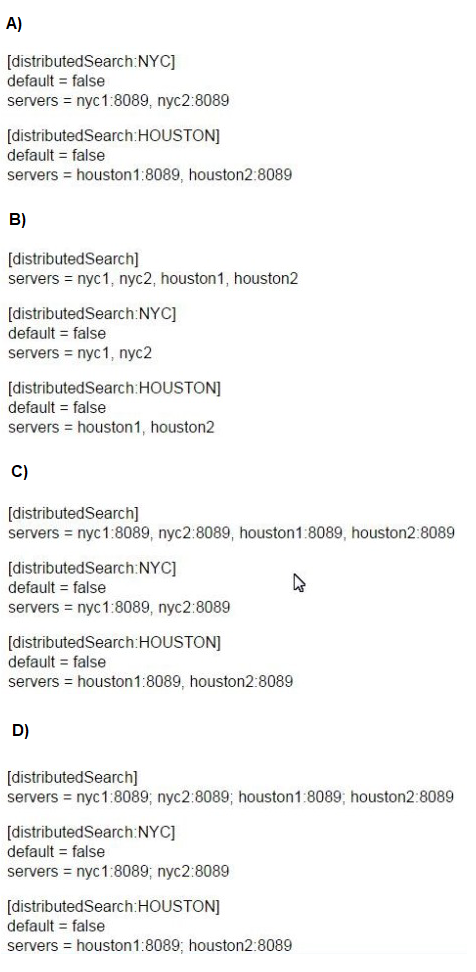
How would you configure your distsearch conf to allow you to run the search below?
sourcetype=access_combined status=200 action=purchase
splunk_setver_group=HOUSTON
Show answerHide answer
Correct answer: COption C
Explanation
Explanation:
The search splunk_server_group=HOUSTON requires a properly configured distsearch.conf with:
Server groups (e.g., [distributedSearch:HOUSTON]) to logically group indexers.
Correct server list format (host:port pairs separated by commas, not semicolons).
No redundancy (Option B omits ports, which can cause connection failures).
Why Option C?
Defines global ([distributedSearch]) and group-specific (HOUSTON, NYC) server lists.
Uses host:port format (e.g., houston1:8089) with comma separators (Splunk’s required syntax).
Matches the search’s splunk_server_group=HOUSTON filter.
Why Not Others?
A: Missing global [distributedSearch] section (limits flexibility).
B: Omits ports (:8089), which may fail if non-default ports are used.
D: Uses semicolons (;) instead of commas (invalid syntax).
Key Takeaway:
Use commas to separate servers and include ports for reliability.
Define both global and group-specific server lists for granular control.
In a customer managed Splunk Enterprise environment, what is the endpoint URI used to collect data?
Show answerHide answer
Correct answer: Cservices/ data/ collector
Explanation
Explanation:
The answer to your question is C. services/data/collector. This is the endpoint URI used to collect data in a customer managed Splunk Enterprise environment.According to the Splunk documentation1, “The HTTP Event Collector REST API endpoint is /services/data/collector.You can use this endpoint to send events to HTTP Event Collector on a Splunk Enterprise or Splunk Cloud Platform deployment.” You can also use this endpoint to send events to a specific token or index1. For example, you can use thefollowing curl command to send an event with the token 578254cc-05f5-46b5-957b-910d1400341a and the index main: curl -https://localhost:8088/services/data/collector -H'Authorization: Splunk 578254cc-05f5-46b5-957b-910d1400341a'-d'{"index":"main","event":"Hello, world!"}'
Question 10Choose 1
Given a forwarder with the following outputs.conf configuration:
[tcpout : mypartner]
Server = 145.188.183.184:9097
[tcpout : hfbank]
server = inputsl . mysplunkhfs . corp : 9997 , inputs2 . mysplunkhfs . corp : 9997
Which of the following is a true statement?
Show answerHide answer
Correct answer: AData will continue to flow to hfbank if 145.1 ga. 183.184 : 9097 is unreachable.
Explanation
Explanation:
The outputs.conf file defines how forwarders send data to receivers1. You can
specify some output configurations at installation time (Windows universal
forwarders only) or the CLI, but most advanced configuration settings require that
you edit outputs.conf1.
The [tcpout:…] stanza specifies a group of forwarding targets that receive data
over TCP2. You can define multiple groups with different names and settings2.
The server setting lists one or more receiving hosts for the group, separated by
commas2. If you specify multiple hosts, the forwarder load balances the data
across them2.
Therefore, option A is correct, because the forwarder will send data to both
inputsl.mysplunkhfs.corp:9997 and inputs2.mysplunkhfs.corp:9997, even if
145.188.183.184:9097 is unreachable.
Full mock exam
Sit the SPLK-1003 exam before exam day
Full-length mocks with the same number of questions and the same time limit as the real SPLK-1003 exam. Every attempt draws a new set of questions from the full bank, so you can keep going until you pass comfortably.
About Splunk Enterprise Certified Admin - SPLK-1003 Exam
Splunk Enterprise Certified Admin certification demonstrates your ability to configure, manage, and troubleshoot Splunk deployments, making you a valuable asset to organizations that rely on Splunk for data analysis and operational intelligence. Its ideal for Splunk administrators, system engineers, IT professionals, and security analysts who want to enhance their skills in managing Splunk Enterprise efficiently.
Key Topics:
1. Installation and Configuration - 20% of exam
2. Data Inputs and Forwarding - 20% of exam
3. Indexes and Data Management - 20% of exam
4. Search Optimization and Performance - 20% of exam
5. User Authentication and Authorization - 10% of exam
56. Troubleshooting and Maintenance - 10% of exam
Splunk offers official training courses to help you prepare. Splunk Enterprise System Administration Specifically designed for the SPLK-1003 exam. Set up a lab environment to practice installing, configuring, and managing Splunk Enterprise. Refer to the official Splunk Enterprise documentation. Prepare from our Splunk SPLK-1003 dumps and solve practice tests to get familiar with exam format. Study official Splunk documentation on deployment, configuration, and administration. Preparing for the exam equips you with advanced skills in Splunk administration, data management, and troubleshooting.
Who should pursue the Splunk Enterprise Certified Admin certification?
Splunk Enterprise Certified Admin certification is designed for IT administrators, system engineers, and Splunk Core Certified Power Users looking to advance their careers.