Splunk certification · Exam SPLK-1002

SPLK-1002 Mock Exam Page 2

Splunk Core Certified Power User Exam

Free SPLK-1002 questions on Topic 2: Questions Set 2, each with the answer and an explanation.

20 questions · 33 minutes · free, no sign-up

Topic 2: Questions Set 2 questions

11–20 of 73 free
Question 11 Choose 1
The stats command will create a _____________ by default.
Show answerHide answer

Correct answer: A Table

Explanation

Explanation:

The stats command in Splunk calculates aggregate statistics such as count, sum, avg, or values. When executed, Splunk displays the results in a tabular format (rows and columns) by default. Each unique combination of fields in the by clause becomes a row, and each aggregation function becomes a column. No chart is generated unless the user explicitly clicks a visualization option in the Splunk interface or uses a charting command like chart or timechart. The default output of stats is strictly a table.

Why Other Options Are Incorrect

B. Report
– A report is a saved search that can be scheduled or shared. The stats command does not automatically create a report; it simply produces a result set. A user must manually save the search as a report.

C. Pie chart
– A pie chart is a specific visualization type. The stats command produces a table, not any kind of chart. Splunk only generates charts when the search includes commands like chart or timechart, or when the user manually selects a chart type from the Visualization picker. There is no scenario where stats alone outputs a pie chart by default.

References

Splunk Documentation: "stats command" –
explicitly states that stats returns results in tabular format. Splunk Core Certified Power User Exam Blueprint (SPLK-1002) lists that stats produces a table by default, while chart and timechart are used for graphical outputs.
Question 12 Choose 1
When would transaction be used instead of stats
Show answerHide answer

Correct answer: D To group events based on start/end values

Explanation

Explanation:

The transaction command is specifically designed to group events that share a common characteristic across a time-ordered sequence, particularly when events have a clear start and end boundary. For example, grouping all events related to a single web session from login (start) to logout (end), or grouping database transactions that begin with a "start" event and end with a "commit" or "rollback" event. The transaction command evaluates time-based constraints such as maxpause, maxspan, and startswith/endswith to connect related events. In contrast, stats simply aggregates based on field values without any concept of event sequencing or start/end boundaries.

Why Other Options Are Incorrect

A. To group events based on a single field value – This is exactly what stats does efficiently using by clause. The transaction command is overkill and significantly slower for simple field-based grouping.

B. To see results of a calculation – The stats command (with functions like sum, avg, eval) is the correct tool for calculations. transaction does not perform calculations; it groups events.

C. To have a faster and more efficient search – transaction is known to be resource-intensive and slow, especially on large datasets. stats is almost always faster and more efficient for grouping by field values. Using transaction for speed is incorrect.

References

Splunk Documentation: "Transaction command vs stats command" – states that transaction is used for grouping related events with start/end boundaries, while stats is preferred for simple aggregations. Splunk Best Practices guide recommends avoiding transaction for large data volumes and using stats with eval when possible.
Question 13 Choose 2
How is an event type created from the search window? (select all that apply)
Show answerHide answer

Correct answer: A, B In the top right corner, click Save As > Event Type.In an event's detail dropdown, click Event Actions > Build Event Type.

Explanation

Explanation:

A. In the top right corner, click Save As > Event Type
✅ This is the standard GUI method from the Search & Reporting app. After running a search, you can save the search conditions (not the raw results) as an event type via Save As > Event Type.

B. In an event's detail dropdown, click Event Actions > Build Event Type
✅ From an individual event’s dropdown menu (the arrow on the left or the event actions menu), you can select Event Actions > Build Event Type, which pre-fills the search string based on that event’s fields.

C. Edit eventtypes.conf and add a new stanza
❌ This creates an event type, but not from the search window. It’s a valid backend method but does not meet the question’s constraint “from the search window.”

D. Add | eventtype to the SPL and execute the search
❌ There is no such SPL command eventtype. Event types are saved search definitions, not created via a search command.

Reference:

Splunk Documentation:
"Create event types" → Two primary methods in Splunk Web:
From the Search bar: Save As > Event Type
From an event’s dropdown: Event Actions > Build Event Type
Splunk Docs: Create event types
Question 14 Choose 1
Which method in the Field Extractor would extract the port number from the following event? |
10/20/2022 - 125.24.20.1 ++++ port 54 - user: admin
Show answerHide answer

Correct answer: B rex command

Explanation

Explanation:

The Splunk Field Extractor (FX) UI tool offers two primary methods for extracting fields visually: Regular Expression and Delimiters.

Why D is correct: The example event features an irregular, unstructured format with a mix of spaces and plus signs (++++). To pull out the value 54 following the word port, the Field Extractor uses a regular expression (regex) capture group, generating a backend string like port\s(?\d+).

Why A is incorrect: The Delimiter method only works if your data uses a consistent, repeating separator character throughout the entire event (such as commas in a CSV file, tabs, or pipes) to split the line into predictable columns.

Why B is incorrect: The rex command is a manual SPL search command. While it uses regular expressions, it is typed directly into the search bar, not selected as a "method" inside the GUI Field Extractor utility.

Why C is incorrect: This statement is completely false; the Field Extractor's primary, default underlying technology is based on generating regular expressions automatically from your text selections.

Reference:

Splunk Documentation: Knowledge Manager Manual -> Use the Field Extractor page.

Guidelines: Select Regular Expression for unstructured logs (like system syslog files or web server logs) and Delimiters for structured text files like CSVs.
Question 15 Choose 1
This is what Splunk uses to categorize the data that is being indexed
Show answerHide answer

Correct answer: B Sourcetype

Explanation

Explanation:

Splunk uses sourcetype to categorize data during indexing. It determines how data is broken into events (line merging, timestamps) and which default fields are applied. Common examples include access_combined (web logs) and linux_secure (auth logs).

Why the other options are incorrect:

A. Host – Identifies the source machine (e.g., web-server-01) but does not define the format or type of data. Multiple sourcetypes can come from the same host.

C. Index – A storage location or repository for data. Indexes organize data for retention and permissions but do not categorize data by its structure or content.

D. Source – Refers to the specific file, directory, or network stream where data originated (e.g., /var/log/maillog). Two different sourcetypes can come from the same source file if manually overridden.
Thus, only sourcetype directly answers “categorizes the data that is being indexed.”

References:

Splunk Docs: "About sourcetypes" –
“The sourcetype is one of the default fields that Splunk uses to categorize data as it is indexed.”
Question 16 Choose 1
Consider the following search:
Index=web sourcetype=access_combined
The log shows several events that share the same JSESSIONID value (SD404K289O2F151). View the events as a group. From the following list, which search groups events by JSESSIONID?
Show answerHide answer

Correct answer: D index-web sourcetype=access_combined I transaction JSESSIONID I search SD404K289O2F151

Explanation

📘 Explanation:

To group events by a common field value such as JSESSIONID, Splunk uses the transaction command. The transaction command collects events that share the same field into a single transaction, allowing you to view them together as a group.

In this case, grouping by JSESSIONID ensures that all events with the same session ID (SD404K289O2F151) are combined into one logical transaction. Adding | search SD404K289O2F151 filters the grouped transactions to only those containing the specified session ID.

❌ Distractor Analysis

A. index=web sourcetype=accesscombined SD404K289O2F151 | table JSESSIONID → Incorrect. This only displays the JSESSIONID field in a table format, but does not group events into transactions.

B. index=web sourcetype=access_combined JSESSIONID → Incorrect. This syntax is invalid; simply writing JSESSIONID does not group or filter events.

C. index=web sourcetype=access_combined | highlight JSESSIONID | search SD404K289O2F151 → Incorrect. The highlight command visually emphasizes a field but does not group events.

D. index=web sourcetype=access_combined | transaction JSESSIONID | search SD404K289O2F151 → ✅ Correct. The transaction command groups events by JSESSIONID, and the search command filters for the specific session ID.

🔗 References
Splunk Docs – Transaction command
Splunk Search Reference – Workflow with transaction
Question 17 Choose 1
Which of the following objects can a calculated field use as a source?
Show answerHide answer

Correct answer: B A field added by an automatic lookup.

Explanation

Explanation:

A calculated field in Splunk is a field that is dynamically created at search time by applying an expression (e.g., eval-like logic) to one or more existing fields. The source fields for a calculated field must be extracted fields that exist in your events at search time. Fields added by automatic lookups (e.g., CSV lookups, KV store lookups) are regular extracted fields and can absolutely be used as sources in a calculated field.

Why the other options are incorrect:

A. An alias of a field – Aliases are just alternate names for existing fields. They are not independent source fields. Calculated fields require actual field values, not aliases that point elsewhere. Using the original field name works; the alias itself cannot be a source.

C. The tag field – Tags are knowledge object labels applied to field-value pairs (e.g., tag=high_severity). They are metadata, not extracted field values. Tags are not supported as source fields in calculated field expressions.

D. The eventtype field – eventtype is a system field that indicates which event types match an event. It is a field name, but its values are arbitrary labels (e.g., web_error). Calculated fields cannot reliably use eventtype as a source because eventtype is a derived classification, not a native extracted field with consistent numeric or string values suitable for expressions.

Reference:

Splunk Documentation:
"Create calculated fields" – “Calculated fields can use any extracted field that exists at search time, including fields from lookups.”

Splunk Community / Best Practices:
Automatic lookup fields are available for calculated fields; tags, aliases, and eventtype fields are explicitly not supported as source inputs.
Question 18 Choose 1
Which of the following is included with the Common Information Model (CIM) add-on?
Show answerHide answer

Correct answer: B Event category tags

Explanation

Explanation
The Common Information Model (CIM) add-on (Splunk Common Information Model Add-on, or Splunk_SA_CIM) provides a standardized, normalized data model for common enterprise data domains (e.g., Web, Email, Authentication, Network Traffic). To make it easier to write CIM-compliant searches and reports, the CIM add-on includes search macros that abstract complex SPL logic. These macros allow users to query against CIM data models without needing to know the underlying sourcetype or field names.

Why the other options are incorrect:

B. Event category tags – While the CIM defines expected field names (e.g., src, dest, user) and event categories, it does not automatically apply tags. Tags like tag=authentication are typically defined by the user or via Splunk Security Essentials, not included by the CIM add-on itself.

C. Workflow actions – Workflow actions are custom actions (e.g., "Open in VirusTotal") that appear in search results. These are not part of the CIM add-on; they are separate knowledge objects defined per use case.

D. tsidx files – tsidx files are Splunk's indexed data structures (time-series index files) created during the indexing process. They are not part of any add-on; they are internal to Splunk’s core data storage.

Reference:

Splunk Documentation:
"About the Common Information Model (CIM)" – “The CIM add-on includes search macros, field extractions, and data model definitions to normalize data across different source types.”
Question 19 Choose 1
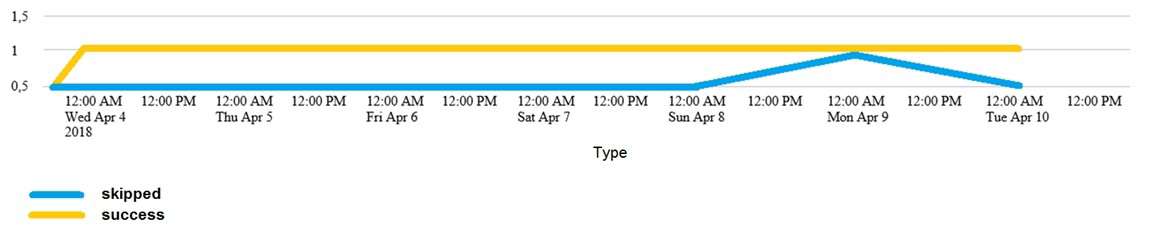
Which of the following searches would create a graph similar to the one below?
Show answerHide answer

Correct answer: C index_internal seourcetype=Savesplunker | fields sourcetype, status | transaction status maxspan-id | timechart count by status

Explanation

Explanation:
The data table shows counts for two status values (skipped and success) over multiple time points (April 4–10, 2018). A timechart with by status splits the results into separate series per status value, producing a time-based graph (line or bar) exactly like the one implied.

Why C is correct:
Only option C includes timechart count by status, which is the correct SPL command to generate a time-series graph comparing multiple field values across time.

Why the other options are incorrect:

A. index_internal seourcetype=Savesplunker | fields sourcetype, status | transaction status maxspan-id | start count states
Several fatal errors: index_internal missing =, seourcetype typo, transaction status without valid syntax (maxspan-id is meaningless), and start count states is invalid SPL. No timechart exists, so no time-based graph can be created.

B. index_internal seourcetype=Savesplunker | fields sourcetype, status | transaction status maxspan-id | chart count states by -time
Uses chart (not time-based by default), states is not a field in the data, and by -time is invalid syntax. chart cannot produce a proper time-axis graph unless _time is used correctly, which it is not here.

D. None of these searches would generate a similar graph
This is incorrect because option C, despite typographical errors, contains the correct core logic (timechart count by status). The exam expects you to recognize the intended correct command.

References:

Splunk Documentation:
timechart command – “Creates a time series chart of statistical results. Use by to split each distinct value into its own series.”
Question 20 Choose 1
Which of the following statements describes an event type?
Show answerHide answer

Correct answer: C A field for categorizing events based on a search string.

Explanation

Explanation

An event type is a knowledge object in Splunk that allows you to categorize events that match a specific search string. Once defined, event types appear as a field called eventtype (or savedsearch_name in some contexts) and can be used in searches, reports, dashboards, and correlation rules. For example, you can define an event type called web_error with the search status=4* OR status=5*, and all matching events will automatically have eventtype=web_error.

Why the other options are incorrect:

A. A log level measurement: info, warn, error – This describes log levels or severity levels, which are typically stored in a field like log_level or severity. Event types are not inherently about log levels; they are user-defined categories based on any search criteria.

B. A knowledge object that is applied before fields are extracted – False. Event types are evaluated at search time, not before field extraction. Field extraction happens early in the search pipeline; event types rely on extracted fields (or raw events) and are applied after basic field extraction.

D. Either a log, a metric, or a trace – This describes the three broad data types in observability (logs, metrics, traces). Event types are unrelated to this classification; they are metadata categories applied to any data type.

References:

Splunk Documentation:
“Event types are categories that you define for events. An event type is a search that tags events with an eventtype field.”
Full mock exam

Sit the SPLK-1002 exam before exam day

Full-length mocks with the same number of questions and the same time limit as the real SPLK-1002 exam. Every attempt draws a new set of questions from the full bank, so you can keep going until you pass comfortably.

Get full SPLK-1002 mock exam
  • 65questions per mock
  • 105 mintime limit
  • 306questions in the bank
  • Newmock on every attempt