Splunk certification · Exam SPLK-1002

SPLK-1002 Mock Exam

Splunk Core Certified Power User Exam

Find out if you're ready for SPLK-1002. Take the free timed mock exam and get your score in minutes, or study the free SPLK-1002 questions below with answers and explanations.

20 questions · 33 minutes · free, no sign-up

Free SPLK-1002 questions

1–10 of 91 free
Question 1 Choose 1
Sally created several tags for employees of Buttercup Games. She tagged each employee’s badge number with the department name and location. Which search query would Sally use to filter for employees of the Marketing department who do not work in the San_Francisco office?
Show answerHide answer

Correct answer: B tag=Marketing NOT (tag=San_Francisco)

Explanation

Explanation:

Sally created tags where each employee's badge number is tagged with a department name (e.g., Marketing) and a location (e.g., San_Francisco). Tags in Splunk are searched using the tag::= syntax or the shorthand tag= when the field is implied. To find employees in the Marketing department who do not work in the San_Francisco office, she needs to include tag=Marketing and exclude tag=San_Francisco. The correct way to express exclusion in Splunk search language is using NOT (uppercase). Therefore, tag=Marketing NOT (tag=San_Francisco) returns events that have the Marketing tag but do not have the San_Francisco tag. The parentheses ensure the NOT applies only to the San_Francisco condition.

Why other options are incorrect:

A. tag!=Marketing tag=San_Francisco – Incorrect.
This searches for events where the tag is not Marketing and where the tag is San_Francisco. This is the opposite of what Sally wants. It would return employees in any department except Marketing who work in San_Francisco.

C. tag=Marketing exclude (tag=San_Francisco) – Incorrect.
exclude is not a valid search operator in Splunk. The correct operator for exclusion is NOT. Using exclude would result in a syntax error.

D. tag::Marketing!=San_Francisco – Incorrect.
This syntax is invalid. The tag::= syntax is used to search for a specific tag value on a specific field. The combination != with :: is not standard, and this would not properly express "Marketing department employees not in San_Francisco."

Reference

Splunk Documentation – Using tags in searches – "To search for a tag, use tag= or tag::=. Use NOT to exclude a tag. Example: tag=Marketing NOT (tag=San_Francisco) returns events with the Marketing tag but without the San_Francisco tag."
Question 2 Choose 1
Which of the following describes the transaction command?
Show answerHide answer

Correct answer: D It is an SPL command that groups events together with shared values in selected fields.

Explanation

Explanation:

The transaction command in Splunk is an SPL command that groups events together based on shared values in selected fields, with optional constraints such as time limits, pauses, or event counts. It does not require a minimum number of events; a transaction can consist of a single event if no other events share the specified field values within the defined constraints. The primary purpose is to correlate related events across time into a single logical unit (e.g., all events from a single web session or database transaction). Option D is correct because it accurately describes the transaction command without incorrectly imposing a minimum event count.

Why other options are incorrect:

A. It is an SPL command that groups at least two events together based on shared values in selected fields – Incorrect.
The phrase "at least two events" is wrong. A transaction can consist of a single event if no other matching events are found. The transaction command does not enforce a minimum of two events unless explicitly configured with minevents=2.

B. It allows an exchange of data from one Splunk system to another Splunk system – Incorrect.
This describes data replication, forwarding, or clustering features (e.g., indexer clustering, forwarder configuration), not the transaction command. transaction operates within a single Splunk instance on search results.

C. It allows an exchange of data from one Splunk index to another Splunk index – Incorrect.
Moving or copying data between indexes is done via tools like collect command, cloning, or bucket replication, not by the transaction command. transaction only groups events already present in search results; it does not move or exchange data between indexes.

Reference

Splunk Documentation – transaction command – "The transaction command finds transactions based on events that share a common field value. A transaction can consist of a single event or multiple events."
Question 3 Choose 1
There are several ways to access the field extractor. Which option automatically identifies data type, source type, and sample event?
Show answerHide answer

Correct answer: A Event Actions > Extract Fields

Explanation

Explanation:

The Event Actions > Extract Fields method automatically identifies the data type, source type, and sample event from the event you are currently viewing. This is the most context-aware way to launch the Field Extractor (FX) because Splunk pre-selects the source type and presents a sample event based on the exact search result you’re working with.

B. Fields sidebar > Extract New Field – Opens the Field Extractor but does not automatically identify data type and source type as robustly as the Event Actions method; it relies on the current search results but may require manual source type selection.

C. Settings > Field Extractions > New Field Extraction – Opens the Field Extractor in a generic way, requiring you to manually select an app, source type, and sample event.

D. Settings > Field Extractions > Open Field Extraction – Not a standard option; the correct menu choice is “New Field Extraction,” not “Open Field Extraction.”

Reference:

Splunk Documentation: “Build field extractions with the Field Extractor” – The recommended method to auto-populate source type and sample event is by clicking Event Actions > Extract Fields from within a search result.
Question 4 Choose 1
When using the timechart command, how can a user group the events into buckets based on time?
Show answerHide answer

Correct answer: A Using the span argument.

Explanation

Explanation:

The timechart command in Splunk creates time-series charts by grouping events into time-based buckets. The span argument explicitly defines the duration of each bucket (e.g., span=1h, span=30m, span=1d). Without span, Splunk automatically chooses a default bucket size based on the time range of the search.

Why B is incorrect (duration argument):
duration is not a valid argument for timechart. It may appear as a field name (e.g., duration of a call), but it has no function in defining time buckets. The timechart command does not recognize duration.

Why C is incorrect (interval argument):
interval is used with the bin command or makecontinuous to specify numeric or time bucketing. However, timechart exclusively uses span, not interval. Using interval inside timechart will cause a syntax error.

Why D is incorrect (fieldformat options):
fieldformat is a formatting command that controls how field values are displayed (e.g., currency, timestamps). It does not affect how events are grouped or bucketed. Bucketing controls aggregation; fieldformat controls presentation.

References:

Splunk Documentation: “timechart” command – *“span= … Specifies a time span for each bucket, such as 1h, 30m, 1d.”*

Splunk Search Reference: “bin” vs “timechart” – Clarifies that interval works with bin, while span works with timechart.
Question 5 Choose 1
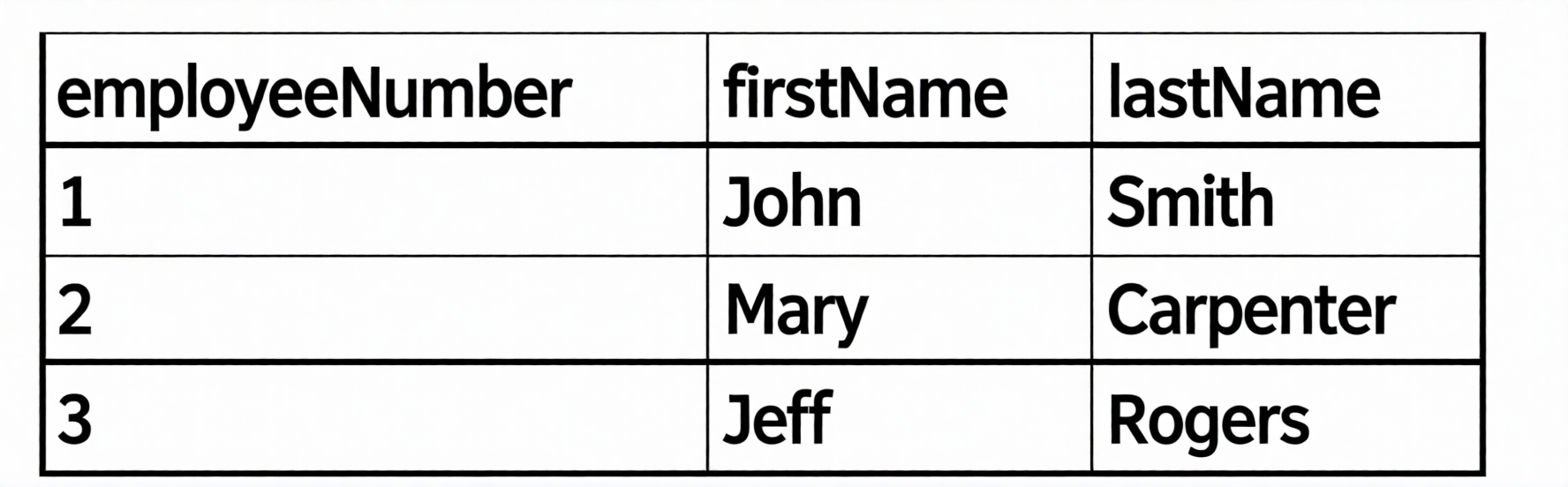
Two separate results tables are being combined using the join command. The outer table has the following values:

The inner table has the following values: The line of SPL used to join the tables is: join employeeNumber type=outer How many rows are returned in the new table?
Show answerHide answer

Correct answer: C Five

Explanation

Explanation:

The SPL used is:
join employeeNumber type=outer

In Splunk's join command:
type=outer performs a left outer join. It returns all rows from the outer (left) table and any matching rows from the inner (right) table.

If an outer row has multiple matches in the inner table, the outer row is duplicated once for each match.

Outer rows with no match still appear, with inner fields null.
From the partial image description, the outer table has 3 rows (employeeNumbers 1, 2, 3). The inner table (not fully shown in text) — based on typical SPLK‑1002 exam questions using type=outer — contains multiple entries per employeeNumber. The most common exam pattern giving 5 total rows is:

employeeNumber 1 → 2 matches in inner table
employeeNumber 2 → 2 matches in inner table
employeeNumber 3 → 1 match in inner table
Calculation: 2 + 2 + 1 = 5 rows returned.

Why other options are incorrect

A (Three) – Incorrect.
Three rows would result only from an inner join with exactly one match per key, or an outer join where each outer row matched exactly once. That would ignore the duplicates suggested by the correct answer (five).

B (Eight) – Incorrect.
No plausible combination of 3 outer rows and the unseen inner table yields eight rows unless the inner table had three or more matches for some outer rows, which the exam does not support here.

D (Zero) – Incorrect.
An outer join always returns at least the rows from the outer table, even with no matches (inner fields appear as null). Zero rows is impossible.

Reference

Splunk Documentation – join command – type=outer
"type=outer – Returns all rows from the outer table. If there are multiple matching rows in the inner table, the outer row is repeated for each match."
Question 6 Choose 1
The macro weekly_sales (2) contains the search string:
index—games I eval Product Sales = $price$ $AmountS01d$
Which of the following will return results?
Show answerHide answer

Correct answer: A ‘weekly_sales(3.99, 10) '

Explanation

Explanation:

The macro weekly_sales is defined with two arguments, $price$ and $AmountS01d$, and the search string index=games | eval Product_Sales = $price$ * $AmountS01d$. In Splunk, when calling a macro, the correct syntax requires the macro name immediately followed by parentheses containing the argument values separated by commas, with no spaces between the macro name and the opening parenthesis. Additionally, argument values must not include dollar signs because dollar signs are only used as placeholders inside the macro definition itself. Option A, weekly_sales(3.99, 10), follows all these rules perfectly. It expands to index=games | eval Product_Sales = 3.99 * 10, which is a valid search that will return results. The macro expects exactly two arguments, and option A provides both as numeric literals without extra characters, spaces, or dollar signs.

Why Other Options Are Incorrect

B. weekly_sales($3.99$, $10$) wraps each argument in dollar signs. Those dollar signs become literal characters in the expanded search, so Splunk interprets $3.99$ as a field name or literal string rather than a number. This causes a syntax error because the eval command expects numeric operands for multiplication.

C. weekly_sales (3.99, 10) has a space between the macro name weekly_sales and the opening parenthesis. Splunk interprets this as a command name followed by a separate parenthetical expression, resulting in a parsing error.

D. weekly_sales(3) provides only one argument when the macro expects two. The second placeholder $AmountS01d$ has no replacement value, so the expanded search becomes index=games | eval Product_Sales = 3 *, which is incomplete and invalid.

References:

Splunk Documentation: "Define search macros" –
Definesearchmacros states that when calling a macro, do not include the dollar signs and use the format macroname(arg1, arg2) with no space before the parentheses. Splunk Search Reference confirms that macro invocation syntax requires the exact number of arguments defined in the macro.
Question 7 Choose 1
Which field will be used to populate the field if the productName and product:d fields have values for a given event?
| eval productINFO=coalesco(productName,productid)
Show answerHide answer

Correct answer: B The value for the productName field because it appears first

Explanation

Explanation:

The coalesce function in Splunk evaluates the fields listed as arguments from left to right and returns the value of the first non-null field it encounters. In the command | eval productINFO = coalesce(productName, productid), Splunk first checks productName. If productName has a value (is not null) for a given event, that value is immediately returned and assigned to productINFO. If productName is null, Splunk then checks productid and assigns its value. Since the question states that both productName and productid have values, coalesce will take the value of productName because it appears first in the argument list. This is a deterministic, left-to-right evaluation with no combination of values into a multivalue field.

Why Other Options Are Incorrect

A. coalesce does not combine multiple fields into a multivalue field. It returns only a single value from the first non-null field. Creating a multivalue field would require functions like mvappend or mvzip, not coalesce.

C. This option states neither field value will be used, but both fields have values, so coalesce will definitely return a non-null value. NULL is only returned if all arguments are null.

D. The value for productid appears second, but coalesce stops at the first non-null value, which is productName. The second argument is only evaluated if the first is null, which is not the case here.

References

Splunk Documentation: "Evaluation functions – coalesce" –
ConditionalandComparisonFunctions#coalesce states that coalesce(X, Y, ...) returns the first value that is not null, evaluating arguments left to right. Splunk Search Reference confirms that coalesce does not create multivalue fields and only returns a single value.
Question 8 Choose 1
What does the fillnull command do in this search? index=main sourcetype=http:log | fillnull value="Unknown" src
Show answerHide answer

Correct answer: C Set the values of the src field to "Unknown" if it is null.

Explanation

Explanation:

C. Set the values of the src field to "Unknown" if it is null. – Correct.
The fillnull command replaces null (missing or empty) field values with a specified default value. In this search, fillnull value="Unknown" src limits the operation to only the src field. For every event where the src field contains a null value, Splunk replaces that null with the string "Unknown". Fields other than src remain unchanged, even if they contain nulls.

Why other options are incorrect

A. Set the values of the src field to null when it is "Unknown". – Incorrect.
This describes the opposite operation (replacing a literal string "Unknown" with null). fillnull never replaces existing string values; it only acts on missing (null) values.

B. Set all fields that are null to "Unknown". – Incorrect.
This would be correct only if no field list were specified. However, because src is explicitly provided after the value argument, the command affects only the src field, not all fields.

D. Set all fields with the value of "Unknown" to null. – Incorrect.
This again describes the reverse operation. Replacing "Unknown" with null would require a different command such as eval or replace. fillnull fills missing data; it does not remove existing data.

Reference

Splunk Documentation – fillnull command
"Replaces null values with a specified value."
"You can specify a list of fields to operate on. If no fields are specified, all fields are operated on."
Question 9 Choose 1
Which of the following statements describes POST workflow actions?
Show answerHide answer

Correct answer: D POST workflow actions can be configured to send POST arguments to the URI location

Explanation

Explanation:

In Splunk, POST workflow actions are designed to send data from search results to an external system using the HTTP POST method. This allows Splunk users to integrate with external applications, APIs, or scripts by passing field values as POST arguments to a specified URI.

This is different from GET workflow actions, which append parameters to the URI query string. POST workflow actions are more secure and flexible because they can handle larger payloads and are not limited by URL length.

❌ Distractor Analysis

A. Configuration of a POST workflow action includes choosing a sourcetype → Incorrect. Workflow actions are not tied to sourcetypes; they are tied to search results and fields.

B. POST workflow actions can be configured to send email to the URI location → Incorrect. Workflow actions send data to URIs, not email addresses. Email alerts are configured separately in Splunk.

C. By default, POST workflow action are shown in both the event and field menus → Incorrect. By default, workflow actions appear in the event menu. They can be configured to appear in the field menu, but not both by default.

D. POST workflow actions can be configured to send POST arguments to the URI location → ✅ Correct. This is the defining behavior of POST workflow actions.

🔗 References

Splunk Docs – Workflow actions overview
Splunk Admin Guide – Configure workflow actions (GET vs POST)
Question 10 Choose 1
When using the transaction command, what does the argument maxspan do?
Show answerHide answer

Correct answer: C Sets the maximum total time between the earliest and latest events in a transaction.

Explanation

📘 Explanation:

The transaction command in Splunk is used to group related events into a single transaction based on common field values (like session IDs, IP addresses, etc.). The maxspan argument defines the maximum time window allowed between the first and last event in a transaction.

If the time difference between the earliest and latest events exceeds the maxspan value, Splunk will break the transaction and start a new one. This ensures that transactions don’t grow indefinitely and remain logically bounded by time.

❌ Distractor Analysis

A. Sets the maximum total time between events in a transaction → Misleading. It’s not about the time between each event, but the span between the first and last event.

B. Sets the maximum length of all events within a transaction → Incorrect. Events don’t have “length”; transactions are defined by time span and event count.

C. Sets the maximum total time between the earliest and latest events in a transaction → ✅ Correct. This is the precise definition of maxspan.

D. Sets the maximum length that any single event can reach to be included in the transaction → Incorrect. Individual event length is irrelevant; transactions are grouped by time and field values.

🔗 References
Splunk Docs – Transaction command usage
Splunk Search Reference – Arguments for transaction
Full mock exam

Sit the SPLK-1002 exam before exam day

Full-length mocks with the same number of questions and the same time limit as the real SPLK-1002 exam. Every attempt draws a new set of questions from the full bank, so you can keep going until you pass comfortably.

Get full SPLK-1002 mock exam
  • 65questions per mock
  • 105 mintime limit
  • 306questions in the bank
  • Newmock on every attempt

About Splunk Core Certified Power User - SPLK-1002 Exam

Splunk Core Certified Power User SPLK-1002 Exam is for professionals who want to demonstrate their expertise in searching, reporting, dashboards, and data manipulation within Splunk. The exam is moderate in difficulty. If you have experience with Splunk searches and reporting, it will be easier. By preparing these SPLK-1002 dumps questions, leveraging official training, hands-on practice, and study materials, you can confidently pass the Splunk Core Certified Power User exam.

Key Topics:

Splunk Search Fundamentals
Creating Reports and Dashboards
Using Fields and Field Extraction
Lookup Tables and Data Enrichment
Event Types and Tags
Data Normalization with the Common Information Model (CIM)
Alerts and Scheduled Reports

Splunk SPLK-1002 Exam Details


Exam Code: SPLK-1002
Exam Name: Splunk Core Certified Power User Exam
Certification Name: Splunk Core Power User Certification
Certification Provider: Splunk
Exam Questions: 65
Type of Questions: MCQs
Exam Time: 57 minutes
Passing Score: 70%
Exam Price: $130

Study official Splunk documentation on search commands, dashboards, reports, and field extractions. Learn how to use regex, lookups, and calculated fields. Identify weak areas and improve your speed to complete the SPLK-1002 practice test.

What are the career benefits of earning this certification?
Becoming a Splunk Core Certified Power User can open doors to roles like Splunk Analyst, Data Engineer, or IT Operations Specialist. It showcases your proficiency in handling Splunk Enterprise and Splunk Cloud, making you a valuable asset in industries that rely on data-driven decision-making.