Splunk certification · Exam SPLK-1002

SPLK-1002 Mock Exam Page 2

Splunk Core Certified Power User Exam

Free SPLK-1002 questions on Topic 1: Questions Set 1, each with the answer and an explanation.

20 questions · 33 minutes · free, no sign-up

Topic 1: Questions Set 1 questions

11–18 of 18 free
Question 11 Choose 1
Which of the following describes the Splunk Common Information Model (CIM) add-on?
Show answerHide answer

Correct answer: C The CIM add-on contains data models to help you normalize data.

Explanation

Explanation:

The Splunk Common Information Model (CIM) add-on is a collection of pre-configured data models that provide a shared semantic framework for normalizing data at search time. These data models consist of standardized field names and tags that define the "least common denominator" of a particular data domain, such as Network Traffic or Authentication.

The purpose of the CIM add-on is to act as a search-time schema ("schema-on-the-fly"). It applies a common standard to data from different sources without altering the raw machine data, allowing you to create consistent reports, dashboards, and correlation searches across diverse data formats. To achieve this, the add-on provides the data models, which are implemented as JSON files. You then use these models to guide your normalization process, which may involve creating field aliases, field extractions, lookups, and event types to make your data CIM-compliant.

Why Other Options Are Incorrect

A. The CIM add-on uses machine learning to normalize data. The CIM add-on normalizes data using a collection of defined field names and tags, not machine learning.

B. The CIM add-on contains dashboards that show how to map data. While the add-on includes tools and documentation to help you map data to the CIM, it does not contain dashboards for this purpose.

D. The CIM add-on is automatically installed in a Splunk environment. The CIM add-on is not automatically installed. It must be downloaded from Splunkbase, and it is packaged with some apps like Splunk Enterprise Security.

References

Splunk Documentation: "The Splunk Common Information Model (CIM) is a shared semantic model focused on extracting value from data. The CIM is implemented as an add-on that contains a collection of data models, documentation, and tools that support the consistent, normalized treatment of data for maximum efficiency at search time".

Splunk Documentation: "The objective of normalization is to use the same names and values for equivalent events from different sources or vendors... The Common Information Model (CIM) defines relationships in the underlying data, while leaving the raw machine data intact".
Question 12 Choose 1
Which of the following is the correct way to use the data model command to search field in the data model within the web dataset?
Show answerHide answer

Correct answer: A | datamodel web search | filed web *

Explanation

Explanation:

The datamodel command is a generating command that must be the first command in a search and must be preceded by a leading pipe character |. Its correct syntax is | datamodel . In option A, web is the data model name, search is the search mode that returns events from the dataset, and the results are then piped to the fields command to display only fields starting with "web." This follows Splunk's documented syntax for accessing and searching data model datasets.

Why Other Options Are Incorrect

B. | Search datamodel web web | filed web*
– This is invalid because the datamodel command must be preceded by a pipe and followed by the data model name and dataset name. The Search keyword is not part of the datamodel command syntax, and the order of arguments is incorrect. The correct syntax is | datamodel search, not | Search datamodel .

C. | datamodel web web field | search web*
– This is incorrect because the field keyword is not valid syntax for the datamodel command. The command expects a search mode like search or counts, not field. The arguments are also in the wrong order.

D. Datamodel=web | search web | filed web*
– This is incorrect because Datamodel=web is not a valid field-value pair in a search. Data models are not accessed by searching for a field called Datamodel; they are accessed using the datamodel command as the first command in the search pipeline.

References

Splunk Documentation: "The datamodel command is a generating command that must be the first command in a search. Its syntax is | datamodel "
Question 13 Choose 1
Which of the following statements describes macros?
Show answerHide answer

Correct answer: C A macro Is a reusable search string that may have a flexible time range.

Explanation

Explanation:

A macro is a reusable chunk of Search Processing Language (SPL) that can be inserted into other searches . It simplifies complex or repetitive search strings.

A key aspect of macros is their flexibility. You can define them to include a time range, or you can leave that out and specify the time range when you run the search that calls the macro. This aligns with the concept that macros "may have a flexible time range" , making them adaptable for different reporting periods or investigations.

Why Other Options Are Incorrect

A. A macro is a reusable search string that must contain the full search. This is incorrect. Macros can be any part of a search, such as an eval statement or search term, and "do not need to be a complete command" .

B. A macro is a reusable search string that must have a fixed time range. This is incorrect because macros do not require a fixed time range; they can be defined with or without one, offering flexibility.

D. A macro is a reusable search string that must contain only a portion of the search. This is incorrect. While macros can be a portion of a search, they are not required to be; they can contain a full search string as well.

References

Splunk Documentation: "Search macros are reusable chunks of Search Processing Language (SPL) that you can insert into other searches. Search macros can be any part of a search, such as an eval statement or search term and do not need to be a complete command" .

Splunk Documentation: "Define search macros in Settings... Search macros are reusable chunks of Search Processing Language (SPL) that you can insert into other searches. Search macros can be any part of a search... and do not need to be a complete command"
Question 14 Choose 4
Which delimiters can the Field Extractor (FX) detect? (select all that apply)
Show answerHide answer

Correct answer: A, B, C, D TabsPipesSpacesCommas

Explanation

Explanation:

The Splunk Field Extractor (FX) is designed to handle delimiter-based field extractions for structured data. When you select the Delimiters method, the tool can detect and use several common delimiters to separate fields in your event data. According to the official Splunk documentation, the Rename Fields step explicitly states that you can select from "Space, Comma, Tab, or Pipe" as delimiter options. This is also confirmed by the Select Method step documentation, which explains that the Delimiters method is appropriate for data that is "cleanly separated by a common delimiter, such as a space, a comma, or a pipe character." If your data uses a delimiter that is not one of these four common options, you can also select "Other" and specify a custom character or character combination.

Why all options are correct

Since the question asks which delimiters the FX can detect, and all four listed options are explicitly supported, the correct selection is A, B, C, and D.

References

Splunk Documentation: "If you select Delimiters, specify the delimiter that separates the fields in your events. You can choose space, comma, tab, pipe, or other" –

Splunk Documentation:"The Delimiters method is used for events that contain structured, delimited data such as space-delimited, comma-separated, or pipe-separated data"
Question 15 Choose 1
When should you use the transaction command instead of the scats command?
Show answerHide answer

Correct answer: D When you need to group based on start and end constraints.

Explanation

Explanation:

The transaction command is specifically designed to group events based on time-based constraints such as start and end conditions. Unlike the stats command, which performs simple aggregations and cannot handle event boundaries or sequences, transaction can define a transaction using parameters like startswith and endswith. These parameters allow you to specify the exact event that begins a transaction and the event that ends it, making transaction ideal for analyzing workflows, sessions, or processes where event order matters.

For example, you could use transaction to group all events from a user login to a logout, or from an HTTP request to its corresponding response. The stats command cannot do this because it does not track event sequences or boundaries.

Why Other Options Are Incorrect

A. When you need to group on multiple values.
– This is incorrect because the stats command can group on multiple fields just as easily as transaction. In fact, stats is more efficient for grouping on multiple fields because it is distributable and does not require sequential event processing.

B. When duration is irrelevant in search results.
– This is incorrect because transaction automatically calculates and adds a duration field to each transaction. If duration is not relevant to your analysis, stats would be a lighter and more efficient choice.

C. When you have over 1000 events in a transaction.
– This is incorrect because the transaction command has a default limit of 1000 events per transaction. If you have more than 1000 events, transaction will truncate the transaction, making stats a better choice for large datasets.

References

Splunk Documentation: "The transaction command is used to group events into transactions based on start and end constraints. Use it when you need to define transaction boundaries with startswith and endswith" –
Question 16 Choose 1
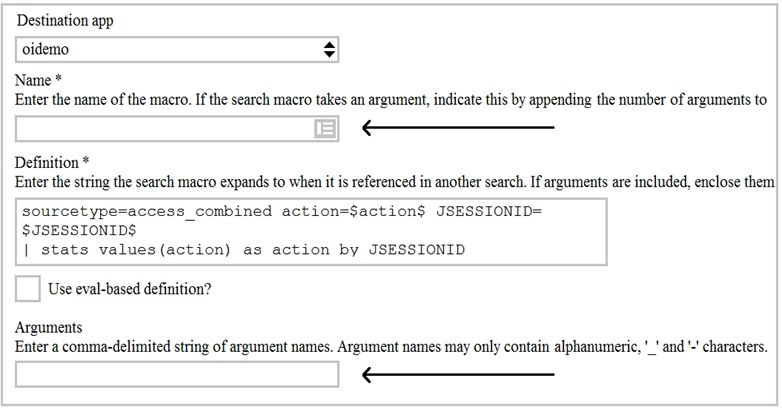
Given the macro definition below, what should be entered into the Name and Arguments fileds to correctly configured the macro?
Show answerHide answer

Correct answer: B The macro name issessiontracker(2)and the arguments areaction, JESSIONID.

Explanation

Explanation:

In Splunk, when defining a macro that accepts arguments, the macro name must include the number of arguments in parentheses at the end of the name. Since this macro definition contains two placeholders ($action$ and $JSESSIONID$), it requires exactly two arguments. Therefore, the macro name must end with (2).

The Arguments field in the macro configuration requires a comma-delimited list of argument names, using only alphanumeric characters, underscores (_), and hyphens (-). The argument names should be entered without dollar signs ($). The dollar signs are used only inside the Definition field to denote where the arguments are substituted.

Why Other Options Are Incorrect

A. The macro name is sessiontracker and the arguments are action, JSESSIONID. – This is incorrect because the macro name does not include the required (2) to indicate it accepts two arguments. Without this, Splunk will not recognize the macro as one that accepts arguments.

C. The macro name is sessiontracker and the arguments are $action$, $JSESSIONID$. – This is incorrect for two reasons: the macro name lacks the (2) suffix, and the arguments field should contain the argument names without dollar signs. The dollar signs are only used in the Definition field.

D. The macro name is sessiontracker(2) and the arguments are $action$, $JSESSIONID$. – This is incorrect because the Arguments field should not contain dollar signs. The correct format for the Arguments field is a comma-delimited list of plain argument names.

References:

Splunk Documentation: "The macro name must end with the number of arguments in parentheses, such as sessiontracker(2)" –

Splunk Documentation: "The Arguments field must contain a comma-separated list of argument names, without dollar signs" –
Question 17 Choose 3
Which of the following can be used with the eval command tostring function (select all that apply)
Show answerHide answer

Correct answer: A, B, D ‘’hex’’ ‘’commas’’ ‘’duration’’

Explanation

Explanation:

The tostring() function within the eval command converts a numeric field value into a string. It accepts an optional second argument—the format argument—to define exactly how that numeric value should be visually reshaped.

Why A, B, and D are Correct

Splunk officially recognizes exactly three specific string format arguments within the tostring(value, "format") function:

A. "hex": Converts the input numeric integer into its corresponding lowercase hexadecimal (base-16) string representation (e.g., converting 255 into ff).

B. "commas": Formats the number with commas as thousands separators and preserves up to two decimal places (e.g., converting 1000000 into 1,000,000).

D. "duration": Formats a numeric count of seconds into a human-readable time format string, displayed as HH:MM:SS or Days+HH:MM:SS depending on the magnitude of the number (e.g., converting 90 seconds into 00:01:30).

Why C is Incorrect

C. "Decimal": This is not a valid format argument for the tostring() function. Numbers in Splunk are already stored as decimals or integers by default. If you need to enforce a specific number of decimal places or handle float rounding rather than converting the data type to a string, you must use alternative mathematical eval functions such as round(value, [int]) or printf(). Passing "Decimal" into the tostring() function will result in a evaluation parsing failure.

Reference

Splunk Documentation: Search Reference -> Evaluation functions -> Text functions.

Syntax Restrictions: The official documentation for the tostring() evaluation function explicitly dictates: "The format argument can be "commas", "hex", or "duration"."' No other string format expressions are natively evaluated by this specific function.
Question 18 Choose 1
Which of the following statements describe GET workflow actions?
Show answerHide answer

Correct answer: D GET workflow actions can be configured to open the URT link in the current window or in a new window

Explanation

Explanation:

GET workflow actions are designed to create HTML links that perform an HTTP GET request to an external web resource, such as a search engine or IP lookup service . Configuration options include specifying the URI, label, and target fields .

The configuration form for a GET workflow action includes an "Open link in" setting, where you can choose whether the link opens in the current window or a new window . This makes option D correct.

Why Other Options Are Incorrect

A. GET workflow actions must be configured with POST arguments. – This is incorrect because POST arguments are specific to POST workflow actions, which are used for sending data to external systems . GET actions use URI parameters, not POST arguments.

B. Configuration of GET workflow actions includes choosing a sourcetype. – This is incorrect because workflow actions can be restricted by fields or event types, but not by sourcetype directly .

C. Label names for GET workflow actions must include a field name surrounded by dollar signs. – This is incorrect because labels can be static or dynamic; they do not must include a field name .

References

Splunk Documentation:"Under Open link in, determine whether the workflow action displays in the current window or if it opens the link in a new window" .

Splunk Documentation:
"POST workflow actions... you have to identify POST arguments to send to the identified URI" .

That's the last free question in Topic 1: Questions Set 1

You've seen the free 30% (18 of 62 questions). Full access unlocks every question and full-length SPLK-1002 mock exams (65 questions, 105 minutes), a different mock on every attempt.

Unlock full mock exam
Full mock exam

Sit the SPLK-1002 exam before exam day

Full-length mocks with the same number of questions and the same time limit as the real SPLK-1002 exam. Every attempt draws a new set of questions from the full bank, so you can keep going until you pass comfortably.

Get full SPLK-1002 mock exam
  • 65questions per mock
  • 105 mintime limit
  • 306questions in the bank
  • Newmock on every attempt