You have a Microsoft 36S tenant.
You create a named location named HighRiskCountries that contains a list of high-risk countries.
You need to limit the amount of time a user can stay authenticated when connecting from a high-risk country.
What should you configure in a conditional access policy? To answer, select the appropriate options in the answer area.
NOTE: Each correct selection is worth one point.

You create a named location named HighRiskCountries that contains a list of high-risk countries.
You need to limit the amount of time a user can stay authenticated when connecting from a high-risk country.
What should you configure in a conditional access policy? To answer, select the appropriate options in the answer area.
NOTE: Each correct selection is worth one point.
Show answerHide answer
Explanation
Explanation
A Conditional Access policy is built from building blocks that follow an "if-then" logic: IF these conditions are met, THEN apply these controls.
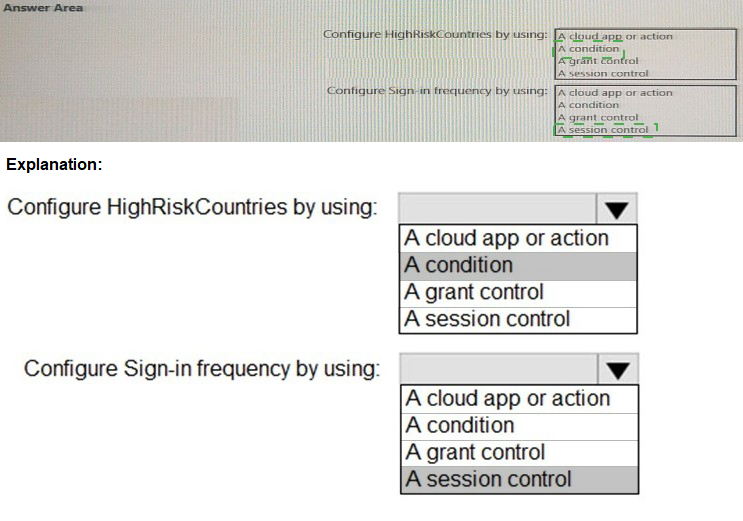
1.Configure HighRiskCountries by using: A condition
Explanation: The "HighRiskCountries" named location is used to define when the policy should apply. Conditions are the "IF" part of the policy. You are essentially saying, "IF the sign-in attempt is coming from a location in the 'HighRiskCountries' list..." Therefore, the named location must be configured as a Condition (specifically, under the "Locations" condition).
2.Configure Sign-in frequency by using: A session control
Explanation: Sign-in frequency is a feature that limits how long a user can use a session before being forced to re-authenticate. In Conditional Access, this is not a one-time grant of access; it is a control that governs the behavior of an ongoing session. Controls that dictate the experience during an active session, such as requiring re-authentication after a period of time or enforcing app-enforced restrictions, are categorized as Session controls.
Why the Other Options Are Incorrect
A cloud app or action: This is the target of the policy. You select which applications (e.g., Office 365, Salesforce) or user actions (like registering security information) the policy should apply to. It is not the mechanism for defining a risk location or a session duration.
A grant control:
This is a block-or-allow control that acts as a gatekeeper for initial access. Examples include "Block access," "Grant access" (but require MFA or a compliant device). Grant controls decide if you get in at all. Sign-in frequency does not block the initial grant of access; it controls how long that granted access remains valid before it must be re-evaluated, which is the definition of a session control.
Reference:
Microsoft Learn:
Conditional Access - Conditions
This document lists "Location" as a primary condition for a policy.
Microsoft Learn:
Conditional Access - Session controls
This document explicitly lists "Sign-in frequency" as a type of session control.