Microsoft certification · Exam PL-900

PL-900 Mock Exam Page 2

Microsoft Power Platform Fundamentals

Free PL-900 mock exam questions 11–14, each with the answer and an explanation.

14 questions · 23 minutes · free, no sign-up

Free PL-900 questions

11–14 of 14 free
Question 11
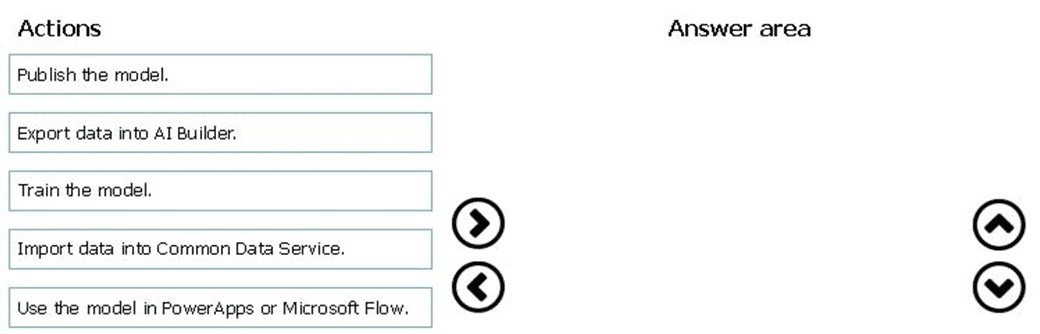
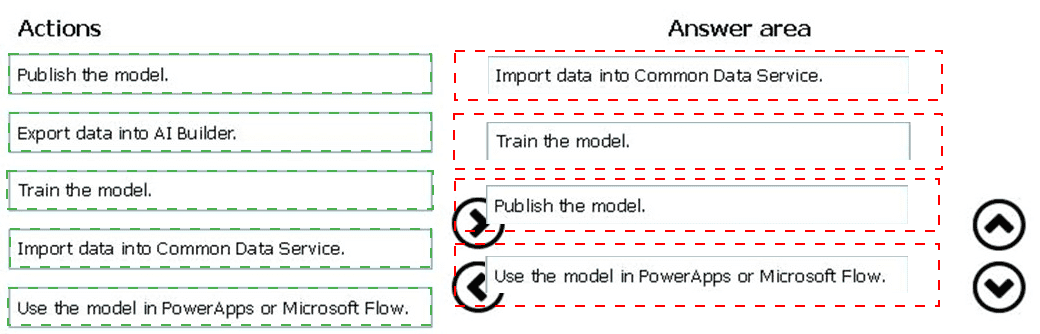
A bank uses Power Platform apps and flows to support business processes.

The company would like to use historical client data to predict whether a client's loan application is likely to be approved or rejected.

You need to use AI Builder to implement the solution.

Which four actions should you perform in sequence? To answer, move the appropriate actions from the list of actions to the answer area and arrange them in the correct order.

Show answerHide answer

Explanation

Question 12
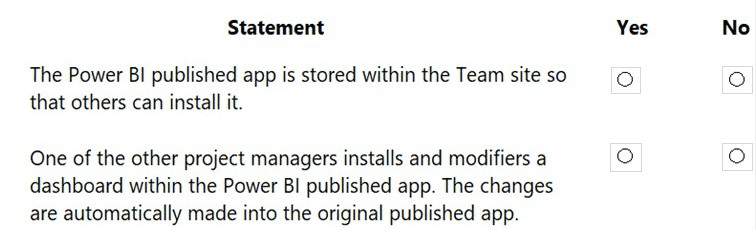
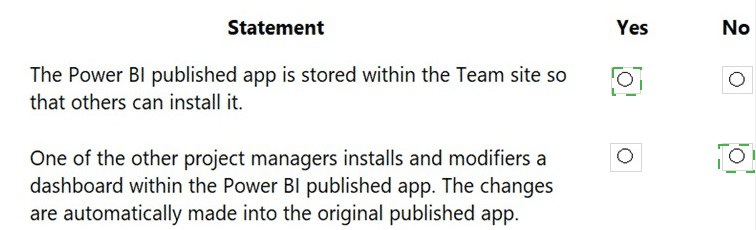
You create reports within Power BI to report on the status of a project. A manager asks you to share the reports with other team members. You decide to create a published app and set permissions to allow other team members to view the reports.

For each of the following statements, select Yes if the statement is true. Otherwise, select No.

NOTE: Each correct selection is worth one point.

Show answerHide answer

Explanation

Question 13 Choose 1
This question requires that you evaluate the BOLD text to determine if it is correct.

You have a Power BI report with a page named RevReceived.

The page shows revenue received by your company. You want to create an almost identical page that shows net revenue instead of gross revenue. To accomplish this task, you modify the RevReceived page.

Review the underlined text. If it makes the statement correct, “No change is needed”. If the statement is incorrect, select the answer choice that makes the statement correct.
Show answerHide answer

Correct answer: B duplicate the RevReceived page.

Explanation

Explanation
The question tests your knowledge of efficient report design practices in Power BI. When you need to create a page that is nearly identical to an existing page, the best practice is to duplicate the original page. Duplication creates an exact copy including all visuals, formatting, and filters, which you can then modify. Modifying the original page would replace the gross revenue view entirely, losing the original page's purpose.

Correct Option

B. duplicate the RevReceived page:
Explanation: Power BI provides a "Duplicate Page" feature that creates an exact copy of the selected report page, including all visuals, data fields, filters, and formatting. After duplication, you can rename the new page (e.g., "NetRevenue") and modify its visuals to show net revenue instead of gross revenue. This preserves the original RevReceived page while allowing you to create the new version efficiently.

Incorrect Option

A. No change is needed:
Explanation: This option is incorrect because modifying the existing RevReceived page would replace the gross revenue view with net revenue. The requirement is to have both pages available: one showing gross revenue (original) and one showing net revenue (new). Simply modifying the existing page does not satisfy the requirement of having an almost identical but separate page.

C. import the RevReceived page:
Explanation: Importing is not a relevant action in this context. Import functionality in Power BI typically refers to bringing data from external sources or bringing report pages from another Power BI file. You cannot "import" a page from within the same report. This option does not apply to creating a copy within the current report.

D. copy the visuals from RevReceived to a new page:
Explanation: While this approach could technically work, it is inefficient and prone to errors. Manually copying each visual from the original page and pasting onto a new page would require multiple steps and might miss formatting consistency, filters, or layout alignment. Power BI's built-in "Duplicate Page" function is the correct, efficient method for this scenario.

Reference
Microsoft Learn: "Copy a report page in Power BI" - (Documentation explaining how to duplicate pages in both Power BI Desktop and the Power BI Service).
Question 14 Choose 1
A carpet cleaning company uses Dynamics 365 Sales.

The process for entering customer information during onsite sales calls is very complicated.

The company wants a simplified screen that allows salespeople to capture the customer name, phone number, and other information while speaking to the customer.

You need to recommend a solution that works on various types of mobile devices.

What should you recommend?
Show answerHide answer

Correct answer: D Canvas app

Explanation

Explanation
The scenario describes a need for a simplified, custom data entry screen for salespeople using mobile devices. The key requirements are: a simplified user interface, mobile compatibility, and integration with existing Dynamics 365 Sales data. Among the Power Platform options, Canvas apps are specifically designed for building custom, task-focused interfaces that work across multiple device types (phones, tablets) with tailored user experiences.

Correct Option

D. Canvas app:
Explanation: Canvas apps provide complete control over the user interface design, allowing you to create a simplified, custom screen exactly matching the salespeople's workflow. You can design the app to show only the essential fields (name, phone number) in a clean layout. Canvas apps are responsive and work on various mobile devices (iOS, Android, Windows) through the Power Apps mobile app, making them perfect for onsite data capture.

Incorrect Option

A. Common Data Service:
Explanation: Common Data Service (now Microsoft Dataverse) is the underlying data platform that stores and manages data used by business applications. While Dynamics 365 Sales data resides in Dataverse, it is not a user interface solution. Dataverse provides the data storage and business logic, but salespeople need an app interface to interact with that data, not the database itself.

B. Microsoft Flow:
Explanation: Microsoft Flow (now Power Automate) is an automation tool used to create workflows between applications and services. While it can automate processes based on data entry (like sending a confirmation email after a customer is added), it does not provide a user interface for salespeople to enter data. It works in the background, not as a front-end data capture screen.

C. AI Builder:
Explanation: AI Builder is a capability that brings artificial intelligence to the Power Platform, enabling functions like form processing, object detection, and prediction. While potentially useful for advanced scenarios (like scanning business cards), it is not a solution for creating a simplified data entry screen. It could be integrated into a canvas app, but alone it does not provide the required user interface.

E. Power BI:
Explanation: Power BI is a data visualization and business analytics tool used for creating reports and dashboards. It is designed for analyzing and presenting data, not for capturing it. Salespeople need to enter customer information, which is a data input task. Power BI is read-only for data visualization and cannot be used to create records in Dynamics 365 Sales.

Reference
Microsoft Learn: "What is Power Apps?" - (Explains canvas apps and their flexibility for custom UI design).

Microsoft Learn: "Responsive layout in canvas apps" - (Documentation on making apps work across different device sizes).
That's the last free question

You've seen the free 30% (14 of 50 questions). Full access unlocks every question and full-length PL-900 mock exams (65 questions, 105 minutes), a different mock on every attempt.

Unlock full mock exam
Full mock exam

Sit the PL-900 exam before exam day

Full-length mocks with the same number of questions and the same time limit as the real PL-900 exam. Every attempt draws a new set of questions from the full bank, so you can keep going until you pass comfortably.

Get full PL-900 mock exam
  • 65questions per mock
  • 105 mintime limit
  • 50questions in the bank
  • Newmock on every attempt