Microsoft certification · Exam PL-900

PL-900 Mock Exam

Microsoft Power Platform Fundamentals

Free PL-900 questions on Topic 1: Understand the business value of Power Platform, each with the answer and an explanation.

14 questions · 23 minutes · free, no sign-up

Topic 1: Understand the business value of Power Platform questions

1–5 of 5 free
Question 1
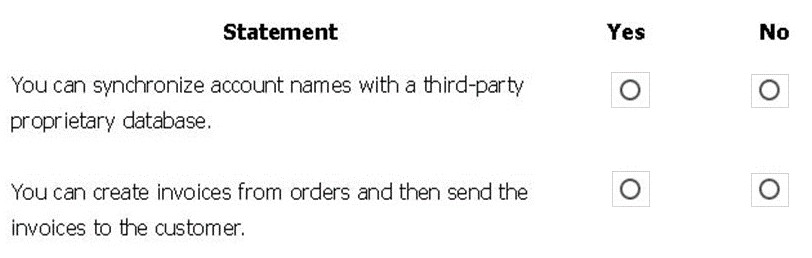
A company plans to implement Power Platform apps. The company does not plan to use any development tools or plug-ins.

Which actions can you perform?

For each of the following statements, select Yes if the statement is true. Otherwise, select No.

NOTE: Each correct selection is worth one point.
Show answerHide answer

Explanation
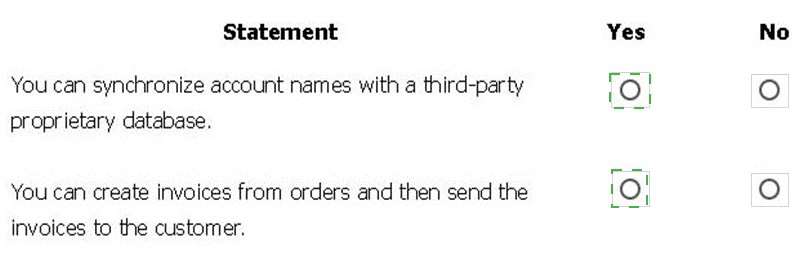


Explanation:
This question tests understanding of Microsoft Dataverse's out-of-the-box capabilities versus those requiring custom development. The Power Platform is designed for low-code/no-code solutions, but some integrations and automations require additional tools or code.

Correct Option:

First Statement (Synchronize account names):
No. Synchronizing data with a proprietary third-party database typically requires custom connectors, Azure services, or development tools (like Power Automate desktop or custom code), which are excluded in this scenario.

Second Statement (Create and send invoices):
Yes. This is a standard business process automation achievable within Power Apps and Power Automate using native Dataverse tables (like Orders and Invoices) and the out-of-the-box email capability or Power Automate flows, requiring no plug-ins.

Incorrect Option:
The incorrect selections would be "Yes" for the first statement or "No" for the second. The first statement describes an integration that exceeds no-code boundaries, while the second describes a core, declarative platform capability.

Reference:
Microsoft Learn: "Introduction to Microsoft Dataverse" describes standard tables and no-code automation. Connectors are covered in "Connect to data in Power Apps," noting that proprietary systems often require custom development.
Question 2
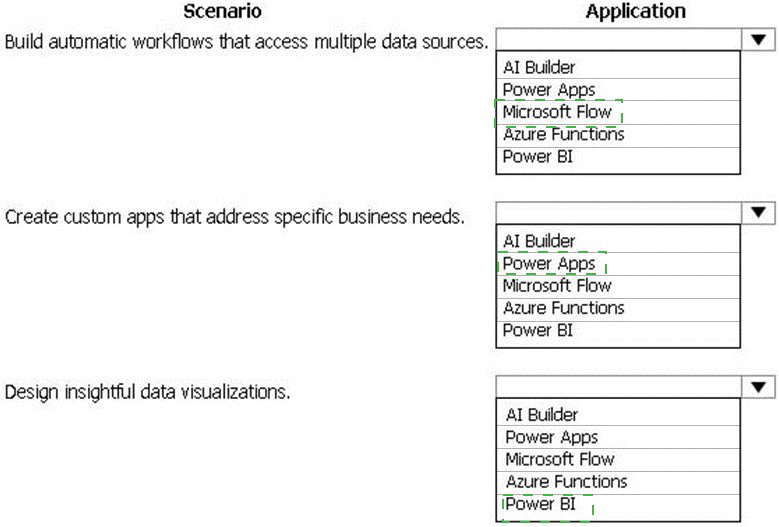
A rapidly growing company wants to empower users to build apps, automate business processes, and analyze data without requiring I expertise or development skills and without increasing IT expenses and dependencies.

You need to recommend tools so that users can accomplish specific tasks.

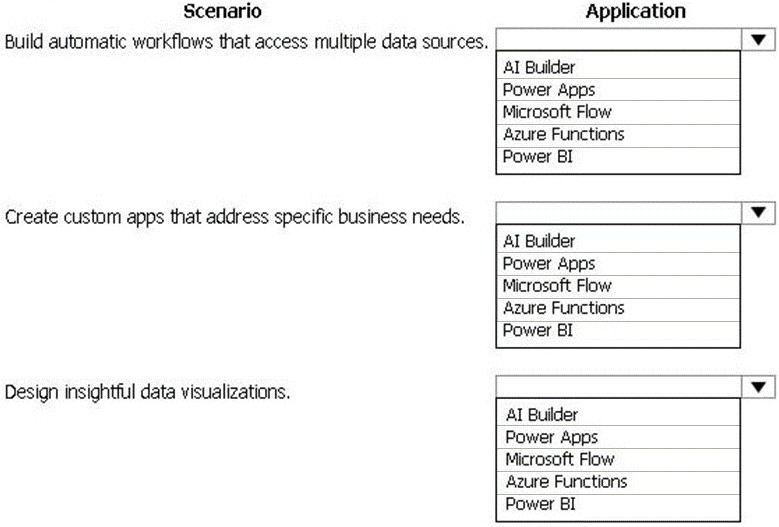
Which tools should you recommend? To answer, select the appropriate options in the answer area.

NOTE: Each correct selection is worth one point.

Show answerHide answer

Explanation


Explanation:
This question assesses the fundamental purpose of each core Power Platform component. The scenario emphasizes a low-code/no-code approach for business users to build solutions independently, without deep IT skills or increasing IT overhead.

Correct Option:

Build automatic workflows:
Microsoft Flow (now Power Automate). This is the primary low-code tool for creating automated workflows that connect to hundreds of data sources and services.

Create custom apps:
Power Apps. This is the core low-code application platform for building custom canvas or model-driven apps to address specific business needs.

Design insightful data visualizations:
Power BI. This is the dedicated business analytics service for creating interactive reports, dashboards, and data visualizations.

Incorrect Options:

AI Builder:
Incorrect for all three. While it adds AI capabilities to apps, flows, or reports, it is not the primary tool for building workflows, apps, or visualizations from scratch.

Azure Functions:
Incorrect for all three. This is a pro-code, serverless compute service requiring development skills, contradicting the "no development skills" requirement. Using Power Apps for workflows, Power BI for apps, etc., would also be incorrect as it misapplies each tool's primary function.

Reference:
Microsoft Learn PL-900: "Describe the business value of Power Platform services," which defines the core purpose of Power Apps (build apps), Power Automate (automate processes), and Power BI (analyze data).
Question 3 Choose 1
A distribution company has multiple warehouses.

Tax rates charged on sales orders need to be calculated based on locality and region.

You need to recommend a cost-effective solution that can be implemented quickly.

What should you recommend?
Show answerHide answer

Correct answer: B Create alerts in Dynamics 365 Finance for tax table changes.

Explanation

Explanation:
The question requires a quick, cost-effective Power Platform solution to calculate dynamic tax rates based on location for sales orders. The goal is to avoid custom coding and leverage low-code services.

Correct Option:

C. Implement the Common Data Model.
The Common Data Model (CDM) within Dataverse provides standardized, extensible data schemas, including for finance and operations.

You can quickly create a Tax Rate table with columns for locality, region, and rate, then relate it to your sales order data.

A Power App or automated Power Automate flow can use this table to perform the lookup and calculation without code, meeting the "quick and cost-effective" requirement.

Incorrect Options:

A. Check AppSource for a tax add-on:
While possible, it may not be "cost-effective" (could require purchase/subscription) and is not the primary low-code solution to build.

B. Create alerts in Dynamics 365 Finance:
This addresses notification of changes but not the core problem of calculating taxes. It also assumes use of Dynamics 365 Finance, which isn't specified.

D. Run a Power BI report:
Power BI is for analysis and visualization, not for operational calculation and enforcement of tax rates during the sales order process.

E. Write scripts and code tax updates:
This contradicts "cost-effective" and "quick," as custom code requires developer skills, time, and ongoing maintenance.

Reference:
Microsoft Learn: "Introduction to Microsoft Dataverse" explains how the Common Data Model provides standard and custom tables to build business solutions rapidly without code.
Question 4
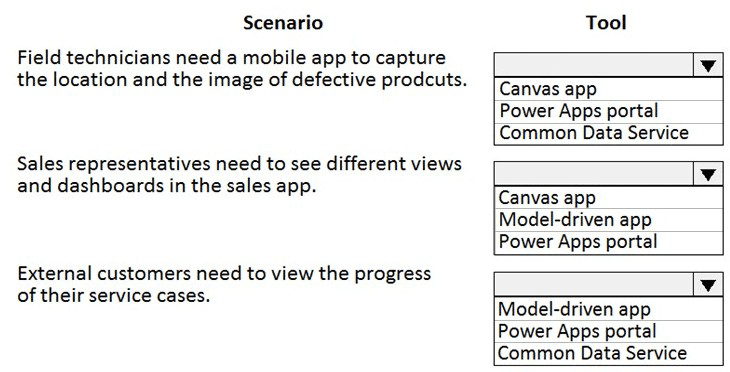
A company plans to use Power Platform to build apps which address specific business challenges.

You need to recommend the appropriate types of Power Apps to use.

What should you recommend? To answer, select the appropriate option in the answer area.

NOTE: Each correct selection is worth one point.

Show answerHide answer

Explanation


Explanation:
This question tests understanding of the three main Power Apps project types: Canvas apps, Model-driven apps, and Power Apps portals. Each is designed for different user experiences, audiences, and development approaches.

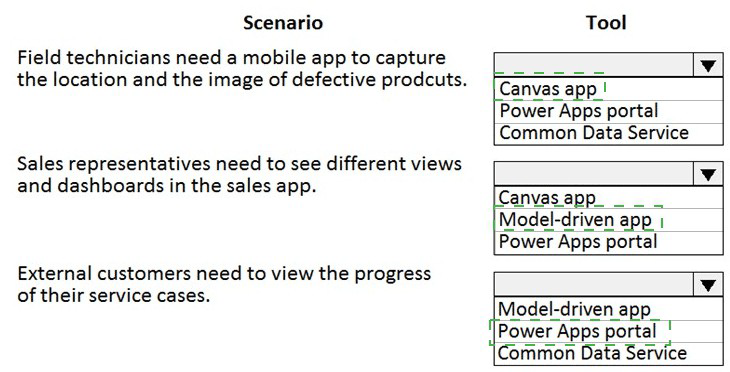
Correct Option:

Field technicians (mobile, location/image):
Canvas app. Canvas apps are ideal for task-specific, pixel-perfect mobile interfaces. You can easily add a camera control and location sensor for capturing images and GPS data.

Sales reps (views/dashboards in sales app):
Model-driven app. Model-driven apps are built on Dataverse and provide a rich, forms-views-dashboards interface by default, perfect for complex business data like sales.

External customers (view case progress):
Power Apps portal. Portals are designed to create external-facing websites where anonymous or authenticated external users (like customers) can interact with Dataverse data, such as viewing their service cases.

Incorrect Options:
Power Apps portal for internal field techs or sales reps is incorrect; portals are for external users.

Model-driven app for the field techs is too heavy and not optimized for a simple, custom camera/LOCATION capture task.

Canvas app for sales reps or external customers is incorrect. Sales reps need the structured, data-rich environment of a model-driven app. Customers need an external website (portal), not an internal canvas app.

Common Data Service (now Dataverse) is a data platform, not an app type, so it is incorrect for any scenario requiring an application.

Reference:
Microsoft Learn PL-900: "Describe Power Apps" module, which distinguishes use cases for canvas, model-driven, and portal apps.
Question 5
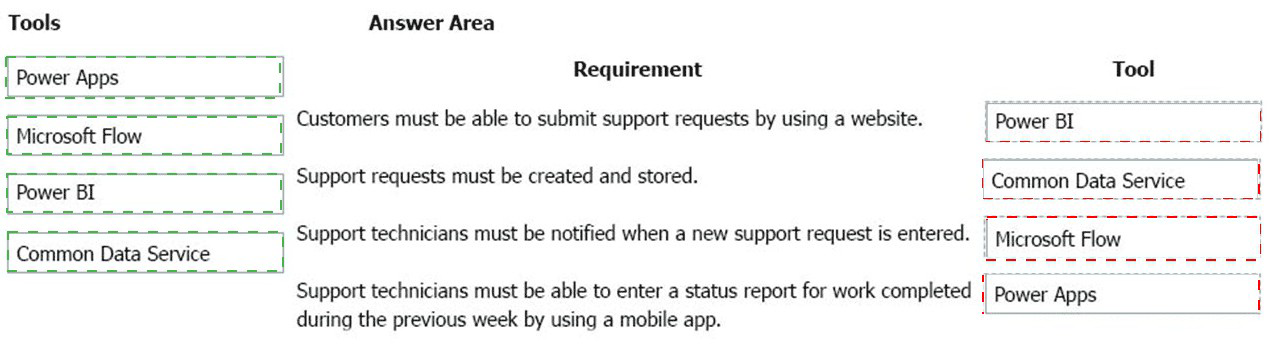
You manage the support team at a rapidly growing company.

Customers and support technicians need a better experience when logging and responding to support requests. You need more visibility into what the support technicians are doing every week.

You need to recommend tools to help the company's needs.

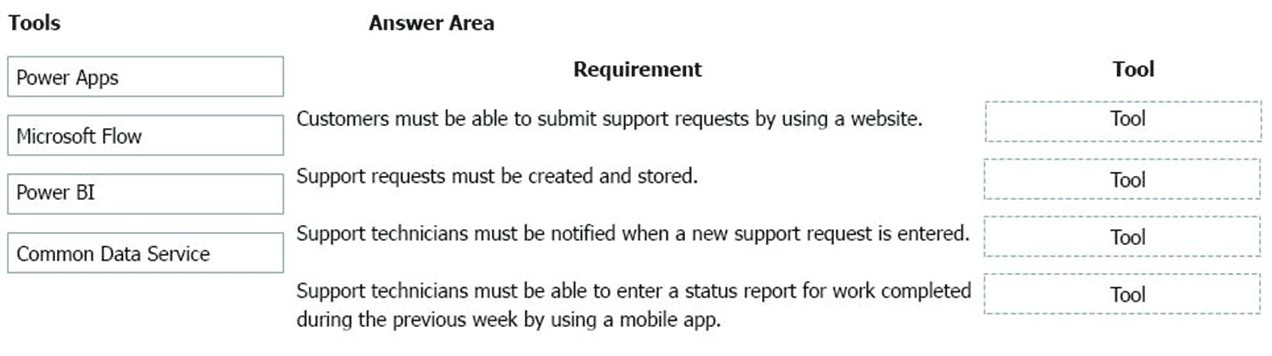
Which tools should you recommend? To answer, drag the appropriate tools to the correct requirements. Each tool may be used once, more than once, or not at all. You may need to drag the split bar between panes or scroll to view content.

NOTE: Each correct selection is worth one point.

Show answerHide answer

Explanation


Explanation:
This is a drag-and-drop question mapping Power Platform tools to specific business requirements. The solution requires selecting the component that best fulfills each need, using the core Power Platform services: Power Apps, Power Automate (Microsoft Flow), Power BI, and Dataverse (Common Data Service).

Correct Option:
Customers must be able to submit support requests by using a website: Power Apps (specifically, a Power Apps portal). Portals create external-facing websites for customers to interact with Dataverse data, such as submitting a new support ticket.

Support requests must be created and stored: Common Data Service (now Dataverse). This is the centralized, secure data platform where the support request records (data) are stored and managed.

Support technicians must be notified when a new support request is entered: Microsoft Flow (now Power Automate). This is the automation tool used to create a workflow that triggers (e.g., when a new row is created in Dataverse) and sends a notification (e.g., email, Teams message) to a technician.

Support technicians must be able to enter a status report... by using a mobile app: Power Apps (specifically, a canvas app). Canvas apps are ideal for building custom, mobile-optimized interfaces for tasks like data entry by field or support technicians.

Incorrect Options:
Power BI would be incorrect for any requirement. It is for data visualization and reporting, not for data entry, storage, notifications, or building customer websites. Using Common Data Service for the website or notification is incorrect. It's the backend data service, not the front-end application (portal) or the automation engine (Flow).

Using Microsoft Flow for the mobile app or website is incorrect. Flow automates processes between services; it does not build user-facing applications.

Reference:
Microsoft Learn PL-900: "Describe the business value of Power Platform services," which defines the core purpose of Power Apps (build apps/portals), Power Automate (automate processes), Power BI (analyze data), and Dataverse (store and manage data).

That's the last free question in Topic 1: Understand the business value of Power Platform

You've seen the free 30% (5 of 18 questions). Full access unlocks every question and full-length PL-900 mock exams (65 questions, 105 minutes), a different mock on every attempt.

Unlock full mock exam
Full mock exam

Sit the PL-900 exam before exam day

Full-length mocks with the same number of questions and the same time limit as the real PL-900 exam. Every attempt draws a new set of questions from the full bank, so you can keep going until you pass comfortably.

Get full PL-900 mock exam
  • 65questions per mock
  • 105 mintime limit
  • 50questions in the bank
  • Newmock on every attempt