Refer to the exhibits.
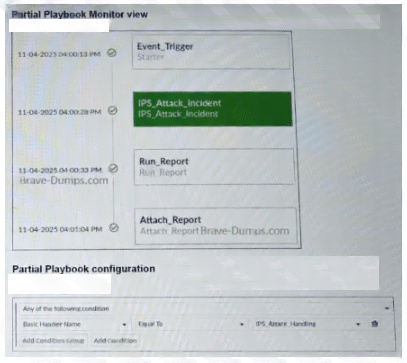
A partial view of the Playbook Monitor page and the corresponding playbook configuration are shown. Based on the monitor page and the configuration of the playbook, what has triggered the Run_Report task? (Choose one answer)
A partial view of the Playbook Monitor page and the corresponding playbook configuration are shown. Based on the monitor page and the configuration of the playbook, what has triggered the Run_Report task? (Choose one answer)
Show answerHide answer
Correct answer: A An IPS_Attack_Handling event
Explanation
Explanation:The Playbook Monitor timeline shows Event_Trigger first, then IPS_Auxck_Incidient (typo for IPS_Attack_Incident?), then Run_Report. The playbook configuration shows condition "IPS_Auxck_Handing" (likely IPS_Attack_Handling). This indicates the playbook was triggered by an IPS_Attack_Handling event, which then executed Run_Report after matching the condition.
Correct Option:
A. An IPS_Attack_Handling event
The playbook configuration explicitly includes a condition referencing "IPS_Auxck_Handing" (interpreted as IPS_Attack_Handling). The monitor shows Event_Trigger with state change, followed by Run_Report. This means the event handler or trigger condition IPS_Attack_Handling fired, initiating the playbook and subsequently the Run_Report task.
Incorrect Options:
B. An IPS incident creation
Run_Report appears after IPS_Auxck_Incidient in the timeline, but the condition in the config is IPS_Attack_Handling, not incident creation. Incident creation is a potential outcome, not the trigger for Run_Report.
C. An Event_Trigger log
Event_Trigger appears in the monitor timeline, but this is the first step showing the trigger firing, not the specific condition that caused Run_Report. Event_Trigger is generic; the specific condition is IPS_Attack_Handling.
D. An IPS_Attack_Incident log
The monitor shows IPS_Auxck_Incidient (typo for IPS_Attack_Incident), but this appears before Run_Report. The playbook configuration condition references IPS_Attack_Handling, not IPS_Attack_Incident. They are separate event types.
Reference:
FortiEDR Administration Guide, "Playbook Monitor → Understanding Trigger Conditions"; Fortinet NSE6_EDR_AD-7.0 Study Guide, "Event Triggers and Task Execution."