Fortinet certification · Exam NSE5_FNC_AD_7.6

NSE5_FNC_AD_7.6 Mock Exam Page 2

Fortinet NSE 5 FortiNAC-F 7.6 Administrator

Free NSE5_FNC_AD_7.6 mock exam questions 11–17, each with the answer and an explanation.

17 questions · 32 minutes · free, no sign-up

Free NSE5_FNC_AD_7.6 questions

11–17 of 17 free
Question 11 Choose 1
An administrator has configured the DHCP scope for a registration isolation network, but the isolation process isn't working.
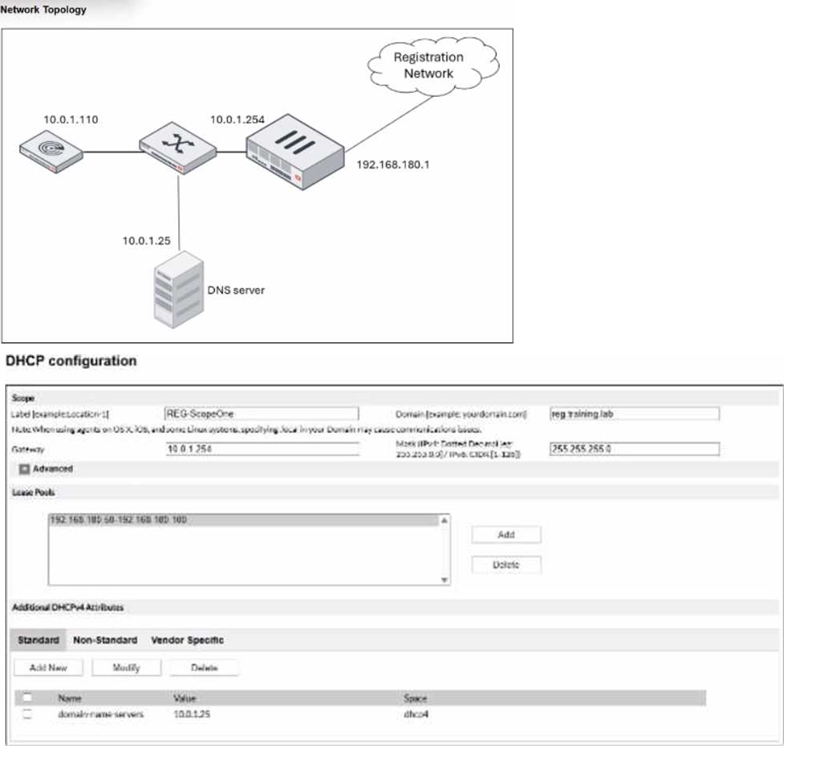


An administrator has configured the DHCP scope for a registration isolation network, but the isolation process isn't working.
What is the problem with the configuration?
Show answerHide answer

Correct answer: D The gateway defined for the scope is incorrect.

Explanation

Explanation:

Question Summary:
This question evaluates the candidate's ability to diagnose a misconfigured DHCP scope within a FortiNAC registration isolation network scenario. It tests understanding of the critical relationship between the defined gateway IP address, the lease pool's subnet, and the network topology for proper client isolation and subsequent network access.

✅ Correct Answer:

Option D: The gateway defined for the scope is incorrect. This option is valid because the topology shows the registration network gateway as 192.168.180.1, but the configured DHCP scope gateway is set to 10.0.1.254. This mismatch prevents isolated hosts from receiving correct routing instructions, breaking the isolation process as clients cannot communicate with the necessary FortiNAC enforcement points on their assigned subnet.

❌ Incorrect Answer:

Option A: The domain name server designation is incorrect. While an incorrect DNS server can cause name resolution failures, it does not directly prevent the core registration and isolation process from functioning. Clients can still initiate contact with FortiNAC for authentication and remediation even with flawed DNS configuration.

Option B: The label uses a system-reserved value. The label "REG-ScopeOne" is an administrator-defined string for scope identification. FortiNAC does not reserve common terms like "REG" for labels; these are user-configurable and do not impact the technical operation of DHCP lease assignment or network isolation.

Option C: The lease pool does not contain a complete subnet. The lease pool 192.168.180.50-192.168.180.100 is a valid range within the 192.168.180.0/24 subnet. DHCP scopes typically define a usable pool, not every address in the subnet, excluding the gateway and other reserved IPs. This configuration is standard and functional.

🔧 Conclusion:
The correct answers demonstrate that a DHCP scope in a registration network must provide clients with a gateway address that matches the subnet of the assigned lease pool and aligns with the network's physical topology. The primary failure point for isolation is an incorrect default gateway, which disrupts all layer-3 communication for the isolated host.

Reference:
Fortinet Documentation Library. FortiNAC Administration Guide, Version 7.6. "Configuring Registration."
Question 12 Choose 3
When creating a user or host profile, which three criteria can you apply? (Choose three.)
Show answerHide answer

Correct answer: A, B, E Host or user group memberships Host or user attributes Location

Explanation

Explanation:

This question tests your understanding of Profile configuration within FortiNAC-F. Profiles are the primary building blocks used to categorize entities based on specific identifying data points before they are evaluated by the policy engine for network access.

✔️Correct Options:

Host or user group memberships:
This criterion allows the system to identify devices based on their presence in local or directory-based groups. It simplifies policy application by grouping multiple entities that share the same organizational role or technical classification.

Host or user attributes:
Attributes allow for granular identification by looking at specific data points like OS version, serial numbers, or LDAP fields. This ensures that security policies are tailored to the exact technical specifications and ownership details of the connecting device.

Location:
Location-based criteria utilize the physical connection point, such as the specific switch, port, or SSID, to define a profile. This is essential for enforcing localized access rules where a user’s permissions may change based on their physical office.

❌Why the Other Options Are Wrong:

C. Adapter current VLAN:
The current VLAN is an operational state resulting from an applied policy rather than a classification criterion used to define a profile. Using the current VLAN as a criterion would create a circular logic loop where the current state determines the profile that is supposed to assign that state. The system needs to identify what the device is before it decides which VLAN it should be placed in.

D. An applied access policy:
Access policies are the final results of a match between a profile and a logical network, not a criterion used within the profile itself. A profile must be defined and matched first before an access policy can even be considered for application to a specific host or user session. Including a policy as a profile criterion would reverse the logical flow of the FortiNAC policy evaluation engine.

Reference:
🔧 FortiNAC-F 7.6 Administration Guide: User and Host Profiles
The documentation confirms that profiles are constructed using location data, group memberships, and specific user or host attributes to facilitate precise network segmentation and identification.
Question 13 Choose 1
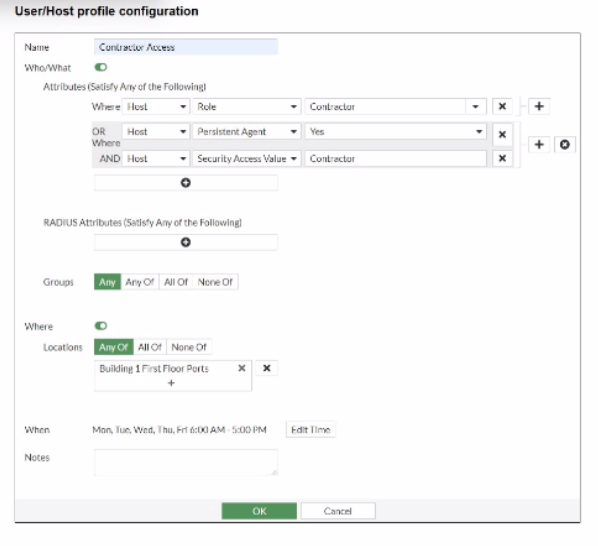
Refer to the exhibit.


If a host is connected to a port in the Building 1 First Floor Ports group, what must also be true to match this user/host profile?
Show answerHide answer

Correct answer: D The host must have a role value of contractor or an installed persistent agent and a security access value of contractor, and be connected between 6 AM and 5 PM.

Explanation

Explanation:

This question assesses your ability to interpret a FortiNAC-F User/Host profile configuration, specifically how the logical "AND" and "OR" conditions combine with "Where" (location) and "When" (time) rules to match a host.

✔️Correct Option:
To match this profile, the host must satisfy all "Who/What," "Where," and "When" conditions.

Who/What (Attributes): The conditions are:

(Host Role is Contractor) OR (Host Persistent Agent is Yes)
AND (Host Security Access Value is Contractor) This means the host needs either the Contractor role or a Persistent Agent, AND it must have a Security Access Value of Contractor.
Where (Locations): The host must be connected to a port in the "Building 1 First Floor Ports" group.
When (Time): The connection must occur between "Mon, Tue, Wed, Thu, Fri 6:00 AM - 5:00 PM."
Option D accurately reflects this combination of conditions.

❌Why the Other Options Are Wrong:

A. The host must have a role value of contractor, an installed persistent agent or a security access value of contractor, and be connected between 6 AM and 5 PM.
This option incorrectly groups the "security access value" with an "OR" condition for the "Who/What" attributes. The exhibit clearly shows "Host Security Access Value = Contractor" linked with an "AND."

B. The host must have a role value of contractor or an installed persistent agent, a security access value of contractor, and be connected between 9 AM and 5 PM.
This option correctly interprets the "Who/What" and "Security Access Value" conditions but incorrectly states the connection time as "9 AM and 5 PM" instead of "6 AM and 5 PM" from the exhibit.

C. The host must have a role value of contractor or an installed persistent agent or a security access value of contractor, and be connected between 6 AM and 5 PM.
This option incorrectly uses "OR" for the "security access value." The exhibit clearly states "AND Host Security Access Value = Contractor" as a separate, mandatory condition that must be met in addition to one of the prior conditions.

Reference:
⇒ Fortinet Document Library: FortiNAC 7.2.0 Administration Guide - Creating User and Host Profiles.This official documentation explains the logical operations (AND/OR) used when defining conditions within FortiNAC user/host profiles for matching purposes.
Question 14 Choose 1
An administrator wants to create a conference manager administrator account but would like to limit the number of conference accounts that can be generated to 30.
Which statement about conference accounts is true?
Show answerHide answer

Correct answer: B The administrator can set a maximum of 30 conference accounts in the administrative profile for the conference manager.

Explanation

Explanation:

This question tests configuration of sponsor privileges for conference account creation in FortiNAC-F. Conference accounts are bulk guest accounts for events, managed by sponsors (e.g., conference managers). Limits on how many a sponsor can create are set per administrator to control usage and prevent abuse, rather than globally or per-template.

✅ Correct Option:
B is correct because the administrator profile (under Users & Hosts > Administrators > Profiles) includes a "Manage Guests" or custom tab for sponsor settings. Here, you can enable conference account creation and specify a maximum number (e.g., 30) that this conference manager administrator can generate, enforcing the limit directly on that admin account.

❌ Why the Other Options Are Wrong:

A. In FortiNAC-F, conference accounts can be limited by multiples of 25, so the conference administrator could create 50 accounts — Incorrect; there is no restriction or requirement in FortiNAC that conference account limits must be in multiples of 25. Limits are flexible and set to any number (including 30) in the administrator profile, without forced increments or rounding to 25/50/etc.

C. The conference account limit is defined in the onboarding conference portal — Incorrect; the onboarding/portal pages handle guest/contractor self-registration and login flows, but do not control creation limits for sponsors/conference managers. Account creation limits for admins are configured in administrator profiles, not in portal settings.

D. Conference account limits are defined in the conference guest and contractor template — Incorrect; guest/contractor templates define account parameters like duration, password format, access times, and visitor types. While templates can influence how accounts are created, the maximum number a sponsor can generate is controlled per administrator in their profile, not in the template itself.

Reference:
⇒ https://docs.fortinet.com/document/fortinac-f/7.6.0/fortinac-manager/814925/add-an-administrator-profile — Confirms in the "Conference" permission: Sponsors may create any number of conference accounts, or the number may be limited by a template (but actual max count is settable per admin profile).

⇒ https://docs.fortinet.com/document/fortinac-f/7.6.0/administration-guide/580980/administrators — Explains administrator profiles limit sponsor access, including permissions to create guest/contractor/conference accounts with configurable restrictions.

⇒ FortiNAC-F 7.6.0 Administration Guide (Administrator Profiles section) — Details custom controls in profiles for guest/contractor management, including setting maximums for conference account creation by the administrator.
Question 15 Choose 1
An administrator manages a corporate environment where all users log into the corporate domain each time they connect to the network. The administrator wants to leverage login scripts to use a FortiNAC-F agent to enhance endpoint visibility Which agent can be deployed as part of a login script?
Show answerHide answer

Correct answer: B Dissolvable

Explanation

Explanation:

The question focuses on which FortiNAC-F agent type can be executed via login scripts to enhance endpoint visibility. It tests understanding of agent deployment methods and their suitability for temporary execution during user logins.

🟢 Correct Option:

B. Dissolvable
Dissolvable agents run temporarily during login, collect endpoint information, and remove themselves after execution. This makes them ideal for domain login scripts, providing visibility without permanently installing software on endpoints.

🔴 Why the Other Options Are Wrong:

A. Persistent
Remains installed on endpoints permanently, unsuitable for temporary login-script deployment. It also increases administrative overhead since updates and uninstallation must be managed manually.

C. Mobile
Designed for iOS/Android devices, cannot run via domain login scripts. It focuses on mobile device visibility rather than traditional corporate endpoints.

D. Passive
Only monitors network traffic without actively collecting endpoint information, so it does not enhance visibility during login. Passive agents cannot execute scripts or gather detailed endpoint attributes.

Reference:
⇒ FortiNAC-F 7.6 Administration Guide – Agents
– Confirms that dissolvable agents can be deployed via login scripts and provide temporary endpoint visibility.
Question 16 Choose 1
An administrator wants FortiNAC-F to return a group of user-defined RADIUS attributes in RADIUS responses.
Which condition must be true to achieve this?
Show answerHide answer

Correct answer: B Inbound RADIUS requests must contain the Calling-Station-ID attribute.

Explanation

Explanation:

This question tests your understanding of how FortiNAC delivers dynamic, user-defined RADIUS attributes (like VLAN assignments or ACL names) to network devices. The key requirement involves how FortiNAC links the incoming request to a specific host record to retrieve the correct attributes.

✔️Correct Option:
The inbound RADIUS request must contain the Calling-Station-ID attribute, which carries the client's MAC address. This unique identifier allows FortiNAC to locate the correct host record and return the specific user-defined attributes assigned to that endpoint.

❌Why the Other Options Are Wrong:

❌ A. The requesting device must support RFC 5176:
RFC 5176 defines Change of Authorization (CoA) and Disconnect messages, which are used for mid-session changes like re-authentication or session termination. This is unrelated to including custom attributes in the initial Access-Accept response, which is handled by standard RADIUS attributes.

❌ C. The device models in the inventory view must be configured for proxy-based authentication:
Devices that return user-defined attributes must be configured for Local RADIUS Authentication. Proxy mode forwards requests to an external server, preventing FortiNAC from injecting its own attributes into the response. Local mode allows FortiNAC to control the entire RADIUS transaction.

❌ D. RADIUS accounting must be enabled on the FortiNAC-F RADIUS server configuration:
RADIUS accounting tracks session statistics like start/stop times and data usage. While useful for auditing, it is not required for FortiNAC to return user-defined attributes in an Access-Accept message. The prerequisites are strictly Local Authentication mode and the presence of the Calling-Station-ID.

Reference:
⇒ The Fortinet FortiNAC Administration Guide confirms: "For RADIUS Attribute Groups to work, the device must be configured for Local Authentication and the inbound RADIUS request must contain the Calling-Station-ID." This is also detailed in the RADIUS cookbook section of the documentation.
Question 17 Choose 1
How can an administrator configure FortiNAC-F to normalize incoming syslog event levels across vendors?
Show answerHide answer

Correct answer: A Configure severity mappings.

Explanation

Explanation:

This question addresses how FortiNAC-F handles the lack of standardization in syslog reporting across different manufacturers. It focuses on the translation layer that ensures consistent event processing regardless of the hardware source.

✔️Correct Option:
Severity mappings allow an administrator to translate a vendor's specific numerical or textual log levels into the standardized severity levels used by FortiNAC-F. This ensures that a "Critical" event from a Cisco switch and a "Level 1" event from a Juniper switch are processed with equal priority.

❌Why the Other Options Are Wrong:

B. Configure the vendor OUI settings:
Vendor OUI (Organizationally Unique Identifier) settings are used specifically for identifying the manufacturer of a device based on its MAC address prefix. These settings are critical for the initial discovery and profiling of hardware but have no functional impact on the interpretation of syslog message levels. Adjusting OUI data will not help the system normalize the disparate severity scales found in the incoming log data from various network infrastructure components.

C. Configure the security rule settings:
Security rules define the automated response actions that occur after an event has been identified, such as isolating a port or triggering a scan. While these rules depend on the severity of an event to determine the appropriate response, they do not perform the actual normalization of the raw log data. Without first mapping the vendor-specific severities, the security rules would be unable to trigger consistently across a diverse, multi-vendor environment.

D. Configure event to alarm mappings:
Event to alarm mappings are used to determine which specific system events should trigger a visual or audible notification within the administrative console. This feature manages the alerting behavior of the system but does not provide the logic required to translate or normalize severity levels between vendors. Normalization must happen at the intake stage through severity mapping before the event reaches the alarm or notification stage of the workflow.

Reference:
🔧 FortiNAC-F 7.6 Administration Guide: Syslog Integration
The official documentation states that Severity Mappings are the primary tool for standardizing the severity levels of incoming messages from various third-party syslog sources.

That's the last free question

You've seen the free 30% (17 of 59 questions). Full access unlocks every question and full-length NSE5_FNC_AD_7.6 mock exams (35 questions, 65 minutes), a different mock on every attempt.

Unlock full mock exam
Full mock exam

Sit the NSE5_FNC_AD_7.6 exam before exam day

Full-length mocks with the same number of questions and the same time limit as the real NSE5_FNC_AD_7.6 exam. Every attempt draws a new set of questions from the full bank, so you can keep going until you pass comfortably.

Get full NSE5_FNC_AD_7.6 mock exam
  • 35questions per mock
  • 65 mintime limit
  • 59questions in the bank
  • Newmock on every attempt