Fortinet certification · Exam NSE5_FNC_AD_7.6

NSE5_FNC_AD_7.6 Mock Exam

Fortinet NSE 5 FortiNAC-F 7.6 Administrator

Find out if you're ready for NSE5_FNC_AD_7.6. Take the free timed mock exam and get your score in minutes, or study the free NSE5_FNC_AD_7.6 questions below with answers and explanations.

17 questions · 32 minutes · free, no sign-up

Free NSE5_FNC_AD_7.6 questions

1–10 of 17 free
Question 1 Choose 1
While discovering network infrastructure devices, a switch appears in the inventory topology with a question mark (?) on the icon. What would cause this?
Show answerHide answer

Correct answer: B The SNMP ObjectlD is not recognized by FortiNAC-F.

Explanation

Explanation:

This question addresses Device Discovery and how FortiNAC-F identifies hardware. It tests your understanding of how the system uses the SNMP ObjectID (SysObjectID) to match a physical device to a specific model or driver in its database.

✔️Correct Option:
When FortiNAC-F successfully communicates via SNMP but the ObjectID returned by the device is not in the local database, it cannot assign a specific device type, resulting in a question mark (?) icon. This occurs because the software is unable to map the unique hardware signature to a known vendor profile, even though the management communication itself is functioning correctly.

❌Why the Other Options Are Wrong:

A. The wrong SNMP community string was entered during discovery:
An incorrect string prevents all SNMP communication between the server and the switch. The device would typically fail to be added to the inventory entirely rather than appearing as an unknown type in the topology. The system requires a valid string to even begin the interrogation process of the hardware metadata.

C. A read-only SNMP community string was used:
FortiNAC-F can successfully identify a device’s vendor and model using a read-only string. Write access is only required for active configuration changes like VLAN switching, not for the initial identification of the hardware. The question mark icon is purely a result of a model mismatch, not a lack of write permissions on the device.

D. SNMP is not enabled on the switch:
If SNMP is disabled, FortiNAC-F cannot pull any metadata or system information from the hardware. This prevents the device from being placed in the topology at all because the management protocols are not responding. A device must be reachable via SNMP for the software to even attempt to categorize it or display any icon.

Reference:
🔧 FortiNAC-F 7.6 Administration Guide: Device Inventory
This documentation confirms that a question mark icon signifies that the device's Vendor and Model (via ObjectID) are not recognized by the current software version.
Question 2 Choose 2
Which two requirements must be met to set up an N+1 HA cluster? (Choose two.)
Show answerHide answer

Correct answer: A, B A FortiNAC-F manager A FortiNAC-F device designated as a secondary

Explanation

Explanation:

Question Summary:
This question evaluates understanding of high availability (HA) requirements specifically for N+1 clustering in FortiNAC 7.6. It tests knowledge of the mandatory components and roles needed to form a valid cluster, including the necessity of a FortiNAC-F manager node and proper designation of secondary appliances, while distinguishing these from synchronization network and primary node count constraints.

Correct Answer:

✅ A. A FortiNAC-F manager
A FortiNAC-F manager is mandatory in every N+1 HA cluster. The manager node serves as the central control point that orchestrates configuration synchronization, database replication, and failover coordination across all cluster members. Without this dedicated manager role assigned to one FortiNAC-F appliance, the cluster cannot initialize or maintain consistent state among nodes.

✅ B. A FortiNAC-F device designated as a secondary
At minimum, one FortiNAC-F appliance must be explicitly configured and designated as a secondary node to participate in the N+1 cluster. The secondary device maintains a replicated copy of the primary’s configuration and database, enabling automatic or manual failover when required. This role assignment is a core prerequisite for establishing cluster membership and HA functionality.

Incorrect Answer:

❌ C. A dedicated VLAN for primary and secondary synchronization
While a separate network segment for heartbeat and synchronization traffic is a recommended best practice for stability and security, FortiNAC documentation does not mandate a dedicated VLAN. Synchronization can occur over an existing production network interface if properly isolated and firewalled, so this is not a strict requirement to form the cluster.

❌ D. At least two FortiNAC-F devices designated as primary
FortiNAC N+1 HA architecture allows only one active primary node at any time. Designating multiple devices as primary is invalid and prevented by the configuration logic. The cluster operates with a single primary controlling all operations while secondaries remain in standby, making this option technically incorrect.

Conclusion:
The correct answers confirm that a FortiNAC-F manager and at least one FortiNAC-F device designated as secondary are the two essential requirements. These elements establish the foundational control plane and redundancy membership needed for N+1 high availability. Candidates should remember that the manager role is non-negotiable and only one primary can exist in the cluster architecture.

Reference:
FortiNAC 7.6.0 Administration Guide, High Availability chapter
Question 3 Choose 2
A user was attempting to register their host through the registration captive portal. After successfully registering, the host remained in the registration VLAN. Which two conditions would cause this behavior? (Choose two.)
Show answerHide answer

Correct answer: C, D The port default VLAN is the same as the Registration VLAN. There is another unregistered host on the same port

Explanation

Explanation:

This question evaluates understanding of FortiNAC registration workflows, VLAN assignment behavior, and how switch port context affects post-registration network placement. It focuses on how FortiNAC determines whether a host can transition from a registration VLAN to a production VLAN after successful captive portal registration. Candidates must understand port-level VLAN configuration, multi-host scenarios, and how FortiNAC enforces access control decisions based on switch and host state.

Correct Answer:

🟢 Option C:
When the port default VLAN is identical to the registration VLAN, FortiNAC has no alternate VLAN to transition the host into after successful registration. In this situation, even though the registration process completes correctly, the network configuration prevents VLAN reassignment. FortiNAC relies on a distinct production or access VLAN to enforce post-registration access, and identical VLAN assignments eliminate that capability.

🟢 Option D:
If another unregistered host is connected to the same switch port, FortiNAC cannot safely move the port to a different VLAN without impacting that unregistered device. To preserve security and registration integrity, FortiNAC keeps the port in the registration VLAN. This behavior is common on shared ports, hubs, or improperly configured access ports where multiple MAC addresses are detected.

Incorrect Answer:

🔴 Option A:
Installing the wrong agent does not directly cause a host to remain in the registration VLAN after successful captive portal registration. Agent mismatches typically affect posture assessment or compliance checks, not VLAN transitions tied to registration status. In captive portal-based workflows, FortiNAC primarily relies on authentication and network enforcement logic rather than agent functionality to move hosts between VLANs.

🔴 Option B:
The absence of an agent on the host does not prevent VLAN reassignment following successful captive portal registration. Agentless registration is fully supported by FortiNAC for many access scenarios. VLAN movement decisions are based on registration state, port configuration, and network context. Therefore, lacking an agent alone does not explain why a host would remain in the registration VLAN.

Conclusion:
Options C and D are correct because they describe conditions where FortiNAC is technically or architecturally unable to transition a port to a new VLAN. Matching default and registration VLANs removes the possibility of reassignment, while shared ports with unregistered devices force FortiNAC to maintain a secure baseline state. Candidates should remember that VLAN movement depends on both switch configuration and port usage context.

Reference:
Fortinet FortiNAC Administration Guide
Fortinet FortiNAC Deployment and Design Guide
Question 4 Choose 1
Refer to the exhibit.


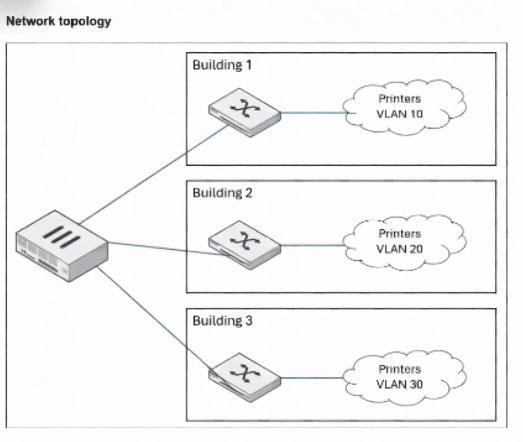
An administrator wants to use FortiNAC-F to automatically provision printers throughout their organization.
Each building uses its own local VLAN for printers.
Which FortiNAC-F feature would allow this to be accomplished with a single network access policy?
Show answerHide answer

Correct answer: B Logical networks

Explanation

Explanation:

This question tests how FortiNAC enables consistent policy application across heterogeneous network segments. In environments with location-specific VLANs (e.g., different printer VLANs per building), a single network access policy can assign access based on abstract roles or device types rather than hard-coded VLAN IDs. Logical networks abstract the enforcement by mapping a common label (e.g., "Printers") to site-specific VLANs on each switch.

✅ Correct Option:
B is correct because logical networks allow a single network access policy to reference a shared logical network (e.g., "Printers") for profiled printer devices. Each switch maps this logical network to its local printer VLAN (10, 20, or 30 per building), enabling automatic provisioning with one policy without creating separate policies per location or VLAN.

❌ Why the Other Options Are Wrong:

A. Dynamic host groups — Incorrect; dynamic host groups are used to automatically group hosts based on attributes such as user role, device type, or location for purposes like alarming, reporting, or applying isolation policies. However, they do not provide the abstraction needed for VLAN assignment or allow a single network access policy to enforce different local VLANs across buildings.

C. Device profiling rules — Incorrect; device profiling rules are responsible for identifying and classifying devices (e.g., recognizing a host as a printer based on DHCP fingerprints, OUI, or behavior). While essential for triggering registration or grouping, they do not handle the actual VLAN enforcement logic or enable one policy to map to multiple site-specific VLANs.

D. Preferred VLAN designations — Incorrect; preferred VLAN designations allow administrators to set fallback or default VLANs on ports or for specific device types when no other policy applies. This is a static, per-device/port configuration and does not provide the dynamic, policy-driven abstraction required to use one network access policy across buildings with different local printer VLANs.

Reference:
⇒ https://docs.fortinet.com/document/fortinac-f/7.6.0/administration-guide/867742/logical-networks — Explains logical networks separate policies from device-specific values; each logical network has an access value mapped to different VLANs per device/location.

⇒ https://docs.fortinet.com/document/fortinac-f/7.6.0/iot-deployment-guide/609917/define-the-logical-networks — Confirms each managed device can use different VLAN IDs for the same logical network label, ideal for consistent policies across buildings/sites.

⇒ https://docs.fortinet.com/document/fortinac-f/7.6.0/corporate-user-device/189158/mapping-logical-networks-to-vlan-s — Details mapping a logical network (e.g., for printers) to appropriate VLANs in model configuration per switch.
Question 5 Choose 1
A network administrator is troubleshooting a network access issue for a specific host. The administrator suspects the host is being assigned a different network access policy than expected.
Where would the administrator look to identify which network access policy, if any, is being applied to a particular host?
Show answerHide answer

Correct answer: C The Policy Details view for the host

Explanation

Explanation:

✔️ Question Summary
This question assesses the administrator's ability to diagnose network access policy assignments within FortiNAC. Understanding where to locate applied policy information for individual hosts is critical for troubleshooting connectivity and access control issues. The scenario requires knowledge of FortiNAC's interface navigation, specifically which view displays the relationship between hosts and their assigned network access policies. Candidates must distinguish between monitoring views and configuration details.

Correct Answer

✅ C. The Policy Details view for the host
The Policy Details view for a specific host provides comprehensive information about which network access policy is currently applied to that device. This view displays the active policy assignment, enabling administrators to verify whether the expected policy is in effect or if misconfigurations exist. FortiNAC's host-centric policy detail interface consolidates policy application data, making it the primary location for identifying policy assignments during troubleshooting scenarios. This view directly answers which policy governs the host's network access.

Incorrect Answer

❌ A. The Policy Logs view
The Policy Logs view displays historical events and actions related to policy enforcement but does not provide a direct, current snapshot of which specific policy is actively assigned to an individual host. While logs offer valuable audit trails and chronological data about policy changes or enforcement actions, they require interpretation and correlation rather than presenting immediate policy assignment status. Administrators seeking real-time policy identification need a view that shows current assignments, not historical log entries.

❌ B. The Connections view
The Connections view focuses on active network sessions and connectivity status rather than policy assignments. This view displays information about current connections, protocols, and communication states but does not explicitly show which network access policy governs a particular host. While connection data can be useful for network monitoring, it lacks the policy-specific details needed to identify which access control rules are being enforced on a device during troubleshooting.

❌ D. The Port Properties view of the host's port
The Port Properties view displays physical switch port configuration and status information rather than host-specific policy assignments. This view focuses on infrastructure elements like port settings, VLAN assignments, and switch interface characteristics. While port configuration influences network access, the Port Properties view does not directly identify which FortiNAC network access policy is applied to a connected host, making it unsuitable for this troubleshooting task.

🔧 Conclusion
The correct answer demonstrates that the Policy Details view for the host is the authoritative location for identifying applied network access policies in FortiNAC. This view provides administrators with immediate visibility into current policy assignments, eliminating guesswork during troubleshooting scenarios. Candidates should remember that host-centric policy views offer the most direct path to verifying policy application, ensuring efficient diagnosis of access control issues and reducing resolution time for network connectivity problems.

Reference
Fortinet Documentation Library - FortiNAC Administration Guide
Question 6 Choose 1
Where should you configure MAC notification traps on a supported switch?
Show answerHide answer

Correct answer: D On all ports except uplink ports

Explanation

Explanation:

This question tests your knowledge of Layer 2 visibility and trap configuration within FortiNAC-F. It focuses on how the system efficiently tracks MAC address movements without creating redundant or conflicting data from network infrastructure connections.

✔️Correct Option:
Configuring MAC notification traps on all ports except uplinks ensures FortiNAC receives alerts for end-user device connections while ignoring traffic from other switches or routers, which prevents "flapping" and unnecessary processing overhead.

❌Why the Other Options Are Wrong:

A. Only on ports that generate linkup/linkdown traps:
Link traps and MAC traps serve different purposes; link traps only monitor physical state, whereas MAC traps provide specific device identity data required for visibility.

B. Only on ports defined as learned uplinks:
Enabling traps on uplinks would cause FortiNAC to see every MAC address in the network through a single port, leading to database inaccuracies and performance issues.

C. On all ports on the switch:
Including uplinks in the configuration causes MAC address "slapping" between the actual edge port and the uplink port, confusing the FortiNAC location engine.

Reference:
🔧 Fortinet Documentation: FortiNAC-F SNMP Configuration
This documentation confirms that MAC notification traps must be excluded from trunk/uplink ports to maintain accurate host location mapping.
Question 7 Choose 1
During an evaluation of state-based enforcement, an administrator discovers that ports that should not be under enforcement have been added to enforcement groups.
In which view would the administrator be able to identify who added the ports to the groups? (Selected)
Show answerHide answer

Correct answer: A The Admin Auditing view

Explanation

Explanation:

This question tests knowledge of auditing administrative actions in FortiNAC during state-based enforcement troubleshooting. When ports are manually added to enforcement groups (port groups enabling VLAN/ACL enforcement), FortiNAC logs these configuration changes for accountability. The Admin Auditing view records who performed the action, what was changed, and when.

✅ Correct Option:

A is correct because the Admin Auditing view (under Logs) tracks all administrator-initiated changes, including adding ports to groups. It shows the user ID, timestamp, and details of modifications like group membership updates, allowing identification of who added the unintended ports.

❌ Why the Other Options Are Wrong:

B. The Event Management view — Incorrect; this view manages events and alarms from system/network activity (e.g., thresholds, mappings), not administrative configuration changes like group additions.

C. The Port Changes view — Incorrect; this logs operational port events (e.g., VLAN changes, host connections), but does not record who manually added ports to enforcement groups via admin actions.

D. The Security Events view — Incorrect; this displays incoming security notifications (e.g., threats, incidents) processed by triggers, unrelated to admin configuration changes on ports/groups.

Reference:
⇒ https://docs.fortinet.com/document/fortinac-f/7.6.0/administration-guide/159530/audit-logs — Confirms the Audit Logs (Admin Auditing view) track all additions/modifications/deletions by administrators, showing who made the change.

⇒ https://docs.fortinet.com/document/fortinac-f/7.6.0/administration-guide/252301/ports-view — Notes "Show Audit Log" opens the admin auditing log for changes to selected ports/items, including group membership.

⇒ FortiNAC-F 7.6.0 Administration Guide (Audit Logs section) — Describes filtering by item/user/action to identify specific admin changes like port group additions.
Question 8 Choose 1
Refer to the exhibit.
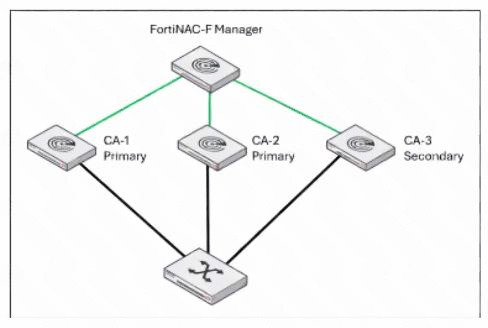
A FortiNAC-F N+1 HA configuration is shown.


What will occur if CA-2 fails?
Show answerHide answer

Correct answer: B CA-3 will continue to operate as a secondary in an N+1 HA configuration.

Explanation

Explanation:

This question tests understanding of FortiNAC-F N+1 HA failover behavior. In an N+1 setup, one secondary appliance monitors and supports multiple primary appliances. The key concept is that the secondary does not get permanently promoted — it steps in to cover the failed primary while retaining its secondary role.

✔️ Correct Option — B:
When CA-2 fails, CA-3 automatically assumes CA-2's responsibilities, but it remains designated as a secondary within the N+1 HA configuration. It continues monitoring and supporting the remaining primaries without changing its architectural role.

❌ Why the Other Options Are Wrong:

A. CA-1 and CA-3 will operate as a 1+1 HA cluster with CA-3 acting as a hot standby.
N+1 HA does not convert into a 1+1 cluster upon failure. CA-3 does not become a hot standby for CA-1 specifically — it retains its role as a shared secondary.

C. CA-3 will be promoted to a primary and share management responsibilities with CA-1.
CA-3 is not promoted to primary. In N+1 HA, the secondary covers the failed node's duties without being re-designated as a primary appliance.

D. CA-3 will be promoted to a primary and FortiNAC-F Manager will load balance between CA-1 and CA-3.
FortiNAC-F Manager does not perform load balancing between nodes in an N+1 failover event. This misrepresents how N+1 HA handles failover traffic.

Reference:
🔧 Fortinet Documentation — FortiNAC-F HA Configuration Guide
Confirms secondary node behavior and N+1 HA failover roles in FortiNAC-F 7.6.
Question 9 Choose 1
Refer to the exhibit.


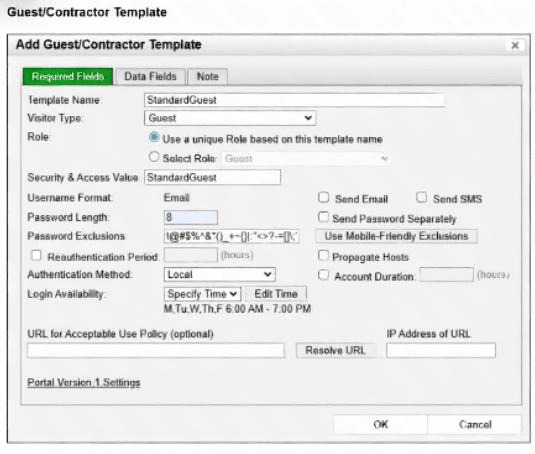
What will happen to the host of a guest user created from this template if the time of connection is 8:00 PM?
Show answerHide answer

Correct answer: A The host will be marked as non-authenticated.

Explanation

Explanation:

This question evaluates your understanding of how "Login Availability" settings in a FortiNAC-F guest/contractor template control access times and the immediate outcome of attempting to connect outside those defined windows.

✔️Correct Option:
The "Login Availability" for this template is set for weekdays from 6:00 AM to 7:00 PM. An attempt to connect at 8:00 PM falls outside this permitted time. In such a case, the authentication attempt will fail because the account is not considered valid for login during that period, thus the host will be marked as non-authenticated.

❌Why the Other Options Are Wrong:

B. The host will be marked as a rogue device.
A rogue device is typically an unknown or unauthorized device on the network. This host is associated with a guest template, meaning it's a known entity, even if its access is currently denied.

C. The host will be marked as at-risk.
"At-risk" usually relates to compliance failures or suspicious behavior. While connecting outside the permitted time is a policy violation, the immediate outcome for login availability is authentication failure, not a change to an "at-risk" status.

D. The host will be administratively disabled.
Administrative disablement is a more severe and persistent action typically taken for repeated violations or serious policy breaches. For a single attempt outside the login window, the immediate and direct consequence is that authentication simply fails, rendering the host non-authenticated, rather than outright disabling the host entry.

Reference:
⇒ Fortinet Document Library: FortiNAC 7.2.0 Administration Guide - Guest Access Configuration.
This documentation details how "Login Availability" restricts access, implying that attempts outside this window lead to an unsuccessful authentication.
Question 10 Choose 1
When configuring isolation networks in the configuration wizard, why does a layer 3 network typo allow for mora than ono DHCP scope for each isolation network typo?
Show answerHide answer

Correct answer: C There can be more than one isolation network of each type

Explanation

Explanation:

Question Summary
This question evaluates knowledge of Layer 3 isolation network configuration in FortiNAC-F 7.6's configuration wizard, focusing on DHCP scope support. It tests FortiNAC-F's network access control mechanisms, including isolation states like Registration, Remediation, and Isolation. Essential areas cover DHCP allocation logic, scope multiplicity per state, and wizard-driven setup for enterprise-scale segmentation without IP conflicts. ​

Correct Answer

C. There can be more than one isolation network of each type.
FortiNAC-F 7.6 Layer 3 configuration explicitly permits multiple DHCP scopes within each isolation network type to accommodate diverse environments, such as separate registration networks across buildings. Official documentation confirms this flexibility in the wizard, enabling administrators to define scopes for varied captive portals or locations while maintaining state-specific routing. This design principle supports scalable deployments with distinct lease pools per network instance. ​

Incorrect Answer

A. The layer 3 network type allows for one scope for each possible host status.
While Layer 3 supports scopes tied to states like Registration or Isolation, the primary reason for multiple scopes per network type is accommodating multiple networks, not limiting to one per status; documentation emphasizes environmental multiplicity over status restriction, making this explanation incomplete and misaligned with wizard capabilities. ​

B. Configuring more than one DHCP scope allows for DHCP server redundancy.
DHCP redundancy in FortiNAC-F relies on High Availability clustering or relay configurations, not additional scopes within Layer 3 networks; official guides separate scope multiplicity for network diversity from failover mechanisms, rendering this option technically inaccurate per product architecture. ​

D. Any scopes beyond the first scope are used if the initial scope runs out of IP addresses.
FortiNAC-F assigns scopes based on network type and isolation state precedence, not sequential exhaustion; lease pool overflow requires manual range expansion or external relays, conflicting with documented deterministic allocation and wizard scope labeling rules. ​

Conclusion
The correct answers demonstrate that Layer 3 isolation networks in FortiNAC-F 7.6 support multiple DHCP scopes per type to handle diverse network instances like building-specific captive portals. This aligns with Fortinet's scalable NAC architecture, enabling precise lease assignment without overlap. Candidates should recall this wizard feature for configuring enterprise isolation effectively.​

Reference
Fortinet Documentation: Layer 3 Network
Fortinet Documentation: Configure Scopes
Fortinet Administration Guide: FortiNAC-F 7.6.0
Full mock exam

Sit the NSE5_FNC_AD_7.6 exam before exam day

Full-length mocks with the same number of questions and the same time limit as the real NSE5_FNC_AD_7.6 exam. Every attempt draws a new set of questions from the full bank, so you can keep going until you pass comfortably.

Get full NSE5_FNC_AD_7.6 mock exam
  • 35questions per mock
  • 65 mintime limit
  • 59questions in the bank
  • Newmock on every attempt

Boost Your NSE5_FNC_AD_7.6 Exam Score with Smart Preparation


The NSE5_FNC_AD_7.6 Fortinet NSE 5 FortiNAC-F 7.6 Administrator certification is aimed at IT and security professionals responsible for deploying and managing FortiNAC in enterprise environments. This exam validates your ability to control network access, enforce security policies, and maintain visibility across wired, wireless, and IoT devices.

Who This Exam Is For


Fortinet NSE 5 FortiNAC-F 7.6 Administrator certification is well-suited for network administrators, security administrators, and engineers who work with FortiNAC-F and want to demonstrate practical administration and troubleshooting skills.

Exam Topics Covered


The NSE5_FNC_AD_7.6 exam evaluates both conceptual understanding and hands-on knowledge in areas such as:

FortiNAC architecture and core components
Network visibility and device profiling
Policy creation and enforcement
Authentication methods and onboarding
Integration with Fortinet Security Fabric
Monitoring, reporting, and troubleshooting

Exam Information


Number of questions: Around 35
Time limit: 60 minutes
Question format: Multiple choice

High-Impact Study Approach


Success in the NSE5_FNC_AD_7.6 exam requires more than reading documentation. Practical exposure, scenario-based learning, and timed Fortinet NSE 5 FortiNAC-F 7.6 Administrator practice test are essential to build confidence and accuracy.

Practice That Makes the Difference


Using targeted NSE5_FNC_AD_7.6 mcqs can greatly enhance your preparation. These Fortinet NSE 5 FortiNAC-F 7.6 Administrator practice exam questions helps you become familiar with real exam-style questions, improve time management, and identify knowledge gaps before exam day.

Trusted by Customers


"FortiNACs complexity is in its breadth. The practice on profiling, posture checking, and automated remediation workflows made it all click. The exams heavy weighting on troubleshooting network access issues, just as the insight noted, was undeniable. I now have a clear blueprint for deploying NAC across our campuses."
- Daniel Patrick

“For NSE5_FNC_AD_7.6, Prepforti practice tests made a big difference. The coverage of NAC concepts, profiling, and policy flow was excellent. I reviewed explanations after each attempt and passed confidently.”
- Ava Morgan

Network access control is critical for security posture. Prepforti.com helped me understand FortiNAC integration with switches, profiling policies, and quarantine workflows. The practice tests were accurate and prepared me for exam success.
Angela Roberts, NAC Administrator | Dallas, TX