Nutanix Certified Professional - End User Computing (NCP-EUC) v6
Find out if you're ready for NCP-EUC. Take the free timed mock exam and get your score in minutes, or study the free NCP-EUC questions below with answers and explanations.
What are two primary purposes of a Frame utility Server? (Choose two.)
Show answerHide answer
Correct answer: A, BBackend for a client-server applicationshared file server
Explanation
Explanation: Frame utility server is a stand-alone, general purpose Windows server that
can be helpful for a variety of use cases, including:
License server: Install a network licensing manager for your software on a Frame
utility server. Your production instances can then connect to this server to get the
licenses.
Backend for a client-server application: Install a database or other backend service
on a Frame utility server. Your production instances can then connect to this
server to run your client-server application.
Shared file server: Install a file sharing service on a Frame utility server. Your
production instances can then access shared files from this server.
Test and develop virtual desktops: Use a Frame utility server as a sandbox
environment to test and develop your virtual desktops before publishing them to
your production account.
Question 2Choose 1
In Frame, what occurs when the minimum value in the capacity settings is set to less than
the Quick Publish value specified?
Show answerHide answer
Correct answer: CQuick Publish value settings are ignored, and regular publishing is performed.
Explanation
Explanation: Nutanix Frame allows administrators to configure capacity settings for their
virtual machines (VMs) that run virtual apps and desktops.
Capacity settings include:
Default capacity, which defines how many VMs are turned on when there is no
user activity on the account. This setting helps reduce costs by turning off unused
VMs.
Active capacity, which defines how many VMs are turned on when there is user activity on the account. This setting helps improve performance by ensuring
enough VMs are available for user sessions.
Quick Publish, which defines how many VMs are updated with the latest changes
when publishing a new version of an app or desktop. This setting helps speed up
the publishing process by updating only a subset of VMs instead of all of them.
According to Nutanix Frame documentation1, Quick Publish value should be equal to or
less than the active capacity value for each instance type.
If Quick Publish value is set higher than active capacity value, then Frame will ignore Quick
Publish value and perform regular publishing instead.
Question 3Choose 1
What is the AHV Xi PC plug-in used for?
Show answerHide answer
Correct answer: AWhen Prism Central resides in Xi Cloud
Explanation
Explanation: AHV Xi PC plug-in is used for when Prism Central resides in Xi Cloud. Prism
Central is a management plane that provides centralized control and visibility across
multiple Nutanix clusters and clouds. Xi Cloud is a hybrid cloud platform that enables
customers to run their applications and workloads on Nutanix infrastructure in public cloud
environments such as AWS and Azure2. The AHV Xi PC plug-in allows customers to use
Citrix Virtual Apps and Desktops with Nutanix AHV clusters running on Xi Cloud3.
Question 4Choose 1
An administrator wants to allow Citrix MCS integration with AHV.
Which component needs to be installed and where should it be deployed?
Show answerHide answer
Correct answer: ANutanix AHV MCS Plug-in on Citrix XenDesktop DC
Explanation
Explanation: According to Nutanix Support & Insights3, you need to install the Nutanix
AHV plugin for Citrix Virtual Apps and Desktops on Delivery Controllers (also called the
MCS plugin SDK) to create and manage Citrix-provisioned VMs in a Nutanix AHV
infrastructure environment.
Question 5Choose 2
Refer to the exhibit.
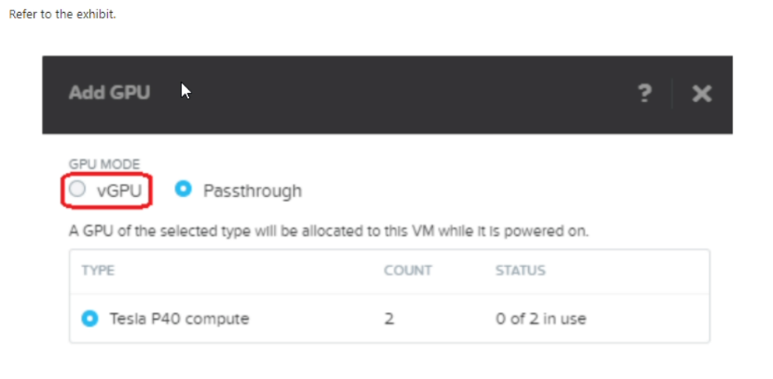
An administrator is configuring a virtual desktop gold master image withP40 NVIDIA vGPU.
upon trying to add a vCPU assignment inPrism Element, the administrator noticed that it is
not selectable and cannot proceed.
Which two actions are correct steps to resolve this issue? (Choose two.)
Show answerHide answer
Correct answer: B, DDisable ECC by runningnvdia-smi-e0.Checkif ECC Mode is turned on by runningnvdia-smi -q | grep “ECC Mode” -A2
Explanation
Explanation: ECC (Error Correcting Code) mode is a feature of some NVIDIA GPUs that
provides error detection and correction for memory errors. However, ECC mode can
interfere with vGPU functionality and prevent vGPU-enabled VMs from being created or
started1. Therefore, two correct steps to resolve this issue are B (Disable ECC by running
nvdia-smi -e 0) and D (Check if ECC Mode is turned on by running nvdia-smi -q | grep “ECC Mode” -A2).
Question 6Choose 2
During initial testing of a new VD' deployment, users are complaining that they are not
seeing the performance increase that was seenduring the POC phase of the project.
The POC deployment was tested on an NX line of nodes with AHV as the hypervisor. After
the test, the customer has decided to moveforwardwith a production deployment using Dell
XC nodes with ESXi as the hypervisor.
Which two actions must be taken. based on the hypervisor and node model change?
(Choose two.)
Show answerHide answer
Correct answer: A, DDisable the C-states.Update Network Drivers
Explanation
Explanation: one of the possible causes of poor performance in a VDI deployment
is power management, which can affect CPU frequency and performance. Therefore, it is
recommended to disable any power saving features on the BIOS level, such as C-states
and P-states.
Another possible cause of poor performance is network configuration, which can affect
network throughput and latency. Therefore, it is recommended to update network drivers
and firmware on the Dell XC nodes with ESXi23, and ensure that they are compatible with
Nutanix software.
Question 7Choose 1
A previous administrator provisioned all of the virtual desktops in a virtual desktop Nutanix
cluster using the following specifications:
• 6 vCPU
• 8 GB Memory
• 300 GB HDD
How can the current administrator best prepare next fiscal year's budget using Prism
Central?
Explanation: In Nutanix Prism Central, the Capacity Runway scenario provides details on
the available capacity for the next 12 months based on the current usage pattern. This
feature can help the administrator to plan and prepare the budget for the next fiscal year.
The administrator can use this information to decide whether more resources need to be
added to the Nutanix cluster or if the existing resources are sufficient.
https://www.nutanix.com/products/prism/prism-central
Prism Central planning tools can help you estimate the capacity runway of your cluster by
considering the storage, CPU, and memory capacity. However, you need to have at least
21 days of data from a cluster to calculate the baseline runway estimates4.
Question 8Choose 2
When creating a Frame account, which two are valid Network Type options? (Choose two.)
Show answerHide answer
Correct answer: A, CPublic NetworkPrivate Networkwith VPN
Question 9Choose 1
An organization recently deployed an Active-passive VDI solution across multiple sites within their Nutanix platforms. The Organization is now on phase two of the project, which
requires them to consolidate all user profile and home data, since each location will
haveitsown standalone Microsoft File Server.
Which solution will provide a more easily-managed environment for profile and Home
Share data that includes High Availability and a unified single namespace?
Show answerHide answer
Correct answer: DNutanix Files
Explanation
Explanation: Nutanix Files is a software-defined, scale-out file storage solution that
provides a repository for unstructured data, such as home directories, user profiles,
departmental shares, applicationlogs, backups, and archives1. Nutanix Files also provides
high availability and a unified single namespace for easy management2.
Question 10Choose 1
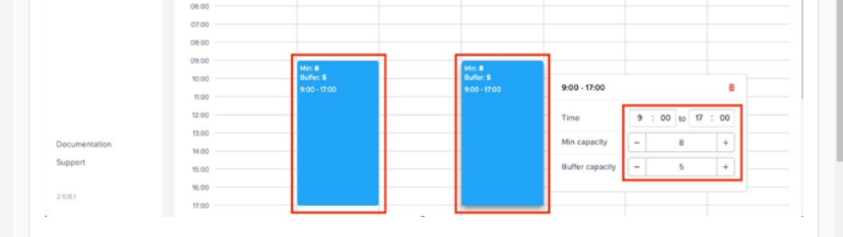
Refer the exhibit.
Which statement is true?
Show answerHide answer
Correct answer: BFive instances are running Tuesday and Thursday from 00:00am till 24:00 pm
Explanation
Explanation: The schedule has two rows: one for Weekdays and one for Tuesday and
Thursday.
Each row has a column for Instances, which indicates how many instances should be
running during that time range.
Each row also has a column for Time Range, which indicates the start and end time for
running the instances.
The time range is expressed in 24-hour format, where 00:00 means midnight and 24:00
means midnight of the next day.
According to the exhibit, the schedule Dev has the following settings:
On Weekdays (Monday to Friday), five instances are running from 09:00 am till
05:00 pm.
On Tuesday and Thursday, five instances are running from 00:00 am till 24:00 pm.
Full mock exam
Sit the NCP-EUC exam before exam day
Full-length mocks with the same number of questions and the same time limit as the real NCP-EUC exam. Every attempt draws a new set of questions from the full bank, so you can keep going until you pass comfortably.
About Nutanix Certified Professional - End-User Computing Exam
Key Facts:
Exam Questions: 60
Type of Questions: Multiple Choice Questions
Exam Time: 90 minutes
Passing Score: 70%
Key Topics:
1. Deployment & Configuration: 30% of exam
2. EUC Architecture & Design: 25% of exam
3. Management & Monitoring: 25% of exam
4. Troubleshooting: 20% of exam
Exam Day Strategies
Time Management: Allocate ~1.5 minutes per question.
Scenario Focus: Many questions simulate real-world VDI issues (e.g., "Users report slow logins. What’s the first step?").
Flagging: Skip complex questions and revisit them later.
Final Checklist
✅ Completed Frame/AHV hands-on labs
✅ Reviewed VDI optimization techniques
✅ Scored >75% on practice tests
✅ Familiar with troubleshooting workflows