Microsoft certification · Exam MS-700

MS-700 Mock Exam Page 3

Managing Microsoft Teams

Free MS-700 questions on Topic 5: Misc, Questions, each with the answer and an explanation.

20 questions · 30 minutes · free, no sign-up

Topic 5: Misc, Questions questions

21–30 of 85 free
Question 21 Choose 1
You have a Microsoft 365 E3 subscription that contains 500 users. All the users have computers that run Windows 10 and are joined to Azure AD.
Vou need to generate a report that identifies which documents the users copied from Microsoft Teams to USB devices.
What should you do first?
Show answerHide answer

Correct answer: B Assign the Microsoft 365 ES compliance add-on to each user.

Explanation

Explanation:
Generating a report on documents copied from Microsoft Teams to USB devices requires Data Loss Prevention (DLP) monitoring for endpoints. This specific capability—monitoring file activities on Windows 10 devices, including USB transfers—is a feature of Endpoint DLP. However, Endpoint DLP is not included in the Microsoft 365 E3 subscription. It requires an upgrade to Microsoft 365 E5 Compliance add-on licenses or an E5 suite. Therefore, you must first assign the necessary licenses before you can enable and configure the required DLP features.

Correct Option:

B. Assign the Microsoft 365 E5 compliance add-on to each user.
The Microsoft 365 E5 Compliance add-on license provides the advanced DLP capabilities required for Endpoint DLP, which includes monitoring and reporting on file activities such as copying to USB devices. This is a prerequisite step. Without this license, the Endpoint DLP features (including the necessary reporting) will not be available to configure or use, regardless of any subsequent policy creation or device onboarding.

Incorrect Option:

A. Onboard the Windows 10 computers to Endpoint data loss prevention (Endpoint DLP).
This is a critical step, but it is not the first step. You cannot onboard devices to Endpoint DLP until the tenant has the necessary licenses (E5 Compliance) and Endpoint DLP is enabled in the compliance portal. Licensing must come first.

C. Create a custom data loss prevention (DLP) policy.
Creating a DLP policy is an important configuration step after licensing and onboarding. However, a DLP policy for monitoring USB transfers on endpoints cannot be created or applied unless the Endpoint DLP feature (enabled by the E5 Compliance license) is available.

D. Assign the Enterprise Mobility + Security E5 add-on to each user.
The Enterprise Mobility + Security (EMS) E5 suite includes advanced security features like Microsoft Defender for Endpoint and advanced identity protection, but it does not include the advanced compliance and DLP features required for Endpoint DLP reporting. The correct licensing add-on for this specific requirement is the Microsoft 365 E5 Compliance add-on.

Reference:
Microsoft Docs - Get started with Endpoint data loss prevention: The "Prerequisites" section explicitly lists the licensing requirements: Microsoft 365 E5 or Microsoft 365 E5 Compliance subscription is required for Endpoint DLP. This confirms that assigning the correct license is the foundational first step.
Question 22 Choose 2
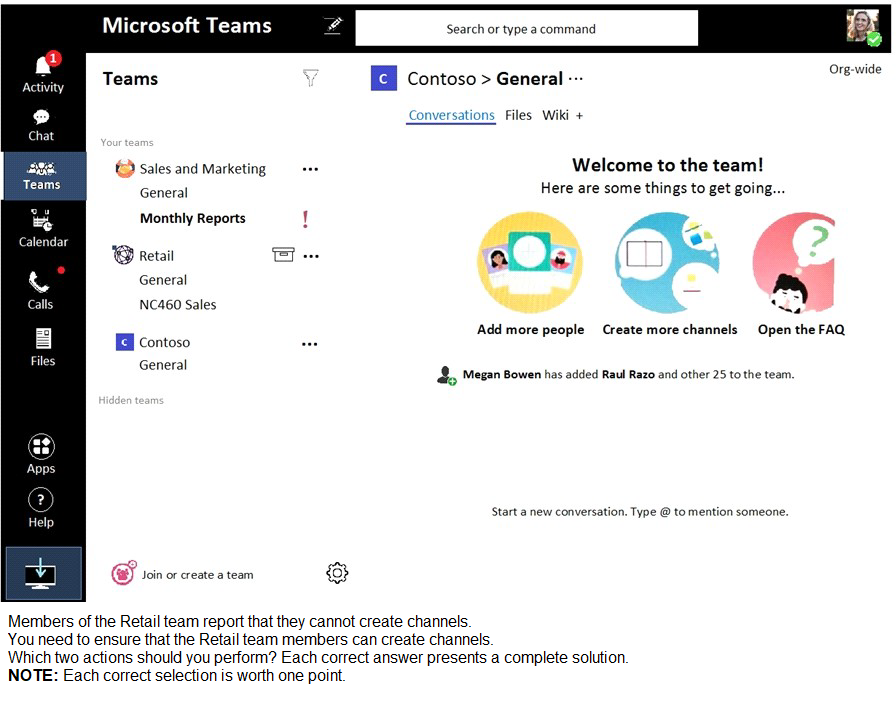
Your company has a Microsoft 365 subscription. From the Microsoft Teams client, you review the teams shown in the exhibit. (Click the Exhibit tab.)
Show answerHide answer

Correct answer: C, D From the Microsoft Teams admin center, unarchive the Retail team.Instruct the Retail team owner to restore the team by using the Microsoft Teams client.

Explanation

Correct Option:

C. From the Microsoft Teams admin center, unarchive the Retail team.
This is the primary administrative action. In the Teams admin center, an administrator can search for the Retail team, select it, and choose the "Unarchive" action. This restores the team to active status, re-enabling all member capabilities, including the ability to create channels.

D. Instruct the Retail team owner to restore the team by using the Microsoft Teams client.
This is the alternative user-driven action. A team owner can manage archiving/unarchiving for their own team. The owner can go to the ... (More options) menu next to the hidden/archived Retail team and select "Restore team". This also unarchives the team and solves the problem.

Incorrect Option:

A. From the Azure Active Directory admin center, change the membership type of the Office 365 group for the Retail team to Assigned.
The membership type (Assigned vs. Dynamic) controls how users are added to the group but has no impact on whether a team is archived or on the channel creation permissions within Teams.

B. From the Microsoft Teams client, promote all the Retail team members to an owner role.
While owners have more permissions than members, promoting all members is unnecessary and doesn't address the root cause. The limitation is because the team is archived/hidden, not because of their role. Even owners cannot create channels in an archived team.

E. From PowerShell, modify the information barrier policy.
Information barrier policies are used to restrict communication and collaboration between specific groups of users for compliance reasons (e.g., preventing HR from chatting with Finance). They have no relation to team archiving or the ability to create channels.

Reference:
Microsoft Docs - Restore an archived team: The documentation states that "When a team is archived, some actions are no longer available to team members," including the ability to "add or remove channels." To re-enable these features, you must restore (unarchive) the team. This can be done by an administrator in the admin center or by a team owner in the Teams client.
Question 23
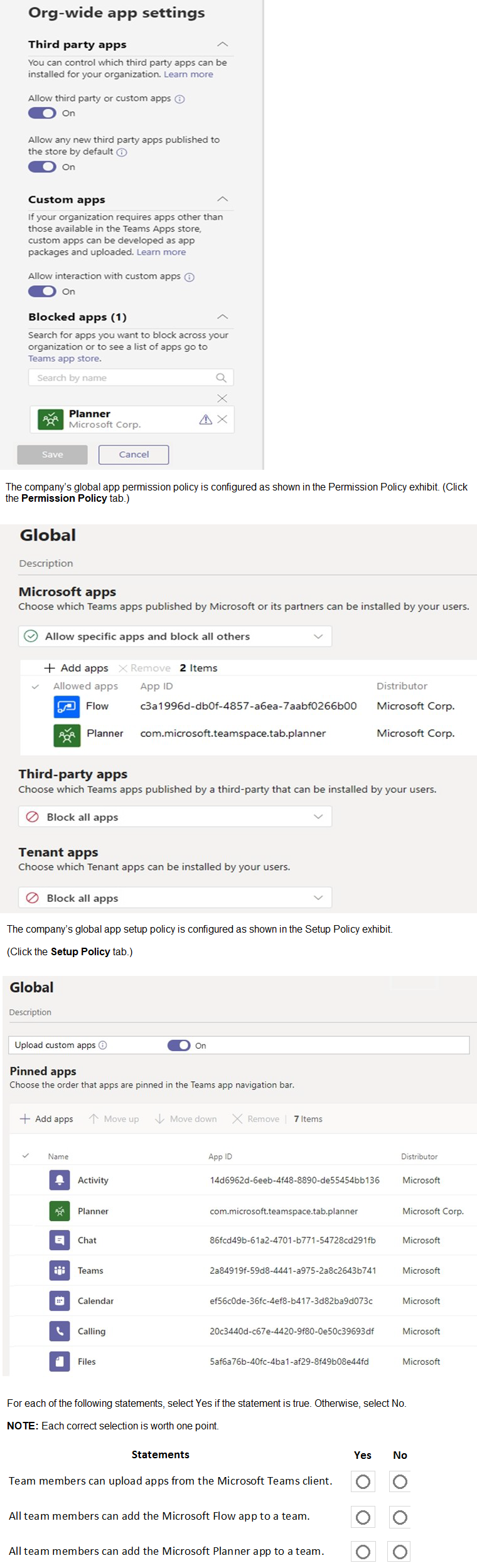
You are a Microsoft Teams administrator for your company. You have the Org-wide app settings shown in the App Settings exhibit. (Click the App Settings tab.)
Show answerHide answer

Explanation


Analysis of Settings:

Org-wide App Settings (Exhibit 1):
Third-party apps: Enabled (On). However, this is overridden by the more restrictive permission policy.

Custom apps (upload): Enabled (On). This allows uploading custom apps at the tenant level.

Global App Permission Policy (Exhibit 2): This policy is the primary gatekeeper for what apps users can install/use.

Microsoft apps: "Allow specific apps and block all others" is selected. The only explicitly allowed Microsoft apps are Flow and Planner.

Third-party apps: "Block all apps" is selected.

Tenant apps (custom apps): "Block all apps" is selected.

Global App Setup Policy (Exhibit 3): This policy controls which apps are pinned to the app bar for users (it does not control permission to install or add apps). Planner is pinned here, but this doesn't grant permission if it's blocked elsewhere.

Now, evaluate each statement:

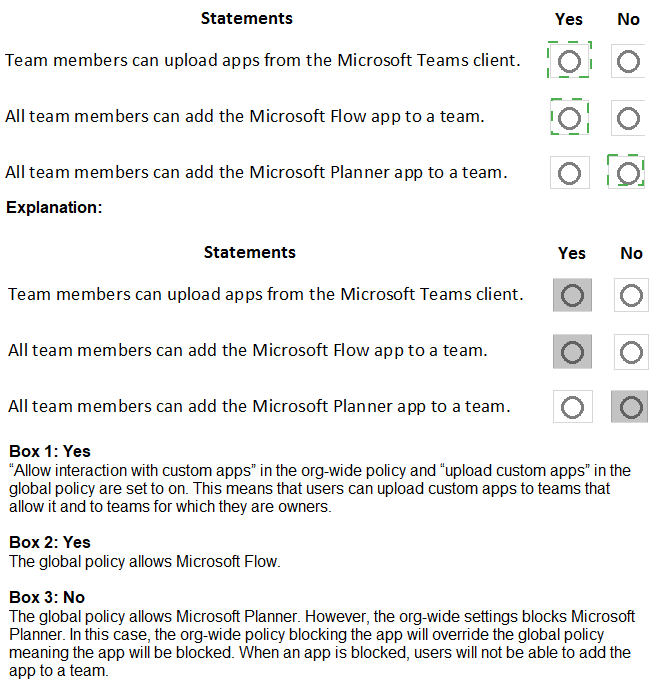
Statement 1: Team members can upload apps from the Microsoft Teams client.

Correct Selection: No

Explanation:
The ability to upload custom apps requires the Org-wide setting to be On (which it is) AND the user's App Permission Policy must allow "Tenant apps." The Global App Permission Policy explicitly sets "Tenant apps" to "Block all apps." This blocks users from uploading custom apps via the Teams client, regardless of the org-wide setting.

Statement 2: All team members can add the Microsoft Flow app to a team.

Correct Selection: Yes

Explanation:
The Global App Permission Policy for Microsoft apps is set to "Allow specific apps and block all others." Flow is one of the two explicitly allowed apps in this list (its App ID is shown). Therefore, users assigned this global policy have permission to add the Microsoft Flow app to a team.

Statement 3: All team members can add the Microsoft Planner app to a team.

Correct Selection: Yes

Explanation:
The Global App Permission Policy for Microsoft apps is set to "Allow specific apps and block all others." Planner is the other explicitly allowed app in this list. Therefore, users assigned this global policy have permission to add the Microsoft Planner app to a team. (Note: It being pinned in the Setup Policy is a separate, reinforcing action, but the permission is granted by the Permission Policy.)
Question 24 Choose 1
Your company has five offices. Each office has a unique phone number.
You plan to deploy Phone System to all the offices.
You need to ensure that each office has a unique greeting message for the weekdays and a unique greeting message for the weekends. The solution must minimize administrative effort.
D18912E1457D5D1DDCBD40AB3BF70D5D
What should you create?
Show answerHide answer

Correct answer: C five auto attendants that each contains one phone number

Explanation

Explanation:
Auto attendants are designed to provide custom call routing and greetings based on a schedule (e.g., business hours, after hours, weekends). They can play specific recorded messages and direct callers to different resources. Since you need unique greetings per office and separate messages for weekdays vs. weekends, each office requires its own set of greeting logic. Creating one auto attendant per office (each with its assigned unique phone number) allows you to independently configure the greeting schedule and messages for that specific location, minimizing complexity compared to trying to manage five different schedules and greetings within a single auto attendant.

Correct Option:

C. five auto attendants that each contains one phone number
An auto attendant is the correct feature to provide customized call greetings and routing based on a schedule. By creating one auto attendant per office, you assign each office's unique phone number to its own auto attendant. You can then configure each auto attendant with a call flow that uses separate greeting messages for weekdays and weekends. This is administratively clean, as each location's settings are managed independently in its own auto attendant object.

Incorrect Option:

A. one auto attendant that contains all five phone numbers:
A single auto attendant can only have one primary greeting schedule and message set. It cannot play a unique greeting based on which of the five office numbers was dialed. All calls would hear the same message, failing the requirement for office-specific greetings.

B. one call queue that contains all five phone numbers:
Call queues are designed to distribute incoming calls among a group of agents or users, not to play informational greetings or provide complex menu routing based on schedule. They are not the tool for customized office greetings.

D. five call queues that each contains one phone number:
While this would assign a unique number per office, call queues lack the sophisticated greeting and schedule management features needed. They are for routing to people, not for playing different recorded messages on weekdays vs. weekends.

Reference:
Microsoft Docs - What is a Cloud Auto Attendant?: Auto attendants are described as services that "answer incoming calls" and "play greetings" and can use different call flows for business hours vs. after hours. Creating multiple auto attendants is the standard method to handle geographically distinct locations with unique greetings.
Question 25 Choose 1
You have a Microsoft 365 subscription that uses Microsoft Teams and contains a user named User.
You need to ensure that User1 can investigate call-quality issues and identify the following types of information:
Caller and recipient names Device names and IP addresses
The number and names of all meeting participants
The solution must use the principle of least privilege.
Which role should you assign to User1?
Show answerHide answer

Correct answer: B Teams communication support engineer

Explanation

Explanation:
The requirement is for User1 to investigate call-quality issues with access to caller/recipient names, device details, IP addresses, and meeting participant information. This is a support and troubleshooting role focused on call analytics, not on administrative configuration of policies, devices, or settings. The principle of least privilege means granting only the permissions necessary for this specific task. The Teams communication support engineer role is explicitly designed for this purpose, providing read-only access to call and meeting diagnostic data.

Correct Option:

B. Teams communication support engineer
This role is specifically tailored for support personnel who troubleshoot communications issues. It grants permissions to read call records, call details, and telemetry data in the Teams admin center, including information about callers, devices, IP addresses, and meeting participants. It does not allow the user to change configurations, perfectly aligning with the principle of least privilege for an investigative task.

Incorrect Option:

A. Teams Device Administrator:
This role manages Teams devices (phones, panels, etc.)—tasks like configuring, restarting, and updating devices. It does not provide access to the detailed call analytics and user-level call records needed for quality investigation.

C. Teams Administrator:
This is a broad, high-privilege role that allows management of all Teams settings (teams, policies, users, configuration). It provides far more access than necessary (violating least privilege) and is intended for full administrators, not dedicated troubleshooters.

D. Teams communication admin:
This role is for managing call routing policies, phone numbers, and emergency addresses. It is focused on the configuration of voice and telephony features, not on investigative read-only access to call quality diagnostics and meeting participant details.

Reference:
Microsoft Docs - Use Teams administrator roles to manage Teams: The documentation defines the Teams communication support engineer role as having permissions to "read call records, call details, and telemetry data to troubleshoot communication issues." This directly matches the requirements. The Teams communication administrator role is defined for managing calling and phone system features, not for troubleshooting access.
Question 26 Choose 1
Your company has 200 users.
You plan to upgrade all the users from Microsoft Skype for Business Online to Microsoft Teams. Enterprise Voice must be enabled for all users.
You need to recommend a coexistence mode for the Microsoft Teams upgrade policy.
Which mode should you recommend?
Show answerHide answer

Correct answer: B Islands

Explanation

Explanation:
The requirement is to upgrade all users to Teams while also enabling Enterprise Voice (Phone System) for them. In the Teams upgrade journey, when you need to introduce voice calling capabilities, the Islands mode is a strategic, transitional step. Islands mode allows users to run both Skype for Business and Teams side-by-side. This is critical because Enterprise Voice (calling plans, direct routing) is only fully supported and functional in Teams for new deployments, but you may need time to pilot and configure voice services for all users before cutting over completely from Skype for Business.

Correct Option:

B. Islands
Islands mode is the recommended starting point for an organization planning to enable Enterprise Voice in Teams. It allows you to:

Deploy the Teams client to all users while keeping Skype for Business active.

Pilot and configure Phone System (calling plans, direct routing) for a subset of users in Teams Only mode, while the rest continue using Skype for Business for voice.

Gradually migrate users to "Teams Only" with voice functionality fully tested and operational.

This provides a controlled coexistence period essential for a successful voice migration.

Incorrect Option:

A. Skype for Business with Teams collaboration and D. Skype for Business with Teams collaboration and meetings:
In these modes, Skype for Business remains the primary client for chat, meetings, and calling. Teams is used only for collaboration (files, channels) and possibly meetings. You cannot enable Enterprise Voice in Teams for users in these modes—voice remains in Skype for Business. These modes do not support the requirement to move voice to Teams.

C. Teams only:
This is the final target state, not the recommended initial coexistence mode for a planned migration involving voice. Moving all 200 users directly to "Teams Only" without a pilot phase for Enterprise Voice could lead to service disruption if voice configuration isn't fully tested and validated.

Reference:
Microsoft Docs - Understand Microsoft Teams and Skype for Business coexistence and interoperability: The official guidance states that Islands mode is the typical starting point for organizations. It allows Teams to be installed alongside Skype for Business, enabling a phased migration where voice can be moved to Teams on a per-user basis while others remain on Skype for Business. This is the essential step before moving users to "Teams Only."
Question 27 Choose 1
Your company has a Microsoft 365 subscription.
All users have computers that run Windows 10. The computers are joined to Azure Active Directory (Azure AD) and enrolled in Microsoft Intune. All the users are standard users.
The company plans to start using Microsoft Teams.
You need to deploy the Microsoft Teams client to the computers. What should you use?
Show answerHide answer

Correct answer: D an app in Microsoft Intune

Explanation

Explanation:
The environment described uses Azure AD-joined devices and Microsoft Intune for management (a modern, cloud-based MDM approach). The requirement is to deploy the Microsoft Teams client to all Windows 10 computers. Since the devices are enrolled in Intune, the correct and most efficient method is to use Intune's app deployment capabilities. Intune can deploy the Teams MSI (machine-wide installer) as a required app to all targeted devices, ensuring installation regardless of user actions.

Correct Option:

D. an app in Microsoft Intune
Microsoft Intune is the cloud-based Mobile Device Management (MDM) service used in this environment. You can add the Microsoft Teams (machine-wide installer) MSI as a Windows app (Win32) or a Microsoft Store app (new) in Intune. You then assign it to the group of users or devices with a Required installation context. Intune will automatically download and install the client on all targeted Azure AD-joined devices, which is the modern, scalable deployment method for this scenario.

Incorrect Option:

A. an Azure AD app registration:
App registrations are used to integrate applications with Azure AD for authentication and API permissions (like a custom web app). They are not used to deploy desktop client software to physical devices.

B. a domain-based Group Policy Object (GPO):
While GPOs can deploy software via traditional Active Directory, the computers are Azure AD-joined, not domain-joined to an on-premises Active Directory. Therefore, there is no domain Group Policy infrastructure available. This is a cloud-managed environment, making Intune the correct tool.

C. Azure App Service:
Azure App Service is a Platform-as-a-Service (PaaS) for building and hosting web applications, mobile backends, and RESTful APIs. It has no capability to deploy desktop applications to end-user Windows 10 computers.

Reference:
Microsoft Docs - Deploy Microsoft Teams with Microsoft Intune: The official documentation details the steps to deploy Teams using Intune, including using the machine-wide installer. This is the recommended deployment method for cloud-managed, Azure AD-joined devices.
Question 28
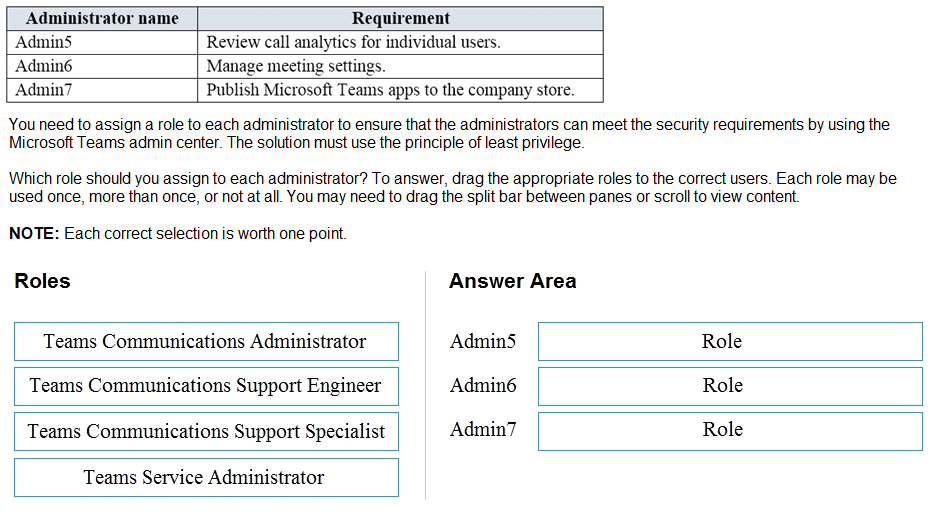
Your company has a Microsoft Office 365 subscription. The company has the administrators and the security requirements shown in the following table.
Show answerHide answer

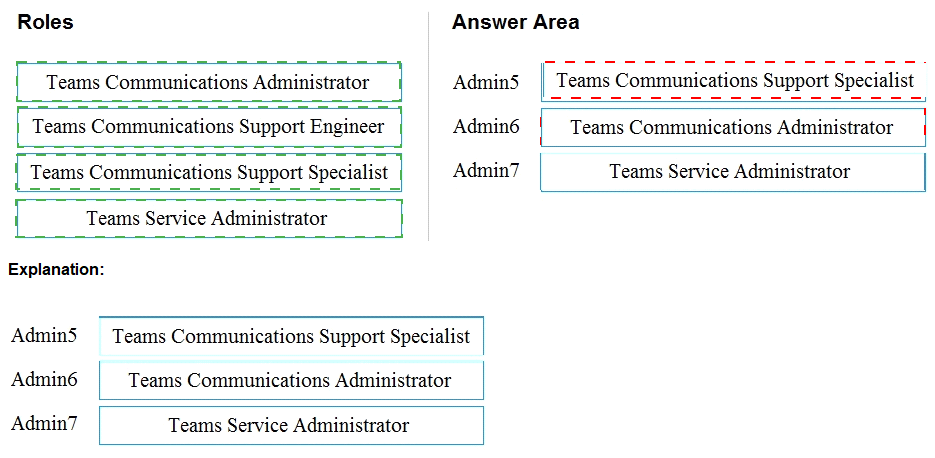
Explanation


1. Admin5 Requirement: Review call analytics for individual users. Correct Role: Teams Communications Support Engineer Why: This role is specifically designed for support personnel to troubleshoot call quality issues. It provides read-only access to call analytics, call records, and user-level telemetry data, which is exactly what Admin5 needs. It does not grant permissions to change settings, aligning with least privilege.

2. Admin6 Requirement: Manage meeting settings.

Correct Role: Teams Communications Administrator
Why: The Teams Communications Administrator role has permissions to manage meeting settings in the Teams admin center (e.g., meeting policies, conference bridge settings, live event policies). This is more specific than the broader Teams Administrator role and matches the requirement precisely.

3. Admin7 Requirement: Publish Microsoft Teams apps to the company store.

Correct Role: Teams Service Administrator
Why: The Teams Service Administrator role has permissions to manage and publish apps in the Teams app store (tenant apps/custom apps). This role is tailored for managing the Teams service ecosystem, including apps, while having more limited permissions than the full Teams Administrator.

Answer Area Mapping:

Admin5: Teams Communications Support Engineer

Admin6: Teams Communications Administrator

Admin7: Teams Service Administrator

Explanation for Roles Not Used:
Teams Communications Support Specialist: This is a more restricted role than the Support Engineer. It typically allows viewing user call quality data for a specific user only (often via the "Call Analytics" tab in the user's profile), not broad analytics across all users. The "Support Engineer" role is the better fit for the general requirement to "review call analytics for individual users."
Question 29 Choose 1
You have a Microsoft 36S E5 subscription that uses Microsoft Teams.
You need to enforce multi-factor authentication (MFA) for all users that access Microsoft Teams outside the corporate network.
What should you configure?
Show answerHide answer

Correct answer: D a Conditional Access policy

Explanation

Explanation:
The requirement is to enforce Multi-Factor Authentication (MFA) based on a condition: when users access Microsoft Teams from outside the corporate network. This is a classic access control scenario based on user location, which is precisely what Azure AD Conditional Access policies are designed for. Conditional Access policies allow you to define rules (like requiring MFA) that are triggered when specific conditions (such as network location not being the trusted corporate IP range) are met.

Correct Option:

D. a Conditional Access policy
An Azure AD Conditional Access policy is the correct solution. You would create a policy that:

Targets: All users or specific users/groups.

Cloud apps: Includes Microsoft Teams.

Conditions: Sets a Location condition to exclude the trusted corporate network IP addresses (defined as a Named Location in Azure AD).

Access controls: Grants access but Requires multi-factor authentication.

This ensures MFA is prompted only when accessing Teams from untrusted (non-corporate) networks.

Incorrect Option:

A. a compliance policy:
Compliance policies in Microsoft Endpoint Manager (Intune) are used to enforce device compliance rules (like requiring encryption or a minimum OS version) before granting access to resources. They are not used to enforce MFA based on network location for an application like Teams.

B. a Teams policy:
Teams policies (meeting, messaging, calling) control features and settings within the Teams application itself, such as who can record meetings or use private channels. They cannot enforce authentication requirements like MFA; that is an identity-layer control handled by Azure AD.

C. a sign-in risk policy:
This is a subset of Azure AD Identity Protection, which uses machine learning to detect risky sign-in behavior (like impossible travel or unfamiliar locations). A sign-in risk policy can require MFA or block access when risk is detected, but it is not the primary tool for enforcing a blanket MFA requirement based on a defined network location. Conditional Access is more direct and predictable for this specific geographic/IP-based rule.

Reference:
Microsoft Docs - Conditional Access: Require MFA for all users: The Conditional Access documentation provides templates and examples for creating policies that require MFA based on various conditions, including location. The location condition is explicitly used to define trusted IP ranges and apply controls to "Any location" except those trusted networks.
Question 30
You have a Microsoft 365 subscription.
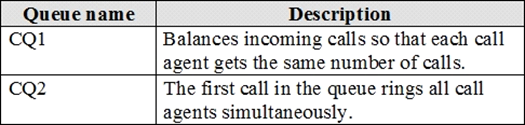
You need to create the call queues shown in the following table.


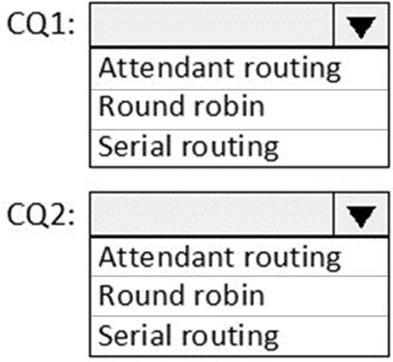
Which routing method should you configure for each call queue? To answer, select the appropriate options in the answer area.

Show answerHide answer

Explanation


Explanation of Each Routing Method:

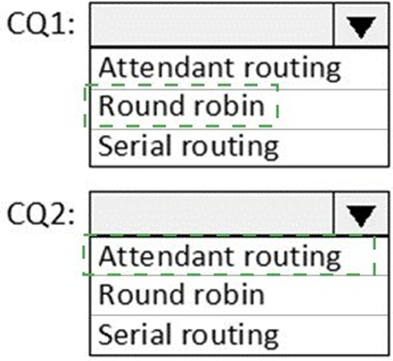
CQ1: Round robin
Round robin is a load-balancing method that distributes calls sequentially to agents in a predefined, repeating order. It ensures an even distribution of call volume so that, over time, each agent receives approximately the same number of calls, matching the description of "balances incoming calls."

CQ2: Attendant routing
Attendant routing (also known as simultaneous ringing) makes all available agents' phones ring at the same time when a new call enters the queue. The first agent to answer gets the call. This is ideal for small, highly responsive teams where immediate pickup is critical, matching the description "rings all call agents simultaneously."

Why the Other Option Is Incorrect:
Serial routing: This method rings agents one at a time in a specific order (like a list). If the first agent doesn't answer, it rings the second, and so on. It does not balance calls evenly (CQ1) nor ring all agents at once (CQ2).
Full mock exam

Sit the MS-700 exam before exam day

Full-length mocks with the same number of questions and the same time limit as the real MS-700 exam. Every attempt draws a new set of questions from the full bank, so you can keep going until you pass comfortably.

Get full MS-700 mock exam
  • —questions per mock
  • —time limit
  • 334questions in the bank
  • Newmock on every attempt