Your company has a Microsoft 365 subscription.
You need to prevent guest users from creating or updating channels.
How should you complete the PowerShell script? To answer, drag the appropriate options to the correct targets. Each option may be used once, more than once, or not at all. You may need to drag the split bar between panes or scroll to view content.
NOTE: Each correct selection is worth one point.
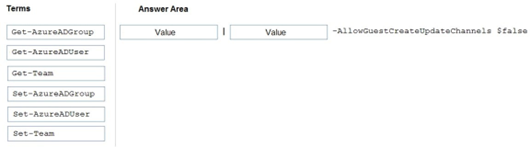
You need to prevent guest users from creating or updating channels.
How should you complete the PowerShell script? To answer, drag the appropriate options to the correct targets. Each option may be used once, more than once, or not at all. You may need to drag the split bar between panes or scroll to view content.
NOTE: Each correct selection is worth one point.
Show answerHide answer
Explanation
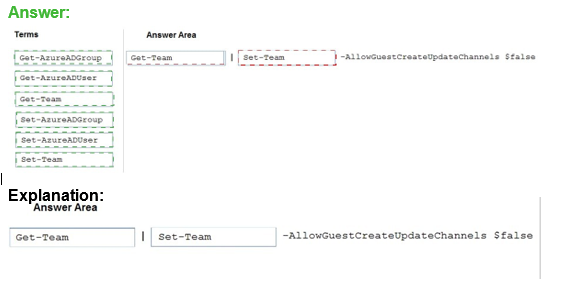
Explanation:
This configuration is a team-specific setting that controls guest permissions for channel management. It cannot be applied globally via Azure AD user or group settings. The Set-Team PowerShell cmdlet is the administrative tool used to modify the properties of an existing Microsoft Team. The -AllowGuestCreateUpdateChannels parameter, when set to $false, explicitly revokes the permission for guest users in that specific team to create new channels or modify existing ones.
Why Other Options Are Incorrect:
Get-AzureADGroup / Get-AzureADUser / Get-Team:
These are Get-* cmdlets used for retrieving information, not for changing configuration settings. They are read-only.
Set-AzureADGroup / Set-AzureADUser:
These cmdlets modify properties of Azure AD objects (like group details or user profiles) but do not contain parameters for managing Teams-specific collaboration settings like guest channel permissions.
Set-Team:
This is the correct cmdlet. It is the only one listed that can modify team settings, including guest permissions related to channels.
Reference:
Microsoft Docs - Set-Team: The official documentation for the Set-Team cmdlet lists the -AllowGuestCreateUpdateChannels parameter, specifying that it controls whether guests can create and update channels in the team.