Microsoft certification · Exam MS-700

MS-700 Mock Exam Page 2

Managing Microsoft Teams

Free MS-700 mock exam questions 11–20, each with the answer and an explanation.

20 questions · 30 minutes · free, no sign-up

Free MS-700 questions

11–20 of 98 free
Question 11
Your company has a Microsoft 365 subscription.
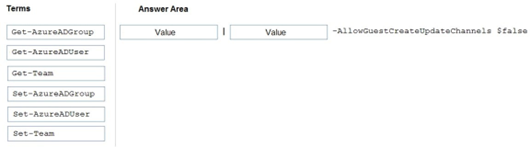
You need to prevent guest users from creating or updating channels.
How should you complete the PowerShell script? To answer, drag the appropriate options to the correct targets. Each option may be used once, more than once, or not at all. You may need to drag the split bar between panes or scroll to view content.
NOTE: Each correct selection is worth one point.
Show answerHide answer

Explanation


Explanation:
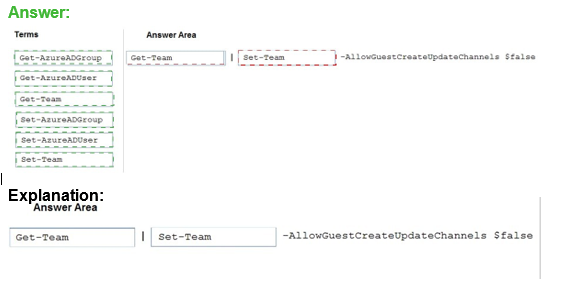
This configuration is a team-specific setting that controls guest permissions for channel management. It cannot be applied globally via Azure AD user or group settings. The Set-Team PowerShell cmdlet is the administrative tool used to modify the properties of an existing Microsoft Team. The -AllowGuestCreateUpdateChannels parameter, when set to $false, explicitly revokes the permission for guest users in that specific team to create new channels or modify existing ones.

Why Other Options Are Incorrect:

Get-AzureADGroup / Get-AzureADUser / Get-Team:
These are Get-* cmdlets used for retrieving information, not for changing configuration settings. They are read-only.

Set-AzureADGroup / Set-AzureADUser:
These cmdlets modify properties of Azure AD objects (like group details or user profiles) but do not contain parameters for managing Teams-specific collaboration settings like guest channel permissions.

Set-Team:
This is the correct cmdlet. It is the only one listed that can modify team settings, including guest permissions related to channels.

Reference:
Microsoft Docs - Set-Team: The official documentation for the Set-Team cmdlet lists the -AllowGuestCreateUpdateChannels parameter, specifying that it controls whether guests can create and update channels in the team.
Question 12
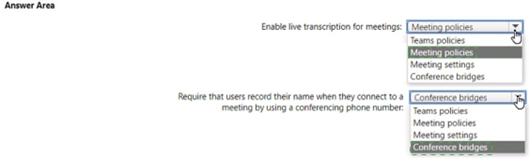
You have a Microsoft 365 subscription that uses Microsoft Teams.
You need to configure Microsoft Teams to meet the following requirements:

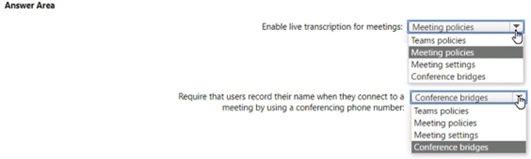
• Enable live transcription for meetings.
• Require that users record their name when they connect to a meeting by using a conferencing phone number.

What should you configure for each requirement? To answer, select the appropriate options in the answer area. NOTE: Each correct selection is worth one point.

Show answerHide answer

Explanation


Explanation for Each Requirement:

Requirement 1: Enable live transcription for meetings.

Correct Configuration: Meeting policies
Live transcription is a feature controlled at the per-user or per-group level via Teams meeting policies. An administrator creates or modifies a meeting policy (e.g., the global policy) and turns the "Transcription" setting to On. This policy is then assigned to users, granting them the ability to start transcription in their meetings.

Requirement 2: Require that users record their name when they connect to a meeting by using a conferencing phone number.

Correct Configuration: Meeting settings
This is a global, organization-wide setting for the audio conferencing (dial-in) experience. It is found under Meetings > Meeting settings in the Teams admin center. The setting is named "Entry/exit announcement type" or related "Name recording" for dial-in users. Configuring this here applies the requirement to all meetings using the organization's conference bridge.

Why Other Options Are Incorrect for These Requirements:

Teams policies:
This is a broad category. In the admin center, "Teams policies" typically refer to settings governing teams creation, messaging, and fun stuff, not meeting-specific features like transcription or dial-in behavior.

Conference bridges:
This section in the admin center is for managing phone numbers (toll and toll-free) assigned to your organization for audio conferencing. It is not where you configure behavior rules like name recording for participants; that is done in Meeting settings.

Reference:
Microsoft Docs - Meeting policies for transcription: Confirms that the "Transcription" toggle is located within a Teams meeting policy.

Microsoft Docs - Change settings for audio conferencing: Details that dial-in participant settings, including entry/exit announcements and name recording, are managed in the Meeting settings page of the Teams admin center.
Question 13 Choose 1
Your company has a Microsoft 365 subscription that contains several teams.
The company’s security policy states that an administrator must be notified when a new team is created by using the Build a team from scratch option.
You need to configure the environment to meet the security policy requirement. What should you do?
Show answerHide answer

Correct answer: B From the Security & Compliance admin center, create an alert policy.

Explanation

Explanation:
The requirement is for an administrator to be notified when a specific event (creating a team from scratch) occurs. This is an auditing and alerting scenario, not a prevention or supervision of content. The correct tool for creating automated notifications based on specific user activities or events in Microsoft 365 is an Alert Policy in the Microsoft Purview compliance portal (Security & Compliance admin center).

Correct Option:

B. From the Security & Compliance admin center, create an alert policy.
An Alert Policy in the Security & Compliance admin center can be configured to trigger an email notification to administrators when a specific activity occurs. You can create a custom alert policy that monitors the "Created team" activity (or similar audit event) and filters for the specific creation method if detailed logging is available. This directly fulfills the requirement for proactive notification.

Incorrect Option:

A. From the Security & Compliance admin center, create a supervision policy.
Supervision policies are for reviewing employee communications for compliance (e.g., scanning emails/Teams chats for sensitive info). They are not designed to send notifications for administrative events like team creation.

C. From the Azure Active Directory admin center, create a protection notification.
While Azure AD can send alerts for risky sign-ins or user risk, it does not have a native, configurable notification system for Teams creation events. This is not the correct service for this specific workload alert.

D. From the Microsoft Teams admin center, modify the global teams policy.
Teams policies control settings like who can create teams, create private channels, or use apps. They are used to set permissions and rules, not to generate notifications when an action is taken. You cannot configure email alerts from a Teams policy.

Reference:
Microsoft Docs - Alert policies in the compliance portal: This documentation outlines how to create custom alert policies to track specific activities across Microsoft 365 services, including Teams events. The "Created team" activity is an auditable event that can be monitored by an alert policy.
Question 14 Choose 1
You work as a Microsoft 365 Administrator for your company. All users have Microsoft 365 licenses.
Users frequently collaborate by using private chats in Microsoft Teams.
You need to ensure that a single user is unable to permanently delete private chats. Which of the following should you configure?
Show answerHide answer

Correct answer: C A litigation hold on the user's mailbox.

Explanation

Explanation:
Private chats in Microsoft Teams (1:1 and group chats) are stored as conversation items in the Exchange Online mailboxes of the participants. To prevent permanent deletion of this data, you must place a legal hold on the mailbox. A litigation hold (or the newer Purview retention hold) preserves all mailbox content, including Teams chats, by preventing users and automated processes from permanently deleting items, even if they are removed from the "Deleted Items" folder.

Correct Option:

C. A litigation hold on the user's mailbox.
Placing a litigation hold (or an equivalent Purview retention hold) on a user's Exchange Online mailbox prevents the permanent deletion of all mailbox content, including Teams private chat messages stored in a hidden folder. This ensures compliance data is preserved regardless of user actions, meeting the requirement that a single user cannot permanently delete these chats.

Incorrect Option:

A. The user's Microsoft 365 license options in the Microsoft 365 Admin Center.
License options control feature availability (like enabling/disabling Teams or Exchange Online) but do not provide data retention or preservation capabilities. They cannot prevent deletion of chat content.

B. A meeting policy in Microsoft Teams.
Meeting policies govern settings for meetings, such as who can present, recording permissions, and lobby settings. They have no control over the retention or deletion of private chat messages.

D. A Sensitivity Label in the Security & Compliance Admin Center.
Sensitivity labels are used to classify and protect documents and emails with encryption or watermarking. They do not apply to Teams chat conversations for the purpose of preventing deletion.

Reference:
Microsoft Docs - How Teams uses Exchange Online: Confirms that private chat messages are stored in a hidden folder within the user's Exchange Online mailbox.

Microsoft Docs - Litigation Hold: Explains that placing a mailbox on Litigation Hold preserves all mailbox items (including Teams chat data) by preventing permanent deletion and retaining modified or deleted items for a specified duration.
Question 15
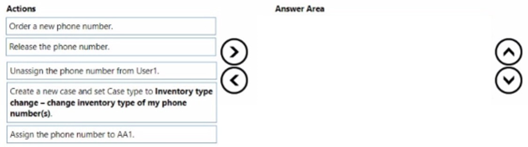
Your company uses Microsoft Teams and has an auto attendant named AA1. A user named User1 has a phone number of 613-555-1234.
You need to assign the phone number to AA1.
Which three actions should you perform in sequence in the Microsoft Teams admin center?
To answer, move the appropriate actions from the list of actions to the answer area and arrange them in the correct order.

Show answerHide answer

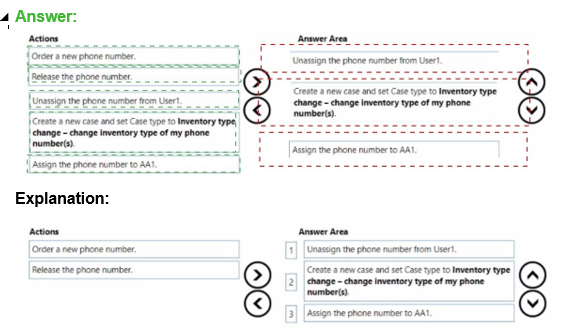
Explanation


Explanation of the Correct Sequence:

Step 1: Unassign the phone number from User1.
First, you must disassociate the number from its current owner. In the Teams admin center, navigate to Voice > Phone numbers, locate the number (613-555-1234), and change its assignment from "User1" to Unassigned. This frees the number from the user but keeps it in your tenant's inventory.

Step 2: Release the phone number.
After unassigning, the number will be in an Unassigned state. Before it can be assigned to a resource like an auto attendant, it must be placed in the Available inventory pool. The "Release" action performs this step, moving the number from the "Unassigned" tab to the general available inventory.

Step 3: Assign the phone number to AA1.
Finally, with the number now available in your inventory, you can assign it to the target resource. In the Voice > Phone numbers section, select the available number and assign it to the auto attendant AA1.

Why the Other Actions Are Incorrect or Not Needed:
Order a new phone number: This is unnecessary. The company already owns the number (613-555-1234); you are simply reassigning it.

Create a new case and set Case type to Inventory type change...:
This is a porting or carrier action used to change a number's underlying service type (e.g., from Microsoft to a direct carrier). It is not required for a simple internal reassignment of an already Microsoft-managed number between resources in the same tenant.
Question 16
Your company has a Microsoft 365 subscription.
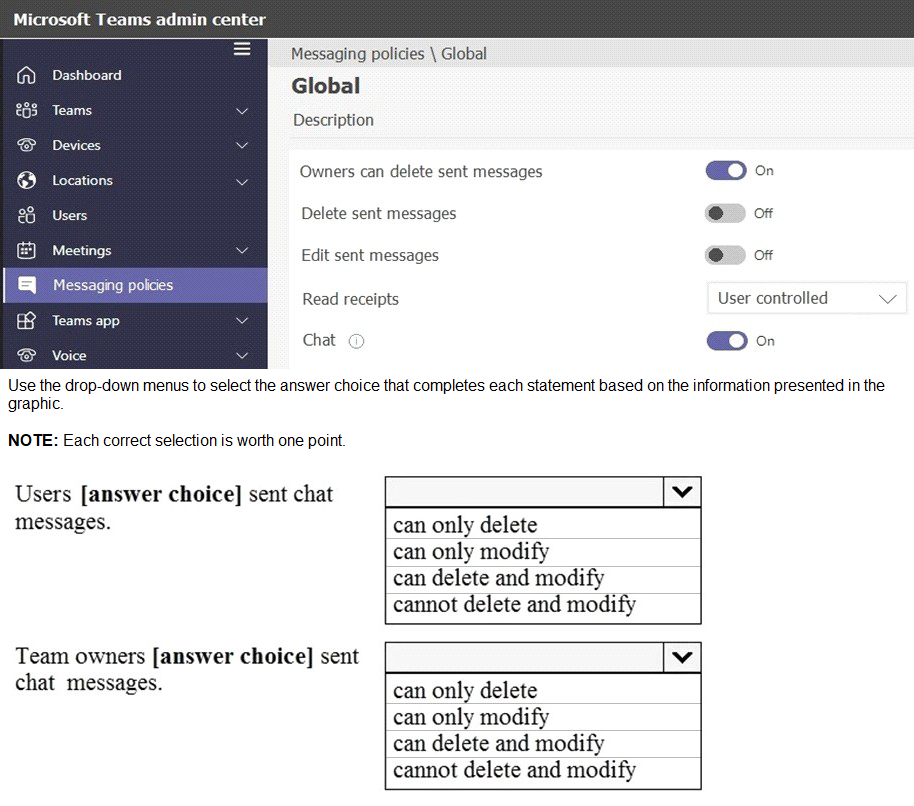
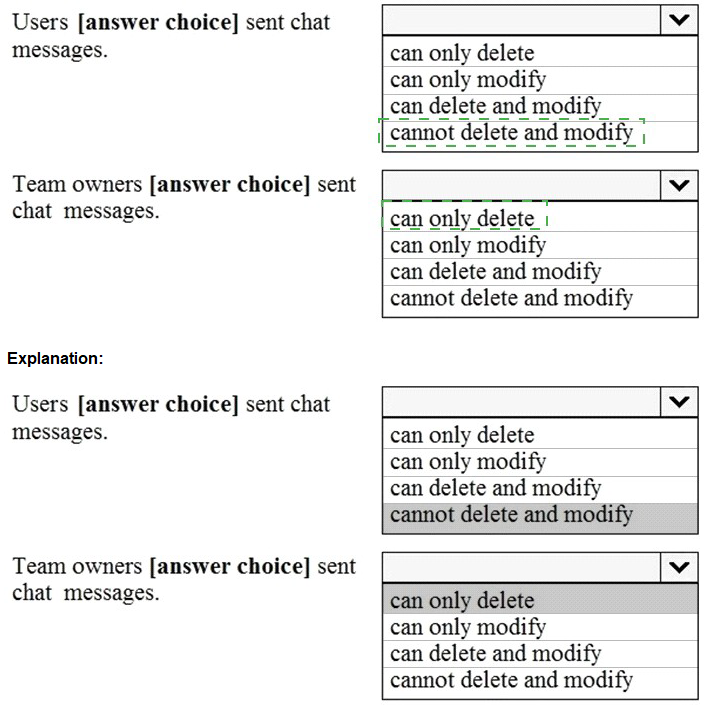
The company’s only messaging policy is a global messaging policy configured as shown in the following exhibit.
Show answerHide answer

Explanation


Explanation for Each Statement:
Statement 1: Users [ ] sent chat messages.

Correct Selection: cannot delete and modify

Explanation:
The global policy explicitly sets both "Delete sent messages" and "Edit sent messages" to Off for all users. Therefore, regular users have neither the delete nor the edit permission for messages they have already sent in chats.

Statement 2: Team owners [ ] sent chat messages.

Correct Selection: can only delete

Explanation:
The global policy has a special privilege: "Owners can delete sent messages" is set to On. This grants team owners the ability to delete messages. However, the separate "Edit sent messages" setting remains Off, and there is no owner-specific override for editing. Consequently, team owners can delete but cannot edit sent messages.

Reference:

Microsoft Docs - Messaging policy settings for chat: The documentation details these three key settings:

Owners can delete sent messages: Controls if team owners have delete permission.

Delete sent messages: Controls if users can delete their own messages.

Edit sent messages: Controls if users can edit their own messages.

These settings work together, with the owner setting acting as a specific override for delete permission only.
Question 17 Choose 2
Your company is upgrading from Microsoft Skype for Business Online to Microsoft Teams.
The company's Microsoft Teams upgrade policy is set to Islands coexistence mode. The company plans to maintain the coexistence mode for several months.
Several users report that they receive email messages about missed chat conversations.
You need to recommend a solution to ensure that all the users receive chat messages.
Which two actions should you recommend? Each correct answer presents part of the solution.
NOTE: Each correct selection is worth one point.
Show answerHide answer

Correct answer: A, E Install the Microsoft Teams clients on all the computers that run the Skype for Business client. Instruct the users to sign in to both client applications.Install the Skype for Business client on all the computers that run the Microsoft Teams client. Instruct the users to sign in to both client applications.

Explanation

Explanation:
In Islands coexistence mode, users have both Skype for Business and Teams clients installed, but their chat and calling experience is split based on the client used by the sender. A user in Teams can only chat with another user in Teams, and a user in Skype can only chat with another user in Skype. If a user is signed into only one client, they will miss messages sent from the other client, resulting in email notifications about missed conversations. The solution is to have all users signed into both clients simultaneously to bridge the gap until a full upgrade to Teams-Only mode.

Correct Option:

A. Install the Microsoft Teams clients on all the computers that run the Skype for Business client. Instruct the users to sign in to both client applications.
This ensures that users currently only using Skype for Business have the Teams client installed and running. Being signed into both clients allows them to receive messages sent from either platform, eliminating missed chats.

E. Install the Skype for Business client on all the computers that run the Microsoft Teams client. Instruct the users to sign in to both client applications.
This is the complementary action to option A. It ensures that users who are already on Teams also have the Skype for Business client installed and running. This allows them to receive messages from colleagues still using Skype, closing the communication gap from both sides.

Incorrect Option:

B. Instruct the users to modify the permissions in the Microsoft Teams client.
User-level permissions in the Teams client do not control interoperability or routing between Skype for Business and Teams. This is a coexistence mode configuration issue, not a permissions problem.

C. Modify the global app setup policy.
App setup policies control which apps are pinned for users in Teams. They do not affect the underlying routing of chat messages between the two different communication platforms (Skype for Business and Teams).

D. Modify the global app permission policy.
App permission policies control which third-party apps and custom apps are allowed in Teams. They are unrelated to the core chat routing between Skype for Business and Teams during coexistence.

Reference:
Microsoft Docs - Understand Microsoft Teams and Skype for Business coexistence and interoperability: The documentation for Islands mode explicitly states that in this mode, "Users can communicate with others only by using the same client app." To ensure no messages are missed, the recommended user experience is to "run both clients side by side." This confirms the need for both clients to be installed and active for all users.
Question 18 Choose 1
Your on-premises network contains a main site and a branch site.
You have a Microsoft 365 subscription that uses Teams.
You need to use Network planner to identify the networking requirements between the sites.
From Network planner, you create a new network plan.
What should you do next?
Show answerHide answer

Correct answer: C Add a network site

Explanation

Explanation:
Network Planner in Teams is a tool used to calculate network bandwidth requirements for deploying Teams across an organization. The process follows a specific sequence: first, you create a Network Plan to define the overall scenario. Next, you must define the Network Sites, which represent the physical locations (like your main site and branch site) where users are based. Only after defining the sites can you add the users (personas) to those sites and generate reports.

Correct Option:

C. Add a network site
After creating the overall network plan, the next logical step is to define your organization's physical locations. You would add at least two network sites: one for the Main site and another for the Branch site. Each site requires information like its name, network IP addresses, and available bandwidth, which is essential for subsequent calculations.

Incorrect Option:

A. Configure the Network settings:
While important, "Network settings" typically refer to broader tenant-level configurations for network discovery or enabling locations. This step is often done before or independent of creating a specific plan within Network Planner. It is not the immediate next step after creating a plan.

B. Start a report:
You cannot generate a report immediately after creating a plan. A report requires data to analyze. You must first define your network sites and then add personas (users with defined usage profiles) to those sites before the planner has the necessary information to calculate bandwidth and "Start a report."

D. Add personas:
Personas represent user groups with defined activity profiles (e.g., heavy video users). This step comes after defining network sites, because you need to specify which site each persona (group of users) is located in to calculate the bandwidth requirements for that site accurately.

Reference:
Microsoft Docs - Use Network Planner for Teams: The documented workflow is: 1. Create a network plan > 2. Add network sites > 3. Add personas and assign them to sites > 4. Generate a report. This confirms that "Add a network site" is the direct next step after plan creation.
Question 19 Choose 1
You have a Microsoft Office 365 subscription.
You need to prevent guest users from deleting channels from a Microsoft Teams team.
What should you use?
Show answerHide answer

Correct answer: A the Microsoft 365 admin center

Explanation

Explanation:
Preventing guest users from deleting channels is a team-level permission setting managed in Microsoft Teams. However, the question asks, "What should you use?" implying the tool or interface. The Microsoft Teams admin center is the primary management portal for configuring team-level settings, including guest permissions. It is accessible via the Microsoft 365 admin center (often as an app within it) and is the correct administrative tool for this task. The Azure portal or Security & Compliance admin center do not manage these granular team collaboration settings.

Correct Option:

A. the Microsoft 365 admin center
While the setting itself is a Teams configuration, the administrative path to configure it is through the Microsoft 365 admin center. You navigate to the Microsoft 365 admin center > Show all > Teams to access the Teams admin center. Within the Teams admin center, you can manage team settings or policies that control guest permissions, such as the ability to delete channels. This is the correct administrative interface for the task.

Incorrect Option:

B. the Azure portal:
The Azure portal is used for managing Azure AD identities, conditional access, and enterprise applications. While guest user accounts exist in Azure AD, the permissions for what a guest can do within a specific Teams team (like deleting channels) are managed within the Teams service, not in Azure AD settings.

C. the Microsoft Teams client:
This is the end-user application. An administrator cannot configure organization-wide or team-level guest permissions from within the user client. These settings require administrative access via an admin portal (Teams admin center).

D. the Security & Compliance admin center:
This center is for configuring data retention, eDiscovery, audit logs, and sensitivity labels. It is not used for managing real-time collaboration permissions like channel deletion within Teams.

Reference:
Microsoft Docs - Guest permissions in Teams: The documentation states that guest permissions for channels (like creating, updating, or deleting) are controlled via team settings. These settings are configured by an administrator in the Teams admin center, which is accessed through the Microsoft 365 admin center.
Question 20
You have a Microsoft 365 E5 subscription that uses Microsoft Teams.
You need to ensure that the users in your organization can communicate with external users who use Teams for personal use.
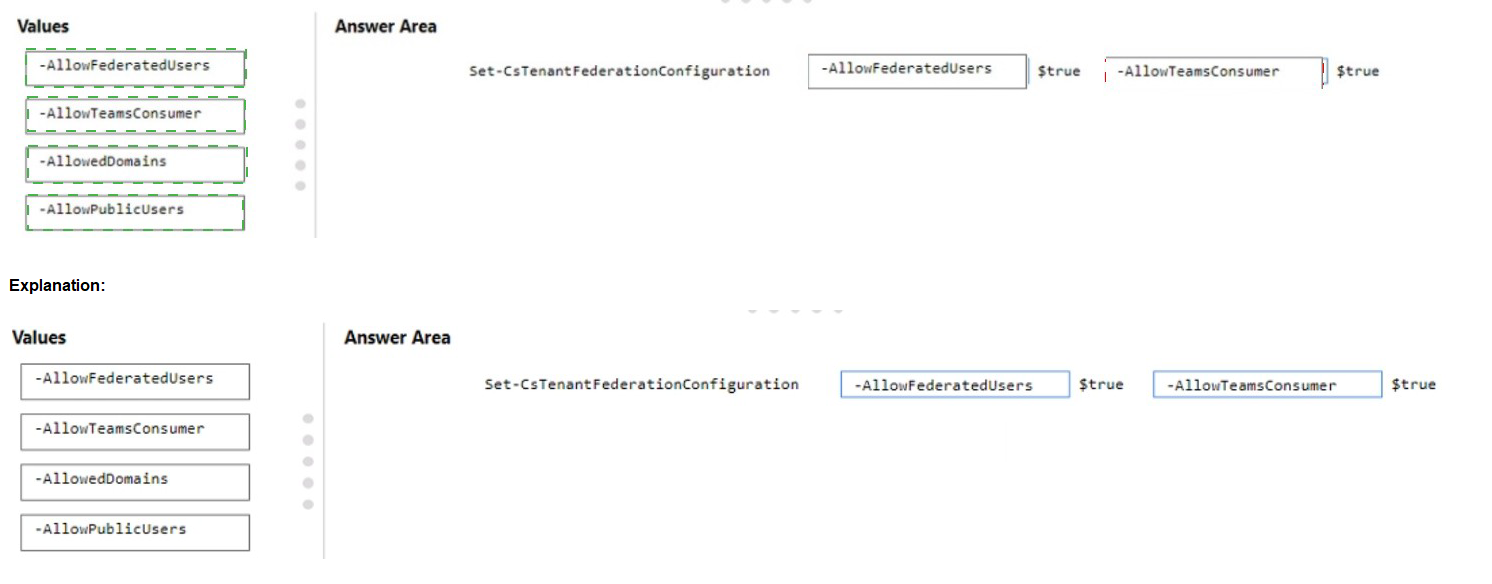
How should you complete the PowerShell cmdlets? To answer, drag the appropriate values to the correct targets. Each value may be used once, more than once, or not at all. You may need to drag the split bar between panes or scroll to view content.
NOTE: Each correct selection is worth one point.
Show answerHide answer

Explanation


Explanation:
To enable federation with external users using Teams for personal (consumer) accounts, you must configure the tenant's federation settings using PowerShell. The Set-CsTenantFederationConfiguration cmdlet with the -AllowTeamsConsumer parameter set to $true is the precise command. This opens communication channels between your organization's managed users and external, unmanaged Teams consumer accounts.

Why the Other Values Are Incorrect or Not Used:

-AllowFederatedUsers:
This parameter controls federation with users from other organizations' managed (business/school) Teams or Skype for Business tenants. It is for B2B federation, not for consumer (B2C) access.

-AllowedDomains:
This parameter is used to specify a list of specific domains that are allowed or blocked for federation with managed external organizations. It is not the parameter used to enable the blanket capability to communicate with consumer users.

-AllowPublicUsers:
This parameter does not exist in the Set-CsTenantFederationConfiguration cmdlet. The correct parameter for allowing public (consumer) users is -AllowTeamsConsumer.

Reference:
Microsoft Docs - Set-CsTenantFederationConfiguration: The official cmdlet reference lists the -AllowTeamsConsumer parameter and describes it as enabling "communication with Skype Consumer users." This setting applies to Teams consumer users as well.
Full mock exam

Sit the MS-700 exam before exam day

Full-length mocks with the same number of questions and the same time limit as the real MS-700 exam. Every attempt draws a new set of questions from the full bank, so you can keep going until you pass comfortably.

Get full MS-700 mock exam
  • —questions per mock
  • —time limit
  • 334questions in the bank
  • Newmock on every attempt