You need to determine the root cause for User1’s issue.
Which configuration options should you check? To answer, select the appropriate options in the answer area.
NOTE: Each correct selection is worth one point

Which configuration options should you check? To answer, select the appropriate options in the answer area.
NOTE: Each correct selection is worth one point
Show answerHide answer
Explanation
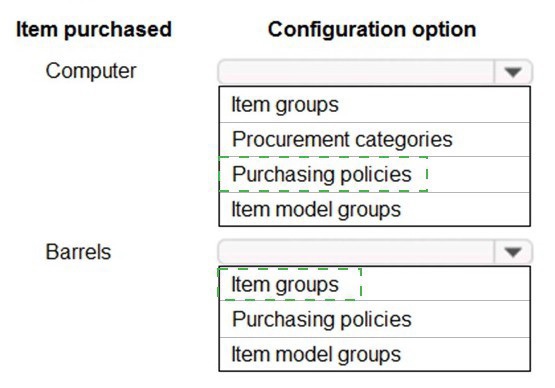
Explanation:
To diagnose a procurement issue, you must verify the settings that govern purchasing rules and inventory behavior. Item groups define the main accounts for posting. Procurement categories are mandatory for purchase requisitions and categorize spending. Item model groups control critical inventory policies like physical and financial tracking. Purchasing policies apply to vendors or legal entities, not directly to items, making them less likely to be the root cause for a specific item issue.
Correct Configuration Reasoning:
Item Groups:
This is fundamental. It determines the ledger accounts (Inventory, COGS, etc.) used when posting transactions for the item. An incorrect setup here causes posting errors.
Procurement Categories:
Required for creating purchase requisitions. If a "Computer" is missing an assigned procurement category, User1 would be unable to create a purchase requisition for it.
Item Model Groups:
This is critical. It controls whether an item is tracked in inventory (Stocked vs. Non-stocked), how it is costed, and whether physical or financial negative inventory is allowed. An incorrect model group is a common root cause for procurement or inventory issues.
Incorrect Configuration Reasoning:
Purchasing Policies:
These are higher-level rules set at the legal entity or vendor level (e.g., trade agreements, pricing). While they can affect purchasing, they are not typically the first configuration to check for a root cause related to a specific item's basic procurement capability. Item-specific settings (groups, categories, model groups) are more directly responsible.
Reference:
Microsoft Learn, "Set up item groups," "Procurement catalogs overview," and "Item model groups": The documentation establishes that Item groups define posting, Procurement categories organize purchasing, and Item model groups are a primary setting for inventory management—all are essential for an item to be purchased correctly.