Microsoft certification · Exam MB-310

MB-310 Mock Exam

Microsoft Dynamics 365 for Finance and Operations, Financials Exam

Find out if you're ready for MB-310. Take the free timed mock exam and get your score in minutes, or study the free MB-310 questions below with answers and explanations.

20 questions · 33 minutes · free, no sign-up

Free MB-310 questions

1–10 of 64 free
Question 1 Choose 3
You need to view the results of Fourth Coffee Holding Company's consolidation D18912E1457D5D1DDCBD40AB3BF70D5D

Which three places show the results of financial consolidation? Each correct answer presents a complete solution.

NOTE: Each correct selection is worth one point.
Show answerHide answer

Correct answer: B, D, E a trial balance in the Fourth Coffee Holding Companya financial report run against the Fourth Coffee Holding Companythe consolidations form in Fourth Coffee Holding Company

Explanation

Explanation:
After running a financial consolidation, the aggregated data resides within the holding company that performed the consolidation. The results are not visible in the individual subsidiary company's ledgers. You can view them in reports and inquiries scoped to the holding company or within the consolidation module itself.

Correct Option:

B. a trial balance in the Fourth Coffee Holding Company:
The consolidated trial balance is generated within the holding company's legal entity, showing the summed balances from all included subsidiaries.

D. a financial report run against the Fourth Coffee Holding Company:
Financial reports (using Management Reporter or Financial Reporting) must be configured for the holding company's data source to display the consolidated results.

E. the consolidations form in Fourth Coffee Holding Company:
The primary consolidation module provides forms (like "Consolidated trials" or inquiry pages) specifically designed to review, adjust, and analyze the results of the consolidation process.

Incorrect Option:

A. a financial report run against the company Fourth Coffee:
This would only show the financials for the "Fourth Coffee" subsidiary company in isolation, not the consolidated results of the holding group.

C. a trial balance in the company Fourth Coffee:
Similarly, this shows the standalone trial balance for the subsidiary ("Fourth Coffee"), not the aggregated results of the consolidation.

Reference:
Microsoft Learn, "Consolidate online": The documentation explains that after running an online consolidation, you can view the results by generating a trial balance for the destination legal entity (the holding company) or by using the Consolidate module to view the consolidation trials.
Question 2 Choose 1
You need to troubleshoot the reporting issue for User7.

Why are some transactions being excluded?
Show answerHide answer

Correct answer: C The report is correctly excluding CustomerY transactions.

Explanation

Explanation:
This is a troubleshooting scenario. The core issue is that User7 cannot see all expected transactions in a report. In Dynamics 365 Finance, data visibility is often controlled by organization hierarchies and security policies. If a user is associated with a security role that has an organization filter, the system will automatically and correctly exclude data outside that user's permitted organizational scope.

Correct Option:

C. The report is correctly excluding CustomerY transactions.
This is correct because the scenario implies User7's security role or an explicit organization filter is configured to restrict access to data for CustomerY. The system is functioning as designed by filtering out transactions based on the user's permissions, which is why it appears as a "correct" exclusion, not an error.

Incorrect Option:

A. User7 is running the report in CompanyB. & B. User7 is running the report in CompanyA.
The company context alone is not the definitive reason here. While important, the answer focuses on the correctness of the exclusion, pointing to a configured security policy, not merely the company from which the report is run.

D. The report is correctly excluding CustomerZ transactions.
This is incorrect because the premise of the question and the correct answer specify that the exclusion pertains to CustomerY. If CustomerZ were excluded, it would be due to a different filter rule not relevant to User7's specific issue.

Reference:
Microsoft Learn, "Organization hierarchies and security": This documentation explains how data security policies can be applied to security roles based on organization hierarchies, automatically filtering report data to only show records from operating units (like customers) assigned to the user.
Question 3
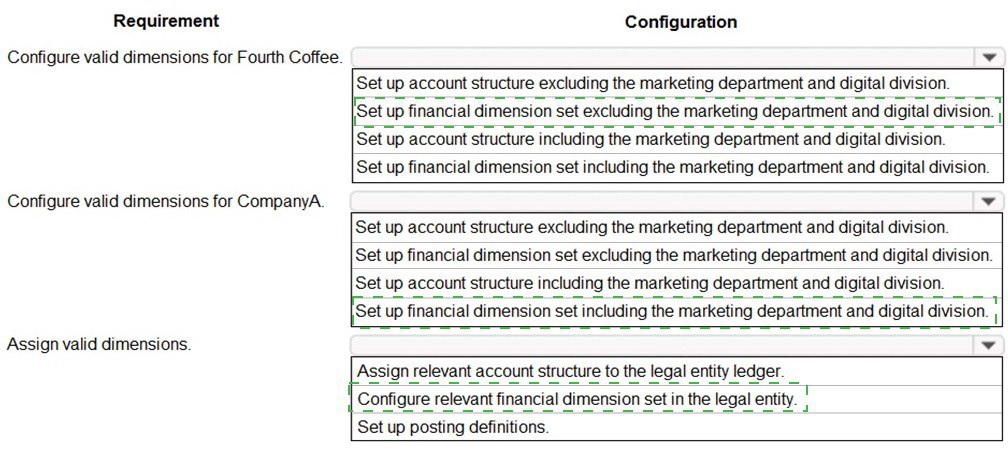
You need to prevent a reoccurrence of User2’s issue.

How should you configure the system? To answer, select the appropriate options in the answer area. NOTE: Each correct selection is worth one point.
Show answerHide answer

Explanation


Explanation:
The requirement is to configure valid dimensions for CompanyA, which is part of Fourth Coffee. User2’s issue likely involved posting transactions with unauthorized dimensions (marketing department or digital division). To prevent this, you must define account structures and financial dimension sets that explicitly exclude these dimensions, thereby enforcing validation rules at the ledger level.

Correct Configuration Reasoning:

Account Structure (excluding):
The account structure attached to the ledger defines the required and allowed dimension combinations for main accounts. By excluding the marketing department and digital division here, the system will block any transaction that tries to use them.

Financial Dimension Set (excluding):
Dimension sets are used across modules (like projects or fixed assets) to control which dimensions are available for entry. A set that excludes these dimensions ensures they cannot be selected in source documents, preventing the issue upstream.

Incorrect Configuration Reasoning:
Set up account structure including... / Set up financial dimension set including...: These options would explicitly allow the problematic dimensions, which contradicts the requirement to prevent their use and would cause User2’s issue to recur.

Reference:
Microsoft Learn, "Configure account structures" and "Financial dimension sets" – explains how account structures validate dimension combinations for posting, and how dimension sets control available dimensions for data entry to maintain consistency and prevent invalid postings.
Question 4
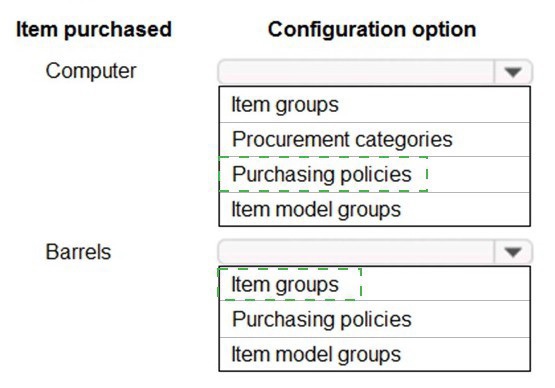
You need to determine the root cause for User1’s issue.

Which configuration options should you check? To answer, select the appropriate options in the answer area.

NOTE: Each correct selection is worth one point

Show answerHide answer

Explanation


Explanation:
To diagnose a procurement issue, you must verify the settings that govern purchasing rules and inventory behavior. Item groups define the main accounts for posting. Procurement categories are mandatory for purchase requisitions and categorize spending. Item model groups control critical inventory policies like physical and financial tracking. Purchasing policies apply to vendors or legal entities, not directly to items, making them less likely to be the root cause for a specific item issue.

Correct Configuration Reasoning:

Item Groups:
This is fundamental. It determines the ledger accounts (Inventory, COGS, etc.) used when posting transactions for the item. An incorrect setup here causes posting errors.

Procurement Categories:
Required for creating purchase requisitions. If a "Computer" is missing an assigned procurement category, User1 would be unable to create a purchase requisition for it.

Item Model Groups:
This is critical. It controls whether an item is tracked in inventory (Stocked vs. Non-stocked), how it is costed, and whether physical or financial negative inventory is allowed. An incorrect model group is a common root cause for procurement or inventory issues.

Incorrect Configuration Reasoning:

Purchasing Policies:
These are higher-level rules set at the legal entity or vendor level (e.g., trade agreements, pricing). While they can affect purchasing, they are not typically the first configuration to check for a root cause related to a specific item's basic procurement capability. Item-specific settings (groups, categories, model groups) are more directly responsible.

Reference:
Microsoft Learn, "Set up item groups," "Procurement catalogs overview," and "Item model groups": The documentation establishes that Item groups define posting, Procurement categories organize purchasing, and Item model groups are a primary setting for inventory management—all are essential for an item to be purchased correctly.
Question 5 Choose 1
You need to recommend a solution to prevent User3's issue from recurring.

What should you recommend?
Show answerHide answer

Correct answer: A Configure automatic charge codes.

Explanation

Explanation:
User3's issue likely involves recurring, manual entry of standard fees (like shipping, handling, or restocking charges) on sales orders, leading to errors, inconsistency, or forgotten charges. The solution is to automate the application of these fees based on predefined rules, ensuring they are added correctly every time relevant conditions are met.

Correct Option:

A. Configure automatic charge codes:
This is the precise recommendation. Automatic charges can be set up to apply fees automatically to sales orders, purchase orders, or transfer orders based on triggers like the customer group, item group, mode of delivery, or order value. This eliminates manual effort and ensures the charge is never missed, directly preventing the recurrence of User3's issue.

Incorrect Option:

B. Create a service item:
While you could create a service item for the fee and manually add it to each order line, this does not prevent the issue—it still relies on User3 remembering to add it. It is a manual workaround, not an automated solution.

C. Configure a sales order template:
A template can pre-populate header details or lines, but it is static. It would only include the charge if it was manually added to the template for a specific customer/scenario. It does not dynamically apply charges based on conditions across all relevant orders.

D. Create a procurement category:
This is related to classifying purchases for internal requisitions, not for automating fees on sales orders to customers. It is irrelevant to a sales process issue.

Reference:
Microsoft Learn, "Automatic charges overview": The documentation explains that automatic charges automate the calculation and assignment of trade expenses (like freight and insurance) to documents. They are defined by charge codes and applied based on setup in the Auto charges form, ensuring consistency and accuracy.
Question 6 Choose 1
You need to prevent the issue from reoccurring for User5.

What should you do?
Show answerHide answer

Correct answer: D Add more keywords to the audit policy.

Explanation

Explanation:
User5's issue likely involves entertainment expense reports that violate company policy but are not being flagged by the current audit system. The audit policy uses keywords and rules to automatically identify suspicious transactions for review. If the policy is missing relevant keywords, violations can go undetected.

Correct Option:

D. Add more keywords to the audit policy:
This is the direct solution. If the policy failed to catch a non-compliant entertainment expense (e.g., for a specific venue or type of expense), the most effective action is to enhance the policy's detection criteria by adding additional relevant keywords (like specific restaurant names, "bar," "alcohol," etc.) to its rule set. This broadens the net for future audits.

Incorrect Option:

A. Use the audit list search query type:
The "Audit list search" is a query type used to manually find transactions that match specific criteria for investigation. It is a reactive troubleshooting tool, not a proactive configuration to prevent issues. It doesn't change what the automated policy catches.

B. Set up the aggregate query type for entertainment expenses: & C. Set up the sampling query type for entertainment expenses:
These query types determine how the system selects transactions for the audit once they are already flagged by the policy rules.

Aggregate looks for totals exceeding a threshold (e.g., total monthly entertainment > $500).

Sampling randomly selects a percentage of transactions.

Changing the query type does not fix the core problem of the policy failing to identify the non-compliant transactions in the first place. The issue is with the detection keywords, not the selection method.

Reference:
Microsoft Learn, "Audit policies": The documentation explains that audit policies are defined by rules containing keywords and conditions. To improve detection, you must modify these rules by adding or refining the keywords and amounts that trigger an audit.
Question 7 Choose 1
The Canadian franchise purchases excess ski equipment from the US franchise. Two sets of skis are purchased totaling USD1,000.

When the purchase invoice is prepared, USD10,000 is keyed in by mistake.

Which configuration determines the result for this intercompany trade scenario?
Show answerHide answer

Correct answer: C Three-way match policy is configured.

Explanation

Explanation:
The scenario involves a $1,000 purchase order (PO) and a mistakenly entered $10,000 invoice—a 10x discrepancy. The system needs a configuration robust enough to block such a significant error automatically, requiring intervention before posting.

Correct Option:

C. Three-way match policy is configured:
This is the strongest control. A three-way match requires the invoice amount to match both the purchase order and the product receipt quantity. The $10,000 invoice would fail this match against the $1,000 PO and the receipt for two skis. The system would block the invoice from being posted, forcing a correction. This is the configuration that directly "determines the result" of rejection.

Incorrect Option:

A. Post invoices with discrepancies is set to require approval:
This is a weaker control than a three-way match policy. While it may flag the discrepancy for approval, it often allows the invoice to be entered and then routed for approval. The policy might have tolerance percentages that could still allow a 10x error to proceed for approval, rather than blocking it outright at the matching stage.

B. Match invoice totals is set to yes:
This typically enables two-way matching (invoice to PO), not three-way. While it would catch the price variance, a two-way match policy may have higher tolerances and might not consider the physical receipt of goods, making it less stringent than a three-way match.

D. Two-way match policy is configured:
Similar to (B), this only matches the invoice to the purchase order. It might flag the variance but could still allow posting within tolerances or with a warning. It does not involve the critical check against the product receipt quantity.

E. Post invoices with discrepancies is set to allow with warning:
This is the weakest control. It would allow the $10,000 invoice to be posted immediately, merely generating a warning that the user could ignore. This would not prevent the error.

Reference:
Microsoft Learn, "Three-way matching policies": The documentation explains that a three-way matching policy is the most complete control, as it compares the invoice to both the purchase order price and the product receipt quantity, preventing payment for quantities not received or for inflated prices.
Question 8
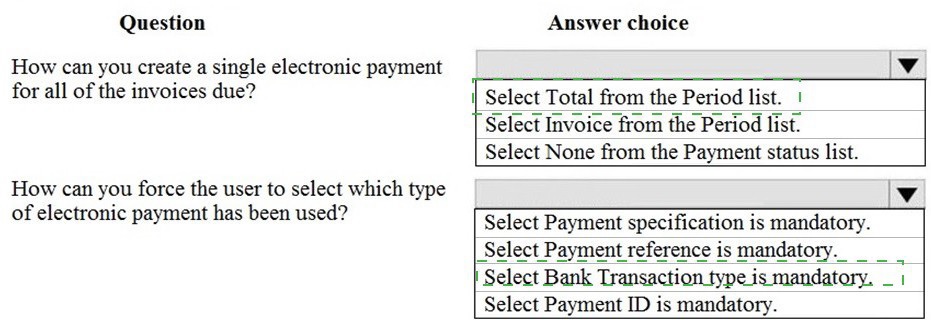
A client needs to configure Accounts payment vendor methods of payment to meet the following business requirements:

Configure the electronic method of payment to create one electronic payment for all of the invoices due. Configure the system to ensure that all payments made with an electronic method of payment also forces the user to select which payment has been used.

You display the Methods of payment setup screen.
Show answerHide answer

Explanation


Explanation:
The configuration is done in the Methods of payment form for vendors. The Period field controls payment consolidation, and checkboxes under a specific format (like PAYROLL_CK) enforce data entry requirements on the payment proposal.

Correct Configuration Reasoning:

Creating a single payment (Period = Invoice): The Period field in the payment setup determines how payments are grouped.
Setting it to Invoice means the system will create one lump-sum electronic payment that includes the total amount of all selected invoices due for a vendor when you run the payment proposal. This meets the requirement for "a single electronic payment for all invoices due."

Total would create one payment for the total balance of all vendor transactions (including open and non-due), which is broader than requested.
Forcing selection of payment type (Bank Transaction type is mandatory): The checkboxes in the PAYROLL_CK or similar format section control which fields are required on the payment proposal screen before generating the file.
Bank Transaction type is mandatory forces the user to explicitly select the specific electronic payment type (e.g., ACH Credit, Wire Transfer) from a list when submitting the payment proposal. This directly meets the requirement to "force the user to select which payment has been used."

Other mandatory fields like Payment ID or Payment reference are for internal tracking or communication with the vendor, not for specifying the type of electronic funds transfer.

Incorrect Option Reasoning:

Period = Total: This is too broad and would pay the vendor's total outstanding balance, not just the "invoices due" as specified.

Period = None: This is not a standard option for the Period field in this context.

Select Payment specification is mandatory / Payment reference is mandatory / Payment ID is mandatory: These fields are for adding references or notes to the payment file. They do not force the user to specify the type of electronic payment (the bank transaction method).

Reference:
Microsoft Learn, "Methods of payment for vendors" and "Set up method of payment": The documentation explains that the Period field set to "Invoice" creates a single payment per vendor for selected invoices. The Bank transaction type field on the payment proposal is used to specify the electronic payment method, and making it mandatory ensures it is always selected.
Question 9
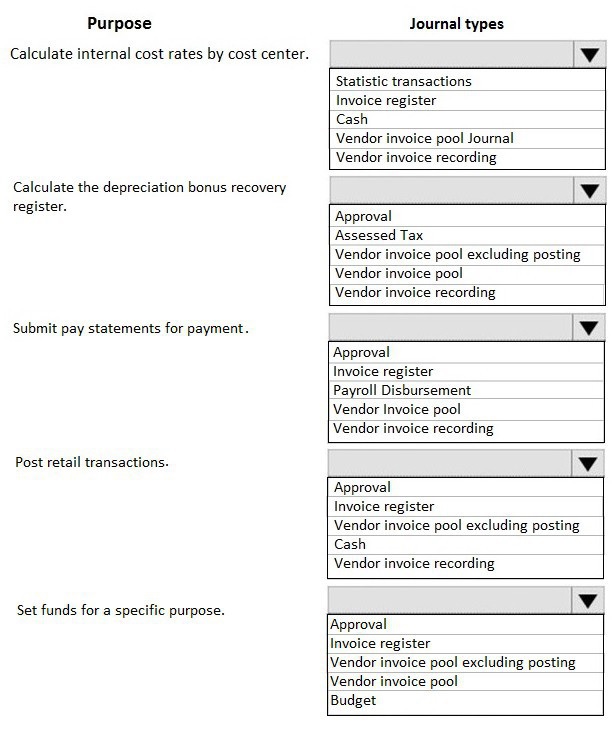
A company is using vendors to produce components for its products.

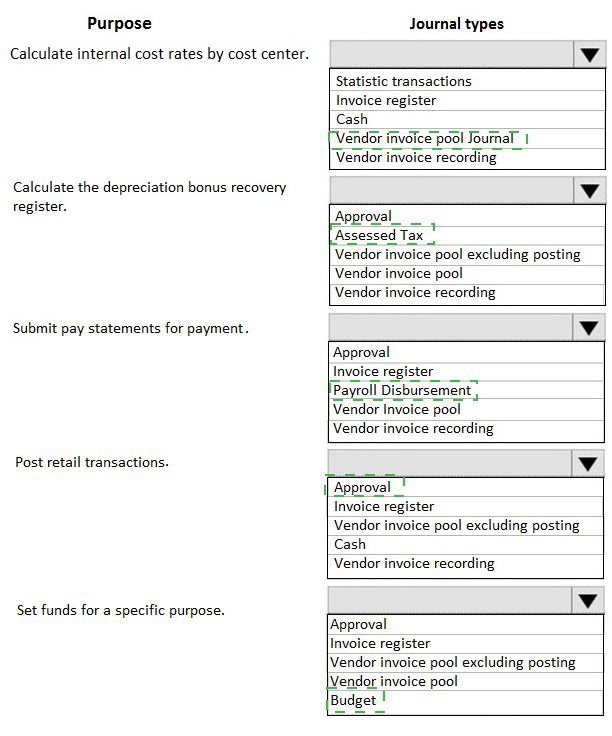
Journal types are not configured to support vendor invoices-

You need to identify and configure journals to use for vendor invoices.

Which journal types should you use? To answer, select the appropriate options in the answer area,

NOTE: Each correct selection is worth one point

Show answerHide answer

Explanation


Explanation:
For processing vendor invoices, especially in a production context, you typically use a workflow that involves recording/approval first, followed by final posting. The relevant journal types form this sequence: Invoice register (for initial recording and accruals), Vendor invoice pool (for holding invoices pending approval), and Vendor invoice recording (for the final posting to the general ledger after matching).

Correct Journal Type Reasoning:
The question asks to "identify and configure journals to use for vendor invoices." The core vendor invoice journal types are:

Invoice register:
Used to initially record vendor invoices for accrual purposes. It posts to an interim accrued liabilities account before the invoice is matched and finally approved.

Vendor invoice pool / Vendor invoice pool excluding posting:
This journal type is used in the approval workflow. Invoices are held here for review and matching before they are released for final posting. "Excluding posting" holds them without any GL impact until released.

Vendor invoice recording:
This is the journal type used for the final posting of the vendor invoice to the general ledger, after all matching and approvals are complete. It creates the definitive accounts payable liability.

Incorrect Journal Type Reasoning:

Approval, Cash, Payroll Disbursement, Budget, Statistic transactions, Assessed Tax:
These journal types serve other specific purposes (budgeting, cash disbursements, payroll, statistical entries) and are not the standard journals for processing accounts payable vendor invoices for goods received.

The other listed "Purposes" (Calculate internal cost rates, etc.) are distractors for different business processes.

Reference:
Microsoft Learn, "Journal types (form)": The documentation lists the purpose of each journal type. Invoice register, Vendor invoice pool, and Vendor invoice recording are explicitly defined for the vendor invoice process, supporting the record -> approve/match -> post workflow.
Question 10 Choose 1
A client has multiple legal entities set up in Dynamics 365 for Finance and Operations. All companies and data reside in Finance and Operations,

The client currently uses a separate reporting tool to perform their financial consolidation and eliminations. They want to use Finance and Operations instead.

You need to configure the system and correctly perform eliminations.

Solution: Select Consolidate online in Finance and Operations. Include eliminations during the process or as a proposal. Setup the transactions to post in the legal entity configured for consolidations.

Does the solution meet the goal?
Show answerHide answer

Correct answer: B No

Explanation

Explanation:
The core issue is that the client's data all resides within a single Finance and Operations instance. The Consolidate online feature is designed to consolidate data from different systems or separate databases (including other Finance instances) into a designated consolidation company within the same system. However, for performing intercompany eliminations, the system requires intercompany transactions to be specifically identified using intercompany accounting setups, which is not the primary function of the online consolidation tool.

Correct Option:

B. No

Detailed Analysis:

What the solution does correctly:
Using Consolidate online is appropriate for aggregating financial balances from multiple legal entities into a holding company within Finance & Operations. It can also propose elimination entries.

Why the solution does NOT meet the goal:
The critical missing step is the configuration of intercompany relationships and accounts. For eliminations to post automatically (not just as a proposal), you must first:

Set up intercompany accounting (identifying the legal entities that trade with each other).

Configure elimination rules that specify the main accounts to use for posting elimination journal entries (like an intercompany profit elimination account).

Without this prior configuration, the consolidation process cannot correctly post elimination transactions, even if they are included as a proposal. The solution describes the execution step but omits the essential setup step.

Reference:
Microsoft Learn, "Consolidate online" and "Elimination rules": The documentation clarifies that while you can generate elimination proposals during online consolidation, for the system to post eliminations, you must predefine elimination rules and a elimination legal entity. The solution incorrectly assumes the process will work without this foundational configuration.
Full mock exam

Sit the MB-310 exam before exam day

Full-length mocks with the same number of questions and the same time limit as the real MB-310 exam. Every attempt draws a new set of questions from the full bank, so you can keep going until you pass comfortably.

Get full MB-310 mock exam
  • 65questions per mock
  • 105 mintime limit
  • 222questions in the bank
  • Newmock on every attempt
These MB-310 practice questions with explanations help candidates learn financial management features within Dynamics 365. Topics include general ledger, accounts payable, accounts receivable, budgeting, and financial reporting. Each question is supported by a detailed explanation that clarifies concepts and improves understanding of business processes. This approach helps learners go beyond memorization and truly understand how financial operations are managed in Dynamics 365. By practicing consistently, candidates can identify weak areas, strengthen their knowledge, and feel confident when tackling exam scenarios.

MB-310 - Microsoft Dynamics 365 Finance Official Exam Blueprint and Weight:

1. Configure and Manage Finance

Official Exam Weight: 25-30%

Subtopics: Configure legal entities and ledgers, manage fiscal calendars and periods, configure chart of accounts and financial dimensions, configure currencies and exchange rates, manage accounting structures and rules, configure financial reporting and inquiries, manage workflow approvals, configure cash and bank management settings, implement financial controls and compliance requirements, configure budget control and budget planning, manage financial close processes, configure intercompany accounting and consolidations.

2. Implement and Manage Accounts Payable and Accounts Receivable

Official Exam Weight: 20-25%

Subtopics: Configure vendor and customer records, manage vendor invoices and payments, process purchase order invoices, configure payment schedules and methods, manage collections and credit limits, process customer invoices and payments, configure accounts receivable parameters, manage vendor collaborations and settlements, implement customer collections strategies, manage aging reports and inquiries, configure sales tax and withholding tax settings, process refunds and adjustments.

3. Manage Budgeting Fixed Assets and Cost Accounting

Official Exam Weight: 20-25%

Subtopics: Configure and manage budget planning processes, implement budget control policies, create and manage budget registers, configure fixed asset groups and profiles, acquire transfer depreciate and dispose of fixed assets, manage fixed asset leasing, configure depreciation methods and books, perform fixed asset transactions and reporting, configure cost accounting structures, allocate and distribute costs, manage cost objects and dimensions, analyze costs using cost accounting reports.

4. Implement and Manage Cash and Treasury Management

Official Exam Weight: 15-20%

Subtopics: Configure bank accounts and banking parameters, process bank reconciliations, manage cash flow forecasting, configure electronic payments and collections, manage liquidity and cash positions, process bank transactions and imports, implement treasury management processes, manage foreign currency transactions, configure letters of credit and bank guarantees, monitor cash management reports and analytics, automate banking operations and workflows.

5. Configure Financial Reporting and Analytics

Official Exam Weight: 10-15%

Subtopics: Configure financial reporting structures, create and customize financial reports, manage report definitions and row structures, implement Management Reporter and financial insights, configure Power BI integration, create financial dashboards and KPIs, analyze financial performance metrics, configure reporting security and access controls, manage report scheduling and distribution, troubleshoot reporting issues, optimize financial analytics and reporting performance.


Domain Title Exam Weight
1 Configure and Manage Finance 25-30%
2 Implement and Manage Accounts Payable and Accounts Receivable 20-25%
3 Manage Budgeting Fixed Assets and Cost Accounting 20-25%
4 Implement and Manage Cash and Treasury Management 15-20%
5 Configure Financial Reporting and Analytics 10-15%

See What People Are Saying


Finance in Dynamics 365 covers general ledger, accounts payable/receivable, and budgeting. The MB-310 exam requires precision. MSmcqs practice exam broke down complex financial scenarios into digestible questions. I mastered the material and passed on my first attempt. Thank you MSmcqs!
David Peterson, Finance Consultant | New York, NY