You must define VLANs as untagged, tagged, or using VLAN pooling.
In this scenario, where would you accomplish this task in the Juniper Mist UI?
Show answerHide answer
Correct answer: BWLAN settings
Explanation
Explanation:
In the Juniper Mist UI, the definition of how VLANs are handled for wireless clients—whether they are untagged (using the AP's native/management VLAN), tagged (assigned a specific VLAN ID), or part of a VLAN Pool (distributing clients across multiple VLANs to reduce broadcast domain size)—is configured within the WLAN settings.
When you create or edit a WLAN, the "VLAN" section allows you to specify these behaviors. This ensures that any client connecting to that specific SSID is mapped to the correct network segment.
Why Other Options are Incorrect
Option A: Site settings are used to define site-wide parameters like time zones, AP local status pages, or radio management (RRM) defaults. While you can define a "Management VLAN" here, the specific mapping for user traffic happens at the WLAN level.
Option C: Organization settingsdeal with high-level administrative tasks, such as SSO, API keys, and global object definitions. While you can create WLAN Templates at the Org level, the actual "untagged/tagged/pooling" logic is still a component of the WLAN object settings within those templates.
Option D: Policy settings (such as WXLAN policies) are used to permit or deny traffic based on user roles or resources. They do not define the primary VLAN tagging or pooling mechanism for the SSID itself.
According to the 802.11 standard, how wide are 2.4 GHz band OFDM channels?
Show answerHide answer
Correct answer: C20 MHz
Explanation
Explanation:
The 802.11 standard specifies that for Orthogonal Frequency Division Multiplexing (OFDM) operation in the 2.4 GHz band, the channel width is 20 MHz.
This specification applies to 802.11g and 802.11n (when operating in 20 MHz mode) in the 2.4 GHz frequency range. The 20 MHz channel consists of 64 subcarriers, with 48 used for data and 4 used as pilots for synchronization.
It is important to distinguish OFDM from the legacy Direct Sequence Spread Spectrum (DSSS) modulation used in original 802.11b. DSSS requires a 22 MHz channel width. The question specifically asks about OFDM channels, which are defined as 20 MHz.
Why other options are incorrect:
A. 5 MHz – This channel width applies to specific configurations in the 5 GHz band for certain 802.11 OFDM modes (e.g., half-clocking), not to standard 2.4 GHz OFDM operation.
B. 22 MHz – This is the channel width for DSSS modulation (802.11b), not for OFDM.
D. 3 MHz – This is not a defined channel width in any 802.11 standard for 2.4 GHz operation.
What do 802.11 stations perform to help avoid collisions on the WLAN medium?
Show answerHide answer
Correct answer: BListen to verify that the medium is free before transmitting.
Explanation
Explanation:
802.11 stations use a mechanism called Carrier Sense Multiple Access with Collision Avoidance (CSMA/CA) . Unlike wired Ethernet, which can detect collisions after they happen (CSMA/CD), Wi-Fi radios cannot transmit and listen at the same time because they are half-duplex. Therefore, they must avoid collisions before they occur.
The primary method for avoiding collisions is Clear Channel Assessment (CCA) . Before a station transmits, it "listens" (senses) the wireless medium for energy. If energy is present (indicating another station is transmitting), the station defers and waits a random back-off period before trying again. Only after verifying the medium is free will the station transmit.
Why other options are incorrect:
A. 802.11 stations detect collisions and set a back-off timer. — This is incorrect because 802.11 stations cannot detect collisions reliably (they cannot listen while transmitting). This describes CSMA/CD (used in Ethernet), not CSMA/CA (used in Wi-Fi).
C. Stations only transmit when polled by the access point. — This describes polling (used in some legacy or point-to-point systems), not standard Wi-Fi. In infrastructure mode, stations contend for the medium; the AP does not continuously poll each station.
D. Transmit on a fixed schedule. — This is Time Division Multiple Access (TDMA) , which is not part of standard 802.11 DCF (Distributed Coordination Function). Wi-Fi uses random back-off, not fixed schedules.
References:
*IEEE 802.11-2020 Standard*: "CSMA/CA requires a station to sense the medium before transmitting; transmit only if medium is idle."
Mist AI Documentation – RF Fundamentals: "Clear Channel Assessment (CCA) determines if the wireless medium is busy. Stations defer transmission if energy above threshold is detected."
Question 24Choose 3
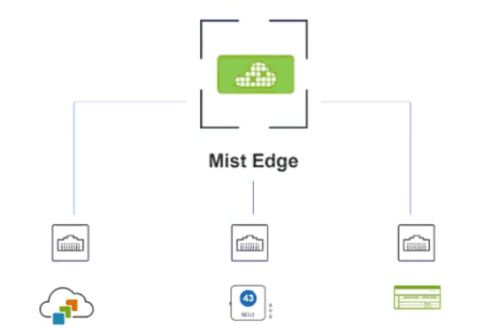
You are asked to deploy a new Juniper Mist Edge VM for your customer.
Referring to the exhibit, which three interfaces are required to accomplish this task?
(Choose three.)
Show answerHide answer
Correct answer: A, B, Dout-of-band
downstream
upstream
Explanation
Explanation:
Based on the official Juniper Mist and Juniper Networks documentation for Virtual Mist Edge deployment, the VM requires three virtual network interfaces to function correctly .
Why A, B, and D are correct:
A. Out-of-band (OOBM) – This is the management interface. It is required for the Mist Edge VM to communicate with the Mist Cloud for configuration, telemetry, and statistics. It also handles the RADIUS proxy service (RadSec) on TCP port 2083 and connects to the EP-terminator service on TCP port 443 .
B. Downstream – This is the Tunnel IP interface. It terminates the L2TPv3 or IPsec tunnels coming from the Mist Access Points (APs). The downstream port receives encapsulated traffic from the APs. It must allow incoming UDP port 1701 (L2TPv3) or UDP ports 500/4500 (IPsec) .
D. Upstream – This is the Data interface. It connects to the trusted wired network (core/aggregate switch). After the Mist Edge decapsulates the tunneled traffic from the AP, it forwards the client traffic out the upstream port. This port is typically configured as a trunk carrying all the user VLANs mapped to the WLANs .
Why the other options are incorrect:
C. Proxy – This is not a required interface type for the Virtual Mist Edge. While the Mist Edge VM can function as an Auth Proxy, this functionality is delivered over the OOBM interface, not a dedicated "Proxy" interface .
E. Revenue – This is not a valid networking interface type in the context of Juniper Mist Edge deployment. It appears to be a distractor term.
References
Mist Documentation - Virtual Mist Edge: "Mist Edge requires the following three virtual NIC interfaces: Out of Band Management (OOBM), Tunnel IP, Upstream"
Juniper Networks Documentation - Getting Started: "Mist Port (Out-of-Band Management Port), Tunnel Port, Data Port"
Question 25Choose 2
Referring to the exhibit, what are two reasons why a Mist AP would have multiple IP
addresses? (Choose two.)
Show answerHide answer
Correct answer: B, DThe Local Status Page is enabled in the site settings.
A guest portal is configured on a tagged VLAN.
Explanation
Explanation:
A Juniper Mist Access Point (AP) typically operates with a single IP address for its Management VLAN to communicate with the Mist Cloud. However, there are specific functional scenarios where the AP will provision additional IP addresses on other VLANs.
Option B: The Local Status Page is enabled (Correct): As discussed in previous questions, enabling the Local Status Page in the site settings allows for direct local troubleshooting. To ensure this page is accessible to a technician on any configured VLAN without requiring complex inter-VLAN routing, the AP requests an IP address for every VLAN it is currently broadcasting.
Option D: A guest portal is configured on a tagged VLAN (Correct): When a WLAN uses a Guest Portal (Captive Portal) hosted by the AP, the AP must act as the interception point for the client's initial web request (HTTP/HTTPS). To do this effectively on a tagged VLAN, the AP often requires an IP address on that specific guest VLAN to serve the portal pages and manage the redirection process for unauthenticated clients.
Why Other Options are Incorrect
Option A: In the Mist architecture, control and management traffic are both handled over the same primary management interface/IP address using a secure outbound TLS connection to the cloud. They are not split across different IP addresses.
Option C: Mist APs do not use multiple IP addresses for redundancy. Redundancy is typically handled at the network layer (e.g., LACP for dual-ethernet ports or VRRP at the gateway), not by assigning multiple IPs to the same AP management plane.
Reference
Juniper Mist Documentation: AP Local Status Page — "Understanding why APs request IPs on multiple VLANs."
Juniper Mist Documentation: Guest Access — "Captive Portal Redirect and VLAN IP requirements."
Question 26Choose 1
Click the Exhibit button.
Users are occasionally having problems connecting to the Internet using Wi-Fi. You
suspect possible interference from a neighboring Wi-Fi network.
Referring to the exhibit, which Wi-Fi Assurance SLE and classifier would provide
information about this issue?
Show answerHide answer
Correct answer: DCapacity and Wi-Fi Interference
Explanation
Explanation:
When troubleshooting potential interference from a neighboring Wi-Fi network in Juniper Mist, the Capacity SLE is the correct starting point. This SLE is specifically responsible for monitoring issues related to airtime utilization and channel contention, which includes interference from both Wi-Fi and non-Wi-Fi sources
✅ D. Capacity and Wi-Fi Interference: Correct. The Capacity SLE measures airtime availability, and its "WiFi Interference" classifier specifically identifies neighboring Wi-Fi networks as the cause .
Why the other options are incorrect
A. Throughput and Network Issues: The Throughput SLE measures data transfer rates. While interference ultimately affects throughput, its dedicated classifier is "Network Issues," which points to backend connectivity problems (e.g., ISP or switch congestion), not airtime contention from neighboring radios .
B. Capacity and Non Wi-Fi Interference: Although the Capacity SLE is correct, the Non Wi-Fi Interference classifier is specifically for interference from non-802.11 sources (e.g., microwaves, cordless phones, Bluetooth). The scenario explicitly describes a "neighboring Wi-Fi network," making this mismatch incorrect .
C. Coverage and Weak Signal: The Coverage SLE tracks signal strength issues like RSSI and asymmetry. "Weak Signal" pertains to distance or physical obstructions, not interference from other networks. This is a distinct problem domain .
References:
Mist SLE API Documentation: Capacity metric classifier list includes "WiFi Interference: wifi-interference" .
Exam Discussions: Verified answer for JN0-452 topic on interference
Question 27Choose 1
Which policy would you use to allow or deny user access to resources?
Show answerHide answer
Correct answer: D WxLAN
Explanation
Explanation:
WxLAN (Wireless LAN) policies are the dedicated feature in Juniper Mist for enforcing access control—allowing or denying specific users access to specific network resources. This is explicitly stated in the official documentation: "Policies are used for allowing/denying all or specific users from accessing all or specific resources" .
WxLAN policies function as a simplified, cloud-native access control framework. They work by matching user identities (defined by labels for roles like "employee" or "guest") against resources (defined by labels for applications, IP addresses, or VLANs), with each rule specifying either an "allow" or "deny" action . These policies are configured within WLAN templates or directly at the site level under Wireless > Policy .
Why other options are incorrect:
A. WLAN template – This defines the SSID, security settings, and VLAN configurations, but it does not contain the granular allow/deny logic for application or IP-based access control . WLAN templates can reference WxLAN policies but are not policies themselves.
B. access list – While traditional network devices use ACLs, Mist's native access control mechanism is WxLAN. The documentation notes that "Access Controls lists from other vendors can be used to create WxLAN policies," but "access list" is not the correct Mist-specific term for this function .
C. RF template – This configures radio frequency parameters such as transmit power, channels, and data rates. It manages physical layer performance, not user access permissions .
References
Juniper Mist Documentation: "Policies are used for allowing/denying all or specific users from accessing all or specific resources"
Question 28Choose 2
Which two statements are true about 802.1X/EAP? (Choose two.)
Show answerHide answer
Correct answer: A, BCredentials are exchanged with a RADIUS server prior to the 4-way Handshake.
Credentials are exchanged with a RADIUS server after the 802.11 Association.
Explanation
Explanation:
In 802.1X/EAP authentication for Wi-Fi networks, the process follows a specific sequence. Understanding the order of operations is key to answering this question correctly.
Why A is correct (Prior to the 4-way Handshake): The 4-way Handshake is the final security step that generates encryption keys for data traffic. The 802.1X/EAP authentication must complete successfully before the 4-way Handshake can begin. In fact, the Pairwise Master Key (PMK) generated during the EAP/802.1X authentication is exactly what the 4-way Handshake uses to derive the Pairwise Transient Key (PTK). The official 802.11 sequence shows that RADIUS authentication happens first, and only after an EAP-Success message is received can the 4-way Handshake (EAPOL-Key frames 1-4) proceed.
Why B is correct (After the 802.11 Association): The client must first complete 802.11 Association with the AP before any EAP/802.1X authentication can occur. The typical frame exchange is:
802.11 Authentication (Open System Authentication) – this establishes basic compatibility
802.11 Association Request/Response – this creates a logical connection
EAP/802.1X Authentication (credentials exchanged with RADIUS server) – this verifies user identity
4-way Handshake – this establishes encryption keys
Why C is incorrect: The credentials are exchanged before, not after, the 4-way Handshake. The 4-way Handshake occurs only upon successful EAP authentication.
Why D is incorrect: Credentials are exchanged after 802.11 Association, not before. The Association process must complete first to establish a logical connection over which the EAPOL frames can be exchanged.
References
IEEE 802.11 Standard: The complete sequence is 802.11 Authentication → 802.11 Association → 802.1X/EAP Authentication → 4-way Handshake
Your organization has recently purchased new VoIP handsets. All of the VoIP handsets fail
to connect to the corporate WLAN. However, all other devices connect successfully. You
expect that there might be a bug with the new handsets. The vendor asks you to provide a
pcap file of the handsets’ connection attempts.
Which Juniper Mist feature will provide this file?
Show answerHide answer
Correct answer: ADynamic Packet Capture
Explanation
Explanation:
When a vendor requests a pcap file of connection attempts from new VoIP handsets that are failing to connect, Dynamic Packet Capture is the correct Juniper Mist feature to provide this file .
Dynamic Packet Capture is an automated troubleshooting feature in Juniper Mist that triggers short-term packet captures whenever a connection failure occurs between a wireless client and an access point . The captures are automatically saved to the cloud and can be downloaded from the Insights page .
In this scenario, since the VoIP handsets are failing to connect, Mist automatically captures these failure events. You would locate the relevant client failure events on the Insights page—look for the paperclip icon indicating events with attached dynamic packet captures—and download the pcap file to share with the vendor .
Why the other options are incorrect
B. Service Level Expectations (SLEs): SLEs provide performance metrics and insights about the client experience (e.g., Time to Connect, Coverage) but do not produce downloadable pcap files . SLEs help identify problems but are not a source for raw packet capture data.
C. Clients Insights: This feature provides detailed information about specific client MAC addresses, including "bad events" and connection history . While it may indicate that a failure occurred and reference dynamic packet captures, the feature itself does not generate or provide the pcap file—it points to where the capture can be found.
D. Alerts dashboard: The Alerts dashboard shows system notifications and warnings (e.g., missing VLANs, configuration issues) . It does not provide packet capture files for client connection attempts.
References
Juniper Documentation - Dynamic and Manual Packet Captures: "Dynamic packet captures are saved to the cloud. You can download these files from the Insights page. Paperclip icons indicate the events with dynamic packet captures"
Mist Troubleshooting Guide: "DHCP failures will have dynamic packet captures indicating what part of DORA (discovery, offer, request, acknowledgement) is failing"
Question 30Choose 2
What are two ways to access Marvis? (Choose two.)
Show answerHide answer
Correct answer: A, B Use the conversational assistant.
Use Actions.
Explanation
Explanation:
Marvis, Juniper Mist's AI Virtual Network Assistant, can be accessed primarily through two distinct interfaces within the Mist portal: the Conversational Assistant and the Marvis Actions dashboard.
Why A is correct (Use the conversational assistant): The Marvis Conversational Assistant is accessible by clicking the Marvis icon (typically located at the top-left or bottom-right corner of the Juniper Mist portal) . This interface allows network administrators to type or speak questions in natural language to troubleshoot issues, search for devices, or retrieve network information without navigating complex dashboards .
Why B is correct (Use Actions): Marvis Actions is an interface that provides automated problem detection and remediation recommendations. It proactively identifies critical issues (such as DHCP failures, missing VLANs, and network loops) and offers evidence-based resolutions . IT teams can access the Actions dashboard to view both pending and automatically resolved network actions, maintaining full auditability of system-detect issues .
Why C and D are incorrect:
C. Use Insights: Insights is a feature that organizes network telemetry into "metrics and classifiers" that provide recommendations . While Marvis drives insights, it is not the primary access method to Marvis itself.
D. Use config templates: Config templates are used to standardize device configurations across sites (e.g., RF templates, WLAN templates). They are a configuration tool, not a way to query or interact with the Marvis AI engine.
References
Juniper Documentation - Marvis Conversational Assistant: "Click the Marvis icon at the top-left corner or bottom-right corner of the Juniper Mist portal"
Juniper Documentation - Conversational Assistant FAQs: Describes use cases including troubleshooting clients, APs, and sites
Full mock exam
Sit the JN0-452 exam before exam day
Full-length mocks with the same number of questions and the same time limit as the real JN0-452 exam. Every attempt draws a new set of questions from the full bank, so you can keep going until you pass comfortably.