Juniper certification · Exam JN0-232

JN0-232 Mock Exam Page 2

Security, Associate (JNCIA-SEC)

Free JN0-232 mock exam questions 11–19, each with the answer and an explanation.

19 questions · 27 minutes · free, no sign-up

Free JN0-232 questions

11–19 of 19 free
Question 11 Choose 2
Which two statements about global security policies are correct? (Choose two.)
Show answerHide answer

Correct answer: A, D The from-zone and to-zone contexts are not required for a global security policy. You can use both zone-based security policies and global security policies at the same time.

Explanation

Explanation:

A. The from-zone and to-zone contexts are not required for a global security policy. ✅ Correct
Global security policies are defined without specifying source and destination zones. They apply to any zone pair unless a more specific zone-based policy matches. The configuration uses default-policy or global policy statements at the [edit security policies] hierarchy level, not under specific from-zone to to-zone contexts.

D. You can use both zone-based security policies and global security policies at the same time. ✅ Correct
Junos allows coexistence of zone-based policies and global policies. Zone-based policies are evaluated first for traffic matching their specific zone pair. If no match occurs, global policies are then evaluated. This provides flexibility — zone policies for specific inter-zone traffic control, global policies as fallback or catch-all rules.

Why Other Options Are Incorrect

B. Global security policies require specific zone contexts.
❌ This is the opposite of correct. Requiring zone contexts (from-zone and to-zone) defines a zone-based policy, not a global policy. Global policies explicitly omit zone contexts.

C. Global policies are processed before zone-based security policies. ❌ Incorrect. The evaluation order is:
Zone-based policies (highest precedence, specific zone pairs)
Global policies (lower precedence, any zone pair)
Default policy (implicit deny, evaluated last)
Zone-based policies always take precedence over global policies for matching traffic.

Reference

Juniper TechLibrary — Global Security Policies:
"Global policies are not bound to specific zones and are evaluated after zone-based policies. You can configure both types simultaneously."
Question 12 Choose 1
What is transit traffic in the Junos OS?
Show answerHide answer

Correct answer: A It is traffic that is processed solely through the forwarding plane.

Explanation

Explanation:

In Junos OS, transit traffic is traffic that passes through the device from one interface to another (e.g., from a Trust zone to an Untrust zone) without being destined to the device itself. This traffic is processed solely through the forwarding plane (Packet Forwarding Engine — PFE) in most cases, especially for high-performance packet flow.

Why Other Options Are Incorrect

B. It is traffic that is rate-limited to prevent denial-of-service attacks. ❌
Rate-limiting is an optional security feature (e.g., screen options, policers) applied to some transit traffic, but it is not the definition of transit traffic. Transit traffic may or may not be rate-limited depending on configuration.

C. It is traffic that is processed by the control plane. ❌
This describes exception traffic or RE-directed traffic (e.g., ICMP errors, BGP updates, fragmented packets needing reassembly). Standard transit traffic is not processed by the control plane.

D. It is traffic that requires special handling by the Routing Engine. ❌
Only traffic that triggers exceptions (e.g., no session match, destined to local interface, protocols requiring RE processing) gets special RE handling. Normal transit traffic does not require this.

Reference

Juniper TechLibrary — Transit Traffic:
"Transit traffic is processed exclusively in the Packet Forwarding Engine; the Routing Engine is not in the data path for forwarded packets."
Question 13 Choose 2
Your company is acquiring a smaller company that uses the same private address range that your company currently uses in its North America division. You have a limited number of public IP addresses to use for the acquisition. You want to allow the new acquisition's users to connect to the existing services in North America. Which two features would you enable on your SRX Series Firewall to accomplish this task? (Choose two.)
Show answerHide answer

Correct answer: B, D NAT PAT

Explanation

Explanation:

Your scenario describes overlapping private IP addresses between two companies. The North America division uses certain RFC 1918 addresses, and the newly acquired company uses the same range. Users from the acquisition need to connect to existing services in North America. With a limited number of public IPs available, you need both address translation and port multiplexing.

B. NAT (Network Address Translation) ✅
NAT is required to translate overlapping addresses into unique or non-conflicting addresses. Specifically, you would use source NAT (for acquisition users accessing North America services) and potentially destination NAT (if North America services need to respond correctly). A common solution is double NAT or NAT-44 (NAT-Source) to avoid overlap conflicts.

D. PAT (Port Address Translation) ✅
PAT is a form of dynamic source NAT where multiple private IPs are mapped to a single (or few) public IPs using unique source ports. Given your limited public IP addresses, PAT allows many acquisition users to share a single public IP. This is configured in Junos as source NAT with pooled or overload option — often called NAPT (Network Address Port Translation).

Why Other Options Are Incorrect

A. IDP (Intrusion Detection and Prevention) ❌
IDP inspects traffic for malicious patterns and blocks attacks. It does nothing to resolve IP address overlap or allow connectivity when both sides use the same private range.

C. BGP (Border Gateway Protocol) ❌
BGP is a dynamic routing protocol used to exchange routes between autonomous systems. It does not translate IP addresses. Overlapping address space causes route conflicts that BGP cannot resolve without NAT.

Reference

Juniper TechLibrary — Resolving Overlapping IP Addresses with NAT:
"Source NAT with PAT (port translation) allows overlapping private networks to communicate by translating source IPs and ports to a shared public IP pool."
Question 14 Choose 1
You want to confirm that your SRX Series Firewall is connected to the SBL server. Which operational mode command would you use in this scenario?
Show answerHide answer

Correct answer: D show security utm anti-spam status

Explanation

Explanation:

To verify that your SRX Series Firewall is successfully connected to an SBL (Spam Block List) server for anti-spam filtering, you need to check the anti-spam status.

The Spam Block List (SBL) is a third-party server-based list of disallowed IP addresses that the anti-spam feature queries via DNS to identify spam sources. The command show security utm anti-spam status displays the operational status of the anti-spam feature, including whether it is active and properly connected to the configured SBL server.

Why Other Options Are Incorrect

A. show security utm anti-virus status ❌
This command displays status for the antivirus UTM feature, which is entirely unrelated to SBL. Antivirus uses different servers (e.g., Kaspersky or Sophos engines) and has no connection to Spam Block Lists.

B. show security web filtering status ❌
This command checks web filtering/surf control status—completely separate from anti-spam functionality. Web filtering is for HTTP/HTTPS content categorization, not email spam checking.

C. show security utm content-filtering statistics ❌
This command displays content filtering statistics (e.g., MIME type blocking, file extension filtering). It does not provide any SBL or anti-spam connection information.

Reference

Juniper TechLibrary — test security utm anti-spam command: "The anti-spam feature requires internet connectivity with the Spam Block List (SBL) server. Domain Name Service (DNS) must be available to access the SBL server."

Juniper TechLibrary — anti-spam feature configuration: "A license check for the antispam configuration is performed at the time of commit and provides a warning if a valid license is not installed on the device. Once a valid license is installed on the device then the custom antispam profile or the default antispam profile is able to process the traffic."
Question 15 Choose 1
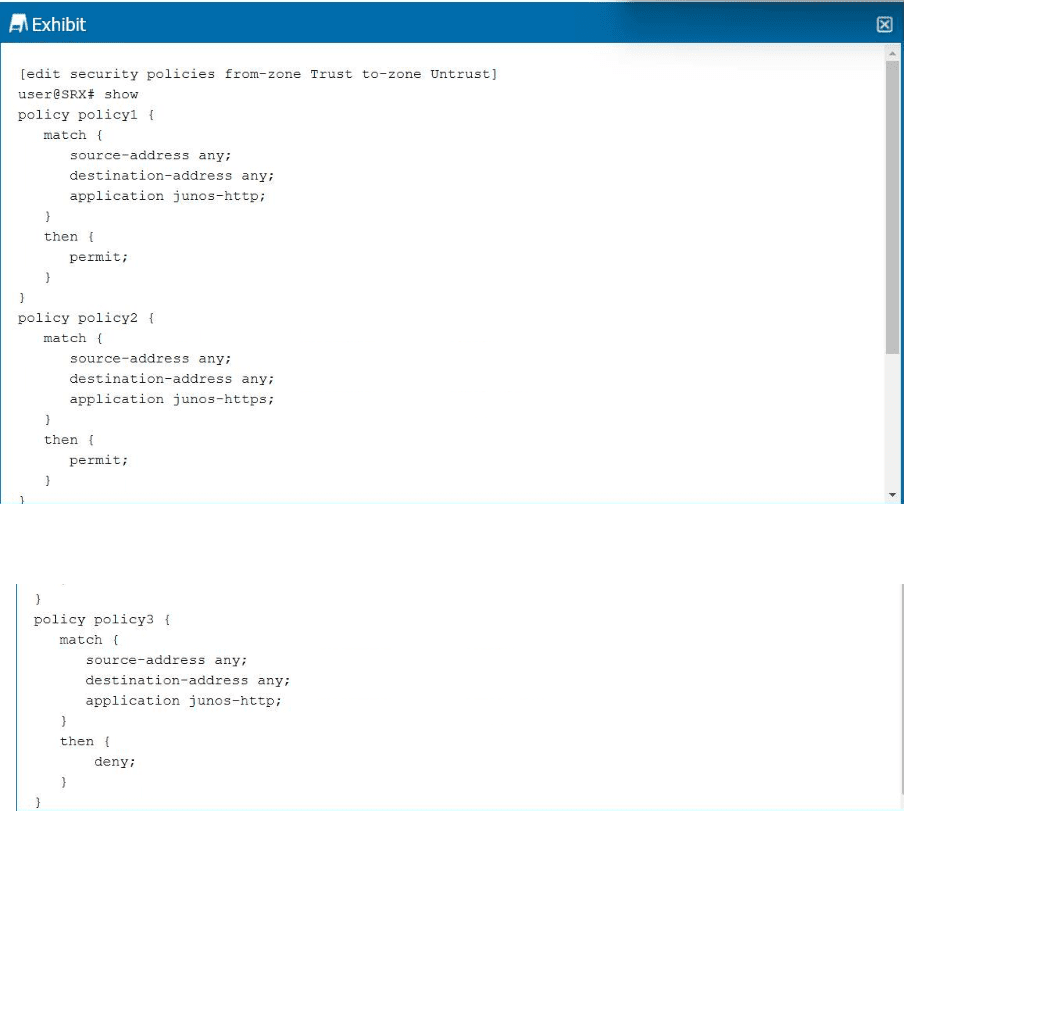
Click the Exhibit button.

Referring to the exhibit, which statement is correct?
Show answerHide answer

Correct answer: A policy3 will be shadowed because it matches the same application as policy1.

Explanation

Explanation:

Policy shadowing occurs when an earlier policy matches the same traffic as a later policy, making the later policy never evaluated. Juniper policies are processed top-down — first match wins.

In the exhibit:
policy1 (sequence 1): junos-http → permit
policy2 (sequence 2): junos-https → permit
policy3 (sequence 3): junos-http → deny
All policies use source-address any and destination-address any.

Why A is correct: policy3 matches the exact same traffic as policy1 (any/any/junos-http). Since policy1 is evaluated first and permits HTTP traffic, policy3 is never reached. It is completely shadowed.

Why Other Options Are Incorrect

B. None of the policies will be shadowed. ❌
False. policy3 is clearly shadowed by policy1. Shadowing exists here.

C. policy1 will be shadowed because it matches the same application as policy3. ❌
Shadowing affects later policies only, not earlier ones. policy1 comes first and always executes regardless of policy3.

D. policy2 will be shadowed because it matches the same application as policy1. ❌
policy2 matches junos-https; policy1 matches junos-http. Different applications. HTTPS traffic hits policy2; HTTP traffic hits policy1. No conflict, no shadowing.

Reference

Juniper TechLibrary — Policy Ordering and Shadowing:
"When multiple security policies exist, the first policy that matches the traffic determines the action. Identical or less-specific policies occurring later are never evaluated."
Question 16 Choose 1
When a new traffic flow enters an SRX Series device, in which order are these processes performed?
Show answerHide answer

Correct answer: D screens zones security policies routes

Explanation

Explanation:

When an SRX Series device processes the first packet of a new session, the order of operations is fixed. The correct sequence is Screens → Zones → Security Policies → Routes.

Why Options A, B, C Are Incorrect

A. screens → security policies → zones → routes ❌
Incorrect because zones must be determined before security policies can be evaluated. You cannot evaluate zone-based policies without knowing which zones are involved. This option places policies before zones, which is impossible.

B. screens → routes → zones → security policies ❌
Incorrect because route lookup occurs after policy evaluation, not before. The SRX must first determine if traffic is permitted before forwarding. Performing a route lookup for denied traffic wastes processing.

C. routes → zones → screens → security policies ❌
Incorrect because routes are the last step. Also, screens (attack detection) must occur before zones and policies to drop malicious traffic at the earliest possible stage.

References

Juniper TechLibrary — First Packet Processing:
"Screens are applied first, followed by zone determination, security policy lookup, and finally route lookup for permitted traffic. This order ensures efficient security processing before forwarding decisions."
Question 17 Choose 2
What are two system-defined zones created on the SRX Series Firewalls? (Choose two.)
Show answerHide answer

Correct answer: B, C junos-host management

Explanation

Explanation:

SRX Series firewalls have four system-defined zone types: Security Zones (user-defined, like trust/untrust), Functional Zones (management), junos-host, and null . Among these, junos-host and management are the two correctly identified system-defined zones from the options provided.

B. junos-host ✅
The junos-host zone is a system-defined zone that controls traffic to and from the Routing Engine (the SRX device itself) . By default, all traffic from any zone to the SRX device is discarded, while traffic from the SRX device to all zones is permitted . You can configure security policies with junos-host as the destination zone to explicitly permit management access (SSH, HTTPS, etc.) to the device, providing an additional layer of control beyond the standard host-inbound-traffic settings .

C. management ✅
The management zone is a functional zone used exclusively for out-of-band management purposes . Interfaces assigned to the management zone (like fxp0 or em0) can only be used for device management traffic (e.g., SSH, Telnet, web interface). Traffic cannot be routed or forwarded through a management interface, and the destination of management traffic can only be the Juniper device itself . This is particularly useful on smaller SRX devices that lack a dedicated out-of-band management port, allowing an administrator to dedicate a standard interface solely to management functions .

Why Other Options Are Incorrect

A. null ❌
While null is a valid system-defined zone, it is not a "system-defined zone" in the sense of being preconfigured for a specific functional purpose. Rather, the null zone is the default zone that all interfaces belong to before they are explicitly assigned to a security zone . An interface in the null zone does not pass any traffic — it is effectively administratively down for data forwarding . Fabric interfaces (fab0/fab1) used for cluster communication remain in the null zone because they are not intended to pass regular data traffic .

D. DMZ ❌
DMZ is a user-defined security zone, not a system-defined zone. While Juniper documentation commonly uses DMZ as an example zone in configuration guides, it is not created by default on an SRX device. Administrators must manually create and configure DMZ zones based on their network requirements .

References

Juniper Networks Documentation— Security Zones: "By default, all interfaces are in the null zone... An interface assigned to a security zone can pass traffic"

Juniper Knowledge Base — Junos-host Zone: "The junos-host zone is used to apply security policies to traffic destined to the Routing Engine"
Question 18 Choose 2
Which two statements about management functional zones are correct? (Choose two.)
Show answerHide answer

Correct answer: A, C The management functional zone is used to control the management-related traffic that is allowed to access your device. The management functional zone is automatically created on the SRX Series Firewalls.

Explanation

Explanation:

A. The management functional zone is used to control the management-related traffic that is allowed to access your device. ✅ Correct
The management zone is specifically designed to control out-of-band management traffic to the SRX device itself. Interfaces in the management zone (such as fxp0 or em0) are used for administrative access (SSH, HTTPS, SNMP, etc.). Security policies can reference the management zone as the destination zone to explicitly permit or deny management access, providing granular control beyond host-inbound-traffic settings.

C. The management functional zone is automatically created on the SRX Series Firewalls. ✅ Correct
The management zone is one of the system-defined functional zones that exists by default on all SRX devices. You do not need to create it manually. Other system-defined zones include junos-host and null. The management zone is ready to use as soon as you assign an interface (e.g., fxp0) to it.

Why Other Options Are Incorrect

B. The management functional zone contains all available revenue ports until they are assigned to a user-defined security zone. ❌
This describes the null zone, not the management zone. By default, all revenue ports (traffic-forwarding interfaces) belong to the null zone. An interface in the null zone cannot pass any traffic until explicitly assigned to a security zone (e.g., Trust, Untrust, DMZ). The management zone is separate and only contains dedicated management interfaces or interfaces you explicitly assign for out-of-band management.

D. The management functional zone cannot be referenced in any security policies. ❌
This is false. The management zone can be referenced in security policies. For example, you can create a policy from Trust → management to permit internal IT staff to SSH into the device, or from management → Trust to allow the device to initiate management connections. However, note that management zone interfaces do not forward transit traffic; they only handle traffic destined to or originating from the Routing Engine.

Reference

Juniper TechLibrary — Functional Zones:
"The management zone is a predefined functional zone used for out-of-band management. It can be referenced in security policies to control access to the device."
Question 19 Choose 1
You need to capture control plane traffic on a high-end SRX Series device. How would you accomplish this task?
Show answerHide answer

Correct answer: A Configure a packet capture under the edit security datapath-debug capture hierarchy.

Explanation

Explanation:

On high-end SRX Series devices (SRX5400, SRX5600, SRX5800), capturing control plane traffic requires configuring datapath debugging under the edit security datapath-debug capture hierarchy.

Control plane traffic consists of packets destined to the Routing Engine (RE) itself (e.g., BGP, OSPF, SSH, ICMP to the device). On high-end SRX platforms, these packets follow a different processing path through the Services Processing Units (SPUs) and Network Processors (NPs), requiring specialized capture methods.

Why Other Options Are Incorrect

B. Apply a firewall filter with the sample action. ❌
The sample action configures packet sampling for flow monitoring (jFlow/NetFlow). This is designed for statistical sampling of transit traffic for traffic analysis, not for capturing actual packet payloads destined to the RE. The sample action does not capture control plane traffic to a pcap file.

C. Start a shell and use the tcpdump tool. ❌
Juniper Junos does not provide shell access or a native tcpdump command. While tcpdump may be available on non-Juniper Linux systems, it is not a supported tool on SRX firewalls. Juniper uses its own operational commands (monitor traffic, show security datapath-debug capture).

D. Apply a port mirroring configuration under forwarding options. ❌
Port mirroring (configured under edit forwarding-options or edit security forwarding-options mirror-filter) duplicates transit traffic to an analyzer port for external monitoring. This method does not capture traffic destined to the RE's control plane. Port mirroring is designed for monitoring traffic passing through the device, not traffic to the device.

References

Juniper Documentation — Data Path Debugging: "SRX5400, SRX5600, and SRX5800 support datapath debugging... The data path debugging feature supports tracing and debugging over multiple processing units along the packet handling path"

Juniper CLI Reference — mirror-filter: "Configure a mirror filter for filtering X2 packets to be mirrored and sent to a packet analyzer" (transit traffic only)

That's the last free question

You've seen the free 30% (19 of 65 questions). Full access unlocks every question and full-length JN0-232 mock exams (65 questions, 90 minutes), a different mock on every attempt.

Unlock full mock exam
Full mock exam

Sit the JN0-232 exam before exam day

Full-length mocks with the same number of questions and the same time limit as the real JN0-232 exam. Every attempt draws a new set of questions from the full bank, so you can keep going until you pass comfortably.

Get full JN0-232 mock exam
  • 65questions per mock
  • 90 mintime limit
  • 65questions in the bank
  • Newmock on every attempt