HP certification · Exam HPE7-A08

HPE7-A08 Mock Exam Page 2

HPE Aruba Networking Certified Professional - Switching

Free HPE7-A08 mock exam questions 11–20, each with the answer and an explanation.

20 questions · 30 minutes · free, no sign-up

Free HPE7-A08 questions

11–20 of 39 free
Question 11 Choose 1
Refer to the exhibit:
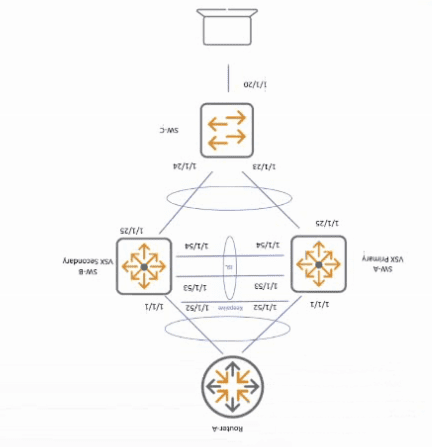
Interfaces 1/1/53 and 1/1/54 were accidentally disconnected from Switch-A, the primary VSX member. Client A is experiencing network disruptions with network connections to Router-A.
What needs to be done to prevent user traffic disruption in this scenario?
Show answerHide answer

Correct answer: B Configure VSX shutdown on-split on SW-B.

Explanation

Explanation:

Interfaces 1/1/53 and 1/1/54 are the VSX ISL between SW-A and SW-B. When those links fail, the VSX pair enters a split condition.

SW-A is the VSX primary, while SW-B is the secondary. During a VSX split, VSX links on the secondary are taken down, but non-VSX interfaces on the secondary can remain operational. If the upstream connection from SW-B toward Router-A stays up, Router-A can continue forwarding traffic to SW-B even though SW-B has lost the forwarding path through the VSX topology. That can result in traffic being black-holed and Client A experiencing interruptions.

HPE Aruba specifically provides the vsx shutdown-on-split feature for this situation. It shuts down selected non-VSX interfaces on the VSX secondary when the ISL goes out of sync, forcing traffic to use the surviving primary switch.

The important point is that HPE's command documentation states that vsx shutdown-on-split has no effect on the VSX primary during a split. Therefore, configuring it for this purpose on SW-A would not solve the problem.

Why the other answers are incorrect

A. Keepalive VLAN on downstream LAG:
Keepalive determines whether the VSX peer is alive; it does not shut the problematic routed/upstream interface during an ISL failure.

C. Keepalive VLAN on upstream LAG:
Again, keepalive provides peer-state detection rather than preventing traffic from being forwarded into the isolated secondary.

D. VSX shutdown-on-split on SW-A:
SW-A is the primary. HPE documentation explicitly says the feature does not perform split shutdown on the primary during a VSX split.

Exam Answer

✅ B. Configure VSX shutdown-on-split on SW-B.

Important:
Some unofficial HPE7-A08 question banks list D, but that conflicts with current HPE Aruba documentation. HPE's own VSX guide describes this exact traffic-loss scenario as one where the relevant non-VSX interfaces on the secondary should be shut down.
Question 12 Choose 1
Refer to the exhibit:

Interfaces 1/1/53 and 1/1/54 were accidentally disconnected from Switch-A, the primary VSX member. Client A is experiencing network disruptions with network connections to Router-A. What needs to be done to prevent user traffic disruption in this scenario?
Show answerHide answer

Correct answer: B Configure VSX shutdown on-split on SW-B.

Explanation

Explanation:

Interfaces 1/1/53 and 1/1/54 are the VSX ISL between SW-A and SW-B. When those links fail, the VSX pair enters a split condition.

SW-A is the VSX primary, while SW-B is the secondary. During a VSX split, VSX links on the secondary are taken down, but non-VSX interfaces on the secondary can remain operational. If the upstream connection from SW-B toward Router-A stays up, Router-A can continue forwarding traffic to SW-B even though SW-B has lost the forwarding path through the VSX topology. That can result in traffic being black-holed and Client A experiencing interruptions.

HPE Aruba specifically provides the vsx shutdown-on-split feature for this situation. It shuts down selected non-VSX interfaces on the VSX secondary when the ISL goes out of sync, forcing traffic to use the surviving primary switch.

The important point is that HPE's command documentation states that vsx shutdown-on-split has no effect on the VSX primary during a split. Therefore, configuring it for this purpose on SW-A would not solve the problem.

Why the other answers are incorrect

A. Keepalive VLAN on downstream LAG:
Keepalive determines whether the VSX peer is alive; it does not shut the problematic routed/upstream interface during an ISL failure.

C. Keepalive VLAN on upstream LAG:
Again, keepalive provides peer-state detection rather than preventing traffic from being forwarded into the isolated secondary.

D. VSX shutdown-on-split on SW-A:
SW-A is the primary. HPE documentation explicitly says the feature does not perform split shutdown on the primary during a VSX split.

Exam Answer

✅ B. Configure VSX shutdown-on-split on SW-B.

Important:
Some unofficial HPE7-A08 question banks list D, but that conflicts with current HPE Aruba documentation. HPE's own VSX guide describes this exact traffic-loss scenario as one where the relevant non-VSX interfaces on the secondary should be shut down.
Question 13 Choose 1
You recently enabled ARP protection on your CX switches, but many users now complain that they can no longer access the network. What do you need to configure to resolve the issue?
Show answerHide answer

Correct answer: C DHCP snooping

Explanation

Explanation:

Dynamic ARP Protection (also called ARP inspection) validates ARP packets by checking every IP-to-MAC binding against a trusted binding database. This database is populated by DHCP snooping, which intercepts DHCP exchanges and records the valid IP-to-MAC leases.

If you enable ARP protection without DHCP snooping configured, the switch has no binding database to validate ARP traffic against. As a result, it treats all ARP packets from untrusted ports as invalid and drops them, causing users to lose network connectivity. The DHCP snooping binding table is the only source of binding information used by ARP inspection.

How to Resolve the Issue

- Enable DHCP snooping globally on the switch.
- Enable DHCP snooping on each VLAN where clients reside.
- Configure trusted ports for the DHCP server and any uplinks or inter-switch links.

This allows the switch to build a valid IP-to-MAC binding table from observed DHCP exchanges. ARP protection can then correctly validate ARP packets against this table.

Why Other Options Are Incorrect

A. Dynamic IP lockdown:
This is a separate security feature that restricts client traffic based on the DHCP snooping binding table. It does not provide the binding database that ARP protection requires.

B. IGMP snooping:
This is used for multicast traffic optimization, not ARP or DHCP security.

D. DHCP reservations:
Reservations are configured on the DHCP server, not on the switch. They do not help the switch validate ARP packets locally.

Key Concept: The Dependency Relationship

DHCP snooping:
Builds and maintains the IP-to-MAC binding database.

ARP protection (ARP inspection):
Validates ARP packets against the DHCP snooping binding database.

Dynamic IP lockdown:
Filters data traffic based on the DHCP snooping binding database.

ARP protection cannot function without a populated binding database—which is why DHCP snooping must be configured first. This is the root cause of the connectivity loss described in the question.
Question 14 Choose 1
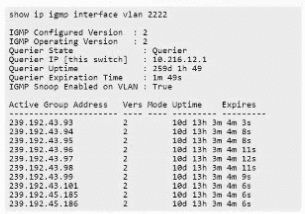
An HPE Aruba Networking CX switch is configured with IGMP using the given output:

Which statement is true about the possible supported message types?
Show answerHide answer

Correct answer: B Join, Leave, Query and Report

Explanation

Explanation:

The output shows that the switch is running IGMP version 2 and is operating as the IGMP querier.

For IGMPv2, HPE Aruba documentation describes the relevant IGMP message functions as:

Query:
Sent by the querier to determine whether multicast receivers are still present.

Report (Join):
Sent by a host to indicate that it wants to join, or remains a member of, a multicast group.

Leave Group:
Sent by an IGMPv2 host when it leaves a multicast group.

HPE Aruba specifically describes the message types as “Query, Report (Join), and Leave Group.”

In exam terminology, Join is often listed separately even though technically the join operation is performed by sending an IGMP Membership Report. Therefore, option B represents all the applicable IGMPv2 message behavior.

Why the other options are incorrect

A. Leave and Report:
Missing Query.

C. Query and Report:
Missing Leave, which is supported by IGMPv2.

D. Join and Query:
Missing the Leave operation.

HPE Aruba's multicast best-practice documentation also confirms that an IGMPv2 querier handles membership queries, membership reports/joins, and leave-group messages.
Question 15 Choose 1
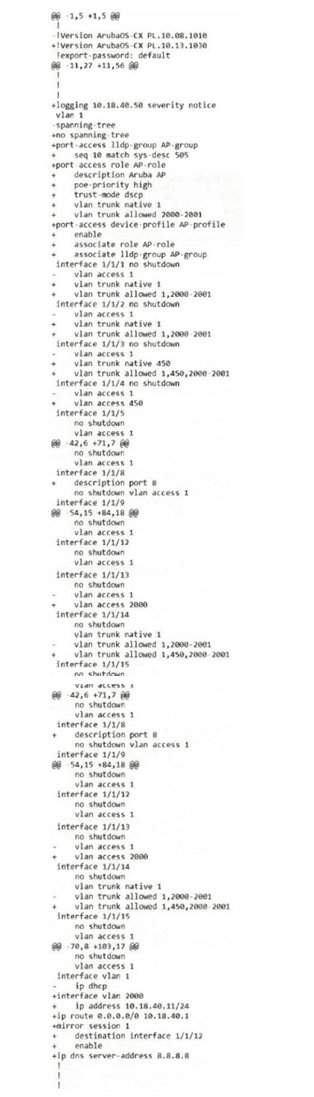
Based on the images provided , which CLI command was used to produce this output?
Show answerHide answer

Correct answer: C Use show checkpoint diff to compare running-config with stored checkpoints.

Explanation

Explanation:

The output shown uses +/- line prefixes to indicate additions and removals between two configurations — this is the classic format produced by ArubaOS-CX's checkpoint diff functionality. The command syntax on ArubaOS-CX is:

switch# show checkpoint diff running-config <checkpoint-name>

or similarly comparing two checkpoints:

switch# show checkpoint diff checkpoint-name-1 checkpoint-name-2

This command compares the running-config (the active configuration currently in memory) against a stored checkpoint (a saved configuration snapshot, such as startup-config or a manually created checkpoint). The output format uses:

+ : Indicates lines present in the running-config but not in the checkpoint (additions).

- : Indicates lines present in the checkpoint but not in running-config (removals/changes).

@@ : Markers indicate line-position/context information, similar to a standard diff output — exactly as shown in the exhibit.

Why not the others:

A. checkpoint diff:
This is not valid ArubaOS-CX syntax; the command must be invoked under the show context as show checkpoint diff, not as a standalone checkpoint diff command.

B. show checkpoint compare (vs. saved-config):
ArubaOS-CX does not use the term "compare" or reference "saved-config revisions" in this context; the correct keyword is diff, and comparisons are against checkpoints, not a generic "saved-config" revision system.

D. checkpoint compare (vs. saved-config revisions):
Same issue as B, combined with the invalid standalone (non-show) command structure as in A.

Since the output format (unified diff style with +/-/@@) directly matches the show checkpoint diff command comparing running-config to a stored checkpoint, Option C is correct.
Question 16 Choose 2
Your customer’s CX switches are managed in HPE Aruba Networking Central. They have recently deployed new cabling to some desks and want to be notified of any physical cabling issues. Which alerts should you enable? (Choose two.)
Show answerHide answer

Correct answer: A, E Switch Port Input ErrorsSwitch Port Duplex Mode

Explanation

Explanation

Physical cabling problems (bad cables, damaged connectors, incorrect cable type/length, poor terminations, etc.) commonly manifest as:

- Input errors (CRC errors, alignment errors, runts, giants, etc.) on the switch ports.
- Duplex mismatches (the port falling back to half-duplex), which is frequently caused by auto-negotiation failures due to cabling issues.

In HPE Aruba Networking Central, the two alerts that directly detect these conditions are:

Switch Port Input Errors:
Triggers when the percentage of input errors on a port exceeds the configured threshold. This is the primary indicator of Layer-1 cabling problems.

Switch Port Duplex Mode:
Triggers when a port is operating in half-duplex mode (instead of the expected full-duplex). Half-duplex operation is a classic symptom of cabling or negotiation issues.

Why the other options are not appropriate

B. Switch Port Rx Rate:
Monitors traffic volume/utilization, not physical errors.

C. Switch Hardware Failure:
Covers broader hardware events (fans, power supplies, temperature, etc.). While some cable-related symptoms can appear under hardware failure categories, it is not the specific, targeted alert for port cabling issues.

D. Switch Uplink Port Usage:
Tracks bandwidth utilization on uplinks, not physical-layer problems.

Recommendation:
Enable both Switch Port Input Errors and Switch Port Duplex Mode alerts (and set appropriate thresholds) so the customer is proactively notified of any physical cabling problems on the newly deployed desk connections.
Question 17 Choose 1
You are attempting to configure an interface, but you are seeing the error message below. What could explain this?
Access-1(config)# interface 1/1/1
Invalid input: interface
Show answerHide answer

Correct answer: C The switch is being managed by HPE Aruba Networking Central

Explanation

Explanation:

When an ArubaOS-CX switch is managed by Aruba Central, certain configuration commands can become restricted or hidden from the local CLI, depending on the management mode (e.g., template-based/overlay management). In these scenarios, Central becomes the source of truth for configuration, and some commands — particularly those Central manages centrally through templates or group-based configuration — will return an "Invalid input" error when attempted locally via CLI, even though the command syntax itself is completely correct. This is because the switch's CLI parser has that portion of the command set disabled/restricted while under Central's management, rather than returning a permission-style error.

This matches the scenario exactly: interface 1/1/1 is valid, standard ArubaOS-CX syntax, yet it's rejected as "Invalid input" — indicating the command is not being recognized/available in the current operating context, which points to Central management restricting local configuration ability.

Why not the others:

A. Password recovery mode:
In password recovery mode, the switch boots into a special recovery context specifically for resetting credentials; you wouldn't be able to reach a normal (config)# prompt and attempt interface configuration in the first place, so this doesn't fit the scenario shown.

B. Must be run from manager context:
The prompt shown, Access-1(config)#, already indicates the switch is in global configuration context (reached after configure terminal), which is exactly where interface commands are meant to be run in ArubaOS-CX. There's no separate "manager context" requirement for this command in ArubaOS-CX.

D. Authorization enabled for CLI commands:
If TACACS+/RADIUS command authorization were blocking this command, the switch would typically return a permission-denied / authorization failure message, not "Invalid input" (which specifically indicates a syntax/command-recognition issue, not an authorization rejection).

Since the symptom is the command being unrecognized rather than denied, and this is a well-documented behavior of Central-managed switches, Option C is correct.
Question 18 Choose 1
You have configured UBT on your CX switches, but now HTTPS-enabled websites will not load, which you suspect is due to the packet size. To resolve the issue, what should you configure on each device with funneled traffic?
Show answerHide answer

Correct answer: D IP fragmentation

Explanation

Explanation

Why it is correct:
When User-Based Tunneling (UBT) is enabled, user data packets are encapsulated in GRE/IP tunnels, which adds extra header overhead and increases the overall packet size. If the resulting packets exceed the path Maximum Transmission Unit (MTU) and fragmentation is disabled or blocked (often causing issues with secure HTTPS traffic due to TLS record sizes), websites fail to load. Configuring or permitting IP fragmentation ensures that oversized encapsulated packets are properly split and successfully delivered across the path.

Why others are incorrect:

- Path MTU discovery relies on ICMP messages, which are frequently blocked by modern firewalls, leading to black-holed traffic.
- Fragment reassembly happens on the receiving end rather than being a mitigation configuration on the transmitting/tunneling device.
- Jumbo frames require end-to-end infrastructure support and do not resolve overhead issues across standard routed intermediate paths.
Question 19 Choose 1
You recently made a configuration change on a switch, and shortly afterward, you noticed a spike in CPU utilization in the NAE dashboard. You are concerned that the high CPU could be affecting users. What should you do to restore service as quickly as possible?
Show answerHide answer

Correct answer: B Revert the change

Explanation

Explanation:

Because the CPU spike appeared shortly after a configuration change, the fastest way to restore normal operation is to roll back or revert that change.

On Aruba AOS-CX, configuration checkpoints and rollback features are designed specifically for situations like this. Reverting the recent change can quickly return the switch to the previously stable state without the disruption of a full reboot.

Why the other options are incorrect

A. Reboot the switch:
More disruptive and may not solve the issue if the problematic configuration remains in place.

C. Disable debug logging:
Useful only if excessive debugging is known to be causing the CPU load. The question points to the recent configuration change as the likely cause.

D. Pause NAE monitoring:
This would stop monitoring but would not address the underlying high-CPU condition affecting users.
Question 20 Choose 1
Your customer's CX switches are managed in HPE Aruba Networking Central. If a VSX primary switch is accidentally powered off, which alert will be triggered?
Show answerHide answer

Correct answer: C Switch Disconnected

Explanation

Explanation:

In a VSX pair, the primary and secondary switches operate as separate devices. If the primary switch is accidentally powered off, HPE Aruba Networking Central detects that the switch has lost connectivity and triggers a Switch Disconnected alert.

This is different from a VSF stack, where a conductor change can occur if the stack's conductor switch fails.

Why the other options are incorrect

A. Switch Reboot:
Indicates a switch reboot event, not simply loss of connectivity due to power-off.

B. Switch Stack Conductor Change:
Applies to a VSF stack conductor change, not a VSX primary switch failure.

D. Switch STP Root Change:
Occurs when the spanning-tree root bridge changes, which is not the direct event described.

Exam takeaway:
VSX primary switch powered off → Central detects the switch going offline → Switch Disconnected alert.
Full mock exam

Sit the HPE7-A08 exam before exam day

Full-length mocks with the same number of questions and the same time limit as the real HPE7-A08 exam. Every attempt draws a new set of questions from the full bank, so you can keep going until you pass comfortably.

Get full HPE7-A08 mock exam
  • —questions per mock
  • —time limit
  • 131questions in the bank
  • Newmock on every attempt