Refer to the exhibits.
Practice Exam
Practice Exam
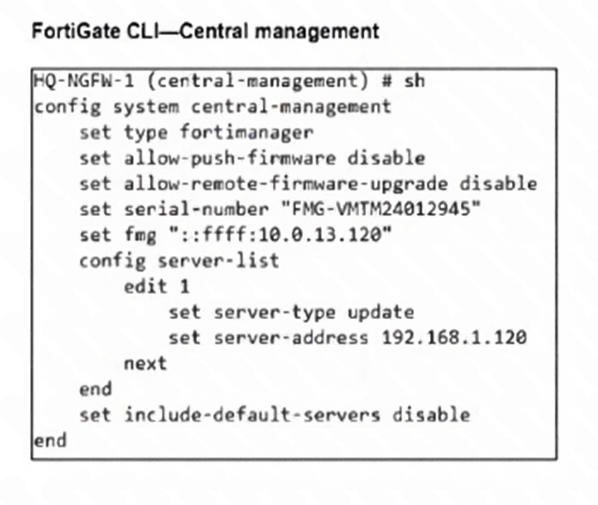
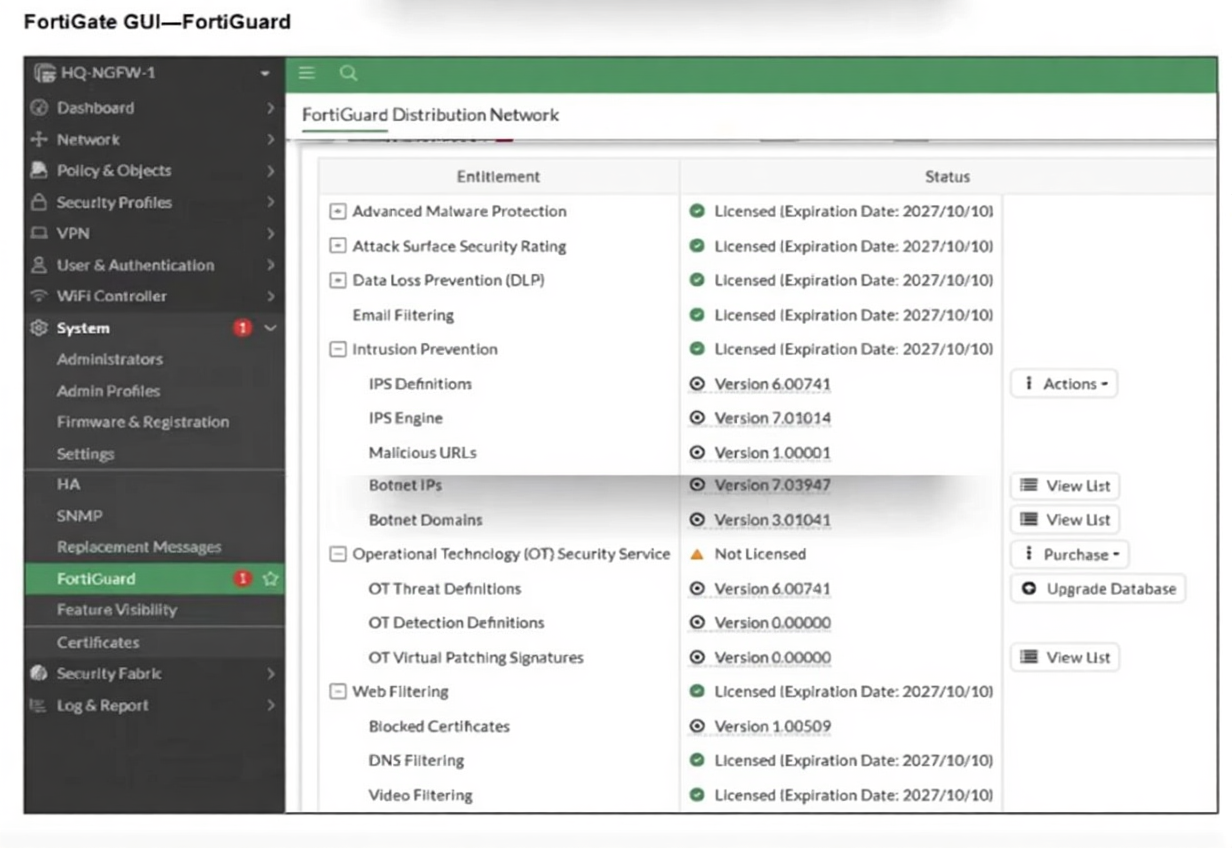
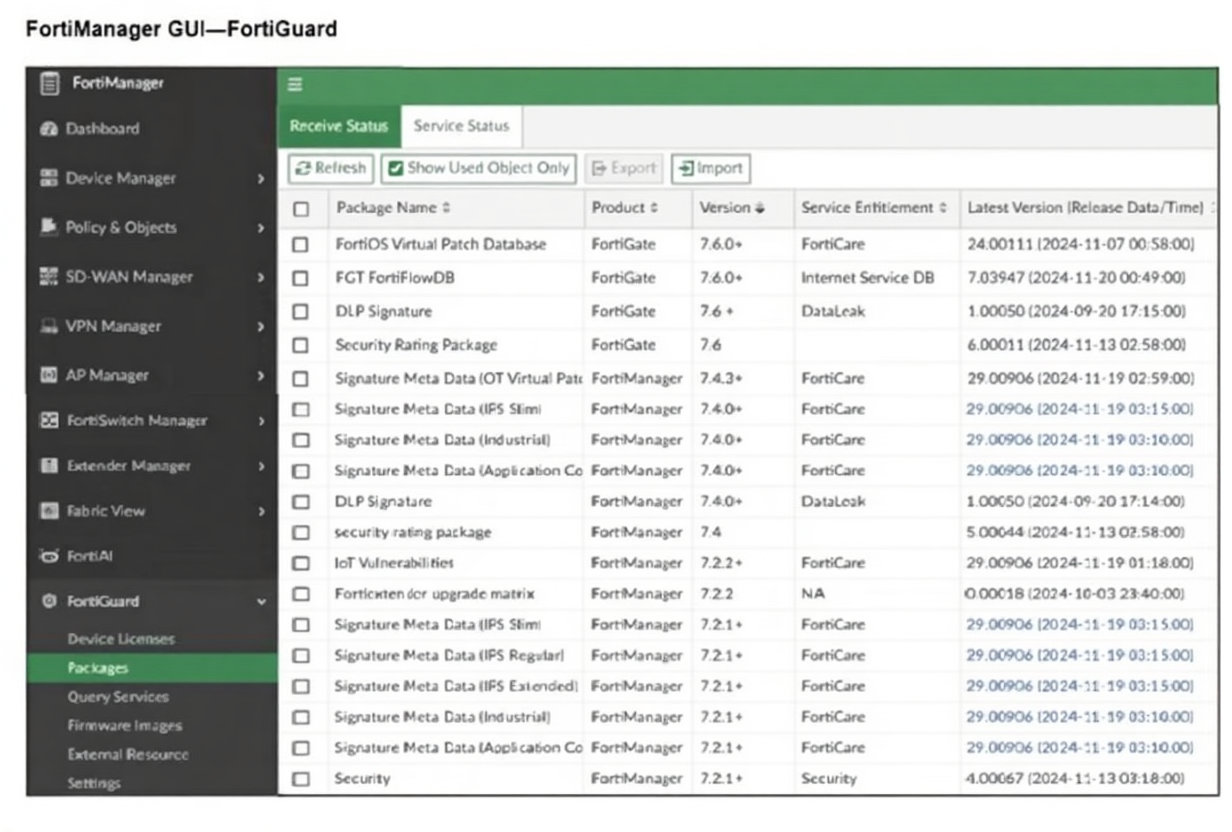
FortiGate HQ-NGFW-1 downloads and validates FortiGuard databases from FortiManager which acts as a
local FortiGuard Distribution Server (FDS) in a closed network. An administrator pushes a new firewall
policy with an intrusion prevention system (IPS) profile from FortiManager to FortiGate HQ- NGFW-1
However, FortiGate does not recognize the new IPS signature from FortiManager. What is the most likely reason why FortiGate HQ-NGFW-1 does not recognize the new IPS signature?
Practice Exam
Practice Exam
FortiGate HQ-NGFW-1 downloads and validates FortiGuard databases from FortiManager which acts as a
local FortiGuard Distribution Server (FDS) in a closed network. An administrator pushes a new firewall
policy with an intrusion prevention system (IPS) profile from FortiManager to FortiGate HQ- NGFW-1
However, FortiGate does not recognize the new IPS signature from FortiManager. What is the most likely reason why FortiGate HQ-NGFW-1 does not recognize the new IPS signature?
Show answerHide answer
Correct answer: B FortiManager and FortiGate have different IPS database versions.
Explanation
Explanation:The scenario describes a managed FortiGate that receives its FortiGuard updates (including IPS signatures) from FortiManager acting as a local FortiGuard Distribution Server (FDS). The FortiGate's configuration shows its update server is 192.168.1.120 (the FortiManager), not the public FortiGuard servers. For the FortiGate to recognize a new IPS signature pushed via policy, the IPS signature database on the FortiGate must be the same version (or newer) than the one referenced when the policy was configured on FortiManager. If FortiManager has a newer IPS database version than what is currently installed on the FortiGate, the FortiGate will not recognize signatures that were added in that newer database version, causing the policy to fail or be ineffective.
Option A is incorrect.
The rating option is for the Security Rating service, not for IPS signature validation. The server list is correctly configured for updates.
Option C is incorrect.
IPv6 is not required; the communication is using IPv4 (shown as ::ffff:10.0.13.120 which is an IPv4-mapped IPv6 address, and server 192.168.1.120).
Option D is incorrect.
The fortiguard-anycast option is used on a FortiGate to use Fortinet's anycast servers for updates. Here, the FortiGate is explicitly configured to use the local FortiManager (192.168.1.120), so anycast is not relevant.
Reference:
FortiManager Administration Guide - FortiGuard - Configuring Local FortiGuard Distribution. When FortiManager acts as an FDS, managed devices must have their FortiGuard update source pointed to it. Synchronization of signature database versions between FortiManager and the managed devices is critical for policy consistency.