Refer to Exhibit:
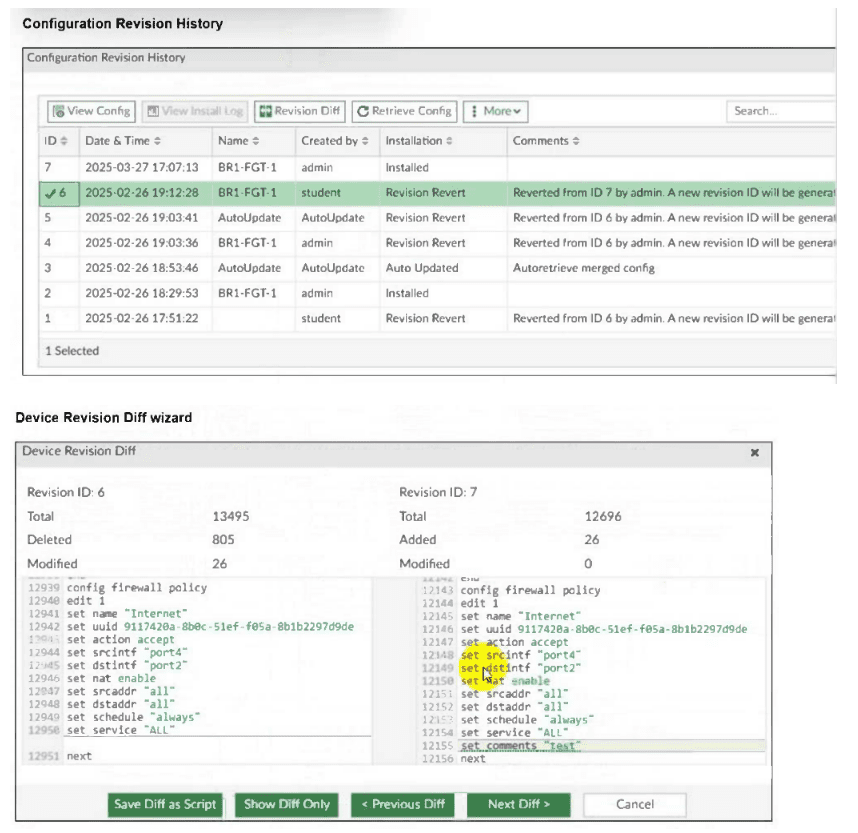
An administrator admin used the Configuration Revision History window to revert the FortiGate device configuration to revision ID 6. After running the reinstall policy package,
the administrator noticed problems with the firewall policy- they could not see the unset comment on policy ID 1.
Why did FortiManager not remove the comment from policy ID 1 when the administrator ran reinstall policy package?
Show answerHide answer
Correct answer: B Because the administrator must import the firewall policies to update the firewall policy package.
Explanation
Explanation:Reverting to a previous revision restores the policy package in FortiManager’s database, but the device-level database still contains the current installed configuration. Running Reinstall Policy Package reapplies the same policy package without re-importing changes. To remove the comment, the administrator must import the reverted policy package to sync the device-level database.
Correct Option:
B. Because the administrator must import the firewall policies to update the firewall policy package.
Correct. After reverting to revision ID 6, the policy package in FortiManager reflects the older configuration. However, the device-level database is not automatically updated. The administrator must use Import Policy Package to pull the reverted configuration into the device-level database before installation.
Incorrect Option:
A. Because the administrator student must install the configuration changes to correctly see the expected results.
Incorrect. The issue is not about who performs the installation. Even if admin runs installation, the device-level database still holds the current policy with the comment. Import is required first.
C. Because every time the administrator uses the revert config file, they must use the Install Wizard instead of running the reinstall policy package.
Incorrect. The Install Wizard and Reinstall Policy Package both install from the policy package. Neither resolves the underlying issue that the device-level database must be re-imported after a revision revert.
D. Because the administrator used the Revision Diff view, which shows what changed, not what will be installed.
Incorrect. The Revision Diff view is only a comparison tool. It does not affect the installation process or why the comment remained.
Reference:
FortiManager 7.6 Administration Guide → Revision History → Reverting Revisions → Importing Policy Package After Revision Revert to Update Device Database