You need to create a solution that meets the development requirements for retrieving the
patient lists.
How should you complete the Transact-SQL code? To answer, select the appropriate options in the answer area.
NOTE: Each correct selection is worth one point.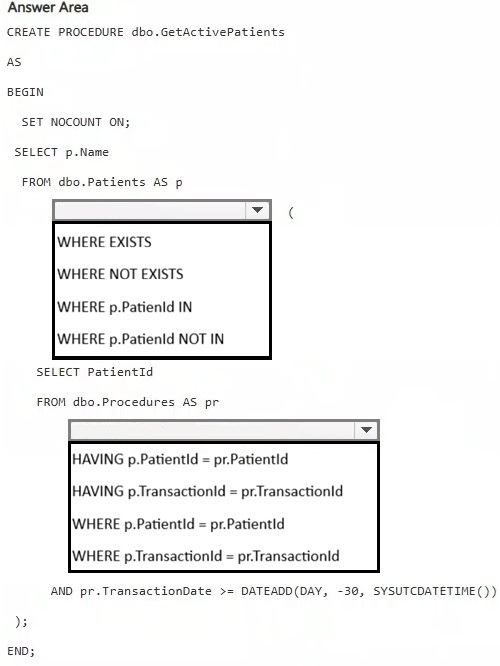
How should you complete the Transact-SQL code? To answer, select the appropriate options in the answer area.
NOTE: Each correct selection is worth one point.
Show answerHide answer
Explanation
Explanation:
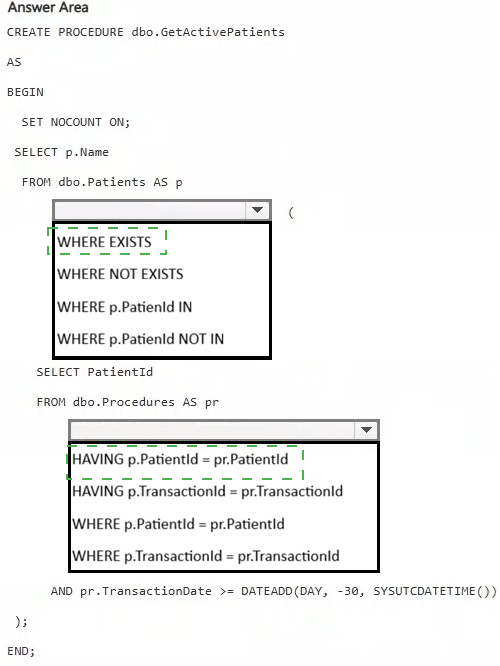
This question evaluates Transact-SQL subquery structures and correlated existence checks within stored procedures in an Azure SQL environment. Specifically, it tests how to retrieve master records based on conditional activity occurring within a related transactional table over a specific rolling time window. Developers must properly connect the outer table to the inner subquery using a correlation predicate. Choosing the right existence operator ensures high performance and accurate row filtering without duplicates. Ultimately, this pattern allows systems to efficiently query active entities based on recent transaction logs.
Correct Option:
✅ WHERE EXISTS
The EXISTS operator in Transact-SQL is a boolean operator that evaluates to true if the subquery returns any rows. In this stored procedure, WHERE EXISTS is the optimal choice for evaluating whether a patient has engaged in any medical procedures within the specified thirty-day timeframe. Unlike IN or NOT IN, EXISTS optimizes performance by processing efficiently with correlated subqueries and halting further evaluation within the inner query as soon as the first matching row is found for each outer row. This makes it highly scalable for large healthcare datasets where patient activity must be verified against transaction logs without incurring unnecessary computational overhead or handling multi-valued list expansions incorrectly.
✅ WHERE p.PatientId = pr.PatientId
Correlating the outer table dbo.Patients (p) with the inner subquery table dbo.Procedures (pr) requires an explicit equality predicate linking their corresponding identifiers. Using WHERE p.PatientId = pr.PatientId establishes a valid correlation between the main patient entity and their respective procedure records. This ensures that the subquery evaluates procedure transactions specifically for the individual patient currently being processed by the outer query rather than evaluating global records across all patients. Combined with the transaction date filter, this proper key linkage guarantees that active patients are accurately identified according to their specific procedure history within the last thirty days.
Incorrect options:
❌ WHERE NOT EXISTS
WHERE NOT EXISTS filters for patients who have no matching records in the procedures table during the timeframe, which retrieves inactive or non-participating patients instead of active ones.
❌ WHERE p.PatientId IN
WHERE p.PatientId IN expects a static or evaluated list of values rather than a correlated existence check, and can suffer from performance degradation and memory overhead with large datasets.
❌ WHERE p.PatientId NOT IN
WHERE p.PatientId NOT IN checks for the absence of patient IDs in a subquery and is vulnerable to NULL propagation issues that can cause the entire query to return zero rows.
❌ HAVING p.PatientId = pr.PatientId
HAVING clauses are used exclusively with GROUP BY aggregations to filter grouped summary rows, making it syntactically invalid here since no aggregation or group clause is present.
❌ HAVING p.TransactionId = pr.TransactionId
This option is syntactically invalid because HAVING requires an aggregation context and grouping, and it references a transaction ID instead of properly correlating patient identifiers.
❌ WHERE p.TransactionId = pr.TransactionId
Correlating on TransactionId instead of PatientId fails to link patient master records to their respective procedure records, resulting in incorrect logic and query failure.
Reference:
→ EXISTS (Transact-SQL) - Microsoft Learn: Confirms that the EXISTS operator tests for the existence of rows in a subquery.
→ SELECT (Transact-SQL) - Microsoft Learn: Confirms proper subquery syntax and correlation predicates in Transact-SQL.