Microsoft certification · Exam DP-800

DP-800 Mock Exam

Developing AI-Enabled Database Solutions

Find out if you're ready for DP-800. Take the free timed mock exam and get your score in minutes, or study the free DP-800 questions below with answers and explanations.

20 questions · 34 minutes · free, no sign-up

Free DP-800 questions

1–10 of 26 free
Question 1 Choose 1
You need to recommend a solution for the development team to retrieve the live metadata. The solution must meet the development requirements. What should you include in the recommendation?
Show answerHide answer

Correct answer: C Use an MCP server

Explanation

Explanation:

This question tests how development teams using GitHub Copilot (typically in Visual Studio Code) can give the AI assistant accurate, up-to-date knowledge of a database’s structure. The key requirement is live metadata—current tables, columns, relationships, indexes, and related objects—rather than a static or outdated snapshot. Model Context Protocol (MCP) is the standardized mechanism that lets Copilot invoke external tools to query database metadata in real time. Other approaches rely on exported files or repository contents that quickly become stale.

✅ Correct Option:

C. Use an MCP server
An MCP server exposes tools that GitHub Copilot can call to retrieve the current database schema, objects, and related metadata on demand. This satisfies the need for live information because the assistant queries the actual connected database (or a governed endpoint such as SQL MCP Server built on Data API builder) instead of relying on previously supplied static content. The approach aligns with the DP-800 skills for configuring MCP tool options and connecting to MCP endpoints for Microsoft SQL Server and Fabric Lakehouse environments.

❌ Incorrect options:

A. Export the database schema as a .dacpac file and load the schema into a GitHub Copilot context window.
A .dacpac is a static package that reflects the schema only at the moment it was exported. Once loaded into the context window it becomes fixed; any later database changes are invisible to Copilot. It therefore fails the live-metadata requirement.

B. Add the schema to a GitHub Copilot instruction file.
Instruction files (for example, copilot-instructions.md) supply permanent guidance or sample text. They are static documents and cannot refresh themselves when the underlying database schema changes, so they do not provide live metadata.

D. Include the database project in the code repository.
A database project in the repository gives Copilot access to the source definitions that exist in source control. Those definitions represent a point-in-time version of the schema and are not automatically synchronized with the live database, so they do not meet the live-metadata requirement.

🔧 Reference:
→ Connect to MCP Server Endpoints for SQL Server and Fabric Lakehouse — Official Microsoft Learn unit explaining how MCP servers supply live database metadata to AI assistants such as GitHub Copilot.

→ SQL MCP Server documentation — Microsoft documentation on using Model Context Protocol to enable secure, real-time interaction between AI agents and SQL databases.
Question 2 Choose 1
You need to enable similarity search to provide the analysts with the ability to retrieve the most relevant health summary reports. The solution must minimize latency. What should you include in the solution?
Show answerHide answer

Correct answer: D a vector index on the Embedding* (vector (1536)) column

Explanation

Explanation:

This question tests the ability to enable similarity search over vector embeddings while minimizing latency. The key is choosing an index type built specifically for approximate nearest neighbor (ANN) searches on high-dimensional vector columns. SQL Server 2025 and Azure SQL support native vector indexes designed for this exact workload, whereas traditional indexes cannot efficiently process vector distance calculations.

✔️ Correct Option:

D. a vector index on the Embedding (vector (1536)) column
A vector index enables approximate nearest neighbor (ANN) search, which returns the most similar embeddings without scanning every row. Microsoft documentation states that vector indexes work with VECTOR_SEARCH to identify similar embeddings efficiently, and the query optimizer automatically selects the ANN index strategy when available. This directly satisfies both the similarity search requirement and the latency minimization goal.

❌ Incorrect Options:

A. a computed column that manually compares vector values
A computed column performs row-by-row calculations at query time, forcing a full table scan for every similarity comparison. This approach cannot scale and adds significant latency as the dataset grows. It also does not leverage any indexing mechanism optimized for vector distance operations.

B. a standard nonclustered index on the Fmbeddings (vector (1536)) column
Standard B-tree indexes are designed for equality and range comparisons on scalar values, not for calculating distances between high-dimensional vectors. A nonclustered index on a vector column cannot accelerate similarity search and may not even be supported for the vector data type in this context.

C. a full-text index on the Fmbeddings (vector (1536)) column
Full-text indexes are built for keyword-based searches over character data, not semantic similarity between embeddings. They cannot interpret vector distance metrics or perform ANN search. Full-text indexes apply to columns like varchar or nvarchar, not the vector data type.

🔧 Reference:
→ CREATE VECTOR INDEX (Transact-SQL) — Confirms vector indexes are created for similarity search on vector columns and work with VECTOR_SEARCH for efficient ANN queries.

→ Implement vector data types and vector search — Explains the vector data type and how vector search enables semantic similarity scenarios in SQL Server.
Question 3 Choose 1
Vou have an Azure SQL database named SalesDB that contains a table named dbo. Articles, dbo.Articles contains two million articles with embeddmgs. The articles are updated frequently throughout the day.
You query the embeddings by using VECTOR_SEARQi Users report that semantic search results do NOT reflect the updates until the following day.
Vou need to ensure that the embeddings are updated whenever the articles change. The solution must minimize CPU usage on SalesDB Which embedding maintenance method should you implement?
Show answerHide answer

Correct answer: B enable change data capture (COC) on dbo.Articles and use an Azure Functions app to process CLX changes.

Explanation

Explanation:

The issue is stale embeddings: when an article changes, its embedding must be regenerated before semantic search can return current results. CDC identifies only the inserted or updated rows, so Azure Functions can regenerate and update embeddings for just those rows, minimizing CPU consumption on SalesDB.

✔️ Correct Option:

✔️ B. Enable change data capture (CDC) on dbo.Articles and use an Azure Functions app to process CDC changes.
CDC tracks inserts, updates, and deletes in change tables without repeatedly scanning the entire two-million-row table. An Azure Functions app can read the changed rows, call the embedding model, and update only the affected embedding values. This keeps semantic search results current while moving embedding generation outside the database and avoiding full-table regeneration.

❌ Incorrect Options:

❌ A. Modify the query to use VECTOR_DISTANCE instead of VECTOR_SEARCH.
VECTOR_DISTANCE calculates similarity between vectors, but it does not regenerate or refresh stored embeddings. Changing the search function cannot make outdated embeddings reflect article updates, so the next-day staleness problem remains.

❌ C. Run an hourly Transact-SQL job that regenerates embeddings for all the rows in dbo.Articles.
Regenerating embeddings for all two million articles every hour creates unnecessary CPU, model-call, and I/O load. It also introduces up to an hour of staleness between updates, which does not meet the requirement to update embeddings whenever an article changes.

❌ D. On dbo.Articles, create a trigger that calls AI_GENERATE_EMBEDDINGS for each inserted or updated row.
Although a trigger can detect row changes, calling an external AI embedding model synchronously inside a database trigger adds latency and CPU load to every write transaction. It can slow article inserts and updates, and trigger-based external calls are not a scalable maintenance pattern for a frequently updated large table.

🔧 Reference:
→ Change data capture (CDC) with Azure SQL Database — Microsoft Learn
Confirms that CDC records table changes and makes modified-row data available for downstream processing.
Question 4 Choose 1
You have a database named DB1. The schema is stored in a Git repository as an SDKstyle SQL database project.
You have a GitHub Actions workflow that already runs dotnet build and produces a database artifact.
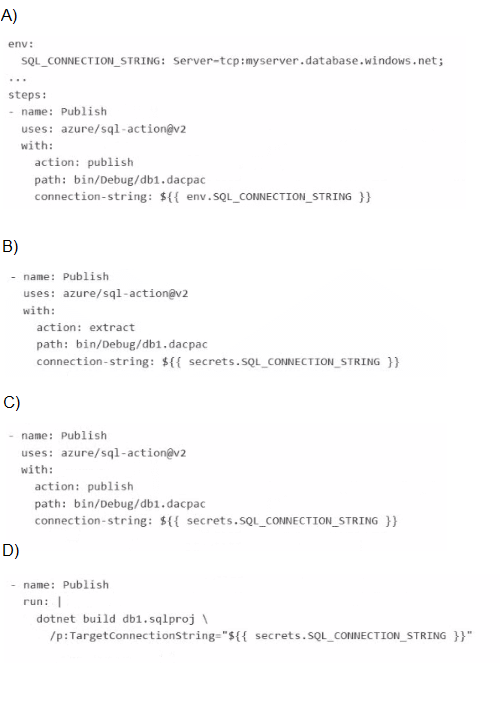
You need to add a deployment step that publishes the dacpac file to an Azure SQL database by using the secrets stored in GitHub repository secrets What should you include in the workflow?
Show answerHide answer

Correct answer: C Option C

Explanation

Explanation:

This question tests the correct configuration of a GitHub Actions workflow step to deploy a pre-built .dacpac file to an Azure SQL database. The key requirements are using the azure/sql-action for deployment, specifying the correct action (publish), providing the path to the artifact, and securely referencing the connection string from GitHub repository secrets.

✔️ Correct Option:

Option C
This option correctly uses the azure/sql-action@v2 with the required action: publish parameter to deploy the database schema . The path points to the .dacpac file, and crucially, the connection-string is securely referenced using the ${{ secrets.SQL_CONNECTION_STRING }} syntax, which is the recommended practice for handling sensitive credentials in GitHub Actions .

❌ Incorrect Options:

Option A
This option defines the connection string as an environment variable (env:) rather than a secure secret. While it references the variable correctly in the step, storing sensitive database connection strings directly in the workflow file or as plain environment variables is a security risk and violates the requirement to use GitHub repository secrets .

Option B
This option specifies action: extract instead of action: publish. The extract action is used to create a .dacpac file from an existing database, not to deploy one. The requirement is to publish the schema to the database, so the action must be publish .

Option D
This option attempts to deploy the database by running dotnet build with a TargetConnectionString parameter. This is not the correct method for deploying a pre-built .dacpac file. The dotnet build command is for compiling the SQL project, not for publishing the resulting artifact to a database. The dedicated azure/sql-action should be used for deployment .

🔧 Reference:
→ Use GitHub Actions to connect to Azure SQL Database — Confirms the correct syntax for azure/sql-action with action: publish, path to dacpac, and connection-string from secrets.
Question 5 Choose 1
You have a SQL database in Microsoft Fabric that contains a table named dbo.Orders, dbo.Orders has a clustered index, contains three years of data, and is partitioned by a column named OrderDate by month.
You need to remove all the rows for the oldest month. The solution must minimize the impact on other queries that access the data in dbo.orders.
Solution; Identify the partition scheme (or the oldest month, and then run the following Transact-SQL statement.
ALTER TABLE dbo.Orders
DROP PARTITION SCHEME (partition_scheme_name);
Does this meet the goal?
Show answerHide answer

Correct answer: B No

Explanation

Explanation:

The question tests partition management in Microsoft Fabric SQL databases. To remove data from the oldest monthly partition while minimizing disruption to queries, you must remove the partition's data using an appropriate partition-level operation. Dropping a partition scheme does not delete individual partition data.

🟢 Correct Option:

B. No
The proposed solution is incorrect because DROP PARTITION SCHEME is not a valid Transact-SQL statement for removing a partition from a table. A partition scheme maps table partitions to filegroups; it does not directly delete rows. Dropping the scheme would also not achieve the requirement of removing only the oldest month's data while preserving the remaining partitions and their availability.

🔴 Incorrect Option:

A. Yes
Dropping a partition scheme is not a method for deleting rows from a specific partition. A partition scheme defines how partitions are mapped to filegroups. Removing the scheme does not selectively remove the oldest month's data and can affect dependent objects. The appropriate approach is to use TRUNCATE TABLE with the PARTITIONS clause to remove only the oldest partition's rows.

🔧 Reference:
1. Microsoft Learn – TRUNCATE TABLE (Transact-SQL)
⇒ Documents how to remove rows from specific table partitions using WITH (PARTITIONS (...)).

2. Microsoft Learn – ALTER PARTITION FUNCTION (Transact-SQL)
⇒ Explains how partition boundaries are merged or split.
Question 6 Choose 1
You have an Azure SQL database.
You deploy Data API builder (DAB) to Azure Container Apps by using the mcr.nicrosoft.com/azure-databases/data-api-builder:latest image.
You have the following Container Apps secrets:
• MSSQL_COMNECTiON_STRrNG that maps to the SQL connection string
• DAB_C0HFT6_BASE64 that maps to the DAB configuration
You need to initialize the DAB configuration to read the SQL connection string. Which command should you run?
Show answerHide answer

Correct answer: B dab init --database-type mssql --connection-string "@env('MSSQL_CONNECTION_STRING')" --host-mode Production --config dabconfig. json

Explanation

Explanation:

DAB configuration must reference the SQL connection string through an environment variable, not embed the secret in dab-config.json. In Azure Container Apps, the MSSQL_CONNECTION_STRING secret is exposed to the container as an environment variable, which DAB reads using its @env() syntax.

✔️ Correct Option:

✔️ B. dab init --database-type mssql --connection-string "@env('MSSQL_CONNECTION_STRING')" --host-mode Production --config dab-config.json
DAB’s --connection-string option supports @env(), so @env('MSSQL_CONNECTION_STRING') instructs DAB to resolve the connection string from the MSSQL_CONNECTION_STRING environment variable at runtime. Azure Container Apps maps the secret named MSSQL_CONNECTION_STRING to that environment variable using secretref:MSSQL_CONNECTION_STRING. This keeps the actual SQL credentials out of the generated DAB configuration file.

❌ Incorrect Options:

❌ A. --connection-string "secretref:DAB_CONFIG_BASE64"
secretref: is an Azure Container Apps syntax used when assigning a secret to an environment variable, not syntax recognized by DAB’s --connection-string option. Also, DAB_CONFIG_BASE64 contains the DAB configuration, not the SQL connection string.

❌ C. --connection-string "secretref:mssql-connection-string"
Although secretref: is valid in Container Apps environment-variable configuration, it is not valid inside the DAB CLI’s --connection-string argument. DAB expects @env(''); the secret must first be mapped to an environment variable.

❌ D. --connection-string "@env('DAB_CONFIG_BASE64')"
This references the environment variable containing the Base64-encoded DAB configuration, not the SQL connection string. Using it would cause DAB to attempt to use configuration data as a database connection string, which is incorrect.

🔧 Reference:
→ init command — Microsoft Learn
Confirms that --connection-string supports @env() and shows the exact @env('MSSQL_CONNECTION_STRING') example.

→ Manage environment variables on Azure Container Apps — Microsoft Learn
Confirms that Container Apps secrets are exposed to containers through environment variables using secretref:< secret-name >.
Question 7
Vou have a Microsoft Fabric workspace named Workspace1 that contains a SQL database named SalesDB and an API for GraphQL tern named SalesApi.
You have a Microsoft Entra group named SqlUsers.
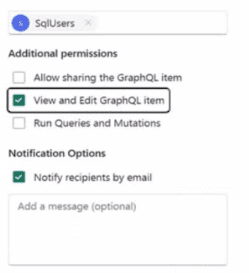
From Workspace1, you assign permission to SalesApi as shown in the following exhibit.

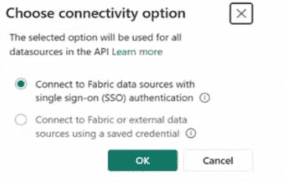
The connection to SalesDB has the connectivity option configured as shown in the following exhibit.

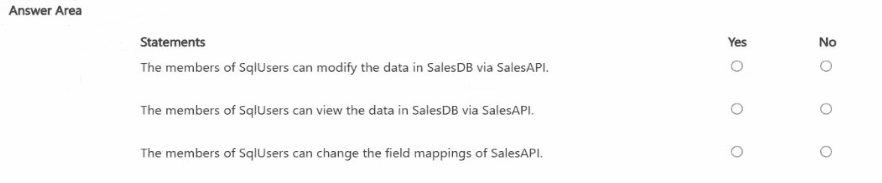
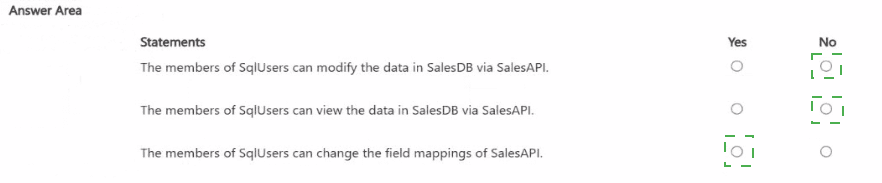
SqlUsers has the Viewer role for Workspace1. For each of the following statements, select Yes if the statement is true. Otherwise, select No. NOTE: Each correct selection is worth one point.

Show answerHide answer

Explanation


Explanation:

This question tests the difference between permissions for a GraphQL API item and the permissions required to actually execute queries and mutations against the underlying data. The exhibit shows that the SqlUsers group is granted the "View and Edit GraphQL item" permission but not the "Run Queries and Mutations" permission. Additionally, SqlUsers has only the Viewer role in the workspace. These two factors determine whether data operations are possible.

✔️ Correct Option:

Statement 3: Yes
The members of SqlUsers can change the field mappings of SalesApi. The "View and Edit GraphQL item" permission allows users to modify the API's configuration, including how fields are mapped to the underlying data source. Even with only the Viewer workspace role, this item-level permission grants the ability to edit the GraphQL schema and field configurations.

❌ Incorrect Options:

Statement 1: No
The members of SqlUsers cannot modify data in SalesDB via SalesApi. To perform mutations (data modifications) through the GraphQL API, a user must have the "Run Queries and Mutations" permission. The exhibit explicitly shows this permission is unchecked for SqlUsers. Without it, any mutation attempt will result in an authorization error.

Statement 2: No
The members of SqlUsers cannot view data in SalesDB via SalesApi. The same "Run Queries and Mutations" permission is required for read operations (queries) as well as writes. Since SqlUsers lacks this permission, their queries will be rejected. Having the "View and Edit GraphQL item" permission only allows them to configure the API, not consume data through it.

🔧 Reference:
→ Connect applications to Fabric API for GraphQL — Confirms that the authenticated credential calling the API needs the "Run Queries and Mutations" permission to execute any operations.

→ What is Microsoft Fabric API for GraphQL? — Explains that operations not permitted by assigned roles fail with an authorization error.
Question 8 Choose 1
You have an Azure SQL database that stores order data. A reporting query aggregates monthly revenue per customer runs frequently. You need to reduce how long it takes to retrieve the calculated values. The solution must NOT alter any underlying table structure. What should you do?
Show answerHide answer

Correct answer: D Create a view by using WITH SCHEHABINDING, include COUNT_BIG(*). and then create a unique clustered index on the view.

Explanation

Explanation

This question tests how to speed up a frequent aggregation query without changing any underlying table. The best fit is an indexed view, which stores the calculated results physically. It checks knowledge of the requirements for creating an indexed view: schema binding, COUNT_BIG() for grouped views, and a unique clustered index.

✅ D. Create a view by using WITH SCHEMABINDING, include COUNT_BIG(), and then create a unique clustered index on the view.
An indexed view stores the aggregated monthly revenue results physically, so the reporting query reads precomputed values instead of recalculating them. SQL Server requires the view to be created WITH SCHEMABINDING, and a grouped view must include COUNT_BIG(). A unique clustered index then materializes the view, which is maintained automatically as order data changes. No underlying table structure is changed.

❌ A. Create a view by using ORDER BY without TOP, and then create a unique clustered index on the view.
ORDER BY without TOP is not allowed in a view definition, so the statement fails to create the view. Even if ordering were removed, this option does not use SCHEMABINDING or COUNT_BIG(), which an indexed view with aggregation requires. A view cannot be materialized with a clustered index without meeting those rules.

❌ B. Create a view without using WITH SCHEMABINDING, and then create a nonclustered index on the view.
Indexed views must be created WITH SCHEMABINDING, so a view created without it cannot be indexed at all. The first index on a view must also be a unique clustered index, not a nonclustered index. Both parts of this option break the rules, so the view would never be materialized as an indexed view.

❌ C. Create a view by using GROUP BY, and then create a unique clustered index on the view.
A GROUP BY view with a unique clustered index is close, but it is incomplete. An indexed view that uses GROUP BY must include COUNT_BIG(), and the view must be created WITH SCHEMABINDING. Without those two elements, SQL Server rejects the index creation, so the monthly revenue results are not stored.

🔧 Reference
🔗 Create indexed views – Microsoft Learn → confirms that an indexed view needs SCHEMABINDING, COUNT_BIG(*) when it uses GROUP BY, and a unique clustered index.

🔗 CREATE VIEW (Transact-SQL) – Microsoft Learn → confirms that ORDER BY is not valid in a view definition unless TOP or OFFSET is also specified.
Question 9 Choose 1
You have a GitHub Actions workflow that builds and deploys an Azure SQL database. The schema is stored in a GitHub repository as an SDK-style SQL database project. Following a code review, you discover that you need to generate a report that shows whether the production schema has diverged from the model in source control. Which action should you add to the pipeline?
Show answerHide answer

Correct answer: A SqlPackage.exe /Action:DriftReport

Explanation

Explanation:

The question tests database schema drift detection using SqlPackage in a CI/CD pipeline. Schema drift occurs when the production database structure changes independently of the database model maintained in source control. The DriftReport action compares the registered database's current state with its recorded baseline and generates a report identifying detected changes.

🟢 Correct Option:

A. SqlPackage.exe /Action:DriftReport
The DriftReport action is designed to identify schema changes made outside the expected deployment process. It generates an XML report showing whether the production database has drifted from its registered baseline. Adding this action to the GitHub Actions pipeline helps administrators detect unexpected schema modifications and investigate differences before they affect future deployments.

🔴 Incorrect Options:

B. SqlPackage.exe /Action:DeployReport
DeployReport generates an XML report showing the schema changes that would be applied if a publish operation were executed. It is useful for reviewing proposed deployment changes, but it does not identify changes made directly to the production database since its last registration.

C. SqlPackage.exe /Action:Extract
Extract creates a DACPAC file containing the schema of an existing database. It is useful for capturing a database schema, but it does not generate a drift report or specifically identify changes made since the database was registered.

D. SqlPackage.exe /Action:Script
Script generates a Transact-SQL deployment script showing the changes required to update the target database to match the source DACPAC. It supports deployment review but does not report schema drift.

🔧 Reference:
1. Microsoft Learn – SqlPackage deploy report and drift report
⇒ Confirms that DriftReport generates an XML report of changes made to a registered database since its last registration, while DeployReport shows proposed deployment changes.

2. Microsoft Learn – SqlPackage
⇒ Explains the purpose of the Extract, DeployReport, DriftReport, and Script actions.
Question 10
You have a Microsoft SQL Servei 2025 database that contains a table named dbo.Customer-Messages, dbo. Customer-Messages contains two columns named HessagelD (int) and MessageRaw (nvarchar(iux)).
MessageRaw can contain a phone number in multiple formats. and some rows do NOT contain a phone number. You need to write a single SELECT query that meets the following requirements:
• The query must return Message ID, RawNumber. DigitsOnly, and PhoneStatus. • RawNumber must contain the first substring that matches a phone-number pattern, or NULL if no match exists.
• DigitsOnly must remove all non-digit characters from RawNumber. or return NULL. • PhoneStatus must return Valid when a phone number exists in MessageRaw. otherwise return Missing.
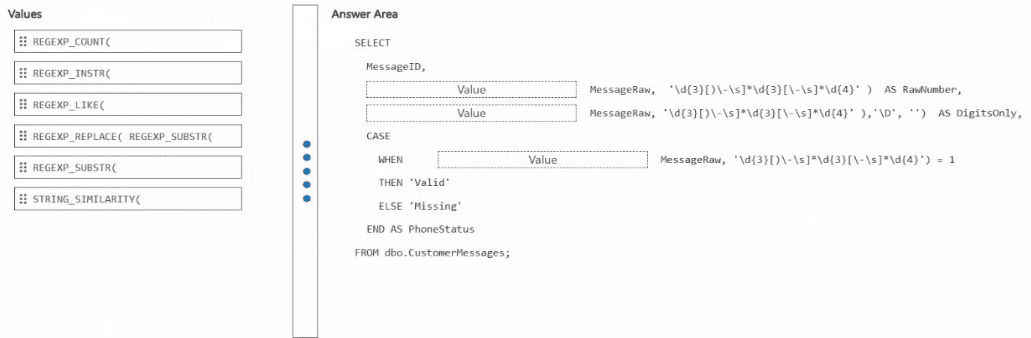
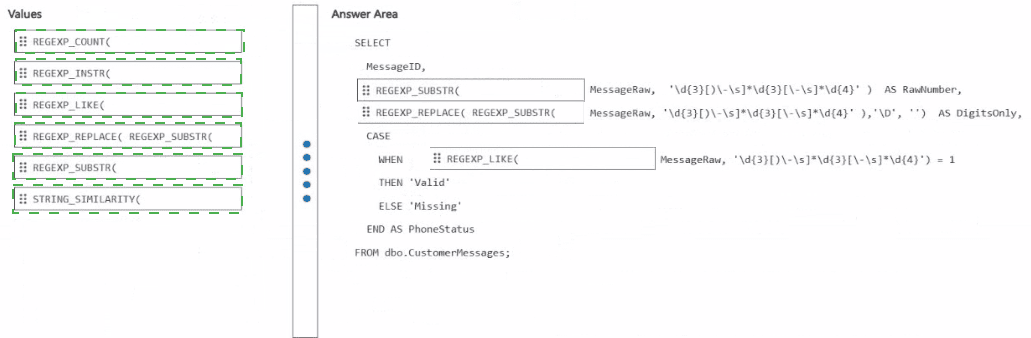
How should you complete the Transact-SQL query? lo answer, drag the appropriate values To the correct targets. Each value may be used once, more than once, or not at all. You may need to drag the split bar between panes or scroll to view content.
NOTE: Each correct selection is worth one point.

Show answerHide answer

Explanation


Explanation:

This question evaluates your ability to leverage regular expression (regex) functions introduced in SQL Server 2025 for parsing, cleaning, and validating pattern-based text within string columns. When extracting specific substrings, replacing non-digit characters, and evaluating conditional patterns in queries, choosing the appropriate regex operator is essential for handling unstructured or semi-structured log data efficiently.

✅ Correct Option:

REGEXP_SUBSTR((Target 1):
The REGEXP_SUBSTR function searches the input string (MessageRaw) and returns the first substring that matches the specified regular expression phone-number pattern, or NULL if no match is found, fulfilling the requirement for RawNumber.

✅ Correct Option:

REGEXP_REPLACE( REGEXP_SUBSTR((Target 2):
To extract only the digits from the matched phone number, the expression nests REGEXP_SUBSTR inside REGEXP_REPLACE, targeting non-digit characters (\D) and replacing them with empty strings ('').

✅ Correct Option:

REGEXP_LIKE((Target 3):
The REGEXP_LIKE function checks whether the pattern matches the text in MessageRaw, returning true or 1 to categorize the row status as 'Valid' or 'Missing' within the CASE statement.

❌ Incorrect options:

REGEXP_COUNT, REGEXP_INSTR, STRING_SIMILARITY:
These functions count occurrences, find character index positions, or calculate string similarity metrics rather than extracting, replacing substrings, or matching full pattern rules required for this transformation logic.

🔧 Reference:
→ For technical documentation on regular expression support and string parsing functions, consult the Microsoft Learn Documentation on SQL Server Regular Expression Functions, which details regex syntax and usage patterns.
Full mock exam

Sit the DP-800 exam before exam day

Full-length mocks with the same number of questions and the same time limit as the real DP-800 exam. Every attempt draws a new set of questions from the full bank, so you can keep going until you pass comfortably.

Get full DP-800 mock exam
  • 60questions per mock
  • 100 mintime limit
  • 87questions in the bank
  • Newmock on every attempt