Which scenario requires the weights and mappings data file to be reimported?
Show answerHide answer
Correct answer: AChange in business goal name
Explanation
Explanation:
The Weights and Mappings data file (weights_and_mappings.csv) is used specifically to:
Define the weight of each business goal within a bonus plan
Map business goals from the performance management module (like Goal Management) to the corresponding columns/fields in the Variable Pay worksheet
If a business goal name is changed in the source system (e.g., Goal Management), the mapping in Variable Pay breaks because the system can no longer match the goal name from the performance data to the predefined mapping in the Variable Pay program. The file must be reimported to update the goal names in the mapping, ensuring proper recognition and calculation of goal-based payouts.
Why other options are incorrect:
B. Change in eligibility rule criteria:
This is managed in the eligibility rule configuration in Admin Center or via the employee history file—not through the Weights and Mappings file.
C. Update in an employee’s assignment date:
Assignment dates are updated via the employee history data file (employee_history_data.csv), not the Weights and Mappings file.
D. Update in bonus cap:
A bonus cap is configured within the Variable Pay template or worksheet business rules, not imported via the Weights and Mappings file.
Reference:
SAP SuccessFactors Variable Pay Help Documentation — “Importing Weights and Mappings.”
The guide specifies that this file is used to map business goals from performance forms to Variable Pay and to assign weights. If goal names change in the source system, the mapping file must be updated and reimported to maintain correct data association.
Question 12Choose 2
In which ways can the basis be configured in a non-EC integrated plan? Note: There are 2 correct answers to this question.
Show answerHide answer
Correct answer: A, CImported from bonus planImported from employee history
Explanation
Explanation:
In a non-EC integrated Variable Pay plan (i.e., using data from a legacy SAP ERP or external HR system), the basis (the baseline amount used for calculating bonus payouts, often called "bonus-eligible base" or "target earnings") must be sourced from data imported into SuccessFactors, since there is no live Employee Central data connection.
The two primary supported methods for providing basis data in this scenario are:
A. Imported from bonus plan
Basis values can be set directly in the Variable Pay program worksheet and imported along with other plan data via the bonus plan import file. This is often done when the basis is manually maintained or calculated outside the system and uploaded for processing.
C. Imported from employee history
The employee history data file (employee_history_data.csv) includes a column (typically basis or similar) where each employee’s basis amount can be specified. This method allows basis to be assigned as part of the employee’s eligibility and historical data upload.
Why other options are incorrect: B. Imported from goal management:
Goal Management provides performance goal ratings/achievements, not monetary basis data. Goal data is mapped via the Weights and Mappings file, not used as a basis amount.
D. Imported from user data file:
In non-EC plans, the User Data File (UDF) is used to import employee master data (e.g., job information, salary) but not for directly populating the basis field in Variable Pay. Basis is specifically mapped through the employee history or bonus plan import.
Reference:
SAP SuccessFactors Variable Pay Implementation Guide – “Setting Up Basis for Non-EC Plans.” The documentation outlines that for non-EC plans, basis must be provided through:
The Employee History Data File (basis column), or
The Bonus Plan Import File (worksheet basis field).
These are the supported import channels for basis data when EC integration is not in use.
Question 13Choose 1
What report requires that worksheets have been launched before it will show results?
Show answerHide answer
Correct answer: BBonus payout
Explanation
Explanation:
The Bonus Payout Report is an operational report that displays calculated bonus amounts after the Variable Pay worksheets have been processed (i.e., launched and completed through their workflow). This report relies on finalized data from the worksheet calculations — including individual performance ratings, business goal achievements, proration, adjustments, and approved payouts — which only become available once worksheets have been launched and fully processed.
Why other options are incorrect:
A. Business goal performance:
This report shows goal ratings and achievements from Goal Management and does not depend on Variable Pay worksheet processing. It can be run as soon as goals are completed in the performance module.
C. Employee history gaps / D. Employee history overlaps:
These are data validation reports that analyze the employee history data file for consistency issues (e.g., missing assignments or conflicting dates). They are run before worksheet launch — often during the data preparation phase — to ensure clean eligibility data.
Reference:
SAP SuccessFactors Variable Pay Administration Guide — “Running the Bonus Payout Report.”
The documentation confirms that this report requires worksheets to be in a launched or processed state to reflect calculated payout results. Pre-launch, there are no calculated payout values to report.
Question 14Choose 1
Your customer wants to ensure that no employee's bonus exceeds 200% of their bonus target. How can this be achieved?
Show answerHide answer
Correct answer: AUse bonus plan caps.
Explanation
Explanation:
A bonus plan cap is a hard limit set at the Variable Pay program or template level that restricts the final calculated payout so it cannot exceed a specified percentage of the target bonus. Setting a cap at 200% would ensure that no employee’s final bonus exceeds 200% of their individual bonus target amount, regardless of performance ratings, goal achievements, or multipliers.
Why other options are incorrect:
B. Use guidelines where the maximum is set to 200%:
Guidelines are used in Compensation (Merit, Base, Stock) to suggest salary adjustments within a range, but they are not used to enforce hard limits on bonus payouts in Variable Pay.
C. Use a bonus plan multiplier of 200%:
A bonus plan multiplier is applied to the target bonus as part of the calculation (e.g., a multiplier based on company performance). Using “200%” as a multiplier would actually set the bonus to 200% of target, not cap it. This would increase payouts rather than limit them.
D. Use gates on business goals:
Gates define threshold levels of performance that must be met before any bonus is paid (e.g., “must achieve at least 70% on goals to receive any bonus”). Gates do not enforce an upper limit on the payout amount.
Reference:
SAP SuccessFactors Variable Pay Implementation Guide — “Setting Bonus Caps.”
The documentation explains that caps can be configured at the plan or individual level to restrict the maximum payout percentage. This is the standard method to enforce an upper ceiling on bonus calculations.
Question 15Choose 1
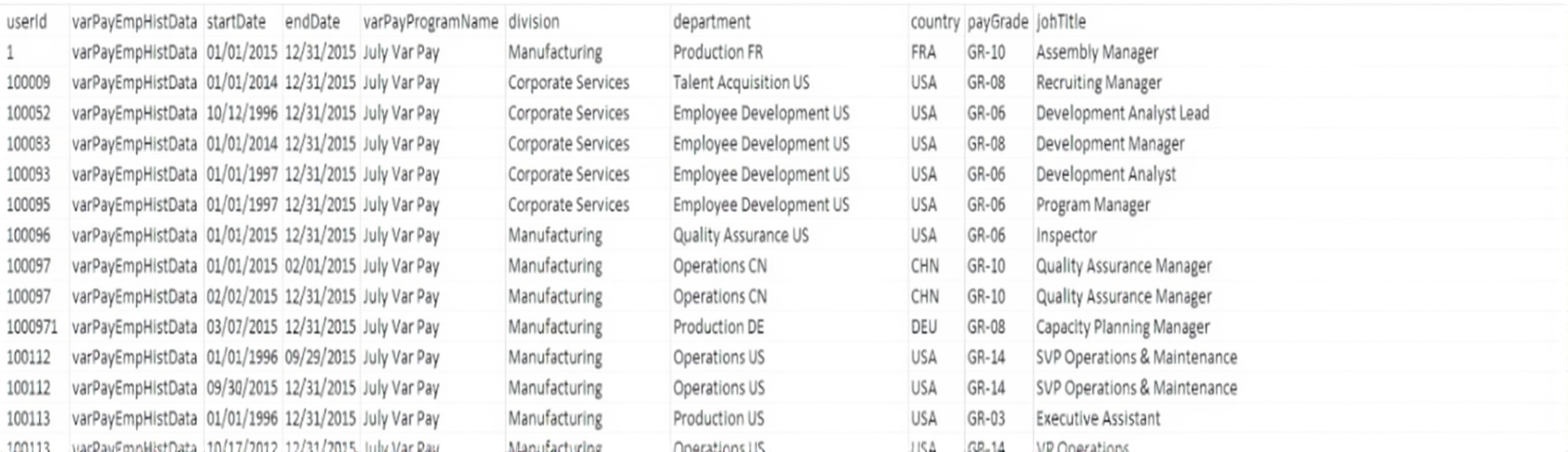
The employee history data file import process was completed but returned with errors. Given the information in the screenshot, which column is causing the error message?
Show answerHide answer
Correct answer: BThe basis column is using commas.
Question 16Choose 3
Your customer wants to use business goals in a Variable Pay program. Which actions are needed? Note: There are 3 correct answers to this question.
Show answerHide answer
Correct answer: A, B, EReference the Plan ID in the business goal data file.Reference the Plan ID in the Bonus Plan file.Update eligibility rules to include a bonus plan
Question 17Choose 2
What does the Enable Guideline Optimization setting do? Note: There are 2 correct answers to this question.
Show answerHide answer
Correct answer: A, BIt helps render the worksheet faster when there are more than 1,000 guideline formulas.It changes the guidelines so they are updated on the form immediately.
Question 18Choose 1
You are implementing an Employee Central-integrated Variable Pay template. The employee has 3 assignment records pulled from Employee Central, each with start and end dates within the bonus period, resulting in NO gaps or overlaps. What is the impact of the 3 assignment records on the payout?
Show answerHide answer
Correct answer: BEach record is considered when the employee's bonus payout is calculated and the bonus is prorated based on the dates of each record.
Question 19Choose 1
What task can you complete in Configure Label Names and Visibility?
Show answerHide answer
Correct answer: DDeactivate form sections.
Question 20Choose 1
Where do you set the display order of the business goals?
Show answerHide answer
Correct answer: CBusiness goal weights file
Full mock exam
Sit the C_THR87_2505 exam before exam day
Full-length mocks with the same number of questions and the same time limit as the real C_THR87_2505 exam. Every attempt draws a new set of questions from the full bank, so you can keep going until you pass comfortably.