SAP certification · Exam C_THR87_2505

C_THR87_2505 Mock Exam

SAP Certified Associate - Implementation Consultant - SAP SuccessFactors Variable Pay

Find out if you're ready for C_THR87_2505. Take the free timed mock exam and get your score in minutes, or study the free C_THR87_2505 questions below with answers and explanations.

20 questions · 45 minutes · free, no sign-up

Free C_THR87_2505 questions

1–10 of 24 free
Question 1 Choose 1
What information should be entered into the varPayProgramName column of the employee history data file?
Show answerHide answer

Correct answer: A The plan template name

Explanation

Explanation:

In SAP SuccessFactors Variable Pay, the employee history data file is imported to load date-effective assignment records (via Admin Center > Import Employee Data). This file determines plan eligibility, proration, bonus basis, and assignment for each employee.

The varPayProgramName column is mandatory and must contain the exact name of the Variable Pay plan template (also called the program name). This value is configured in Variable Pay > Plan Setup > Plan Template Name. The system matches this string (case- and space-sensitive) to assign the correct Variable Pay program to the employee's history record. It is internally mapped to the reserved field vfld5 in the background element (typically varPayEmpHistData).

Why other options are incorrect:

B. The background element name
— This refers to the overall background element ID (e.g., varPayEmpHistData or a custom ID like varPayEmpHistDataProTech) defined in the data model/XML. It structures the history object but is not entered per row in varPayProgramName.

C. The variable pay objective plan ID
— No such field exists in employee history imports. Objectives/business goals are managed separately via goal imports and linked via weights, not this column.

D. The background type ID
— This is the type-id (e.g., "24") in the platform's background element configuration. It is system-level metadata, not a value placed in the import file's varPayProgramName column.

References:
SAP Learning: "Configuring Employee Data" (SAP SuccessFactors Variable Pay Academy) — explicitly states varPayProgramName = "exact name of the Variable Pay program".
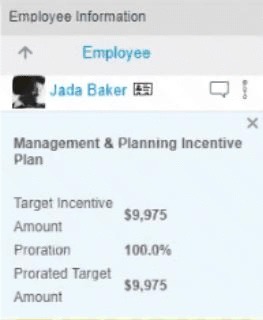
Question 2 Choose 1
Which of the following tools can you use to reorder the fields in the Assignment Details section (as shown in the screenshot)?

Show answerHide answer

Correct answer: A Variable Pay XML template

Explanation

Explanation:

The Assignment Details section shown in the screenshot is part of the Variable Pay worksheet UI. The order of fields displayed in Assignment Details (such as Target Incentive Amount, Proration, Prorated Target Amount, etc.) is controlled directly in the Variable Pay XML template.

In the XML:
The section defines
which fields appear
their sequence/order
Reordering fields requires changing the order of elements in this XML section and re-uploading the template.

Why the other options are incorrect

B. Column Designer ❌
Column Designer controls worksheet columns, not the Assignment Details panel.

C. Configure Label Names and Visibility ❌
This tool only changes labels and visibility, not the order of fields.

D. Succession data model ❌
Used for Succession Planning and MDF-related configurations, unrelated to Variable Pay worksheet layout.

Reference:
Variable Pay → Plan Setup → Variable Pay XML Template
configuration controls display and ordering
Question 3 Choose 1
Which bonus plan configuration is available only when using an import file?
Show answerHide answer

Correct answer: B Team Section Weight

Explanation

Explanation:

In SAP SuccessFactors Variable Pay, bonus plan configuration can be done either through the Admin Center UI or by using a Bonus Plan Import file. However, not all configuration fields are available in the UI. Some advanced or less frequently used settings are supported only through import files.

The Team Section Weight is one such configuration. It defines how much weight is assigned to the team component of a bonus plan when calculating payouts. SAP does not expose this field in the Variable Pay UI, meaning consultants must use the Bonus Plan Import file to configure or change the Team Section Weight. This makes option B the only correct answer.

Why the other options are not correct

A. Bonus Plan Name ❌
The Bonus Plan Name is a basic attribute and can be defined and maintained directly in the Variable Pay UI as well as via import. It is not exclusive to import files.

C. Bonus Cap Percentage ❌
Bonus Cap Percentage is a commonly used configuration that limits the maximum payout. SAP allows this to be configured directly in the UI, so it is not import-only.

D. Individual Section Weight ❌
Individual Section Weight is fully supported in the UI and can be adjusted without using an import file, unlike the Team Section Weight.

References
SAP SuccessFactors Variable Pay Implementation Guide
SAP Help Portal → Variable Pay → Bonus Plan Configuration
Bonus Plan Import Template documentation (Team Section Weight field)
Question 4 Choose 1
A client has three custom fields in their templates and they want to use these fields as plan-level Executive Review filters to help with their analysis. Which of the following is a valid configuration option for this requirement in a non-EC configuration?
Show answerHide answer

Correct answer: C The fields are mapped to import keys uploaded within the UDF and are read-only.

Explanation

Explanation:

In SAP SuccessFactors Variable Pay (non-EC configuration), Executive Review filters at the plan level can only be built using fields that have static, reliable values available at worksheet creation time. For custom fields to be used as plan-level Executive Review filters, SAP requires that these fields be mapped to import keys coming from the User Data File (UDF) and set as read-only.

Mapping custom fields to UDF import keys ensures that:
The data is consistently populated for all employees before worksheets are launched
The values are available for aggregation, filtering, and analysis in Executive Review
No recalculation or user modification occurs after worksheet creation
Making the fields read-only is critical because Executive Review filtering does not support values that can change dynamically or be edited during the planning process. This makes option C the only valid configuration.

Why the other options are not correct

A. Lookup table with conditional logic and read-only ❌
Lookup tables are evaluated dynamically and are not supported as plan-level Executive Review filters because their values are not static at launch time.

B. Custom calculation and read-only ❌
Custom calculations depend on runtime logic and worksheet calculations, which cannot be reliably used for Executive Review filtering.

D. Mapped to UDF import keys and editable ❌
Editable fields can be changed by planners, making the data inconsistent and unreliable for Executive Review analysis.

References
SAP SuccessFactors Variable Pay Implementation Guide
SAP Help Portal → Variable Pay → Executive Review Configuration
Question 5 Choose 1
A client has the following requirements: Executives have 3 business goals and NO individual performance metrics. Divisional VPs have 6 business goals and NO individual performance metrics. Directors have 6 business goals and individual performance weighted at 40%. Managers have 3 business goals and an individual performance multiplier. What is the minimum number of templates that can be configured to satisfy these requirements without the use of custom columns?
Show answerHide answer

Correct answer: D 3

Explanation

Explanation:

The minimum number of Variable Pay template configurations needed is three. This is determined by the structural differences in how performance metrics are calculated and weighted, which must be defined at the template level before being applied to different employee populations (Executives, VPs, Directors, Managers).

Here is the breakdown of the grouping:

Template A: For Executives and Divisional VPs. Both groups use only business goals with no individual performance component. They can share one template where the individual performance section is disabled or weighted at 0%. The difference in the number of business goals (3 vs. 6) is controlled at the goal plan level, not the Variable Pay template, so it does not require a separate template.

Template B: For Directors. This group has a weighted individual performance component (40%) alongside business goals (60%). This requires a separate template to establish the 40/60 weighting split between the two sections.

Template C: For Managers. This group uses an individual performance multiplier. This is a fundamentally different calculation method compared to a weighted section. It requires a unique template where the "Individual Performance Multiplier" payout function is selected, instead of configuring weighted sections.

Why other options are incorrect:

A. (1 template):
Impossible. The multiplier for Managers and the weighted section for Directors are mutually exclusive structures that cannot coexist in a single template.

B. (4 templates):
Not the minimum. While you could create one for each role, it is not necessary as Executives and VPs can share a template.

C. (2 templates):
Incorrect. This count would not accommodate all three distinct calculation structures: goals-only, weighted, and multiplier-based.

Reference:
SAP SuccessFactors Variable Pay configuration guides emphasize that a template defines the calculation structure (weightings, use of multipliers, payout functions). Different calculation methodologies require separate templates. Employee assignment and the specific goals used are managed via eligibility rules and goal plans, not the template itself.
Question 6 Choose 3
Your customer is using a hybrid variable pay template because Employee Central (EC) has NOT been implemented within the entire company. How will you make sure that eligibility rules apply to both (EC and non-EC) target populations? Note: There are 3 correct answers to this question.
Show answerHide answer

Correct answer: A, C, D Use Bonus Plan Eligibility.Use Manager Form Eligibility. Enable global eligibility rule.

Explanation

Explanation:

In a hybrid Variable Pay program (mixing EC and non-EC employees), you must ensure eligibility rules work across both populations. The system handles EC and non-EC employee data differently, so specific configurations are required for unified eligibility.

✅Correct Options:

A. Use Bonus Plan Eligibility.
This is a program-level setting that, when enabled, allows the Variable Pay program to apply its eligibility rules to both EC and non-EC employees simultaneously. It essentially bridges the data source gap.

C. Use Manager Form Eligibility.
When selected in the program settings, this option bases eligibility on whether an employee’s manager has reporting access to the Variable Pay form. It is agnostic to whether the employee is in EC or non-EC, making it effective for hybrid populations.

D. Enable global eligibility rule.
A global eligibility rule is defined in Provisioning and can be applied across multiple programs. When enabled for a hybrid program, it evaluates both EC and non-EC employees against the same rule logic, ensuring consistent application.

❌ Why other options are incorrect:

B. Include inactive employees.
This is a filter option within eligibility rules and does not address the core challenge of harmonizing eligibility between two different employee data sources (EC vs. non-EC).

E. Configure multiple rules by EC entity for the program.
This is inefficient and not best practice. While technically possible, it would require creating and maintaining separate rules for EC and non-EC populations. The correct approaches (A, C, D) provide a single, unified method to cover both groups.

Reference:
SAP SuccessFactors Variable Pay Implementation Guide – “Setting Up Eligibility for Hybrid Programs.” The guide specifies using Bonus Plan Eligibility, Manager Form Eligibility, or global eligibility rules to ensure rules apply uniformly across EC and non-EC populations in a hybrid template.
Question 7 Choose 2
If the Starting Point for Manager Form Eligibility is set to "No employees are eligible", what actions can you take to include employees in the bonus plan? Note: There are 2 correct answers to this question.
Show answerHide answer

Correct answer: C, D Create a rule in Manager Form Eligibility to include employeesAdd employees to the history data file.

Explanation

Explanation:

When the Starting Point for Manager Form Eligibility is set to "No employees are eligible", the system begins with a blank slate. You must explicitly add employees to the plan. The two primary methods to do this are:

C. Create a rule in Manager Form Eligibility to include employees.
You can define inclusion rules directly within the Manager Form Eligibility section. These rules will add employees who meet the specified criteria (e.g., job code, department, custom field) into the eligible population.

D. Add employees to the history data file.
You can import employee eligibility via the employee history data file (e.g., employee_history_data.csv). By including employees in this file with the correct varPayProgramName and dates, you manually populate the eligible list, overriding the "no employees" starting point.

Why other options are incorrect:

A. Use an MDF rule instead of importing eligibility rules.
Incorrect. While MDF objects can be used in some eligibility scenarios, Manager Form Eligibility is a specific framework within Variable Pay that does not use MDF-based eligibility rules. Its rules are configured directly in the program's eligibility section.

B. Flag employees in the UDF as TRUE in COMPENSATION_ELIGIBLE.
Incorrect. COMPENSATION_ELIGIBLE is a standard field used for Compensation plans (like Base and Merit), not for Variable Pay eligibility. Variable Pay does not use this field to determine bonus plan eligibility.

Reference:
SAP Help documentation on Manager Form Eligibility states that when the starting point is "No employees are eligible," you must either:
Question 8 Choose 1
A customer has implemented Employee Central for most of their employees, but some employees remain on SAP ERP. What plan setting allows for the use of a single template for all employees?
Show answerHide answer

Correct answer: C Hybrid template

Explanation

Explanation:

When a company has employees in both Employee Central (EC) and a legacy SAP ERP (non-EC) system, the Hybrid template setting is specifically designed to support this mixed environment. Enabling this option at the plan/template level allows a single Variable Pay template to process data from both EC and non-EC data sources, eliminating the need to create and maintain separate templates for each employee population.

Why other options are incorrect:

A. Enable Guideline Optimization:
This setting relates to Compensation planning (not Variable Pay) and improves performance during guideline calculations. It does not address data source integration.

B. Use MDF rule instead of imported eligibility rule:
This refers to a method for defining eligibility rules (using Meta Data Framework objects) and is not a plan-level setting that enables a single template for mixed EC/non-EC populations.

D. Enable Suppress Statement:
This controls whether payslips/statements are generated for employees and has no bearing on template compatibility across different HR systems.

Reference:
SAP SuccessFactors Variable Pay Implementation Guide — “Creating Hybrid Templates.” The documentation explicitly states that the Hybrid option must be selected when configuring a plan template to ensure it can process employees from both Employee Central and external SAP ERP (or other third-party) HR systems.
Question 9 Choose 3
Which customer scenarios require the use of multiple variable pay programs? Note: There are 3 correct answers to this question.
Show answerHide answer

Correct answer: A, B, E The customer is using a different bonus calculation formula.The customer is using a different plan period date range. The customer is using a different route map.

Explanation

Explanation:

A Variable Pay program is a specific, configured instance of a bonus plan that runs for a defined population during a set period. Certain structural and process differences require separate programs, as they cannot coexist within a single program instance.

Correct Options:

A. The customer is using a different bonus calculation formula.
The calculation formula (including weightings, multipliers, and payout functions) is defined at the program template level and applied to the program. Different formulas require different templates and, consequently, separate programs.

B. The customer is using a different plan period date range.
Each Variable Pay program has its own fiscal/plan period (start and end dates). Employees cannot be processed in a single program under two different date ranges. Separate date ranges mandate separate programs.

E. The customer is using a different route map.
The route map (approval workflow) is assigned at the program level. Different approval chains or workflow steps require separate programs.

Why other options are incorrect:

C. The customer is using different eligibility rules.
Incorrect. A single Variable Pay program can have multiple eligibility rules within it to include different employee populations (e.g., by department, location, job level). Different rules do not automatically require separate programs.

D. The customer has some employees in Employee Central and others in an external system.
Incorrect. This is a hybrid scenario, which is supported by a single hybrid template/program. The hybrid setting allows one program to process employees from both EC and non-EC data sources.

Reference:

SAP SuccessFactors Variable Pay Implementation Guide:
Different plan periods and route maps are explicit criteria for creating separate programs.
Different calculation formulas require different templates, which in turn create separate programs.
Multiple eligibility rules can be combined in one program, and hybrid programs support mixed data sources.
Question 10 Choose 1
Your customer uses role-based permissions. The Variable Pay administrator imports the employee history data file that contains the assignment history for all employees. What data is processed?
Show answerHide answer

Correct answer: B Data for employees who are in the administrator's dynamic group

Explanation

Explanation:

In SuccessFactors, when role-based permissions (RBP) are used, a Variable Pay administrator's data access is restricted by their assigned permission roles. A key component of this is the dynamic group associated with their role, which defines the population of employees they can view and manage.

Even if the imported employee history data file contains assignment records for all employees, the system only processes and applies the data for employees who fall within the administrator's dynamic group. Records for employees outside this group are effectively ignored, preventing unauthorized data updates.

Why other options are incorrect:

A. Data for all employees when the option "Import file contains assignment history for all employees" is checked
This checkbox relates to the file format, not a permission override. It indicates that the file contains records for all eligible employees, but RBP restrictions still apply during processing. An administrator cannot bypass RBP via an import setting.

C. Data for employees who are in the administrator's target population
“Target population” is a compensation planning concept, not a Variable Pay permission structure. In Variable Pay, access is governed by dynamic groups (often based on routing or user permissions), not target populations.

D. Data for all employees when the option "Delete all existing records prior to importing new data" is checked
This is a file processing behavior that controls whether old records are purged before the import. It does not override RBP; the system still only deletes or imports records for employees within the administrator’s permitted dynamic group.

Reference:
SAP SuccessFactors Variable Pay Administrator Guide — “Importing Employee History Data with Role-Based Permissions.” The documentation states that during import, the system filters the file’s records through the administrator’s dynamic group defined in RBP. Only matching employees’ data is processed; all other records are skipped without error, ensuring data security aligns with role permissions.
Full mock exam

Sit the C_THR87_2505 exam before exam day

Full-length mocks with the same number of questions and the same time limit as the real C_THR87_2505 exam. Every attempt draws a new set of questions from the full bank, so you can keep going until you pass comfortably.

Get full C_THR87_2505 mock exam
  • 80questions per mock
  • 180 mintime limit
  • 80questions in the bank
  • Newmock on every attempt
This practice test covers the latest Learning module features for the 2505 release: learning items, curricula, assignments, certifications, and compliance management. You will practice questions on system configuration, user permissions, blended learning approaches, and integration with other SuccessFactors modules. The test emphasizes practical implementation scenarios and best practices. By working through these focused questions, You will validate your understanding of how to configure and manage learning programs that help organizations build employee skills, track compliance, and support continuous development.

Case Studies & Results


Variable pay calculations can get complicated with complex incentive structures. Erpcerts provided practice test that covered everything from plan design to payment processing. The C_THR87_2505 exam questions mirrored the real exam difficulty perfectly. I passed easily and now design variable pay solutions with confidence.
Thomas Wright, Compensation Consultant | San Francisco, CA