Microsoft certification · Exam AZ-700

AZ-700 Mock Exam

Designing and Implementing Microsoft Azure Networking Solutions

Free AZ-700 questions on Topic 1: Litware. Inc Case Study 1, each with the answer and an explanation.

20 questions · 33 minutes · free, no sign-up

Topic 1: Litware. Inc Case Study 1 questions

1–3 of 3 free
Question 1

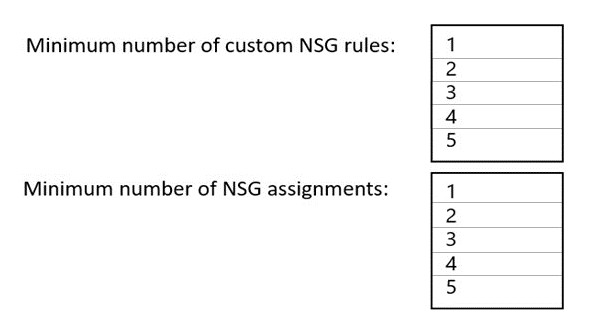
You need to restrict traffic from VMScaleSet1 to VMScaleSet2. The solution must meet the virtual networking requirements.
What is the minimum number of custom NSG rules and NSG assignments required? To answer, select the appropriate options in the answer area.

NOTE: Each correct selection is worth one point.

Show answerHide answer

Explanation


Summary:
To restrict traffic from VMScaleSet1 to VMScaleSet2 using Network Security Groups (NSGs) in Azure, a custom deny rule must be applied to block outbound traffic from VMScaleSet1. NSGs are assigned at the subnet or NIC level. The minimum configuration requires one custom NSG rule (deny outbound to VMScaleSet2) and one NSG assignment (to VMScaleSet1’s subnet or NICs), assuming both scale sets are in different subnets.

Correct Option:

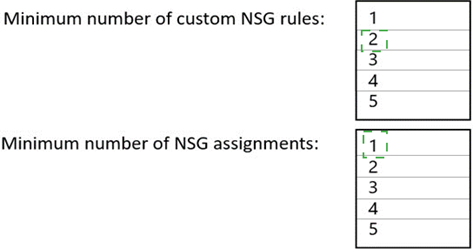
Minimum number of custom NSG rules: 1
A single custom rule with priority lower than default allow rules (e.g., priority 100) can deny outbound traffic from VMScaleSet1 to VMScaleSet2’s IP range or subnet.

Default NSG rules allow intra-VNet traffic; one explicit deny rule overrides this for the specific destination.

No additional rules are needed if the goal is only to block VMScaleSet1 → VMScaleSet2.

Minimum number of NSG assignments: 1
Assigning the NSG to VMScaleSet1’s subnet (or all NICs) ensures the deny rule applies to all instances.

VMScaleSet2 does not require an NSG unless additional filtering is needed; the block is enforced at the source.

One assignment on the source (VMScaleSet1) is sufficient and minimal.

Incorrect Option:

Minimum number of custom NSG rules: 2, 3, 4, or 5
More than one rule is unnecessary; a single deny rule with proper source/destination and port settings fully restricts traffic.

Additional rules increase complexity without improving security for this requirement.

Default rules already handle other traffic; only one custom rule is needed to override allow behavior.

Minimum number of NSG assignments: 2, 3, 4, or 5
Assigning NSGs to both scale sets or multiple NICs is redundant; traffic is blocked at the source (VMScaleSet1).

Multiple assignments do not enhance restriction and violate the minimum requirement principle.

Effective deny is achieved with a single NSG on the sending scale set’s subnet or NICs.

Reference:
https://learn.microsoft.com/en-us/azure/virtual-network/network-security-groups-overview

https://learn.microsoft.com/en-us/azure/virtual-network/network-security-group-how-it-works
Question 2 Choose 2
You need to connect Vnet2 and Vnet3. The solution must meet the virtual networking requirements and the business requirements.
Which two actions should you include in the solution? Each correct answer presents part of the solution.
NOTE: Each correct selection is worth one point.
Show answerHide answer

Correct answer: D, E On the peering from Vnet1, select Allow gateway transit.On the peerings from Vnet2 and Vnet3, select Allow gateway transit.

Explanation

Summary:
This scenario involves connecting two spoke virtual networks (Vnet2 and Vnet3) through a hub virtual network (Vnet1) that contains a VPN or ExpressRoute gateway. To enable direct communication between the spokes, the gateway in the hub must be shared, and the hub must be configured to allow transit traffic between the spokes.

Correct Option:

D. On the peering from Vnet1, select Allow gateway transit.

E. On the peerings from Vnet2 and Vnet3, select Allow gateway transit.

Explanation of Correct Options:

D. On the peering from Vnet1, select Allow gateway transit.
This action is performed on the hub Vnet1's peering to the spokes (Vnet2 and Vnet3). Enabling "Allow gateway transit" on the hub's outbound peerings authorizes the spokes to use the VPN/ExpressRoute gateway present in Vnet1. This is the critical setting that shares the hub's gateway with the spoke networks, enabling the transitive routing path.

E. On the peerings from Vnet2 and Vnet3, select Allow gateway transit.
This action is performed on the spoke Vnet2 and Vnet3's peering back to the hub (Vnet1). Enabling "Use remote gateways" on the spokes' peerings actively configures them to utilize the gateway in the remote virtual network (Vnet1). This setting, combined with "Allow gateway transit" on the hub, completes the configuration, allowing the spokes to route traffic through the hub to reach each other.

Explanation of Incorrect Options:

A. On the peerings from Vnet2 and Vnet3, select Use remote gateways.
This is incorrect because "Use remote gateways" is the setting used by a spoke to leverage a hub's gateway. Option E already correctly states this action. Option A is redundant and does not represent a second, distinct action needed for the solution.

B. On the peering from Vnet1, select Allow forwarded traffic.
This setting allows traffic forwarded by a network virtual appliance (NVA) from one peered network to pass through to another. It is not required for the native Azure gateway transit feature to work and is irrelevant for this specific gateway-sharing scenario.

C. On the peering from Vnet1, select Use remote gateways.
This is illogical. "Use remote gateways" is a setting for a virtual network that does not have its own gateway but wants to use one in a peered VNet. Vnet1 is the hub that contains the gateway, so it would not use a remote gateway from Vnet2 or Vnet3.

Reference:
Microsoft Learn: Configure VPN gateway transit for virtual network peering
Question 3

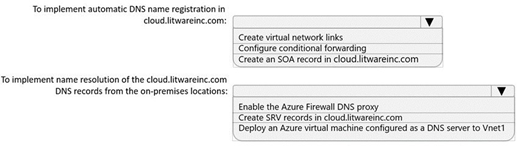
You need to implement name resolution for the cloud.liwareinc.com. The solution must meet the networking requirements.
What should you do? To answer, select the appropriate options in the answer area.
NOTE: Each correct selection is worth one point.
Show answerHide answer

Explanation

Summary:
This scenario involves a hybrid setup where an Azure Private DNS zone (cloud.ltwareinc.com) needs to be auto-registered by Azure resources and also resolved from on-premises networks. The solution requires two parts: enabling auto-registration within Azure and setting up conditional forwarding from on-premises to resolve the Azure private domain.

Correct Option:
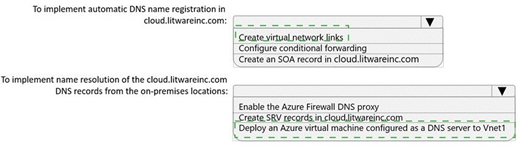
To implement automatic DNS name registration in cloud.ltwareinc.com: Create virtual network links

To implement name resolution of the cloud.ltwareinc.com DNS records from the on-premises locations: Deploy an Azure virtual machine configured as a DNS server to Vnet1

Explanation of Correct Options:

Create virtual network links:
This is the correct method to enable automatic DNS name registration. A virtual network link connects an Azure Virtual Network to a Private DNS zone. When this link is created and "Auto-registration" is enabled on it, any VMs deployed in that virtual network will automatically register their A records in the Private DNS zone. This fulfills the requirement for automatic registration within the Azure environment.

Deploy an Azure virtual machine configured as a DNS server to Vnet1:
To resolve the Azure Private DNS zone from on-premises, you must set up conditional forwarding. An on-premises DNS server cannot directly query an Azure Private DNS zone. The standard solution is to deploy a DNS server VM in the Azure VNet that is linked to the private zone. You then configure this Azure DNS server to forward queries for cloud.ltwareinc.com to the Azure-provided DNS IP (168.63.129.16). Finally, you configure the on-premises DNS servers to conditionally forward all queries for cloud.ltwareinc.com to the IP address of this Azure DNS server VM.

Explanation of Incorrect Options:

Configure conditional forwarding:
This is a necessary step, but it is performed on the on-premises DNS servers, pointing to the Azure DNS VM. It is not the primary Azure-side action you would select from this list. The question asks for the action to implement the solution, and deploying the target DNS server is the foundational step.

Create an SOA record in cloud.ltwareinc.com:
The SOA (Start of Authority) record is created automatically when the Private DNS zone is provisioned. Manually creating it is neither necessary nor possible, as it is a system-managed record.

Enable the Azure Firewall DNS proxy:
The DNS proxy feature in Azure Firewall allows client VMs to use the firewall for DNS resolution, but it does not, by itself, enable on-premises resolution of a Private DNS zone. It is often part of a larger solution but is not the core requirement here.

Create SRV records in cloud.ltwareinc.com:
SRV records are for specific services (like SIP or LDAP) and have no bearing on the general mechanism of enabling automatic VM registration or providing hybrid name resolution for A records.

Reference:
Microsoft Learn: Scenario - Name resolution for resources in Azure and on-premises networks - This documents the hub-spoke architecture where a DNS server in the hub is used for resolving private zones from on-premises.

That's the last free question in Topic 1: Litware. Inc Case Study 1

You've seen the free 30% (3 of 12 questions). Full access unlocks every question and full-length AZ-700 mock exams (65 questions, 105 minutes), a different mock on every attempt.

Unlock full mock exam
Full mock exam

Sit the AZ-700 exam before exam day

Full-length mocks with the same number of questions and the same time limit as the real AZ-700 exam. Every attempt draws a new set of questions from the full bank, so you can keep going until you pass comfortably.

Get full AZ-700 mock exam
  • 65questions per mock
  • 105 mintime limit
  • 181questions in the bank
  • Newmock on every attempt