Microsoft certification · Exam AZ-700

AZ-700 Mock Exam

Designing and Implementing Microsoft Azure Networking Solutions

Find out if you're ready for AZ-700. Take the free timed mock exam and get your score in minutes, or study the free AZ-700 questions below with answers and explanations.

20 questions · 33 minutes · free, no sign-up

Free AZ-700 questions

1–10 of 52 free
Question 1

You need to restrict traffic from VMScaleSet1 to VMScaleSet2. The solution must meet the virtual networking requirements.
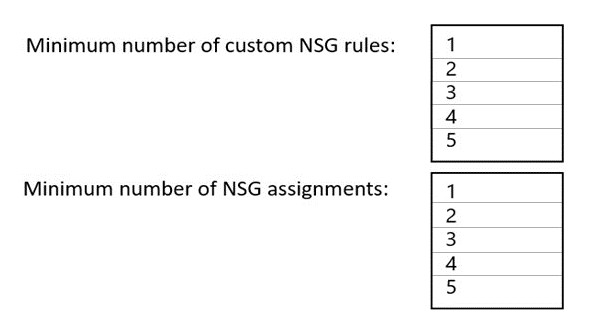
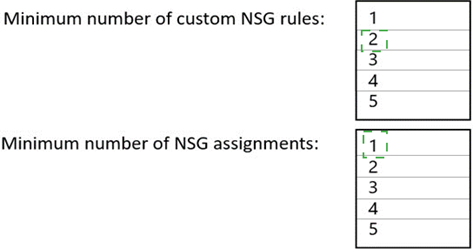
What is the minimum number of custom NSG rules and NSG assignments required? To answer, select the appropriate options in the answer area.

NOTE: Each correct selection is worth one point.

Show answerHide answer

Explanation


Summary:
To restrict traffic from VMScaleSet1 to VMScaleSet2 using Network Security Groups (NSGs) in Azure, a custom deny rule must be applied to block outbound traffic from VMScaleSet1. NSGs are assigned at the subnet or NIC level. The minimum configuration requires one custom NSG rule (deny outbound to VMScaleSet2) and one NSG assignment (to VMScaleSet1’s subnet or NICs), assuming both scale sets are in different subnets.

Correct Option:

Minimum number of custom NSG rules: 1
A single custom rule with priority lower than default allow rules (e.g., priority 100) can deny outbound traffic from VMScaleSet1 to VMScaleSet2’s IP range or subnet.

Default NSG rules allow intra-VNet traffic; one explicit deny rule overrides this for the specific destination.

No additional rules are needed if the goal is only to block VMScaleSet1 → VMScaleSet2.

Minimum number of NSG assignments: 1
Assigning the NSG to VMScaleSet1’s subnet (or all NICs) ensures the deny rule applies to all instances.

VMScaleSet2 does not require an NSG unless additional filtering is needed; the block is enforced at the source.

One assignment on the source (VMScaleSet1) is sufficient and minimal.

Incorrect Option:

Minimum number of custom NSG rules: 2, 3, 4, or 5
More than one rule is unnecessary; a single deny rule with proper source/destination and port settings fully restricts traffic.

Additional rules increase complexity without improving security for this requirement.

Default rules already handle other traffic; only one custom rule is needed to override allow behavior.

Minimum number of NSG assignments: 2, 3, 4, or 5
Assigning NSGs to both scale sets or multiple NICs is redundant; traffic is blocked at the source (VMScaleSet1).

Multiple assignments do not enhance restriction and violate the minimum requirement principle.

Effective deny is achieved with a single NSG on the sending scale set’s subnet or NICs.

Reference:
https://learn.microsoft.com/en-us/azure/virtual-network/network-security-groups-overview

https://learn.microsoft.com/en-us/azure/virtual-network/network-security-group-how-it-works
Question 2 Choose 2
You need to connect Vnet2 and Vnet3. The solution must meet the virtual networking requirements and the business requirements.
Which two actions should you include in the solution? Each correct answer presents part of the solution.
NOTE: Each correct selection is worth one point.
Show answerHide answer

Correct answer: D, E On the peering from Vnet1, select Allow gateway transit.On the peerings from Vnet2 and Vnet3, select Allow gateway transit.

Explanation

Summary:
This scenario involves connecting two spoke virtual networks (Vnet2 and Vnet3) through a hub virtual network (Vnet1) that contains a VPN or ExpressRoute gateway. To enable direct communication between the spokes, the gateway in the hub must be shared, and the hub must be configured to allow transit traffic between the spokes.

Correct Option:

D. On the peering from Vnet1, select Allow gateway transit.

E. On the peerings from Vnet2 and Vnet3, select Allow gateway transit.

Explanation of Correct Options:

D. On the peering from Vnet1, select Allow gateway transit.
This action is performed on the hub Vnet1's peering to the spokes (Vnet2 and Vnet3). Enabling "Allow gateway transit" on the hub's outbound peerings authorizes the spokes to use the VPN/ExpressRoute gateway present in Vnet1. This is the critical setting that shares the hub's gateway with the spoke networks, enabling the transitive routing path.

E. On the peerings from Vnet2 and Vnet3, select Allow gateway transit.
This action is performed on the spoke Vnet2 and Vnet3's peering back to the hub (Vnet1). Enabling "Use remote gateways" on the spokes' peerings actively configures them to utilize the gateway in the remote virtual network (Vnet1). This setting, combined with "Allow gateway transit" on the hub, completes the configuration, allowing the spokes to route traffic through the hub to reach each other.

Explanation of Incorrect Options:

A. On the peerings from Vnet2 and Vnet3, select Use remote gateways.
This is incorrect because "Use remote gateways" is the setting used by a spoke to leverage a hub's gateway. Option E already correctly states this action. Option A is redundant and does not represent a second, distinct action needed for the solution.

B. On the peering from Vnet1, select Allow forwarded traffic.
This setting allows traffic forwarded by a network virtual appliance (NVA) from one peered network to pass through to another. It is not required for the native Azure gateway transit feature to work and is irrelevant for this specific gateway-sharing scenario.

C. On the peering from Vnet1, select Use remote gateways.
This is illogical. "Use remote gateways" is a setting for a virtual network that does not have its own gateway but wants to use one in a peered VNet. Vnet1 is the hub that contains the gateway, so it would not use a remote gateway from Vnet2 or Vnet3.

Reference:
Microsoft Learn: Configure VPN gateway transit for virtual network peering
Question 3

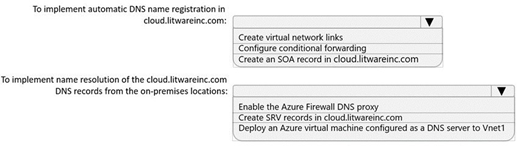
You need to implement name resolution for the cloud.liwareinc.com. The solution must meet the networking requirements.
What should you do? To answer, select the appropriate options in the answer area.
NOTE: Each correct selection is worth one point.

Show answerHide answer

Explanation


Summary:
This scenario involves a hybrid setup where an Azure Private DNS zone (cloud.ltwareinc.com) needs to be auto-registered by Azure resources and also resolved from on-premises networks. The solution requires two parts: enabling auto-registration within Azure and setting up conditional forwarding from on-premises to resolve the Azure private domain.

Correct Option:
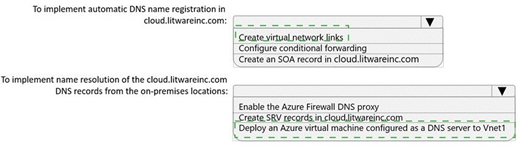
To implement automatic DNS name registration in cloud.ltwareinc.com: Create virtual network links

To implement name resolution of the cloud.ltwareinc.com DNS records from the on-premises locations: Deploy an Azure virtual machine configured as a DNS server to Vnet1

Explanation of Correct Options:

Create virtual network links:
This is the correct method to enable automatic DNS name registration. A virtual network link connects an Azure Virtual Network to a Private DNS zone. When this link is created and "Auto-registration" is enabled on it, any VMs deployed in that virtual network will automatically register their A records in the Private DNS zone. This fulfills the requirement for automatic registration within the Azure environment.

Deploy an Azure virtual machine configured as a DNS server to Vnet1:
To resolve the Azure Private DNS zone from on-premises, you must set up conditional forwarding. An on-premises DNS server cannot directly query an Azure Private DNS zone. The standard solution is to deploy a DNS server VM in the Azure VNet that is linked to the private zone. You then configure this Azure DNS server to forward queries for cloud.ltwareinc.com to the Azure-provided DNS IP (168.63.129.16). Finally, you configure the on-premises DNS servers to conditionally forward all queries for cloud.ltwareinc.com to the IP address of this Azure DNS server VM.

Explanation of Incorrect Options:

Configure conditional forwarding:
This is a necessary step, but it is performed on the on-premises DNS servers, pointing to the Azure DNS VM. It is not the primary Azure-side action you would select from this list. The question asks for the action to implement the solution, and deploying the target DNS server is the foundational step.

Create an SOA record in cloud.ltwareinc.com:
The SOA (Start of Authority) record is created automatically when the Private DNS zone is provisioned. Manually creating it is neither necessary nor possible, as it is a system-managed record.

Enable the Azure Firewall DNS proxy:
The DNS proxy feature in Azure Firewall allows client VMs to use the firewall for DNS resolution, but it does not, by itself, enable on-premises resolution of a Private DNS zone. It is often part of a larger solution but is not the core requirement here.

Create SRV records in cloud.ltwareinc.com:
SRV records are for specific services (like SIP or LDAP) and have no bearing on the general mechanism of enabling automatic VM registration or providing hybrid name resolution for A records.

Reference:
Microsoft Learn: Scenario - Name resolution for resources in Azure and on-premises networks - This documents the hub-spoke architecture where a DNS server in the hub is used for resolving private zones from on-premises.
Question 4 Choose 1
What should you implement to meet the virtual network requirements for the virtual machines that connect to Vnet4 and Vnet5?
Show answerHide answer

Correct answer: B a virtual network peering

Explanation

Summary:
This question involves connecting virtual machines across different virtual networks (Vnet4 and Vnet5). The virtual network requirements typically mandate private, low-latency connectivity that traverses the Microsoft Azure backbone network without exposing traffic to the public internet. The solution must enable direct communication between resources in these VNets.

Correct Option:

B. a virtual network peering:
This is the correct solution. Virtual network peering seamlessly connects two Azure virtual networks, merging them for connectivity purposes. The key benefits are: It provides private, low-latency connectivity through the Azure backbone infrastructure.

Traffic between the peered VNets never crosses the public internet, meeting stringent security and performance requirements.

It is the native and primary method for enabling direct communication between resources in different VNets within the same region (or across regions with global peering).

Incorrect Option:

A. a private endpoint:
A private endpoint is used to provide private access to a specific PaaS service (like Azure Storage or SQL Database) by mapping it into a VNet's IP space. It is not used for general VM-to-VM connectivity across different VNets.

C. a private link service:
This is the service provider side of Azure Private Link. It allows you to offer your own service privately to other VNets. It is not used for connecting VNets together for general VM communication.

D. a routing table:
A routing table (User-Defined Route) is used to override Azure's default system routes to control traffic flow, for example, forcing it through a Network Virtual Appliance (NVA). It does not, by itself, create a network path between two VNets; it only defines the path for traffic that is already allowed. Peering must exist first.

E. a service endpoint:
A service endpoint secures a PaaS service's public endpoint by extending your VNet identity to it. It is used for outbound connectivity from a VNet to an Azure service, not for inbound or lateral connectivity between two VNets.

Reference:
Microsoft Learn: Virtual network peering
Question 5 Choose 1
You need to configure GW1 to meet the network security requirements for the P2S VPN users. Which Tunnel type should you select in the Point-to-site configuration settings of GW1?
Show answerHide answer

Correct answer: A IKEv2 and OpenVPN (SSL)

Explanation

Summary:
This question involves selecting the appropriate Point-to-Site (P2S) VPN tunnel type to meet network security requirements. The key differentiator is the protocol's support for modern authentication and security standards. The solution must prioritize strong, certificate-based authentication and robust encryption protocols.

Correct Option:

A. IKEv2 and OpenVPN (SSL):
This is the correct and most comprehensive choice. Selecting both protocols provides the highest level of client compatibility and security: IKEv2 offers superior stability, especially when users switch networks (e.g., from Wi-Fi to mobile data). It supports certificate-based authentication, which is a strong security standard.

OpenVPN (SSL) is crucial as it is the only protocol that supports the modern, passwordless-capable Azure AD authentication. It also provides broad client compatibility across various operating systems.

Incorrect Option:

B. IKEv2:
Selecting only IKEv2 is insufficient. It does not support Azure AD authentication, which is often a key security requirement for user-based VPNs. This limits authentication to certificates only and excludes users on operating systems that rely on the OpenVPN client.

C. IKEv2 and SSTP (SSL):
This combination is outdated from a security perspective. SSTP is a legacy protocol that does not support Azure AD authentication and is less performant and transparent than OpenVPN. Modern security best practices favor OpenVPN over SSTP.

D. OpenVPN (SSL):
Using only OpenVPN can meet security requirements if Azure AD authentication is the sole goal. However, it excludes native IKEv2 clients (like macOS and iOS), which provide a more seamless and resilient connection experience, especially for mobile users. Offering both is the best practice.

E. SSTP (SSL):
This is the least desirable option. Relying solely on SSTP prevents the use of modern Azure AD authentication and offers no benefits over the IKEv2/OpenVPN combination. It should be avoided for new deployments where modern security is a requirement.

Reference:
Microsoft Learn: About Point-to-Site VPN protocols - This document compares the supported protocols and explicitly states that OpenVPN is required for Azure AD authentication.
Question 6

You need to meet the network security requirements for the NSG flow logs.
Which type of resource do you need, and how many instances should you create? To answer, select the appropriate options in the answer area.
NOTE: Each correct selection is worth one point.

Show answerHide answer

Explanation


Summary:
This question concerns the infrastructure required to collect and store NSG Flow Logs. NSG Flow Logs are a feature of Azure Network Watcher that capture information about IP traffic flowing through a Network Security Group. The solution requires a destination for the logs and follows a specific resource topology.

Correct Option:

Resource type: A storage account

Minimum number of instances: 1

Explanation of Answers:

A storage account:
This is the correct resource type. By definition, NSG Flow Logs must be written to an Azure Storage Account. This is a mandatory requirement; the logs are stored as blobs within a designated container in the storage account. While a Log Analytics workspace can be used for analyzing flow logs, the primary, raw log data must first be persisted in a storage account.

Minimum number of instances: 1:
You only need one central storage account to collect the NSG Flow Logs from all your NSGs. A single storage account can have multiple containers and can receive diagnostic data from numerous resources across the subscription. There is no requirement to create a separate storage account per NSG or per virtual network. Creating one is the most efficient and manageable approach.

Explanation of Incorrect Resource Types:

An Azure Monitor workflow:
This likely refers to a Logic Apps workflow for automation, which is not the direct destination for NSG flow logs.

An Azure Monitor data collection rule (DCR):
DCRs are used to define how data should be collected for Azure Monitor Agent, primarily for guest OS telemetry. They are not the direct storage target for platform-level NSG Flow Logs.

A Log Analytics workspace:
While you can send a copy of your NSG Flow Logs to a Log Analytics workspace for advanced querying with KQL, this is an optional, secondary step. The primary and mandatory storage location is always an Azure Storage Account.

A Data:
This is an incomplete and unclear resource type and is not a valid Azure service for this purpose.

Reference:
Microsoft Learn: Introduction to NSG flow logs - This document explicitly states, "NSG flow logs are stored in an Azure storage account."
Question 7 Choose 2

You have an Azure virtual network named Vnet1 that hosts an Azure firewall named FW1 and 150 virtual machines. Vnet1 is linked to a private DNS zone named contoso.com. All the virtual machines have their name registered in the contoso.com zone.
Vnet1 connects to an on-premises datacenter by using ExpressRoute.

You need to ensure that on-premises DNS servers can resolve the names in the contoso.com zone.
Which two actions should you perform? Each correct answer presents part of the solution. NOTE: Each correct selection is worth one point.

Show answerHide answer

Correct answer: A, D

On the on-premises DNS servers, configure forwarders that point to the frontend IP address of FW1.

For FW1, enable DNS proxy.

Explanation

Explanation:
This question tests integrating on-premises DNS resolution with Azure Private DNS zones. The core challenge is allowing on-premises servers to resolve names in the private zone contoso.com, which is only natively accessible from the linked virtual network (Vnet1). The Azure Firewall's DNS proxy feature, combined with proper forwarding, bridges this connectivity gap.

Correct Option:

D. For FW1, enable DNS proxy.
This is the foundational step. Enabling DNS proxy on the firewall allows it to intercept DNS queries from sources (like on-premises forwarders) and forward them to the Azure-provided DNS service (168.63.129.16), which can resolve names in the privately linked zone contoso.com.

A. On the on-premises DNS servers, configure forwarders that point to the frontend IP address of FW1.
Once the firewall's DNS proxy is active, on-premises DNS servers must be configured to forward queries for the contoso.com domain to the firewall's private IP address. The firewall then proxies these queries to Azure's DNS.

Incorrect Option:

B. On the on-premises DNS servers, configure forwarders that point to the Azure provided DNS service at 168.63.129.16.
The IP 168.63.129.16 is a virtual Azure metadata service IP that is only reachable from within an Azure virtual network. It is not accessible from on-premises over ExpressRoute.

C. Modify the DNS server settings of Vnet1.
Changing Vnet1's DNS server setting (e.g., to a custom server) affects the DNS resolution for the VMs within Vnet1, not the on-premises servers. The problem is about on-premises resolution.

E. For FW1, configure a custom DNS server.
Configuring a custom DNS server on the firewall tells it where to forward queries it intercepts. However, the default/correct destination for resolving Azure Private DNS zones is the Azure-provided DNS (168.63.129.16). This action is not the primary requirement; enabling the proxy (D) is essential first, and the default configuration often works without a custom setting.

Reference:
Microsoft Learn - Configure DNS settings for Azure Firewall and Azure Private DNS hybrid resolution. The documentation specifies using the firewall's DNS proxy to enable hybrid resolution for private zones.
Question 8 Choose 1

Note: This question is part of a series of questions that present the same scenario. Each question in the series contains a unique solution that might meet the stated goals. Some question sets might have more than one correct solution, while others might not have a correct solution.
After you answer a question in this section, you will NOT be able to return to it. As a result, these questions will not appear in the review screen.
You have two Azure virtual networks named Vnet1 and Vnet2.
You have a Windows 10 device named Client1 that connects to Vnet1 by using a Point-to- Site (P2S) IKEv2 VPN.
You implement virtual network peering between Vnet1 and Vnet2. Vnet1 allows gateway transit. Vnet2 can use the remote gateway.
You discover that Client1 cannot communicate with Vnet2. You need to ensure that Client1 can communicate with Vnet2. Solution: You enable BGP on the gateway of Vnet1.
Does this meet the goal?

Show answerHide answer

Correct answer: B

No

Explanation

Explanation:
This question tests P2S VPN connectivity over a peered virtual network topology. The issue is that P2S clients receive a route to the peered VNet (Vnet2) only if BGP is enabled for the P2S connection. Gateway transit settings alone are insufficient; the P2S configuration must advertise the remote network's routes.

Correct Option:

B. No.
The solution does not meet the goal. While enabling BGP on the VNet gateway is a prerequisite, it is not the complete solution by itself. The P2S VPN client (Client1) will only receive a route to the peered VNet2 if BGP is also specifically enabled on the Point-to-Site configuration of the gateway. Merely enabling BGP on the gateway does not automatically propagate the peered network's routes to P2S clients.

Incorrect Option:

A. Yes.
This is incorrect. Enabling BGP on the gateway is a necessary step, but it's incomplete. Without configuring BGP for the P2S connection, the client's VPN tunnel profile will not include the route to Vnet2. The client's route table will only contain routes for Vnet1, causing the communication failure to persist.

Reference:
Microsoft Learn - Configure BGP for VPN Gateway: P2S. The documentation specifies that for P2S connections to use BGP for dynamic routing, you must enable BGP when generating the VPN client profile, not just on the gateway resource.
Question 9 Choose 1
You have a network security group named NSG1.

You need to enable network security group (NSG) flow logs for NSG1. The solution must support retention policies.

What should you create first?
Show answerHide answer

Correct answer: A A standard general-purpose v2 Azure Storage account

Explanation

Explanation:
NSG flow logs capture information about IP traffic flowing through a network security group. To enable them with support for retention policies, the logs must be stored in a durable and scalable storage service that supports lifecycle management and retention settings.

Correct Option:

A. A standard general-purpose v2 Azure Storage account.
This is the required first step. NSG flow logs must be sent to an Azure Storage account, and general-purpose v2 is the recommended and supported type. It supports features like tiering and lifecycle management policies, which are essential for implementing retention policies for the flow log data.

Incorrect Options:

B. An Azure Log Analytics workspace:
While NSG flow logs can be sent to a Log Analytics workspace for analysis, this is an optional second destination. The primary and mandatory storage location for raw flow logs is an Azure Storage account. Retention policies are configured at the storage account level.

C. A premium Block blobs Azure Storage account:
Premium storage is designed for high-performance scenarios and is not required or cost-effective for storing log data. It does not support the hierarchical namespace or lifecycle policies as effectively as a standard general-purpose v2 account for this use case.

D. A standard general-purpose v1 Azure Storage account:
While v1 accounts can store flow logs, they lack advanced features like lifecycle management and access tiers that are available in v2. Retention policies are best supported with a v2 account.

Reference:
Microsoft Azure documentation, "Introduction to flow logging for network security groups," specifies that NSG flow logs require an Azure Storage account for retention. It recommends using a standard general-purpose v2 storage account to leverage features like tiering and lifecycle management for log retention.
Question 10 Choose 1

Note: This question is part of a series of questions that present the same scenario. Each question in the series contains a unique solution that might meet the stated goals. Some question sets might have more than one correct solution, while others might not have a correct solution.
After you answer a question in this section, you will NOT be able to return to it. As a result, these questions will not appear in the review screen.
You have an Azure application gateway that has Azure Web Application Firewall (WAF) enabled.
You configure the application gateway to direct traffic to the URL of the application gateway.
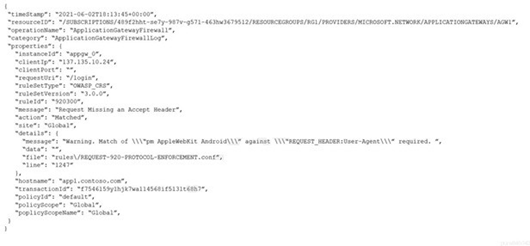
You attempt to access the URL and receive an HTTP 403 error. You view the diagnostics log and discover the following error.

You need to ensure that the URL is accessible through the application gateway.
Solution: You create a WAF policy exclusion for request headers that contain 137.135.10.24.
Does this meet the goal?


Show answerHide answer

Correct answer: B

No

Explanation

Explanation:
This question tests troubleshooting WAF-related HTTP 403 Forbidden errors. The JSON log snippet shows a triggered WAF rule (rule ID 920300). The solution proposes an exclusion based on a specific IP in the request headers, which is a misdiagnosis of the actual cause shown in the log.

Correct Option:

B. No.
The solution does not meet the goal. The WAF log indicates rule 920300 was triggered, which is part of the OWASP Core Rule Set (CRS) and typically blocks requests due to missing a User-Agent or Host header, or because the request contains an IP address in the Host header field. The log's details field ("Missing/Empty Host Header") explicitly states the cause. An exclusion for an IP address in a request header would not resolve this specific rule violation.

Incorrect Option:

A. Yes.
This is incorrect. Creating an exclusion for the IP address 137.135.10.24 is not the appropriate fix. The error is caused by the Host header being missing or containing an IP address instead of a hostname. The correct fix would be to ensure the client request includes a valid Host header with the application gateway's domain name, or to create a WAF exclusion for the Host header for the specific rule ID 920300 if using an IP in the Host header is a legitimate requirement.

Reference:
Microsoft Learn - Web Application Firewall (WAF) exclusion lists. The documentation explains that exclusions must be targeted at the correct part of the request (e.g., request header name) and matched to the specific rule ID. Rule 920300 is documented as "Request Missing/Empty Host Header."
Full mock exam

Sit the AZ-700 exam before exam day

Full-length mocks with the same number of questions and the same time limit as the real AZ-700 exam. Every attempt draws a new set of questions from the full bank, so you can keep going until you pass comfortably.

Get full AZ-700 mock exam
  • 65questions per mock
  • 105 mintime limit
  • 181questions in the bank
  • Newmock on every attempt
These AZ-700 practice questions with explanations help candidates master Azure networking concepts. Topics include virtual networks, load balancing, VPN gateways, and network security. Each explanation breaks down complex networking scenarios, helping learners understand how Azure networking components work together. This learning-focused approach enhances both theoretical knowledge and practical skills. By practicing these questions, candidates can improve their ability to design and manage secure and scalable network solutions and confidently prepare for the certification exam.

AZ-700 - Designing and Implementing Microsoft Azure Networking Solutions Official Exam Blueprint and Weight:

1. Design and Implement Core Networking Infrastructure
Official Exam Weight: 25-30%
Subtopics: Plan and implement network segmentation and address spaces, create virtual network (VNet), plan and configure subnetting for services including VNet gateways private endpoints service endpoints firewalls application gateways VNet-integrated platform services and Azure Bastion, plan and configure subnet delegation, plan and configure shared or dedicated subnets, create prefix for public IP addresses, choose when to use public IP address prefix, plan and implement custom public IP address prefix (bring your own IP), create public IP address, associate public IP addresses to resources, design name resolution inside VNet, configure DNS settings for VNet, design public DNS zones, design private DNS zones, configure public and private DNS zones, link private DNS zone to VNet, design and implement Azure DNS Private Resolver, design service chaining including gateway transit, implement VNet peering, implement and manage virtual network connectivity using Azure Virtual Network Manager, design and implement user-defined routes (UDRs), associate route table with subnet, configure forced tunneling, diagnose and resolve routing issues, design and implement Azure Route Server, identify appropriate use cases for network address translation (NAT) gateway, implement NAT gateway, configure monitoring network diagnostics and logs in Azure Network Watcher, monitor and troubleshoot network health using Azure Network Watcher, monitor and troubleshoot networks using Azure Monitor Network Insights, activate and monitor distributed denial-of-service (DDoS) protection, evaluate network security recommendations identified by Microsoft Defender for Cloud Secure Score, evaluate network security recommendations identified by Microsoft Defender For Cloud Attack Path Analysis, identify network resources using Microsoft Defender for Cloud Security Explorer.

2. Design, Implement, and Manage Connectivity Services
Official Exam Weight: 20-25%
Subtopics: Design site-to-site VPN connection including for high availability, select appropriate VNet gateway stock-keeping unit (SKU) for site-to-site VPN requirements, implement site-to-site VPN connection, identify when to use policy-based VPN versus route-based VPN connection, create and configure local network gateway, create and configure IPsec/Internet Key Exchange (IKE) policy, create and configure virtual network gateway, diagnose and resolve virtual network gateway connectivity issues, implement Azure Extended Network, select appropriate virtual network gateway SKU for point-to-site VPN requirements, select and configure tunnel type, select appropriate authentication method, configure RADIUS authentication, configure authentication using Microsoft Entra ID, implement VPN client configuration file, diagnose and resolve client-side and authentication issues, specify Azure requirements for Always On VPN, specify Azure requirements for Azure Network Adapter, select ExpressRoute connectivity model, select appropriate ExpressRoute SKU and tier, design and implement ExpressRoute to meet requirements including cross-region connectivity redundancy and disaster recovery, design and implement ExpressRoute options including Global Reach FastPath and ExpressRoute Direct, choose between Azure private peering only Microsoft peering only or both, configure Azure private peering, configure Microsoft peering, create and configure ExpressRoute gateway, connect virtual network to ExpressRoute circuit, recommend route advertisement configuration, configure encryption over ExpressRoute, implement Bidirectional Forwarding Detection, diagnose and resolve ExpressRoute connection issues, select Virtual WAN SKU, design Virtual WAN architecture including selecting types and services, create hub in Virtual WAN, choose appropriate scale unit for each gateway type, deploy gateway into Virtual WAN hub, configure virtual hub routing, integrate Virtual WAN hub with third-party NVA for cloud connectivity.

3. Design and Implement Application Delivery Services
Official Exam Weight: 15-20%
Subtopics: Map requirements to features and capabilities of Azure Load Balancer, identify appropriate use cases for Azure Load Balancer, choose Azure Load Balancer SKU and tier, choose between public and internal load balancers, choose between regional and global load balancers, create and configure Azure Load Balancer, implement Azure Traffic Manager, implement gateway load balancer, implement load balancing rule, create and configure inbound NAT rules, create and configure explicit outbound rules including source network address translation (SNAT), map requirements to features and capabilities of Azure Application Gateway, identify appropriate use cases for Azure Application Gateway, choose between manual and autoscale, create back-end pool, configure health probes, configure listeners, configure routing rules, configure HTTP settings, configure Transport Layer Security (TLS), configure rewrite sets, map requirements to features and capabilities of Azure Front Door, identify appropriate use cases for Azure Front Door, choose appropriate tier, configure Azure Front Door including routing origins and endpoints, configure SSL termination and end-to-end SSL encryption, configure caching, configure traffic acceleration, implement rules URL rewrite and URL redirect, secure origin using Azure Private Link in Azure Front Door.

4. Design and Implement Private Access to Azure Services
Official Exam Weight: 10-15%
Subtopics: Plan private endpoints, create private endpoints, configure access to private endpoints, create Private Link service, integrate Private Link and Private Endpoint with DNS, integrate Private Link service with on-premises clients, choose when to use service endpoint, create service endpoints, configure service endpoint policies, configure access to service endpoints.

5. Design and Implement Azure Network Security Services
Official Exam Weight: 15-20%

Subtopics: Create network security group (NSG), associate NSG to resource, create application security group (ASG), associate ASG to network interface card (NIC), create and configure NSG inbound and outbound security rules, implement virtual network flow logs, interpret virtual network flow logs, verify IP flow, configure NSG for remote server administration including Azure Bastion, implement and manage virtual network security using Azure Virtual Network Manager, map requirements to features and capabilities of Azure Firewall, select appropriate Azure Firewall SKU, design Azure Firewall deployment, create and implement Azure Firewall deployment, configure Azure Firewall rules, create and implement Azure Firewall Manager policies, create secure hub by deploying Azure Firewall inside Azure Virtual WAN hub, map requirements to features and capabilities of WAF, design WAF deployment, configure detection or prevention mode, configure rule sets for WAF on Azure Front Door, configure rule sets for WAF on Application Gateway, implement WAF policy, associate WAF policy. 

Domain Title Exam Weight
1 Design and Implement Core Networking Infrastructure 25-30%
2 Design, Implement, and Manage Connectivity Services 20-25%
3 Design and Implement Application Delivery Services 15-20%
4 Design and Implement Private Access to Azure Services 10-15%
5 Design and Implement Azure Network Security Services 15-20%

How MSMCQ.com Practice Questions Secured My AZ-700 Success


What Customers Say About Us

Preparing for the AZ-700 exam—a complex test focused on designing and implementing Azure networking—was a daunting challenge. The breadth of topics, from virtual networks and hybrid connectivity to advanced security and monitoring, required more than just theoretical study. That’s where MSMCQ.com became my secret weapon.

I used Designing and Implementing Microsoft Azure Networking Solutions practice test not for memorization, but as a targeted learning engine. After studying each domain—like Azure VPN Gateway or Private Link I immediately tackled the related AZ-700 exam practice questions. This transformed abstract concepts into real-world scenarios. Each questions detailed explanations clarified subtle distinctions, such as when to choose a VNet peering over a VPN Gateway, or how NSG rules differ from Azure Firewall policies.

Most importantly, the platform exposed the exam’s logic and phrasing. By the time I sat for the real Designing and Implementing Microsoft Azure Networking Solutions exam, the structure felt familiar. I wasn’t just recalling facts; I was confidently applying solutions, having already navigated similar case studies in practice.

MSMCQ.com turned my preparation from passive reading into active problem-solving, directly paving my path to a first-attempt pass.

Real Stories From Real Customers


Networking topics became clearer through MSmcqs.com practice exam while preparing for Microsoft Certified: Azure Network Engineer Associate (AZ-700). The questions strengthened understanding of hybrid networking and connectivity solutions.
Mateo Silva | Portugal