Microsoft certification · Exam AZ-140

AZ-140 Mock Exam Page 2

Configuring and Operating Microsoft Azure Virtual Desktop

Free AZ-140 questions on Topic 3, Misc. Questions, each with the answer and an explanation.

20 questions · 30 minutes · free, no sign-up

Topic 3, Misc. Questions questions

11–20 of 26 free
Question 11 Choose 1
You have an Azure Virtual Desktop host pool. The pool contains session hosts that run Windows 10 Enterprise multi-session.

You connect to a Remote Desktop session on Pool1 and discover an issue with the frequency of screen updates.

You need to identify whether the issue related to insufficient server, network, or client resources. The solution must minimize how long it takes to identify the resource type.

What should you do?
Show answerHide answer

Correct answer: D From within the current session, use Performance Monitor to display the values of all the RemoteFX Graphics(*)\Frames Skipped/Second counters.

Explanation

Explanation:
This question tests your ability to diagnose performance issues (specifically screen update frequency) within an active AVD session. The requirement is to quickly identify the resource bottleneck type (server, network, client) from within the problematic session itself. The most direct, real-time method is to examine performance counters that differentiate between graphics rendering (server) and network transport issues.

Correct Option:

D. From within the current session, use Performance Monitor to display the values of all the RemoteFX Graphics(*)\Frames Skipped/Second counters.
This is correct. Within the Performance Monitor (perfmon) on the session host (accessible from within your session), the RemoteFX Graphics counters are key. High values in specific sub-counters, like "Frames Skipped/Second - Insufficient Server Resources" vs. "Frames Skipped/Second - Insufficient Network Resources", directly identify whether he bottleneck is the server (CPU/GPU) or the network. This provides immediate, actionable diagnostics.

Incorrect Options:

A. From within the current session, use the Azure Virtual Desktop Experience Estimator.
The Experience Estimator is a planning tool used before deployment to estimate user density based on workloads. It cannot diagnose real-time performance issues in an existing session.

B. From Azure Cloud Shell, run the Get-AzOperationalInsightsWorkspaceUsage cmdlet...
This cmdlet retrieves log analytics workspace usage data (volume of data ingested), not real-time session performance metrics. It is irrelevant for troubleshooting screen update frequency.

C. From Azure Cloud Shell, run the Get-AzWvdUserSession cmdlet...
This cmdlet retrieves administrative information about a user session (e.g., session ID, state, host name) but provides no performance or diagnostic data about resource bottlenecks causing graphics issues.

Reference:
Microsoft Docs: Troubleshoot Azure Virtual Desktop graphics and GPU issues - Recommends using Performance Monitor and the RemoteFX Graphics counters to identify the root cause of graphical performance issues.
Question 12 Choose 1

You have a Azure Virtual Desktop host pool named Pool1 that contains three session
hosts. The session hosts are configured to use FSLogtx profile containers. You need to
configure Cloud Cache on the session hosts. What should you do?

Show answerHide answer

Correct answer: C

Add VHDlocations entries to the Windows registry.

Question 13 Choose 1

You have an Azure Virtual Desktop deployment.
You have a RemoteApp named App1.
You discover that from the Save As dialog box of App1, users can run executable
applications other than App1 on the session hosts.
You need to ensure that the users can run only published applications on the session hosts. What should you do?

Show answerHide answer

Correct answer: D

Configure an AppLocker policy on the session hosts

Explanation

Reference:
https://docs.microsoft.com/en-us/azure/virtual-desktop/security-guide

Question 14

Your company has the offices shown in the following table.

Show answerHide answer

Explanation

Question 15 Choose 1

You have a Windows Virtual Desktop host pool named Pool1 that runs Windows 10
Enterprise multi-session hosts.
You need to use Performance Monitor to troubleshoot a low frame quality issue that is
affecting a current use session to Pool1.
What should you run to retrieve the user session ID?

Show answerHide answer

Correct answer: B

qwinsta

Explanation

Reference:
https://docs.microsoft.com/en-us/azure/virtual-desktop/troubleshoot-vm-configuration

Question 16 Choose 1

You have a Azure Virtual Desktop deployment.
In Azure Advisor, you discover the following recommendation related to Azure Virtual
Desktop:
• Impact Medium
• Description: No validation environment enabled
• Potential Benefit Ensure business continuity through AVD service deployments
• Impacted Resource:' Host Pool
What can you validate by implementing the recommendations?

Show answerHide answer

Correct answer: C

Preview features for Azure Virtual Desktop

Question 17 Choose 1

Note: This question is part of a series of questions that present the same scenario.
Each question in the series contains a unique solution that might meet the stated
goals. Some question sets might have more than one correct solution, while others
might not have a correct solution.
After you answer a question in this section, you will NOT be able to return to it. As a
result, these questions will not appear in the review screen.
You have the following:
A Microsoft 365 E5 tenant
An on-premises Active Directory domain
A hybrid Azure Active Directory (Azure AD) tenant
An Azure Active Directory Domain Services (Azure AD DS) managed domain
An Azure Virtual Desktop deployment
The Azure Virtual Desktop deployment contains personal desktops that are hybrid joined to
the on-premises domain and enrolled in Microsoft Intune.
You need to configure the security settings for the Microsoft Edge browsers on the
personal desktops.
Solution: You create and configure a Group Policy Object (GPO) in the on-premises
domain.
Does this meet the goal?

Show answerHide answer

Correct answer: A

Yes

Explanation

Reference:
https://www.compete366.com/blog-posts/eight-tips-on-how-to-manage-azure-virtualdesktop-
avd/

Question 18 Choose 1

You have an Azure subscription that contains the resources shown in the following table.
Which resources can you back up by using Azure Backup?

Show answerHide answer

Correct answer: A

WVDVM-0 and share1 only

Explanation

Reference:
https://docs.microsoft.com/en-us/azure/backup/backup-afs
https://docs.microsoft.com/en-us/azure/backup/backup-azure-vms-introduction

Question 19

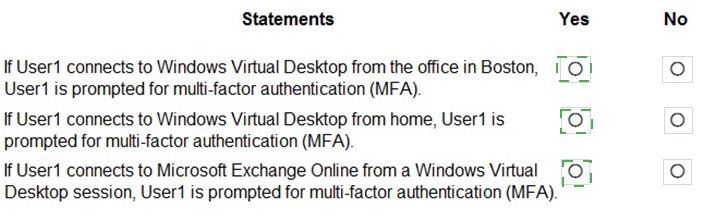
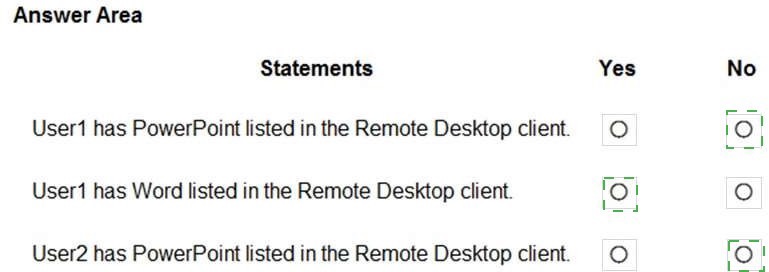
You network contains an on-premises Active Directory domain that syncs to an Azure Active Directory (Azure AD) tenant. The domain contains the users shown in the following table.

Show answerHide answer

Explanation

Question 20

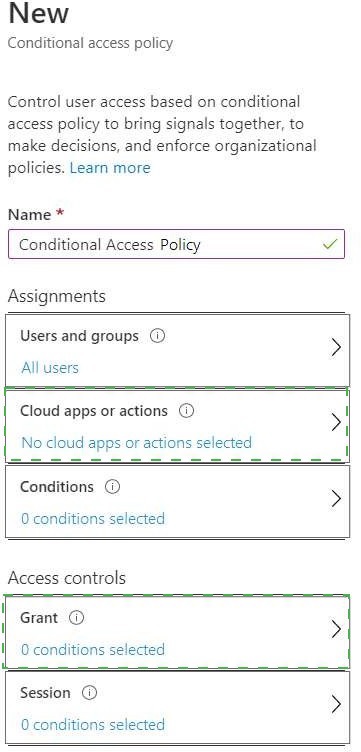
You have a Windows Virtual Desktop deployment.
You need to ensure that all the connections to the managed resources in the host pool require multi-factor authentication (MFA).
Which two settings should you modify in a conditional access policy? To answer, select the
appropriate options in the answer area.
NOTE: Each correct selection is worth one point.

Show answerHide answer

Explanation

Full mock exam

Sit the AZ-140 exam before exam day

Full-length mocks with the same number of questions and the same time limit as the real AZ-140 exam. Every attempt draws a new set of questions from the full bank, so you can keep going until you pass comfortably.

Get full AZ-140 mock exam
  • —questions per mock
  • —time limit
  • 106questions in the bank
  • Newmock on every attempt