Microsoft certification · Exam AI-200

AI-200 Mock Exam Page 2

Developing AI Cloud Solutions on Azure

Free AI-200 mock exam questions 11–20, each with the answer and an explanation.

20 questions · 40 minutes · free, no sign-up

Free AI-200 questions

11–20 of 42 free
Question 11 Choose 3
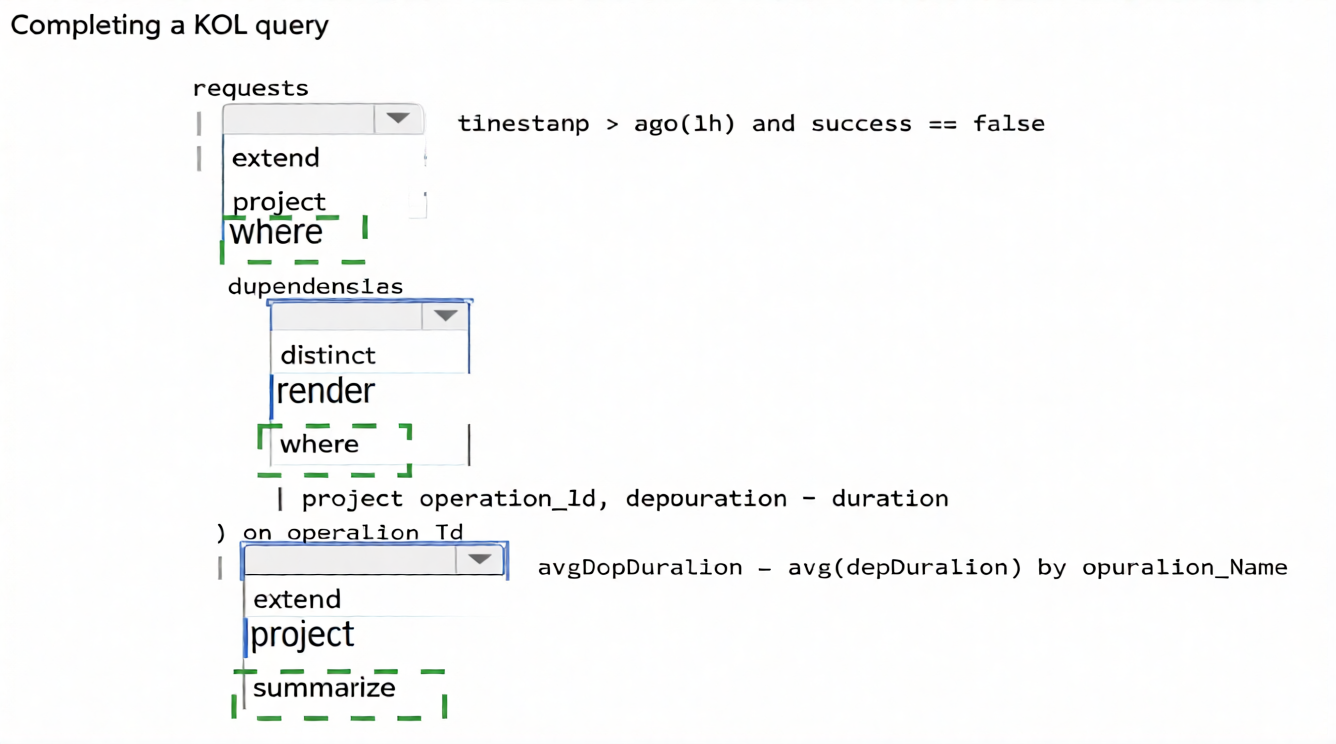
You are using Azure Monitor Application Insights to collect dependency data.
You must be able to:
Correlate failed requests with dependency calls during the last hour.
Calculate the average dependency duration per operation.
You need to construct the KQL query by using the minimum number of statements.
Which three operators should you use? Each correct answer presents part of the solution.
Show answerHide answer

Correct answer: B, C, D summarize join where

Explanation

Explanation

To meet both requirements using the minimum number of statements, you need to correlate two separate telemetry tables (`requests` and `dependencies`) and perform an aggregation. Here is how the three operators accomplish this:

1. where (D): You must filter both datasets to the required time window. While the KQL query itself uses a `where` clause, the `requests` and `dependencies` tables also require filtering (e.g., `where success == false` for failed requests and `where timestamp > ago(1h)`).

2. join (C): To "correlate failed requests with dependency calls," you must combine the `requests` table with the `dependencies` table. The `join` operator is essential to link a failed request to its downstream dependency call using the `operation_Id` (or `Id`/`ParentId`).

3. summarize (B): To "calculate the average dependency duration per operation," you use the `summarize` operator to group the joined results by the operation name and compute the average duration (e.g., `summarize avg(duration) by operation_Name`).

Why the Other Options Are Incorrect

A. extend: While `extend` can create calculated columns, it is not strictly necessary to perform the required correlation or averaging; the `summarize` operator can calculate the average directly.

E. distinct: `distinct` is used to return a unique list of values. It cannot perform calculations (like averages) or correlate datasets.

References

Microsoft Learn: Application Insights telemetry correlation (Explains how to correlate requests and dependencies using `join` on `operation_Id`).
Question 12
A company uses Azure Monitor Application Insights to monitor application behavior, including incoming requests and dependencies.
You must identify failed requests from the last hour. You must also calculate the average duration of failed request dependency calls, grouped by operation name.
You need to analyze telemetry in Application insights.
Which operators should you mm? To answer, select the appropriate options in the answer area NOTE: Each cot reel selection is worth one point.
Show answerHide answer

Explanation


Explanation

1. where (for the requests table): The requirement states you must identify failed requests from the last hour. The `where` operator is used to filter the `requests` table using the condition `timestamp > ago(1h) and success == false`.

2. where (for the dependencies table): When joining two tables in KQL, it is a best practice to filter the secondary table (in this case, `dependencies`) before the join to reduce the dataset size and improve performance. You use `where` to ensure you are only looking at recent dependencies (e.g., `where timestamp > ago(1h)`).

3. summarize: The requirement is to calculate the average duration of the dependency calls, grouped by operation name. The `summarize` operator is specifically designed for this. You use it with the `avg()` aggregation function (e.g., `summarize avg(depDuration) by operation_Name`).

Why the Other Options Are Incorrect

extend: This operator creates a new calculated column. While useful for adding formulas or parsing strings, it is not required to filter data or calculate aggregate averages.

project: This operator selects specific columns to include or exclude. It does not filter rows or perform aggregations.

distinct: This operator produces a table with the distinct combination of the provided columns. It cannot calculate averages or filter based on time.

render: This operator instructs the client to render a visualization (like a chart or graph). It is used at the very end of a query for display purposes and does not manipulate the data.

References

Microsoft Learn: where operator
Question 13
You plan to develop an Azure Functions app with an HTTP trigger.
The app must support the following functionality:
Event-driven scaling -
Ability to use custom Linux images for function execution
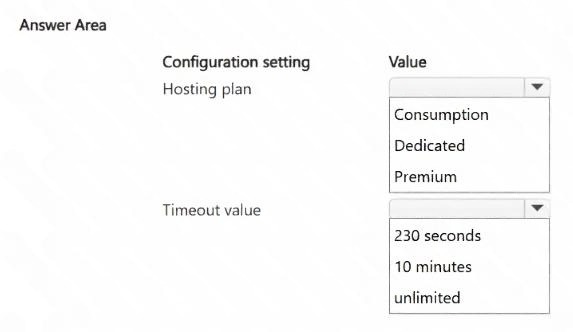
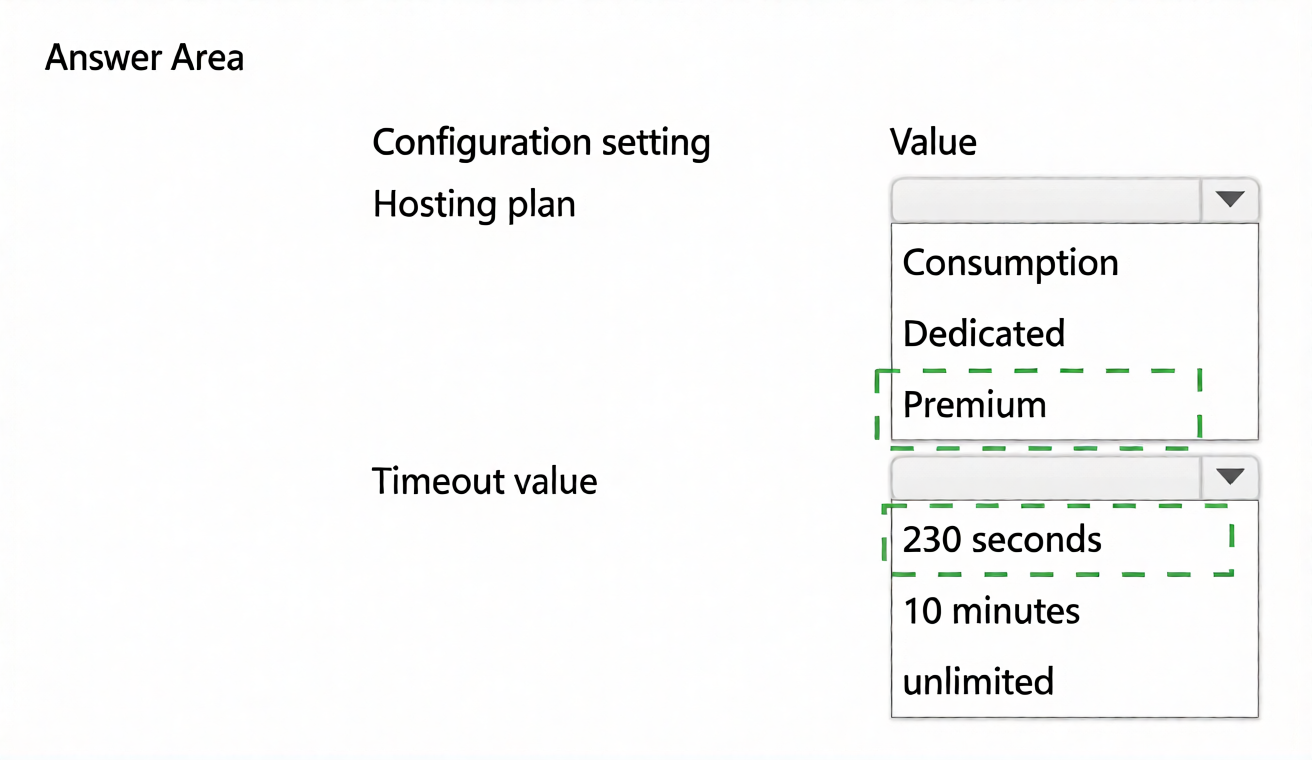
You need to identify the app ' s hosting plan and the maximum amount of time that the app function can take to respond to incoming requests.
Which configuration setting values should you use? To answer, select the appropriate values in the answer area.
NOTE: Each correct selection is worth one point.
Show answerHide answer

Explanation


Explanation

Premium (Hosting Plan): The requirement states the app must support "custom Linux images for function execution." In Azure Functions, custom containers are supported on the Premium and Dedicated (App Service) plans, but not on the Consumption plan. Between the two, the Premium plan provides "event-driven scaling" (like the Consumption plan) while still supporting custom containers, VNET integration, and pre-warmed instances. The Dedicated plan requires manual or autoscale rule-based scaling and does not offer the same event-driven model.

230 seconds (Timeout Value): For HTTP-triggered Azure Functions, the maximum allowed response timeout is limited by the Azure Load Balancer. Regardless of the hosting plan chosen (Consumption, Premium, or Dedicated), the HTTP response timeout is capped at 230 seconds. If the function takes longer than 230 seconds, the request will time out and return a 502 Bad Gateway error.

Why the Other Options Are Incorrect

Consumption: While it offers event-driven scaling, it does not support custom Linux containers.

Dedicated: While it supports custom containers, it does not provide the native, out-of-the-box event-driven scaling requested by the business requirement (it relies on standard App Service autoscale).

10 minutes / unlimited: These timeout values are available for non-HTTP triggers (like Service Bus or Queue triggers) on Premium/Dedicated plans, but they cannot be applied to an HTTP trigger due to the Load Balancer's hard limit of 230 seconds.

References

Microsoft Learn: Azure Functions hosting options (Details plan features, container support, and scaling).
Question 14
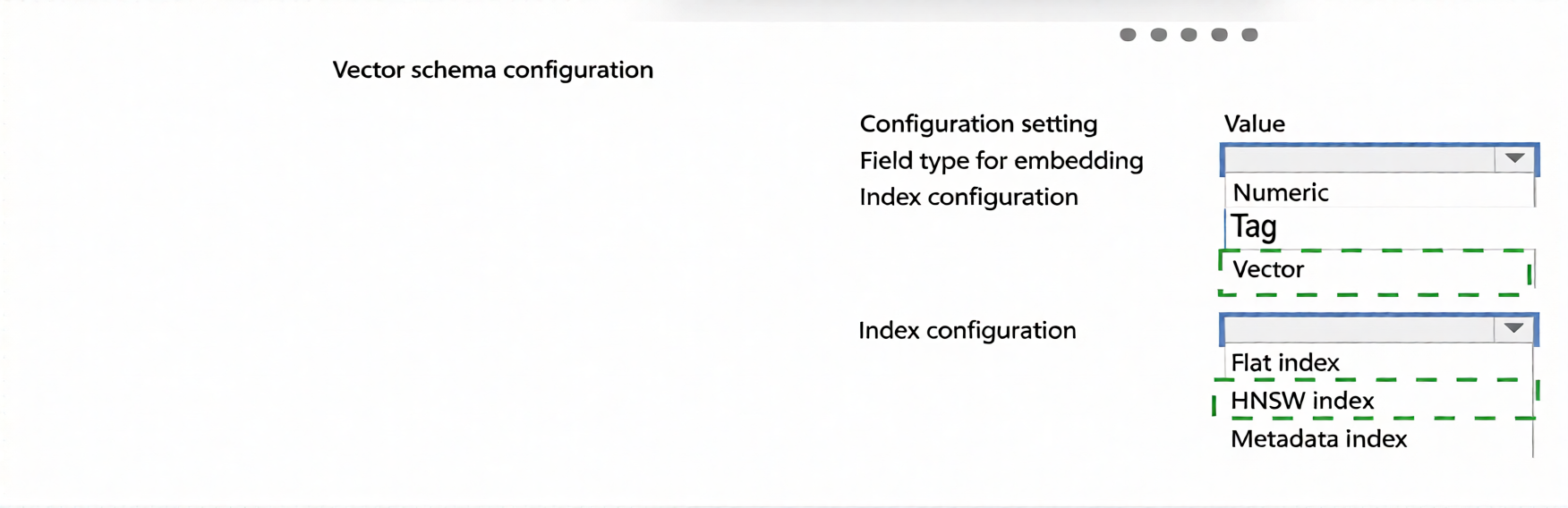
You are implementing semantic retrieval in Redis.
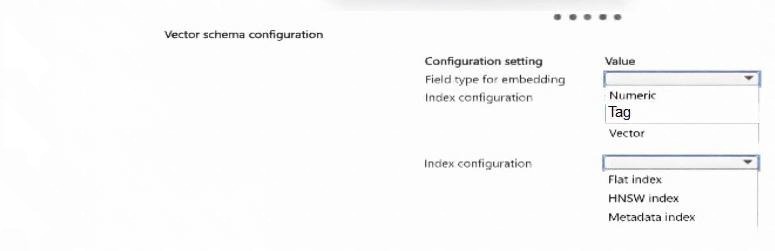
The solution must support low-latency, approximate nearest neighbor (ANN) vector similarity search for large-scale AI retrieval workloads.
You need to select the appropriate vector schema settings.
Which configuration values should you select? To answer, select the appropriate options in the answer area.
NOTE: Each correct selection is worth one point.
Show answerHide answer

Explanation


Explanation

Vector (Field type): To store high-dimensional embeddings and perform similarity searches in Redis, the data field must be explicitly defined as a Vector type. This tells the Redis engine to treat the data as a mathematical vector, enabling it to calculate distances (like cosine or Euclidean distance) against a query vector.

HNSW index: The requirement explicitly asks for a low-latency, approximate nearest neighbor (ANN) search. Hierarchical Navigable Small World (HNSW) is a graph-based indexing algorithm specifically designed for this. It provides extremely fast, sub-linear query times for large-scale vector datasets by navigating a multi-layered graph, which is ideal for AI retrieval workloads.

Why the Other Options Are Incorrect

Numeric / Tag: These are standard Redis data types for scalar values (like integers or labels). They cannot perform vector distance calculations.

Flat index: A Flat index performs a brute-force, exhaustive search (calculating the distance to every single vector). While it provides 100% exact results, it is very slow and resource-intensive for large-scale workloads, failing the low-latency requirement.

Metadata index: Metadata indexes are used to filter search results based on associated scalar data (e.g., category, price) after the vector search, not for the vector similarity search itself.

References

Microsoft Learn: Vector similarity search in Azure Cache for Redis (Covers Vector field types and HNSW index configuration).
Question 15
You are implementing a Retrieval-Augmented Generation (RAG) system by using the native vector search capabilities of Azure Cosmos DB for NoSQL API.
You have a container named Documents that stores technical articles. Each article includes a property named embedding.
You must ensure that the system can perform efficient similarity searches between user queries and the stored articles.
You need to configure the database resources to support semantic retrieval.
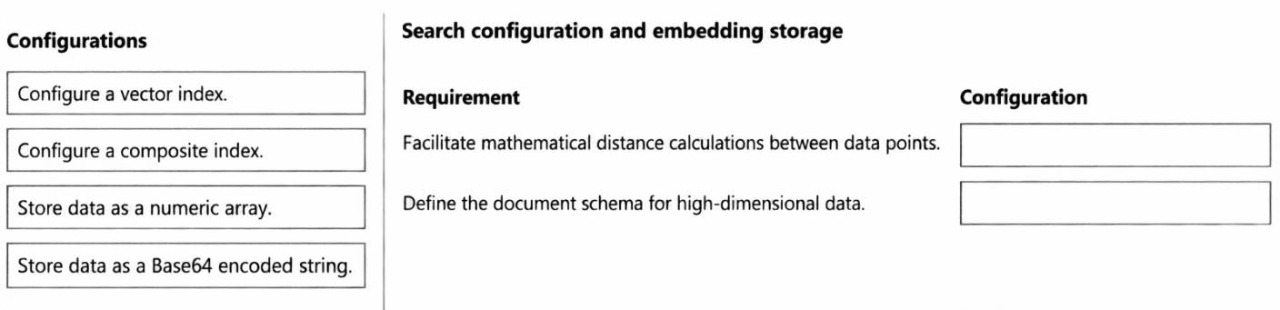
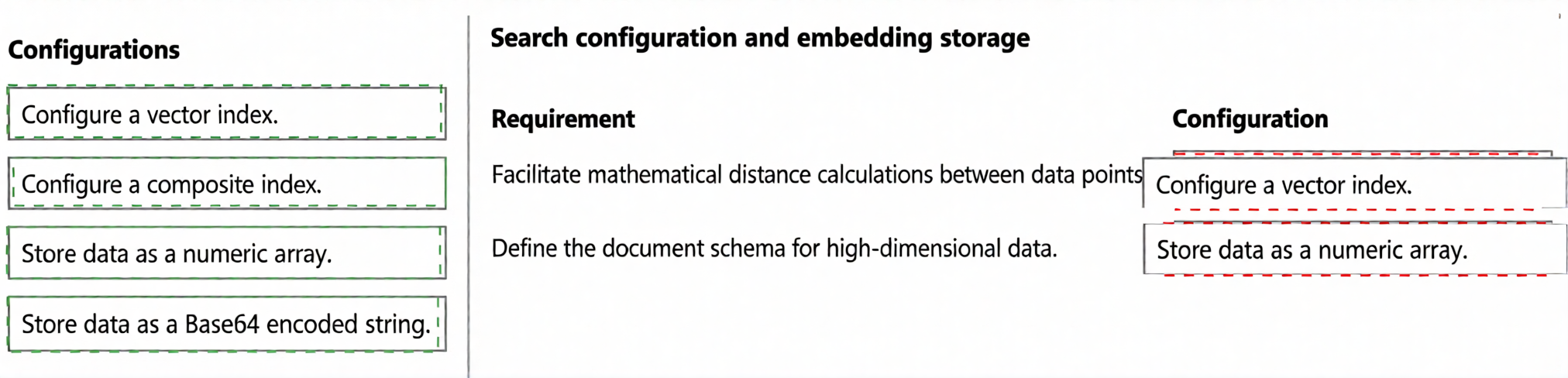
Which configurations should you use? To answer, move the appropriate configurations to the correct requirements. You may use each configuration once, more than once, or not at all. You may need to move the split bar between panes or scroll to view content.
NOTE: Each correct selection is worth one point.
Show answerHide answer

Explanation


Explanation

Configure a vector index: To perform efficient similarity searches (mathematical distance calculations like cosine or Euclidean distance) between a user's query vector and the stored article embeddings, you must define a vector policy and configure a vector index in your Cosmos DB container. This tells the database engine to use specialized algorithms (like flat, quantizedFlat, or DiskANN) to index and query the high-dimensional data efficiently.

Store data as a numeric array: In Azure Cosmos DB for NoSQL, vector embeddings must be stored in the JSON document as an array of numbers (e.g., `[0.1, 0.5, -0.2]`). When defining the container's vector policy, you specify that the `embedding` property path uses this numeric array format so the database can correctly interpret and index the vector data.

Why the Other Options Are Incorrect

Configure a composite index: Composite indexes are used to optimize queries that sort or filter on multiple scalar properties (e.g., `ORDER BY c.category, c.price`). They do not support high-dimensional vector fields.

Store data as a Base64 encoded string: Azure Cosmos DB for NoSQL vector search requires embeddings to be stored as native JSON numeric arrays. It does not natively parse Base64 strings for vector distance calculations.

References

Microsoft Learn: Vector search in Azure Cosmos DB for NoSQL (Details the required vector policy, including the numeric array data type and vector index configuration).
Question 16
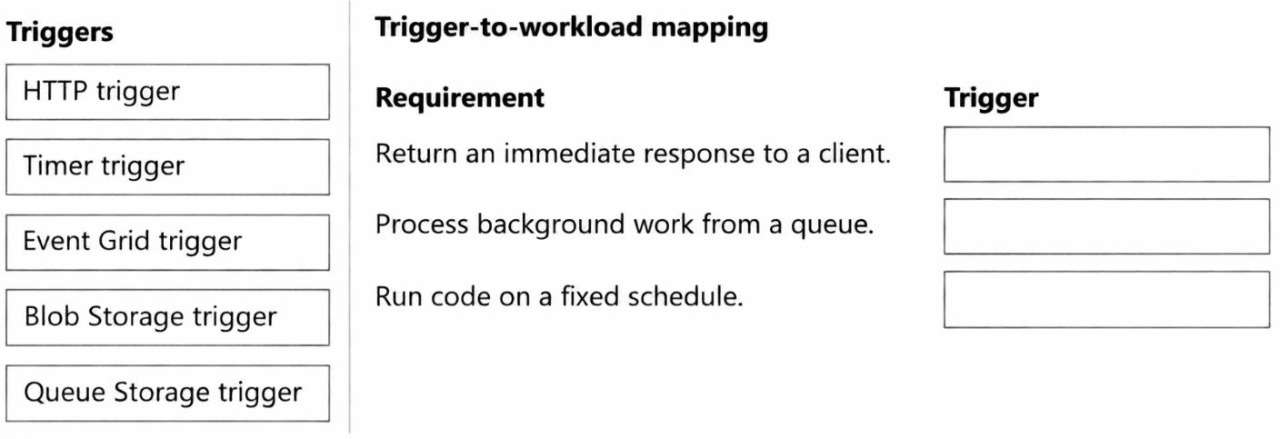
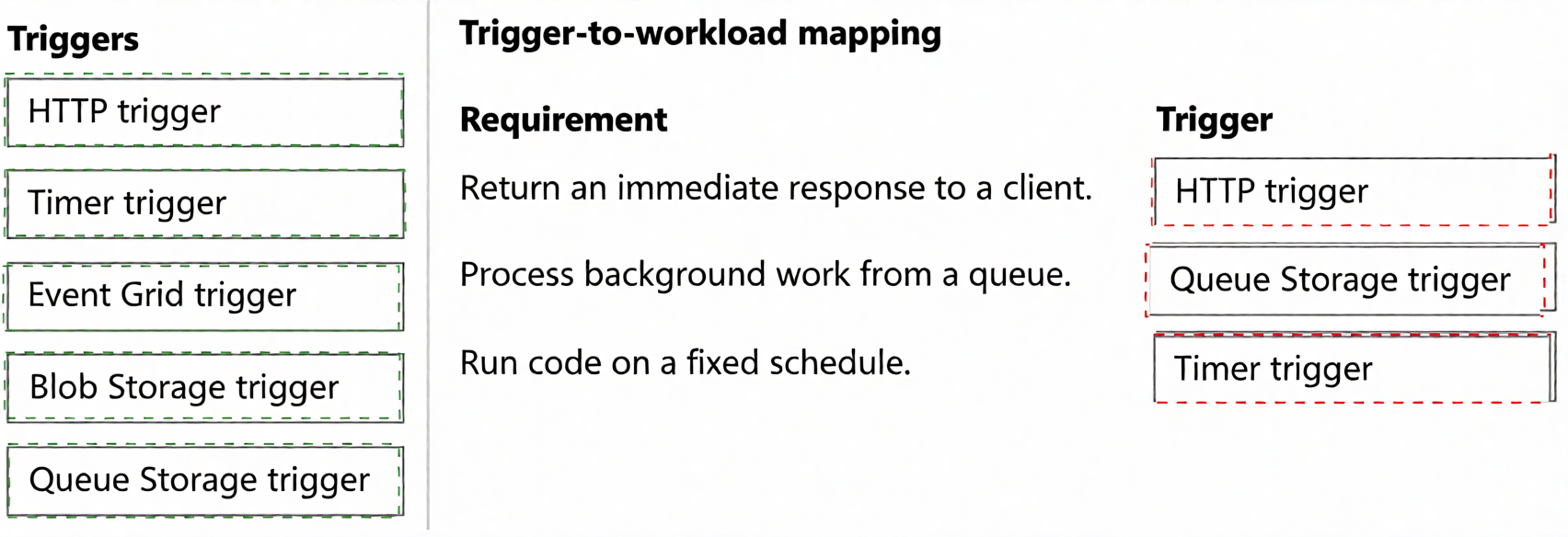
You are designing Azure Functions for three different backend workloads.
Each workload requires one of the following dispatching models:
- Return an immediate response to a client.
- Process background work from a queue.
- Run code on a fixed schedule.
You need to select the trigger for each requirement.
Which triggers should you select? To answer, move the appropriate triggers to the correct requirements. You may use each trigger once, more than once, or not at all. You may need to move the split bar between panes or scroll to view content.
NOTE: Each correct selection is worth one point.
Show answerHide answer

Explanation


Explanation

HTTP trigger: This trigger is specifically designed to execute code in response to an HTTP request. It allows the Azure Function to act as a REST API endpoint, enabling it to process incoming client requests and return an immediate HTTP response (synchronously).

Queue Storage trigger: When messages are added to an Azure Storage Queue, this trigger fires and invokes the function. It is the standard pattern for decoupling application components and processing background work asynchronously.

Timer trigger: This trigger invokes a function based on a predefined schedule using a CRON expression. It is the correct choice for running cleanup tasks, generating reports, or any workload that must run at a fixed, specific time.

Why the Other Options Are Incorrect

Event Grid trigger: This is an event-driven trigger used to react to state changes (like a blob being created or a resource being provisioned), but it does not fit the specific requirements of returning an immediate HTTP response, processing storage queues, or running on a strict schedule.

Blob Storage trigger: This trigger fires when a file is uploaded to or updated in Azure Blob Storage. It is not used for queue processing or fixed scheduling.

References

Microsoft Learn: Azure Functions triggers and bindings concepts
Question 17
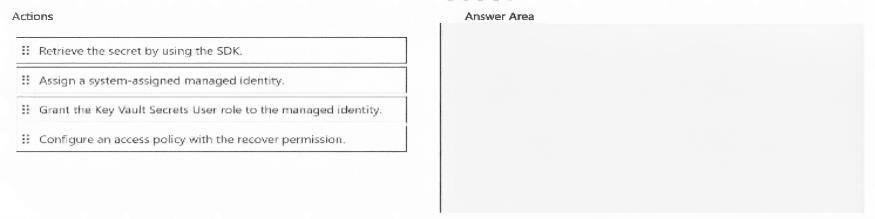
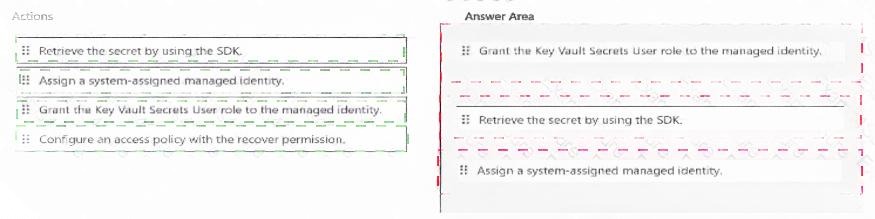
You are deploying an AI service to Azure Container Apps.
The service must retrieve secrets securely from Key Vault by using managed identity.
You need to configure secure access.
Which three actions should you perform in sequence? To answer, move the appropriate actions from the list of actions to the answer area and arrange them in the correct order.
Show answerHide answer

Explanation


Explanation

1. Assign a system-assigned managed identity: Before an application (like your Azure Container App) can authenticate to Azure Key Vault without using passwords or connection strings, it must be given an identity within Microsoft Entra ID. You assign a system-assigned managed identity directly to the Container App resource.

2. Grant the Key Vault Secrets User role to the managed identity: Once the identity exists, it needs authorization. By assigning the Key Vault Secrets User RBAC role to this managed identity on the Key Vault, you grant it the least-privilege permissions required to read secret contents.

3. Retrieve the secret by using the SDK: Finally, with the identity assigned and authorized, the application code can use an Azure SDK library (like `Azure.Identity` and `Azure.Security.KeyVault.Secrets`) to authenticate via the managed identity and fetch the secret securely at runtime.

Why the Other Option Is Incorrect

Configure an access policy with the recover permission: This is incorrect for two reasons. First, the "recover" permission is for recovering deleted Key Vault objects (like keys or secrets) and does not grant read access to active secrets. Second, modern Azure Key Vault implementations heavily favor Azure RBAC (Role-Based Access Control) over legacy Vault Access Policies for managing permissions.

References

Microsoft Learn: Use managed identities for Azure Container Apps
Microsoft Learn: Provide access to Key Vault with Azure RBAC
Question 18
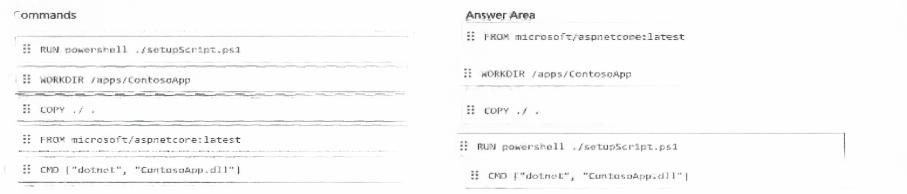
You plan to create a Docker image that runs an ASP.NET Core application named ContosoApp. You have a setup script named setupScript.psl and a series of application files including ContoscApp.dll.

You need to create a Dockerfile document that meets the following requirements:

• Call SQiupScript.psI when the container is built.
• Run CantosoApp.dill when the container starts.

The Dockerfile document must be created in the same folder where ContosoApp.dll and setupScnpt.ps! are stored.
Show answerHide answer

Explanation


Explanation

FROM [mcr.microsoft.com/dotnet/aspnet:latest](https://mcr.microsoft.com/dotnet/aspnet:latest): Every Dockerfile must begin with a `FROM` instruction to specify the base image. This sets the foundation for your container, in this case, the [ASP.NET](https://asp.net/) Core runtime.

WORKDIR /apps/ContosoApp: This command creates and sets the working directory for any subsequent `RUN`, `CMD`, `COPY`, or `ENTRYPOINT` instructions. It ensures your files are placed in a specific directory rather than the root.

COPY . .: This command copies the files from your local machine (the source `.`) into the current working directory of the container image (the destination `.`). This brings your application files (`ContosoApp.dll`) and the setup script into the image.

RUN powershell ./setupScript.ps1: The `RUN` instruction executes commands during the image build process. Since the requirement is to call the setup script when the container is built, you must use `RUN`.

CMD ["dotnet", "ContosoApp.dll"]: The `CMD` instruction specifies the default command to execute when the container starts. Using the JSON array format is the recommended best practice for running the .NET application.

References

Microsoft Learn: Dockerfile reference (Explains RUN vs CMD and general syntax).
Question 19 Choose 1
You have an Event Grid subscription that triggers an Azure Function.
You need to prevent loss of events in case the endpoint returns an HTTP 400 response. Which action should you perform?
Show answerHide answer

Correct answer: A Configure a dead letter destination.

Explanation

Explanation

In Azure Event Grid, when an event delivery fails, Event Grid automatically retries based on its retry policy. However, if the endpoint (your Azure Function) returns specific client error codes—specifically HTTP 400 (Bad Request) or HTTP 413 (Request Entity Too Large)—Event Grid recognizes this as a non-transient error (e.g., a malformed payload or a permanent validation failure).

Because retrying the exact same event will just fail again, Event Grid immediately stops retrying. To prevent the loss of these events, you must configure a dead-letter destination (such as an Azure Storage Blob container). If Event Grid cannot deliver an event, it drops it into the dead-letter destination so you can inspect and process it later.

Why the Other Options Are Incorrect

B. Implement asynchronous handshake validation: This is used during the initial subscription creation to prove endpoint ownership, not for handling delivery failures.

C. Implement optimistic batching: This is a method to increase throughput by sending multiple events in a single HTTP request. It does not address error handling or event loss.

D. Configure a retry policy: While configuring a retry policy is a good practice, Event Grid's default retry policy will not retry an event if the endpoint returns a 400 Bad Request. Retrying a request that the endpoint rejects as "bad" is pointless. Therefore, a retry policy alone cannot prevent the loss of events that trigger a 400 response.

References

Microsoft Learn: Event Grid message delivery and retry (Explains why 400 errors are not retried and the importance of dead-lettering).
Question 20 Choose 1
You need to add a custom voice that matches your company ' s brand for a text-to-speech feature, distinct from any standard neural voice. What should you use?
Show answerHide answer

Correct answer: B Azure AI Speech Custom Neural Voice

Explanation

Explanation

Azure AI Speech Custom Neural Voice: This is a feature that allows you to create a unique, synthetic voice for your applications. It is designed specifically for scenarios where a standard, prebuilt voice is not sufficient and a brand-specific, highly natural-sounding voice is required. You can train a custom neural voice using your own audio recordings to match your company's brand identity, tone, and style. This provides a distinct voice that is not available to other users.

Why the Other Options Are Incorrect

A. Azure AI Speech prebuilt neural voices: These are standard, off-the-shelf voices provided by Microsoft. They are highly natural but are shared across all Azure customers and cannot be customized to match a specific company's brand.

C. Azure AI Language sentiment analysis: This is a Natural Language Processing (NLP) service used to determine the positive, negative, or neutral sentiment of text. It does not generate speech.

D. Azure AI Translator: This service is used to translate text from one language to another. It does not create custom text-to-speech voices.

References

Microsoft Learn: What is Custom Neural Voice?
Full mock exam

Sit the AI-200 exam before exam day

Full-length mocks with the same number of questions and the same time limit as the real AI-200 exam. Every attempt draws a new set of questions from the full bank, so you can keep going until you pass comfortably.

Get full AI-200 mock exam
  • 60questions per mock
  • 120 mintime limit
  • 142questions in the bank
  • Newmock on every attempt