Microsoft certification · Exam AI-103

AI-103 Mock Exam

Developing AI Apps and Agents on Azure

Free AI-103 questions on Topic 2: Mixed Question Types, each with the answer and an explanation.

20 questions · 40 minutes · free, no sign-up

Topic 2: Mixed Question Types questions

1–10 of 26 free
Question 1 Choose 1
You have a Microsoft Foundry project that generates product marketing images from text prompts. After publishing several images, the legal team at your company identifies a competitor's logo on a sign in the background of an image. You need to remove only the logo, while preserving the rest of the image. What should you do?
Show answerHide answer

Correct answer: C Apply a mask-based inpainting edit to the part of the image that contains the logo.

Explanation

Explanation:

This question tests knowledge of image editing capabilities in Microsoft Foundry and generative AI workflows. The requirement is to remove a specific object from an already generated image while preserving all remaining content. This scenario requires targeted editing rather than regenerating or changing the entire image.

🟒 Correct Option:

C. Apply a mask-based inpainting edit to the part of the image that contains the logo.
Mask-based inpainting allows specific regions of an image to be selected and modified while leaving the rest unchanged. By masking only the area containing the competitor’s logo, the AI model regenerates that section without affecting surrounding elements. This approach preserves the overall composition, background, and image quality while removing the unwanted content.

πŸ”΄ Incorrect options:

A. Increase the prompt guidance strength.
Prompt guidance strength controls how strongly a generated image follows the original prompt. Increasing it may influence future image generation but does not selectively remove an existing logo from a published image.

B. Modify the original prompt to exclude brand names.
Updating the prompt may reduce the chance of brand-related content in future generations. However, it does not edit the already created image and cannot guarantee preservation of all existing visual elements.

D. Rerun the prompt by using a different random seed.
Changing the random seed generates a different image variation. The newly created image could change multiple elements, including layout and background details, making it unsuitable when only one specific object needs removal.

πŸ”§ Reference:
β†’ Microsoft Learn β€” Azure AI Foundry: Azure OpenAI image generation models
Confirms inpainting can edit selected areas while preserving the rest of the image.
Question 2
You have a Microsoft Foundry project that contains an internal Q&A agent.
Users report the following issues when they ask the agent questions:
β€’ An increase in the following response: β€œNo relevant information found”
β€’ Periodic HTTP 429 rate limit exceeded errors during peak hours
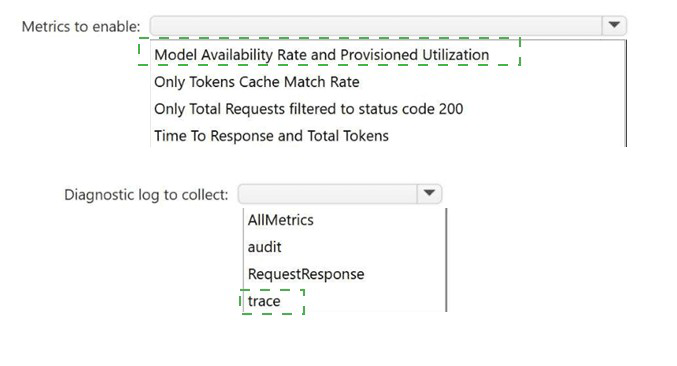
You need to identify whether each issue is caused by model unavailability, resource limits, or inference failures.
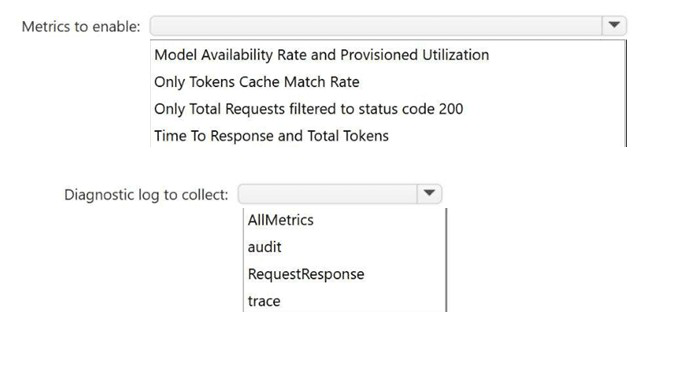
What should you do? To answer, select the appropriate options in the answer area.
NOTE: Each correct selection is worth one point.

Show answerHide answer

Explanation


Explanation:

This question tests the candidate's proficiency in configuring monitoring, logging, and troubleshooting frameworks for internal Q&A generative agents deployed within Microsoft Azure AI Foundry. It evaluates how to capture model-level performance data and request-level telemetry to diagnose inference failures, fallback behaviors, and rate-limiting blocks.

βœ… Correct Option:

Metrics to enable: Model Availability Rate and Provisioned Utilization
The Model Availability Rate and Provisioned Utilization metrics are essential to isolate resource limits and server availability anomalies. Model Availability Rate tracks internal server-side errors, while Provisioned Utilization explicitly monitors baseline capacities for Provisioned Throughput Units (PTU). When utilization hits or exceeds 100%, requests are actively throttled, producing the HTTP 429 errors encountered during peak load hours.

Diagnostic log to collect: trace
The trace diagnostic log category is used to track deep operational telemetry, chat contexts, and detailed execution blocks for Custom Question Answering (Q&A) agents. Collecting trace telemetry records the individual knowledge base lookups and threshold calculations, helping pinpoint why context generation fallback rules trigger the "No relevant information found" inference failures.

❌ Incorrect options:

Only Tokens Cache Match Rate
This option is incorrect because the Token Cache Match Rate solely reflects the percentage of incoming prompt tokens that successfully utilize existing context caches. While beneficial for fine-tuning prompt billing efficiency and reducing latency behaviors, it cannot capture server availability drops or diagnose HTTP 429 rate limits.

Only Total Requests filtered to status code 200
This option is incorrect because filtering metrics strictly to successful HTTP 200 statuses completely omits the HTTP 429 throttling errors. It provides zero visibility into failed operations, making it impossible to diagnose capacity overloads or resource saturation across peak production hours.

Time To Response and Total Tokens
This option is incorrect because Time To Response and Total Tokens measure transitional token counts and latency footprints. While helpful for basic performance monitoring, they lack the specific utilization profiles or error codes needed to distinguish infrastructure limits from functional backend model dropping behaviors.

AllMetrics
This option is incorrect under the Diagnostic Log dropdown because AllMetrics is a diagnostic platform category specifically designed for routing systemic multi-dimensional telemetry metrics into destination analytical data tables. It does not record the raw, request-level textual traces or agent pipeline telemetry needed for intent mapping analysis.

audit
This option is incorrect because the audit diagnostic log records administrative control plane actions, permission adjustments, policy compliance changes, and resource configuration alterations. It does not monitor data-plane chat executions or the run-time context filtering loops of the active AI model.

RequestResponse
This option is incorrect because while RequestResponse logs track basic API inbound metadata and HTTP status codes (such as HTTP 429 entries), it does not provide the deep execution paths or confidence telemetry that the specialized trace log delivers for diagnosing internal knowledge base fallbacks.

πŸ”§ Reference:
β†’ Microsoft Learn - Monitor Model Deployments in Microsoft Foundry Models confirms that Provisioned Utilization measures capacity thresholds where values $\ge$ 100% trigger HTTP 429 limits, while Model Availability Rate monitors service drop-offs.

β†’ Microsoft Learn - Enable diagnostic logging for Microsoft Foundry confirms that the Trace log category is required for deeper analytical workflows inside custom Q&A agent environments to troubleshoot inference fallbacks.
Question 3 Choose 1
You have a Microsoft Foundry project that contains an agent. The agent generates summaries from retrieved policy documents.
You need to improve response completeness. The solution must be implemented in the logic of the application code before responses are returned.
What should you do?
Show answerHide answer

Correct answer: B Add a reflection pass before the responses are returned.

Explanation

Explanation:

This question evaluates techniques to enhance the quality and completeness of agent-generated summaries from retrieved documents. It emphasizes implementing improvements directly in application code logic prior to final output.

βœ… Correct Option:

B. Add a reflection pass before the responses are returned.
Implement a reflection (or self-critique) step in the code where the agent reviews its initial summary against the retrieved policy documents. This pass checks for missing details, inaccuracies, or gaps, then refines the output. It directly improves completeness through iterative reasoning without changing core retrieval or model parameters.

❌ Incorrect options:

A. Decrease the value of the temperature parameter.
Lowering temperature makes responses more deterministic and focused. It reduces creativity but does not systematically ensure completeness of policy summaries.

C. Switch to Retrieval Augmented Generation (RAG).
The agent already uses retrieved documents. Switching to RAG addresses grounding but does not specifically target response completeness in post-generation logic.

D. Enable response streaming.
Streaming delivers output incrementally for better user experience. It has no impact on the final completeness or accuracy of the generated summaries.

πŸ”§ Reference:
β†’ Microsoft Learn - Study guide for Exam AI-103
Covers agentic patterns including multi-step reasoning and reflection for improved outputs.
Question 4
You have a Microsoft Foundry project that contains an agent used by the financial analysts at your company.
You need to optimize the agent workflow by providing additional data access and processing capabilities. The solution must meet the following requirements:
β€’ Ensure that the agent can perform calculations during conversations
β€’ Ensure that the agent can access up-to-date information from public websites.
β€’ Ensure that the agent can retrieve information from documents uploaded directly to the agent.
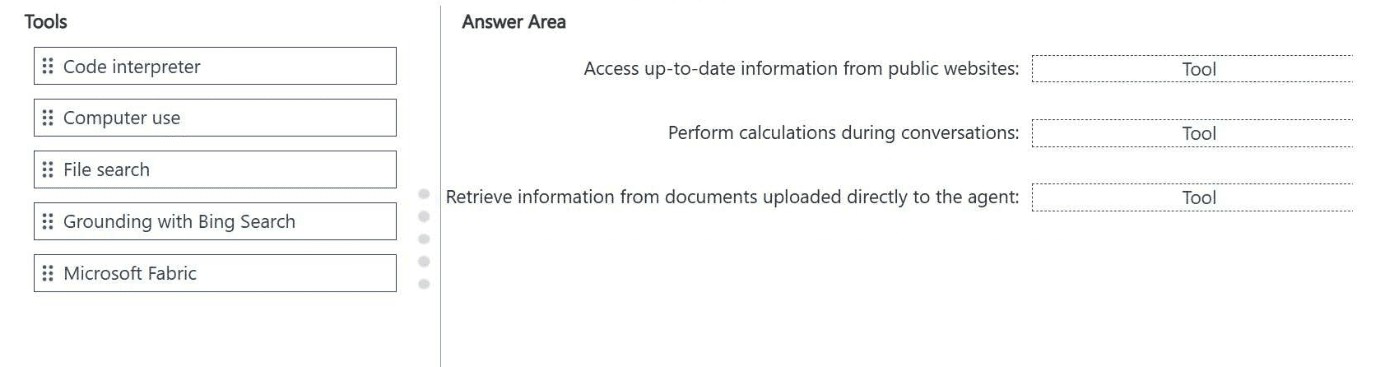
What should you use for each requirement? To answer, drag the appropriate tools to the correct requirements. Each tool may be used once, more than once, or not at all. You may need to drag the split bar between panes or scroll to view content.
NOTE: Each correct selection is worth one point.

Show answerHide answer

Explanation


Explanation:

This question tests your understanding of built-in tools in Microsoft Foundry Agent Service and how to match them to specific agent capabilities for data access and processing. It evaluates knowledge of grounding, computation, and document retrieval tools.

βœ… Correct Option:
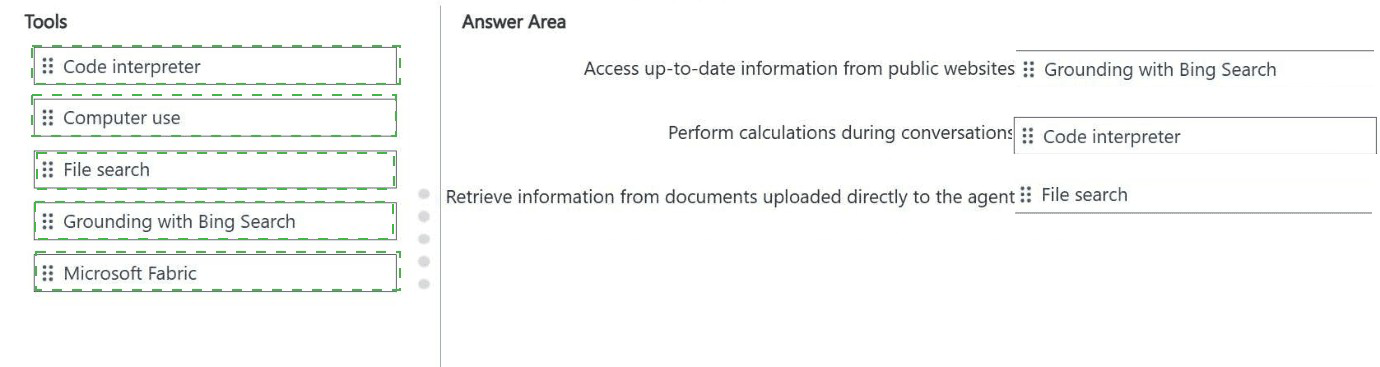
Grounding with Bing Search
This tool enables the agent to query real-time public web data via Bing. It overcomes the model's knowledge cutoff by retrieving current information with citations and is the recommended method for web grounding in agents.

βœ… Correct Option:
Code interpreter
This tool allows the agent to write and execute Python code in a sandboxed environment. It is ideal for mathematical computations, data analysis, and dynamic calculations during ongoing conversations.

βœ… Correct Option:
File search
This tool uses vector search over uploaded files or documents. It enables the agent to retrieve relevant proprietary or user-uploaded content efficiently.

❌ Incorrect Option:
Computer use
This tool supports browser automation or GUI interactions. It is not suitable for calculations, web grounding, or direct document retrieval from uploads.

❌ Incorrect Option:
Microsoft Fabric
This connects to structured data sources or analytics workloads. It does not handle real-time web access, code execution, or vector-based search on uploaded documents.

πŸ”§ Reference:
β†’ Microsoft Learn - What are tools in Azure AI Foundry Agent Service – Confirms purposes of Code Interpreter, File Search, and Grounding with Bing Search.

β†’ Microsoft Learn - Agent tools overview for Foundry Agent Service – Details matching of tools to web grounding, code execution, and file retrieval.
Question 5 Choose 1
You are deploying a support agent that enables users to upload photos. You need to automatically classify uploaded images for harmful content. The solution must block content based on severity levels. What should you do?
Show answerHide answer

Correct answer: A Implement image moderation.

Explanation

Explanation:

This question tests your understanding of Azure AI Content Safety services for moderating user-generated content. The core requirement is to classify uploaded images for harmful visual content and enforce blocking actions based on severity thresholds, which is the primary function of image moderation.

βœ”οΈ Correct Option

A. Implement image moderation.
Azure AI Content Safety image moderation analyzes images for harmful categories (e.g., Violence, Sexual, Hate, Self-Harm) and returns a severity level from 0 (safe) to 6 (high). You can configure a threshold to automatically block images exceeding a specific severity score, fully meeting the requirement.

❌ Incorrect Options

B. Enable prompt shields.
Prompt shields are designed to detect and mitigate prompt injection attacks and jailbreak attempts in text inputs, not to classify or block harmful visual content in uploaded images.

C. Apply keyword scanning to optical character recognition (OCR) output by using Azure Vision in Foundry Tools.
This only scans text extracted from images for specific keywords. It ignores visual elements (e.g., violent scenes) and does not provide severity-based classification or blocking.

D. Use blocklists.
Blocklists are used for matching prohibited text strings to block content. They cannot detect visual harm categories in images or assign severity levels for dynamic content moderation.

πŸ”§ Reference
β†’ Azure AI Content Safety – QuickStart: Analyze image content
Confirms image moderation returns severity levels (0–6) for categories like violence and self-harm.

β†’ Azure AI Content Safety – Harm categories
Confirms severity scoring and category definitions for image and text moderation.
Question 6 Choose 1
Note: This section contains one or more sets of questions with the same scenario and problem. Each question presents a unique
solution to the problem. You must determine whether the solution meets the stated goals. More than one solution in the set might
solve the problem. It is also possible that none of the solutions in the set solve the problem. After you answer a question in this section, you will NOT be able to return. As a result, these questions do not appear on the Review
Screen.
You have a multimodal Al generative model that accepts image uploads and uses extracted image text to generate responses.
You discover that users can upload unsafe images and embed hidden instructions into images to manipulate the model.
You need to implement controls to mitigate the risk.
Solution: You configure a prompt shield for user prompts.
Does this meet the goal?
Show answerHide answer

Correct answer: B No

Explanation

Explanation:

This question tests your ability to identify appropriate security configurations to protect multimodal generative AI models. Specifically, it evaluates your understanding of the functional boundaries between direct user prompt protections and indirect prompt injection safeguards.

βœ… B. No:
The proposed solution does not meet the goal because configuring a prompt shield specifically for user prompts only mitigates direct jailbreak attacks initiated via text input. It completely overlooks indirect prompt injection threats where adversarial instructions are embedded within uploaded documents or images. To secure multimodal models against hidden data-driven exploits, developers must instead implement a prompt shield for indirect attacks.

❌ A. Yes:
Selecting this option is incorrect because a user prompt shield cannot analyze or detect malicious instructions hidden within external data sources like uploaded photos. Relying solely on a user prompt shield leaves the multimodal system highly vulnerable to cross-domain prompt injections and unauthorized model manipulation.

πŸ”§ Reference:
β†’ Microsoft Learn: Azure AI Content Safety Prompt Shields confirms that separate models handle user prompts and indirect document attacks to block exploits successfully.
Question 7 Choose 1
You have a Microsoft Foundry project named Project1 that contains the following:
β€’ An OpenAPI tool that calls an external API
β€’ A project connection named Connection1 that stores the API key of the external API
When an agent calls the OpenAPI tool, the API returns a 401 unauthorized error, and traces show that the API key header is NOT being sent.
You need to ensure that the OpenAPI tool automatically includes the API key from Connection1 on all requests.
What should you do?
Show answerHide answer

Correct answer: B Connect the tool to Connection1.

Explanation

Explanation:

This question tests your understanding of how OpenAPI tools in Microsoft Foundry authenticate with external APIs using project connections. The 401 error indicates the tool is not automatically including the API key header when calling the external API. For an OpenAPI tool to use an API key stored in a project connection, the tool must be explicitly connected to that connection.

βœ”οΈ Correct Option: B. Connect the tool to Connection1
To automatically include the API key from Connection1 in all requests, the OpenAPI tool must be configured to use that specific connection for authentication . When you connect the tool to the project connection containing the API key, Foundry automatically injects the key into the request header as defined in the OpenAPI specification's security scheme . This eliminates the need to manually add the header each time the tool is called.

❌ Incorrect option: A. Configure the tool to use the default connection of Project1
The default connection is typically used for Azure OpenAI or AI Services resources within the project, not for arbitrary external APIs accessed via OpenAPI tools . Even if a default connection existed, it would not automatically contain the specific API key required by your external API. You must explicitly connect the OpenAPI tool to the specific connection that stores its credentials.

❌ Incorrect option: C. Enable identity passthrough so that the tool uses the Microsoft Entra token of the caller
Identity passthrough uses managed identity (Microsoft Entra ID) authentication, which requires assigning proper roles to the target resource and specifying an audience value . The scenario explicitly states that Connection1 stores an API key for the external API. Using Entra token authentication would be a different authentication method altogether, not applicable when you already have an API key stored in a connection.

❌ Incorrect option: D. Add the API key header manually to the OpenAPI specification
The official guidance explicitly states to remove any parameter in the OpenAPI spec that needs the API key, because the API key is stored and passed through a connection . Adding the header manually in the spec would be redundant and not the correct approach. The specification should define the security scheme (securitySchemes) and reference it (security), but the actual key value is provided by the connected project connection at runtime .

πŸ”§ Reference:
β†’ The official Microsoft Learn documentation explains the process: Authenticate with API key. This confirms that after creating a project connection with the API key, you must connect the tool to that connection for automatic header injection, and that API key parameters should be removed from the OpenAPI spec.
Question 8
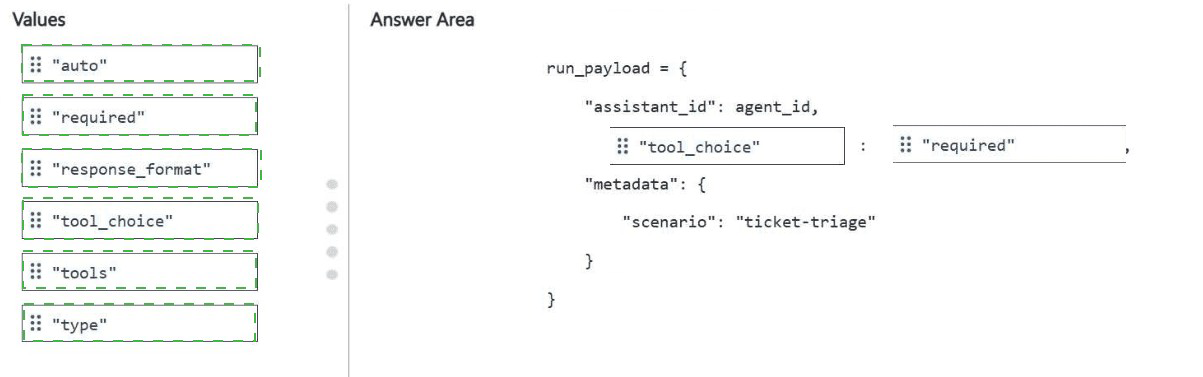
You have a Microsoft Foundry project that contains a deployed ticket-triage agent.
You discover that sometimes the agent responds without calling any tools, even when a tool is required.
You need to ensure that the agent calls a tool during execution.
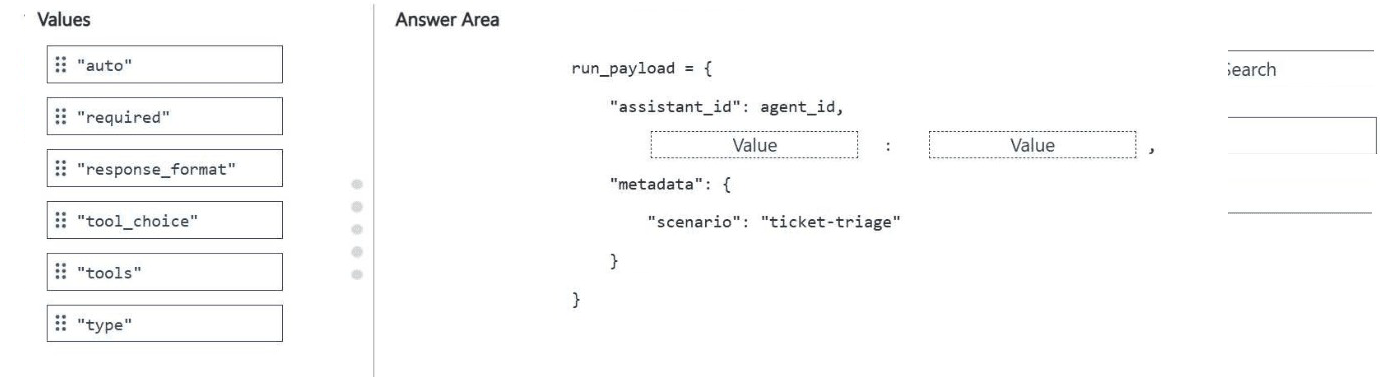
How should you complete the Python code? To answer, drag the appropriate values to the correct targets. Each value may be used once, more than once, or not at all. You may need to drag the split bar between panes or scroll to view content.
NOTE: Each correct selection is worth one point.

Show answerHide answer

Explanation


Explanation:

This question tests your understanding of controlling tool invocation behavior in Microsoft Foundry Agent Service. Since the agent sometimes skips tool calls even when needed, you must force deterministic tool usage during a run.

βœ… Correct Option: "tool_choice": "required"
"tool_choice" is the key that controls whether and how the model calls tools, and setting its value to "required" forces the model to call at least one tool on every run instead of leaving the decision to its own discretion. The tool_choice parameter is the most deterministic way of controlling which tool is called by the model, and setting it to required ensures consistent, predictable tool-calling behavior, directly resolving the reported issue.

❌ Incorrect Option: "auto"
This is the default behavior, letting the model decide on its own whether to call a tool based on context. Since this is exactly the setting causing the agent to inconsistently skip tools, it does not solve the problem described in the scenario.

❌ Incorrect Option: "response_format"
This key controls the structure or format of the model's output, such as enforcing JSON responses, not whether a tool is invoked during a run. It has no role in forcing tool calls, making it unsuitable here.

❌ Incorrect Option: "tools"
This key is used to define or list the tools available to the agent, not to force their usage during a specific run. Simply listing tools doesn't guarantee the model will actually call one.

❌ Incorrect Option: "type"
This is a generic structural key used within JSON objects to specify a category or kind, not a parameter that governs tool invocation behavior. It doesn't influence whether the model calls a tool.

πŸ”§ Reference:
β†’ Microsoft Learn: Tool best practices for Microsoft Foundry Agent Service β€” confirms that setting tool_choice to "required" is the recommended method for deterministic tool-calling control.
Question 9
You have a Microsoft Foundry project that contains an agent.
The agent uses tools to retrieve internal content and call external APIs. The agent is configured to let the model decide when to call the tools.
You need to publish the agent for a compliance workflow. The solution must meet the following requirements
β€’ Each workflow run must include a retrieval step before generating a response.
β€’ Tool calls must authenticate by using the published agent’s own identity.
β€’ Tool access must use an identity isolated from other project resources.
β€’ Tool access must support audit tracing.
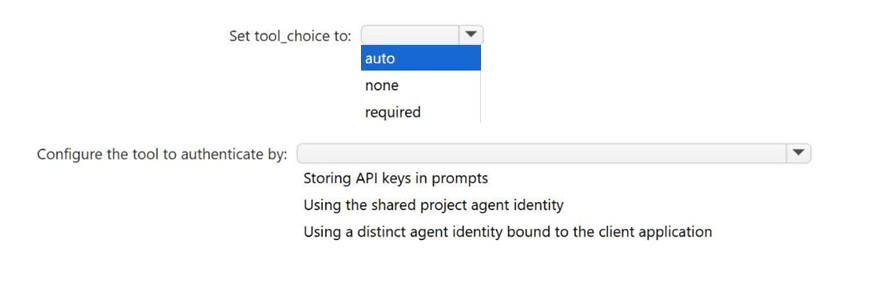
What should you do? To answer, select the appropriate options in the answer area. NOTE: Each correct selection is worth one point.

Show answerHide answer

Explanation


Explanation:

This question tests agent configuration in Microsoft Foundry for compliance workflows, focusing on tool invocation control, authentication, and identity isolation for security and auditing.

βœ… Correct Option:
Set tool_choice to: required
Setting tool_choice to required forces the model to call tools (e.g., retrieval) in every run before generating a response. This ensures the retrieval step always occurs first, meeting the compliance workflow requirement.

βœ… Correct Option:
Using a distinct agent identity bound to the client application
This option uses an isolated identity for the published agent. It authenticates tool calls with the agent’s own identity, keeps access separate from other project resources, and supports audit tracing.

❌ Incorrect Option:
Set tool_choice to: auto
auto lets the model decide when to call tools. This does not guarantee a retrieval step in every workflow run, violating the compliance requirement.

❌ Incorrect Option:
Set tool_choice to: none
none disables tool calling entirely. The agent cannot retrieve internal content or call external APIs as needed.

❌ Incorrect Option:
Storing API keys in prompts
This is insecure and does not provide proper identity-based authentication, isolation, or audit tracing for published agents.

❌ Incorrect Option:
Using the shared project agent identity
The shared identity is not isolated from other project resources. It fails the requirement for a distinct, isolated identity with strong audit support.

πŸ”§ Reference:
β†’ Microsoft Learn - What are tools in Foundry Agent Service? – Covers tool_choice options and authentication methods.

β†’ Microsoft Learn - Agent tools overview for Foundry Agent Service – Explains distinct agent identities for isolation and auditing in published agents.
Question 10 Choose 2
You have a Microsoft Foundry project that contains a prompt agent used by a customer support web app. The agent is invoked from a Python service that does NOT run in the Foundry portal. You need to implement end-to-end tracing to capture latency breakdowns and exceptions across agent runs. Which two components can you use? Each correct answer presents a complete solution. NOTE: Each correct selection is worth one point.
Show answerHide answer

Correct answer: B, C OpenTelemetry Application Insights

Explanation

Explanation:

This question checks how to enable end-to-end observability for a Foundry agent used from an external Python service. The goal is to capture traces, latency breakdowns, and exceptions across agent runs, which requires both instrumentation and a monitoring backend.

B. OpenTelemetry
βœ”οΈ OpenTelemetry is the tracing standard used to instrument the Python service and capture distributed traces across the agent workflow. It records spans, timing, and exceptions, which makes it suitable for end-to-end visibility even when the app is running outside the Foundry portal.

C. Application Insights
βœ”οΈ Application Insights is the Azure monitoring service that receives and visualizes the telemetry. It helps analyze latency, exceptions, and request flow across runs, making it the correct backend for tracing and troubleshooting Foundry agent behavior.

A. a Log Analytics workspace
❌ A Log Analytics workspace can store logs and support querying, but it is not the primary component for instrumenting distributed traces from a Python service. The question asks for end-to-end tracing with latency breakdowns and exceptions, which is better handled through tracing instrumentation plus Application Insights.

D. the Azure Monitor Agent
❌ The Azure Monitor Agent is mainly used to collect machine and platform telemetry from Azure resources. It does not provide the application-level distributed tracing needed for a Python service invoking a Foundry agent.

E. Microsoft Sentinel
❌ Microsoft Sentinel is a security analytics and SIEM platform. It is useful for threat detection and incident response, but it does not provide the tracing pipeline needed to capture latency breakdowns and exceptions across agent runs.

πŸ”§ Reference:
β†’ Microsoft Learn β€” Set Up Tracing for AI Agents in Microsoft Foundry β€” confirms tracing captures latency and exceptions for agent observability.

β†’ Microsoft Learn β€” Monitor AI Agents with Application Insights β€” confirms Application Insights is used for telemetry collection and end-to-end monitoring.
Full mock exam

Sit the AI-103 exam before exam day

Full-length mocks with the same number of questions and the same time limit as the real AI-103 exam. Every attempt draws a new set of questions from the full bank, so you can keep going until you pass comfortably.

Get full AI-103 mock exam
  • 60questions per mock
  • 120 mintime limit
  • 95questions in the bank
  • Newmock on every attempt