Managing Jira Projects for Data Center and Server Certification
Find out if you're ready for ACP-610. Take the free timed mock exam and get your score in minutes, or study the free ACP-610 questions below with answers and explanations.
Currently, the Done column of the Finance board shows all issues ever completed,
regardless of age. Now, the team wants to do a periodic clean-up of the Done column.
• They want to do the clean-up whenever it is needed on an ad-hoc basis.
• They want to be able to report on all the issues that were removed during each clean-up.
Which solution meets their need?
Show answerHide answer
Correct answer: Aremove issues as needed using the Release link
Explanation
Explanation: The team can use the Release link to remove issues as needed from the
Done column. This will create a version in the project that contains all the issues that were
removed, and the team can use the version report to see the details of each clean-up.
Excluding issues in Done status from the board filter or via a sub-filter will not remove them
from the Done column, but only hide them from view. Excluding issues where Resolution !=
EMPTY from the board filter will also hide issues from other columns that have a resolution
set, which is not desired. References: [Releasing a version], [Managing Jira Projects Data
Center and Server: Certification Bundle]
Question 2Choose 1
You are responsible for three software products with individual release cycles.
Each product is managed in a different project.
Which report can provide an instant progress overview of all fix versions across all
projects?
Show answerHide answer
Correct answer: BPie Chart Report
Explanation
Explanation: The report that can provide an instant progress overview of all fix versions across all projects is thePie Chart Report. This report allows you to create a pie chart
based on any statistic type, such as Fix Version, Project, Issue Type, etc. You can use this
report to compare the relative proportions of issues in different fix versions across different
projects. For example, you can create a pie chart based on the Fix Version statistic type,
and select all the projects that you are responsible for. This will show you how many issues
are assigned to each fix version in each project, and what percentage they represent of the
total issues. You can also filter the issues by status, priority, assignee, or any other criteria.
This report can help you monitor the progress of your releases and identify any potential
risks or delays.To generate a Pie Chart Report, follow these steps1:
Navigate to the project that you want to report on.
From the project sidebar, select Reports.
Select Pie Chart Report from the list of reports.
Select the statistic type that you want to base your pie chart on. In this case, select
Fix Version.
Select the projects that you want to include in your report. You can select multiple
projects by holding down the Ctrl key (Windows) or Command key (Mac) while
clicking on the project names.
Optionally, select a filter to narrow down the issues that you want to include in your
report. You can use an existing filter or create a new one.
Click View to generate the report.
You can also access the Pie Chart Report from your dashboard by adding the Jira Chart
gadget2. This gadget allows you to display any Jira report on your dashboard.To add the
Jira Chart gadget to your dashboard, follow these steps2:
Navigate to your dashboard and click Add gadget.
Search for Jira Chart and click Add gadget.
Configure the gadget settings as follows:
You can also edit or delete the gadget at any time by clicking on the menu icon at the top
right corner of the gadget.
Question 3Choose 1
Anu has access to the DEV project and its Scrum board.
She also needs to plan, start, and complete sprints, and to edit sprint goals and dates
Where must Anu be added onto?
Show answerHide answer
Correct answer: Da project role that has Manage Sprints permission
Explanation
Explanation: Anu needs to be added to a project role that has Manage Sprints permission.
This permission allows Anu to plan, start, and complete sprints, as well as edit sprint goals
and dates on a Scrum board. The other options are not correct for Anu’s needs. The group
that has Schedule Issues permission does not allow Anu to manage sprints, but only to
rank issues on a Scrum board. The list of board administrators for the Scrum board does
not grant Anu any permissions, but only allows Anu to configure the board settings. A
project role that has Start/Complete Sprints permission does not allow Anu to edit sprint
goals and dates, but only to start and complete sprints on a Scrum board. A project role
that has Administer Projects permission does not allow Anu to manage sprints, but only to
administer the project settings. For more information on how to manage sprints on a Scrum
board, see Manage sprints and Manage project permissions. References: Manage
sprints, Manage project permissions
Question 4Choose 2
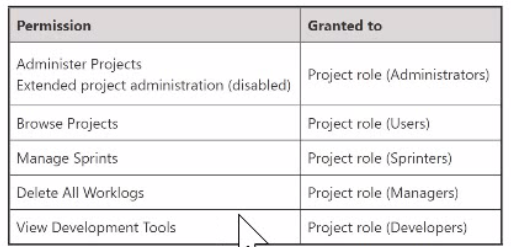
You need to assign team members to view code commits in the DEV project. An excerpt of
the DEV permission scheme is shown.
Which two project roles must they be granted? (Choose two.)
Show answerHide answer
Correct answer: B, CAdministratorsDevelopers
Question 5Choose 1
Which statement is true about Jira attachments?
Show answerHide answer
Correct answer: AUsers can search for issues that contain attachments
Explanation
Explanation:
Jira attachments are files that users can attach to issues to share information with their
team. Users can search for issues that contain attachments by using the attachments field
in the advanced search. For example, attachments is not EMPTY will return all issues that
have at least one attachment. Therefore, option A is true.
Question 6Choose 1
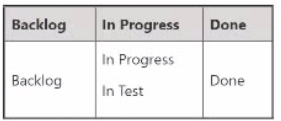
Your team works in a project that uses only one workflow, a simplified workflow.
The configuration of the corresponding Kanban board is shown:
Which statement is definitely true?
Show answerHide answer
Correct answer: ABugs can be dragged from "In Progress" to "In Test" on this board.
Explanation
Explanation: The statement that is definitely true is that bugs can be dragged from “In
Progress” to “In Test” on this board. This is because the board configuration shown in the
image has two columns: “In Progress” and “Done”. The “In Progress” column has three
statuses mapped to it: “To Do”, “InProgress”, and “In Test”. The “Done” column has one
status mapped to it: “Done”. Therefore, issues can be moved from one status to another
within the same column by dragging them on the board. However, issues cannot be moved
from one column to another by dragging them on the board, as this would require a
workflow transition that is not available in a simplified workflow. A simplified workflow is a
default workflow that allows any user with the Edit Issues permission to add or remove
statuses on the fly. To move an issue from one column to another, you need to use the
workflow button on the issue detail view and select a transition that matches the status of
the destination column. References: Configuring columns, Using a simplified workflow
Question 7Choose 1
Your team often accepts new requests from outside groups during an active sprint. You
want to see if such frequent scope change mid-sprint is causing bottlenecks. Which report
provides the needed insight?
Show answerHide answer
Correct answer: ECumulative Flow Diagram
Explanation
Explanation: The Cumulative Flow Diagram is the report that provides the needed insight
to see if frequent scope change mid-sprint is causing bottlenecks. The Cumulative Flow
Diagram shows the quantity and distribution of work items along different stages of a
process over time. The report can help identify potential bottlenecks in the workflow by
showing where work items accumulate or stagnate over time. For example, if the report
shows a sudden increase or a wide band of work items in the “In Progress” stage, it may
indicate that the team is overloaded with work or facing some blockers. If the team often
accepts new requests from outside groups during an active sprint, the report can show how
this affects the flow of work and the completion of the sprint goal.
Question 8Choose 2
You want to update a workflow that is not shared.
You are a project administrator and "Extended project administration" is enabled.
Which two actions can you complete? (Choose two.)
Show answerHide answer
Correct answer: C, DAdd new transitions to the workflow.Delete transitions from the workflow.
Question 9Choose 1
A Scrum team working on multiple epics complains that they are constantly being pushed
to complete more work than they think can be completed. Apparently, the product owner
has constantly overloaded each of the past 8 sprints. Which single report can instantly
prove their statement?
Show answerHide answer
Correct answer: AVelocity Chart
Question 10Choose 1
You are viewing a board that displays stories across multiple projects. You want to see a
grouping of stories without epics. Which swimlane selection will achieve this?
Show answerHide answer
Correct answer: AQuery: epic is EMPTY
Explanation
Explanation: Swimlanes are a way of grouping issues on a board based on certain
criteria, such as assignee, priority, query, or epics. If you want to see a grouping of stories
without epics, you can use a query swimlane with the condition epic is EMPTY, which will
show only issues that are not part of any epic. The other options will either show epics or
not group stories at all. Therefore, the correct answer is A.
Full mock exam
Sit the ACP-610 exam before exam day
Full-length mocks with the same number of questions and the same time limit as the real ACP-610 exam. Every attempt draws a new set of questions from the full bank, so you can keep going until you pass comfortably.