Microsoft certification · Exam AB-731

AB-731 Mock Exam Page 2

AI Transformation Leader

Free AB-731 mock exam questions 11–20, each with the answer and an explanation.

20 questions · 30 minutes · free, no sign-up

Free AB-731 questions

11–20 of 23 free
Question 11
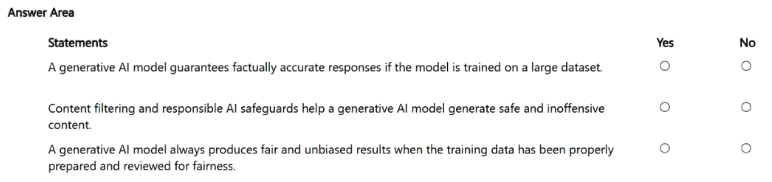
- For each of the following statements, select Yes if the statement is true. Otherwise, select No.
Show answerHide answer

Explanation
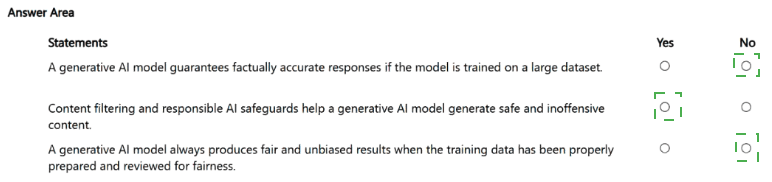


Statement 1: A generative AI model guarantees factually accurate responses if the model is trained on a large dataset.

Answer: No

Explanation:
Generative AI models do not guarantee factual accuracy regardless of dataset size. These models predict the most probable next token based on patterns in training data, not on truth or fact verification. Even with massive datasets, models can produce hallucinations—confidently stating incorrect or fabricated information. Accuracy depends on factors including data quality, model architecture, fine-tuning with reinforcement learning from human feedback (RLHF), and retrieval-augmented generation (RAG). Large dataset size alone cannot eliminate hallucinations or guarantee correctness.

Statement 2: Content filtering and responsible AI safeguards help a generative AI model generate safe and inoffensive content.

Answer: Yes

Explanation:
Content filtering systems (such as Azure OpenAI's content moderation) and responsible AI safeguards are specifically designed to block or mitigate harmful outputs including hate speech, violence, self-harm, and sexual content. These systems work alongside the base model to evaluate prompts and completions against safety thresholds. They do not guarantee perfect safety but significantly reduce the likelihood of offensive or dangerous content. Microsoft implements multiple layers including prompt filtering, completion filtering, and abuse monitoring as part of responsible AI practices.

Statement 3: A generative AI model always produces fair and unbiased results when the training data has been properly prepared and reviewed for fairness.

Answer: No

Explanation: Even with carefully prepared and reviewed training data, generative AI models can still produce unfair or biased results. Bias can arise from multiple sources beyond training data, including model architecture, tokenization methods, fine-tuning processes, prompt engineering, and evaluation metrics. Additionally, fairness is context-dependent—what is fair in one scenario may be unfair in another. The word "always" makes this statement false because no model can guarantee perfectly unbiased outputs under all conditions. Responsible AI practices aim to reduce, not eliminate, bias through continuous monitoring and mitigation.
Question 12
- For each of the following statements, select Yes if the statement is true. Otherwise, select No. NOTE: Each correct selection is worth one point.

Show answerHide answer

Explanation


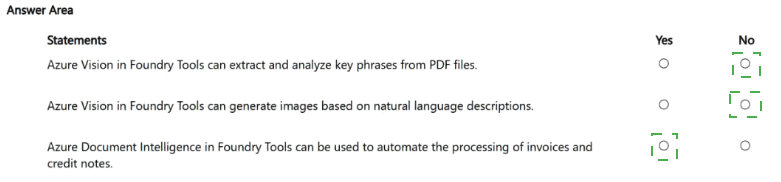
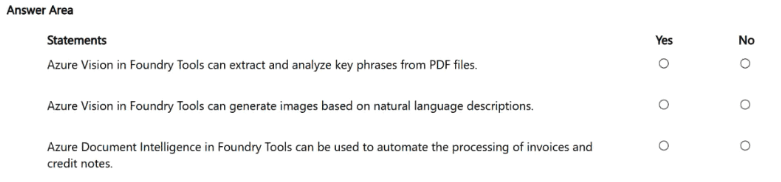
Statement 1: Azure Vision in Foundry Tools can extract and analyze key phrases from PDF files.

Answer: No

Explanation: Azure Vision is optimized for extracting text from natural images such as product labels, screenshots, posters, and street signs using a fast synchronous API. For PDF files and Office documents, Microsoft explicitly recommends using Document Intelligence's Read OCR model, which is optimized for text-intensive digital and scanned documents and uses an asynchronous API. Key phrase analysis is also not a capability of Azure Vision—key phrase extraction falls under language analysis services like Azure Language Service, not computer vision.

Statement 2: Azure Vision in Foundry Tools can generate images based on natural language descriptions.

Answer: No

Explanation:
Image generation from natural language descriptions (text-to-image) is a capability of Azure OpenAI in Foundry Tools, specifically using DALL-E or GPT-image models. Azure Vision provides image analysis, optical character recognition (OCR), and face detection—not image generation. The documentation explicitly states: "Use Azure OpenAI for image generation from natural language descriptions by using DALL-E or GPT-image models" and "Don't use Azure Vision for analysis that large, multimodal foundation models like GPT-4o already support".

Statement 3:Azure Document Intelligence in Foundry Tools can be used to automate the processing of invoices and credit notes.

Answer: Yes

Explanation:
Document Intelligence includes prebuilt models specifically designed for invoice processing. The prebuilt-invoice model can detect and extract structured data from invoices including customer name, vendor name, invoice ID, due date, total amount, tax amount, line items, and more. These capabilities can be automated through Logic Apps workflows that trigger processing when documents are added to folders like OneDrive, then extract information and route it to email or other systems. Credit notes are similarly processed as they follow invoice-like structures.
Question 13 Choose 1
Your company manages an online catalog of office supplies. You plan to use a generative AI solution to create product descriptions for your company’s website. The solution must ensure descriptions can be posted immediately after creation, enable selection/inclusion of product details, and be fast and simple for non-technical staff. What is the best type of solution to use? Select the BEST answer.
Show answerHide answer

Correct answer: C an interactive AI agent

Explanation

Explanation:

An interactive AI agent (e.g., Microsoft Copilot Studio or Azure AI Foundry agent) allows non-technical staff to generate product descriptions through a simple chat interface. Staff can select which product details to include by typing instructions naturally, receive instant output ready for copy-paste, and post immediately—no coding, no model deployment, no waiting.

Why other options are incorrect:

A. Custom Azure Machine Learning model
– Requires ML engineers to build, train, and deploy models. Far too complex and slow for non-technical staff. Violates "simple" and "immediate" requirements.

B. Researcher agent in Microsoft 365 Copilot
– Designed to search across enterprise data (SharePoint, emails) and synthesize answers, not to generate structured product descriptions from specifications with user-controlled detail selection. Also requires expensive per-user licensing.

D. Fine-tuned LLM
– Requires technical expertise to prepare training data, run fine-tuning jobs (hours to days), and deploy models. Must be retrained when requirements change. Violates "fast and simple for non-technical staff." Fine-tuning is overkill when prompting in an interactive agent achieves the same result.

References

Microsoft Learn – Copilot Studio: "Build no-code conversational agents that empower business users to generate content and automate workflows" – Copilot Studio Docs

Azure AI Foundry: "Interactive agents provide a natural language interface for non-technical users to interact with LLMs without writing code"
Question 14 Choose 1
You need to create a custom Azure Machine Learning model. The data used to train the model is consistent and uniform. What should you do first?
Show answerHide answer

Correct answer: A Prepare the training data.

Explanation

Explanation:

Before any training, evaluation, tuning, or deployment can happen, the data must be prepared. Even when data is described as consistent and uniform, preparation is still the essential first step in any machine learning workflow. Data preparation includes:

Cleaning (handling missing values, removing duplicates, correcting inconsistencies)
Formatting (converting to the required structure like CSV, Parquet, or JSON)
Splitting into training, validation, and test sets
Labeling (if supervised learning)
Feature engineering and normalization
Ensuring data quality and integrity

Without properly prepared data, any subsequent steps—training, evaluation, hyperparameter tuning, or deployment—will produce unreliable or incorrect results.

Why other options are incorrect

B. Evaluate the model – Evaluation happens after training, not before. You cannot evaluate a model that does not yet exist.

C. Train the model – Training requires prepared data as input. Jumping to training without data preparation leads to errors or poor model quality.

D. Tune hyperparameters – Hyperparameter tuning occurs during or after initial training, not before data is prepared.

E. Deploy the model – Deployment is the final step after training, evaluation, and tuning are complete. It cannot be done first.

References

Microsoft Learn – Azure Machine Learning workflow:"The first step in creating a custom model is to prepare your data—clean, transform, and split it before training." – Azure ML Data Preparation

Standard ML lifecycle: Data preparation → Model training → Evaluation → Hyperparameter tuning → Deployment.
Question 15
- For each of the following statements, select Yes if the statement is true. Otherwise, select No. NOTE: Each correct selection is worth one point.

Show answerHide answer

Explanation


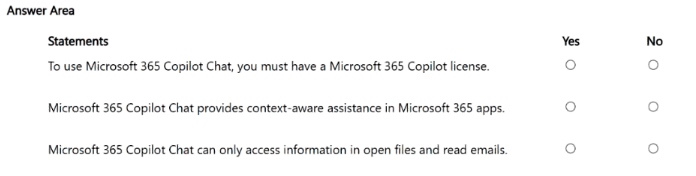
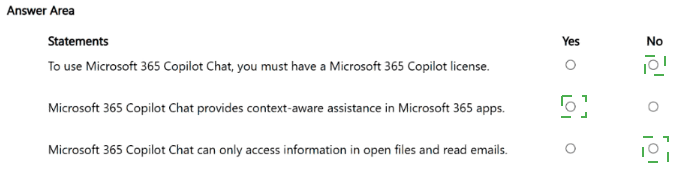
Statement 1: To use Microsoft 365 Copilot Chat, you must have a Microsoft 365 Copilot license.

Answer: No

Explanation:
Microsoft 365 Copilot Chat is included in standard Microsoft 365 subscriptions at no additional cost. Eligible licenses include Microsoft 365 Business Basic/Standard/Premium, E3/E5, F1/F3, Office 365 E1/E3/E5, Teams licenses, and A1/A3/A5 for education. A paid Microsoft 365 Copilot add-on license is not required. The premium license adds capabilities like full work data reasoning across emails, meetings, and files, as well as priority access to advanced agents like Researcher and Analyst. Without the add-on license, users still access Copilot Chat with enterprise data protection, file upload capabilities, and web search.

Why "Yes" is incorrect: Microsoft documentation explicitly lists Copilot Chat as included with many standard subscriptions, not requiring the paid Copilot license.

Statement 2: Microsoft 365 Copilot Chat provides context-aware assistance in Microsoft 365 apps.

Answer: Yes

Explanation:
In Microsoft 365 apps like Word, Excel, PowerPoint, Outlook, and OneNote, Copilot Chat is content-aware, meaning it understands the specific file you have open and tailors responses accordingly. The chat panel opens as a side pane alongside your document, eliminating the need to switch between apps or copy-paste text. Users can reference other files by typing "/" and searching for needed documents.

Why "No" is incorrect: Multiple sources confirm the content-aware integration directly within Microsoft 365 applications.

Statement 3: Microsoft 365 Copilot Chat can only access information in open files and read emails.

Answer: No

Explanation:
This statement is false because of the word "only." Copilot Chat has multiple ways to access organizational content beyond open files and emails. Users can upload files directly using the "+" button, reference files by typing "/" to search across SharePoint and OneDrive, copy-paste content into the chat, and access intranet pages when using Microsoft Edge. In Outlook specifically, Copilot Chat can access calendar, meetings, chats, and files from OneDrive and SharePoint, not just emails.

Why "Yes" is incorrect: Copilot Chat's data access includes file upload, file referencing via search, copy-paste, and web content—far broader than "only" open files and emails.

References

Microsoft Learn – Minimum requirements for Microsoft 365 Copilot Chat: "Copilot Chat is included in your Microsoft 365 subscription"

Microsoft Learn – Copilot Chat license eligibility: Lists all qualifying licenses without requiring paid Copilot add-on
Question 16 Choose 1
Your company creates a custom Azure Machine Learning model that uses a generative AI assistant. The model initially delivers strong results. However, six months later, the model predictions become noticeably less accurate. What is a possible cause of the issue?
Show answerHide answer

Correct answer: A The input data changed over time.

Explanation

Explanation:

The scenario describes a model that initially performed well but became less accurate after six months. This is a classic example of model drift (specifically data drift), where the statistical properties of the input data change over time. Real-world data is not static—customer behavior, market conditions, product catalogs, language patterns, and seasonal trends evolve. A model trained on historical data may no longer reflect current reality, leading to declining accuracy.

Why other options are incorrect:

B. The model requires additional compute resources
– Compute resources affect processing speed and throughput, not prediction accuracy. Adding more CPUs, GPUs, or memory does not improve how accurately a model maps inputs to outputs. If a model was accurate before, insufficient compute would cause slow responses or timeouts, not gradual accuracy decline.

C. The model was trained incorrectly
– If the model was trained incorrectly, it would have delivered poor results from the beginning, not "strong results" initially. Training errors (e.g., data leakage, wrong loss function, overfitting) manifest immediately during validation and testing, not six months later.

What the company should do: Implement continuous monitoring for data drift and concept drift, retrain the model periodically with fresh data, and establish an MLOps pipeline for automated retraining.

References

Microsoft Learn – Model monitoring for Azure Machine Learning: "Data drift occurs when input data changes over time, causing model accuracy to degrade. Monitor for drift and retrain as needed." – Azure ML Model Monitoring

Microsoft documentation: "A model that performed well in production may become less accurate over time due to changes in the underlying data distribution. This is known as model drift."
Question 17 Choose 2
Your company purchases Microsoft 365 Copilot for its sales department. The sales department needs to find and summarize information across internal documents quickly. From which two data sources can the sales department obtain results by default? (Select TWO.)
Show answerHide answer

Correct answer: C, D Microsoft SharePoint Microsoft OneDrive

Explanation

Explanation:

When a company licenses Microsoft 365 Copilot for a sales department, the tool is designed to integrate seamlessly with the Microsoft 365 ecosystem. By default, it connects directly to Microsoft Graph to source data from a user's existing Microsoft 365 environment. This allows it to generate responses grounded in the organization's existing content .

From the provided options, SharePoint and OneDrive are the two primary sources of internal documents. Microsoft 365 Copilot can read and synthesize information from documents stored in both locations. In fact, Microsoft documentation specifies that when Copilot Studio agents are configured to use these sources, they synchronize with the files so updates are automatically reflected, and they respect the user's existing permissions to ensure data security .

Why Other Options Are Incorrect

A. An on-premises file share:
Microsoft 365 Copilot does not access on-premises data by default. To index this data, you must specifically set up a Microsoft Graph connector (e.g., the File Share Graph Connector) to bring that content into the Microsoft Graph, which requires extra configuration .

B. A custom CRM system:
A third-party or custom CRM is not a default data source for Microsoft 365 Copilot. While Microsoft Copilot can connect to CRM data (especially Dynamics 365 through Dataverse ), accessing a custom system requires building a custom connector or plugin. It does not happen by default .

E. Microsoft Sway:
Sway is a presentation tool, not primarily a data repository for document storage and retrieval. It is not a default source for grounding Copilot responses.

References

Microsoft Q&A: "Copilot Pro can’t directly access or ground data from OneDrive or SharePoint. That feature is only available with Microsoft 365 Copilot for education or enterprise users..."

Microsoft Copilot Studio: "You can add files and folders from SharePoint as a knowledge source for your agent... The files you add are synchronized, so changes are automatically updated."
Question 18
Select the answer that correctly completes the sentence.
When a generative AI model produces output that seems realistic but contains incorrect information, the behavior is known as __________.

Show answerHide answer

Explanation


Explanation:

When a generative AI model produces output that appears confident, fluent, and realistic but contains factual errors or entirely fabricated information, the behavior is specifically known as overreliance (often discussed alongside the term "hallucination" in Microsoft's responsible AI guidelines).

Overreliance refers to the user's tendency to trust AI outputs without verification, but in Microsoft's terminology for the AB-731 exam, this is the term used to describe the result of the model confidently presenting incorrect information as fact. Microsoft defines overreliance as accepting AI-generated content as accurate when it may not be.

Why other options are incorrect:

Data leakage – This occurs when training data unintentionally includes information from the validation or test sets, causing overly optimistic performance metrics. It has nothing to do with realistic-sounding incorrect outputs.

Model inaccuracy – This is a general term for any deviation between model output and ground truth. It does not specifically describe the phenomenon where output seems realistic but is wrong. A model can be inaccurate due to bias or noise without producing confident, fluent fabrications.

Prompt injection – This is a security vulnerability where malicious inputs override the model's original instructions. It is not related to the model spontaneously generating incorrect but realistic information.

Reference:

Microsoft Learn – Responsible AI guidance for generative AI: "Overreliance occurs when users trust AI-generated content without critical evaluation, especially when the output is fluent and realistic but factually incorrect. Mitigations include grounding, citations, and user education." – Microsoft Responsible AI
Question 19
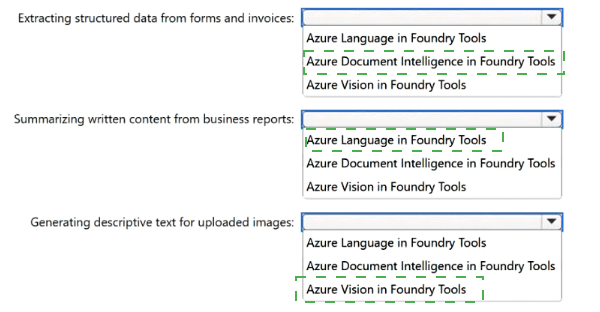
- What should you use for each task? To answer, select the appropriate options in the answer area. NOTE: Each correct selection is worth one point.

Show answerHide answer

Explanation


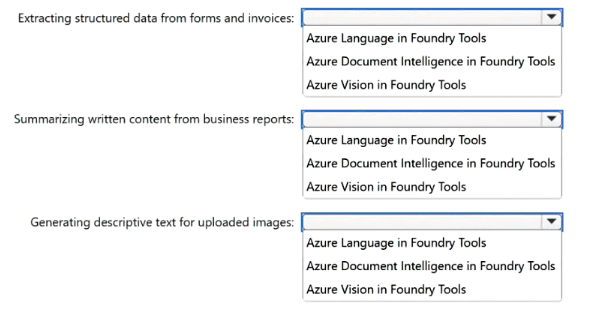
Extracting structured data from forms and invoices: Azure Document Intelligence in Foundry Tools

Explanation: Azure Document Intelligence is specifically designed to turn documents into usable data by extracting key-value pairs, tables, and line items from forms and invoices . It uses machine learning models trained to understand document structure and can handle both prebuilt invoice models and custom models for unique form layouts . The service outputs structured JSON data that preserves relationships within the original file. Azure Vision is optimized for natural images and small scanned documents like business cards, not structured form extraction . Azure Language focuses on text analytics tasks such as sentiment analysis and entity recognition, not on extracting tabular field data from document layouts .

Summarizing written content from business reports: Azure Language in Foundry Tools

Explanation: The Summarization capability is a core feature of Azure Language Service . It provides both extractive and abstractive summarization for documents, accepting native formats including Word documents and PDF files . The service generates concise overviews, extracts key sentences, and condenses complex business reports into human-readable summaries while preserving the document's essential meaning . Azure Document Intelligence extracts structured data but does not generate text summaries. Azure Vision describes visual content in images and cannot summarize written text documents.

Generating descriptive text for uploaded images: Azure Vision in Foundry Tools

Explanation: Azure Vision includes dedicated Caption and Dense Captions features that generate human-readable descriptions of image content . The service analyzes an image and returns descriptive phrases (e.g., "a man walking a dog on a leash") along with confidence scores. Dense captions can describe up to 10 different regions within a single image . Azure Language processes text only and cannot analyze pixel data. Azure Document Intelligence focuses on forms and documents, not general photographs.

References:

Microsoft Learn - Document Intelligence: "Turns documents into usable data... extracts key-value pairs and tables"

Microsoft Learn - Language Service Summarization: "Generative summarization for Word documents, PDFs, or plain text"
Question 20
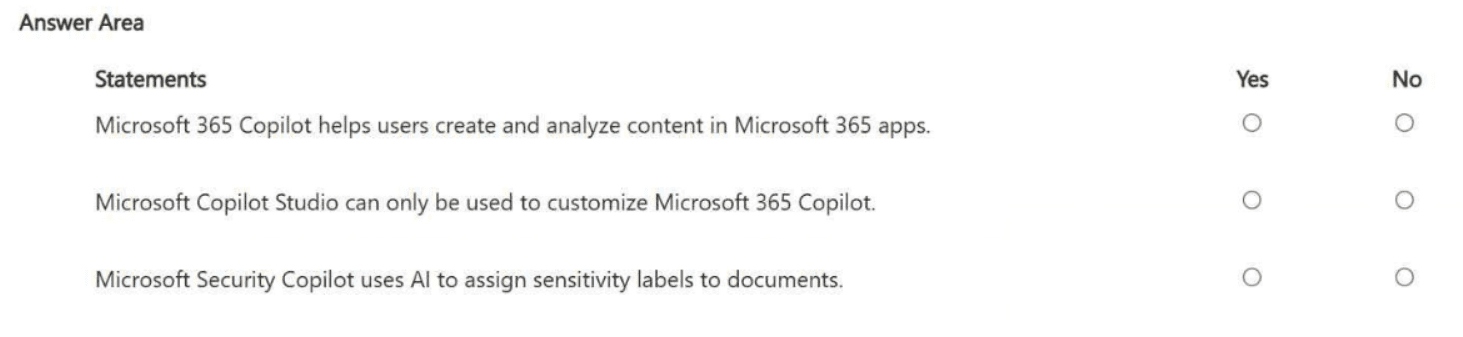
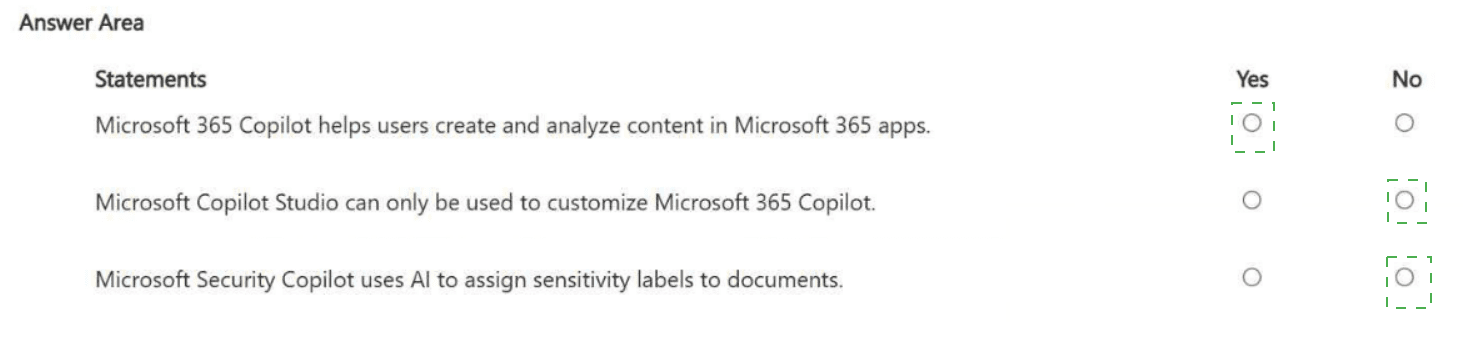
For each of the following statements, select Yes if the statement is true. Otherwise, select No. NOTE: Each correct selection is worth one point.

Show answerHide answer

Explanation


Statement 1: Microsoft 365 Copilot helps users create and analyze content in Microsoft 365 apps.

Answer: Yes

Explanation:
This is a core function of Microsoft 365 Copilot. It integrates directly into Word, Excel, PowerPoint, Outlook, and Teams to help users draft documents, summarize emails, analyze spreadsheets, and create presentations. For example, Copilot in Word can turn meeting notes into structured documents, in Excel can identify sales trends, and in PowerPoint can generate entire slide decks from a brief.

Why "No" is incorrect: Microsoft documentation extensively documents these creation and analysis capabilities across M365 apps.

Statement 2: Microsoft Copilot Studio can only be used to customize Microsoft 365 Copilot.

Answer: No

Explanation:
Copilot Studio is not limited to customizing Microsoft 365 Copilot. You can build custom agents from scratch that work across multiple channels including Microsoft 365 Copilot, Teams, and other platforms. Additionally, Copilot Studio supports publishing custom agents as standalone chatbots or deploying them to external channels beyond the Microsoft ecosystem.

Why "Yes" is incorrect: The word "only" makes this false. Copilot Studio has broader capabilities including building custom agents with knowledge sources (SharePoint, Dataverse), tools (Power Platform connectors), and multi-channel deployment.

Statement 3: Microsoft Security Copilot uses AI to assign sensitivity labels to documents.

Answer: No

Explanation: Sensitivity labels are not assigned by Security Copilot. They are managed through Microsoft Purview, where administrators define and publish labels. Microsoft 365 Copilot then inherits and applies sensitivity labels from source content when generating new documents. The label assignment is based on pre-configured Purview policies, not AI-driven assignment.

Why "Yes" is incorrect: Security Copilot is for threat detection and security investigations, not document labeling. Label inheritance happens automatically based on source content, not through Security Copilot AI.

References

Microsoft Learn – Copilot productivity workflows: "Copilot in Word, Excel, and PowerPoint creates structured documents and analyzes content"

Microsoft Copilot Studio documentation: "Custom agents can be published to Microsoft 365 Copilot, Teams, and other channels"
Full mock exam

Sit the AB-731 exam before exam day

Full-length mocks with the same number of questions and the same time limit as the real AB-731 exam. Every attempt draws a new set of questions from the full bank, so you can keep going until you pass comfortably.

Get full AB-731 mock exam
  • —questions per mock
  • —time limit
  • 77questions in the bank
  • Newmock on every attempt