You need to recommend a Microsoft Power Platform solution for customer support. The solution must include Al capabilities in Microsoft Power Automate and must meet the following requirements:
• Use a centralized workspace for Al models.
• Generate short overviews from large amounts of unstructured text such as case notes or transcripts, without requiring additional training or coding.
What should you include in the recommendation for each requirement? To answer, select the appropriate options in the answer area.
NOTE: Each correct selection is worth one point.
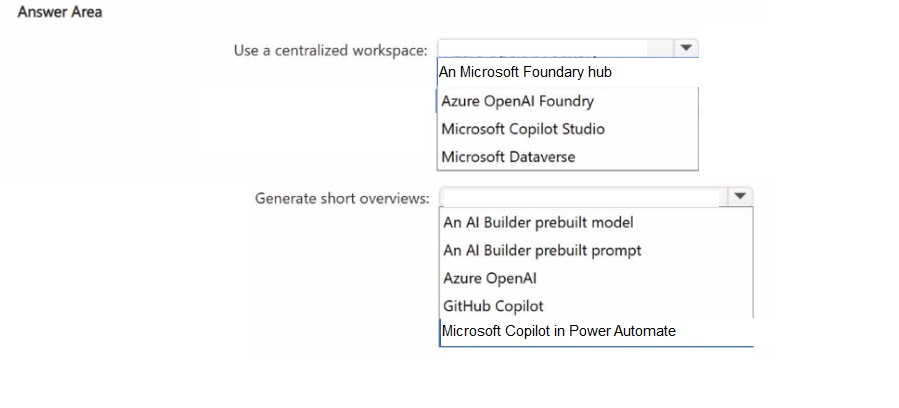
• Use a centralized workspace for Al models.
• Generate short overviews from large amounts of unstructured text such as case notes or transcripts, without requiring additional training or coding.
What should you include in the recommendation for each requirement? To answer, select the appropriate options in the answer area.
NOTE: Each correct selection is worth one point.
Show answerHide answer
Explanation
Explanation:This AB-100 question focuses on recommending AI capabilities in Microsoft Power Automate for a customer support solution. It requires identifying the right tools for a centralized AI model workspace and for generating summaries from unstructured text (case notes/transcripts) with minimal effort.
Correct Option:
Use a centralized workspace for AI models: Azure AI Foundry
Azure AI Foundry (formerly Azure AI Studio) serves as the centralized enterprise workspace for discovering, building, managing, and governing AI models and prompts. It integrates with Power Platform, enabling consistent model management across the organization for customer support automations.
Correct Option:
Generate short overviews from large amounts of unstructured text: AI Builder prebuilt prompts (Summarize)
AI Builder provides prebuilt prompts (such as the "Summarize" prompt) that can be directly used in Power Automate flows. These require no training or custom coding and are ideal for generating concise overviews from long case notes or transcripts using generative AI.
Incorrect Option:
AI Builder custom models
Custom models require training data and more effort, which does not meet the "without requiring additional training or coding" requirement.
Incorrect Option:
Power Automate only (without AI Builder)
Standard Power Automate lacks built-in generative summarization capabilities for unstructured text without using AI Builder or Azure OpenAI prompts.
Incorrect Option:
Microsoft Copilot Studio
While excellent for agents, it is not the primary tool for centralized model management or simple text summarization inside Power Automate flows.
Reference:
Microsoft Learn: AI Builder in Power Automate
Microsoft Learn: Azure AI Foundry overview