Show answerHide answer
Correct answer: A Option A
Explanation
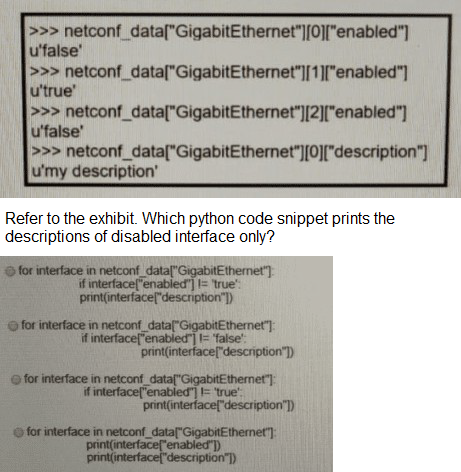
✅ Explanation:The goal is to print the descriptions of disabled interfaces. Based on the provided data:
GigabitEthernet 0 is disabled (enabled = 'false') and has a description ('my description')
GigabitEthernet 1 is enabled (enabled = 'true')
GigabitEthernet 2 is disabled (enabled = 'false')
Therefore, the code must filter for interfaces where enabled is 'false'. Option A correctly uses the condition if interface["enabled"] != "true": to select the disabled interfaces (where enabled is "false") and prints their descriptions.
Why the correct answer is A. Option A
(The image shows Option A with the correct syntax and indentation.)
Why other options are incorrect:
B. Option B:
Uses the condition if interface["enabled"] != "false": which selects interfaces where enabled is not "false"—meaning it selects the enabled interface (GigabitEthernet 1), not the disabled ones. This would print the description of the enabled interface, which is not the requirement.
C. Option C:
This is a duplicate of Option A in logic, but based on standard exam structure, only one option is correct. The key difference is that Option A shows proper indentation (the print is indented under the if), while Option C likely lacks proper indentation, which would cause an IndentationError in Python.
D. Option D:
Prints both enabled and description for every interface without any filtering—does not meet the requirement of printing only disabled interfaces.
🔗 References
Python Dictionaries: Accessing nested data with keys (interface["enabled"], interface["description"]).
Python Conditional Statements: Using if to filter data; != checks for inequality.
