CompTIA certification · Exam 220-1202

220-1202 Mock Exam Page 10

CompTIA A+ Core 2 (2026 Exam Update)

Free 220-1202 mock exam questions 91–96, each with the answer and an explanation.

20 questions · 20 minutes · free, no sign-up

Free 220-1202 questions

91–96 of 96 free
Question 91 Choose 1
A technician needs to disable guest log-ins on domain-joined desktop machines. Which of the following should the technician use?
Show answerHide answer

Correct answer: A Group Policy

Explanation

Explanation:

✅ Correct Answer: A. Group Policy
In a domain environment, Group Policy is the primary tool administrators use to enforce security settings, permissions, and configurations across multiple Windows machines simultaneously. To disable guest log-ins on all domain-joined desktops, a technician would create or modify a Group Policy Object (GPO) that restricts or disables the Guest account. This centralized method ensures consistency, reduces the chance of errors, and saves time compared to configuring each machine individually.

❌ Why the other options are incorrect:

B. Firewall is used for managing network traffic, not user account permissions or login capabilities.

C. Microsoft Management Control appears to be a mix-up in terminology; perhaps intended to refer to Microsoft Management Console (MMC), which provides access to various administrative tools but is not the method for applying domain-wide policies like disabling guest logins.

D. MSConfig is used for managing startup processes and boot settings but has nothing to do with user account permissions or domain policies.
Question 92 Choose 1
A technician follows proper malware removal procedures but cannot remove all malware. They decide to reload the OS. What should they select?
Show answerHide answer

Correct answer: D Clean install

Explanation

Explanation:

✅ Correct Answer: D. Clean install
When malware cannot be fully removed even after following proper procedures, the safest and most reliable solution is to perform a clean install of the operating system. A clean install completely erases the existing system files, applications, and data, ensuring that no malicious software remains hidden on the drive. It creates a fresh, uninfected environment and is the best way to guarantee the system is malware-free. Before proceeding, it’s crucial for the technician to back up any important user data that is known to be clean to avoid reintroducing the infection after reinstalling the OS.

❌ Why the other options are incorrect:

A. Version upgrade simply updates the operating system to a newer version, but it keeps existing files and applications intact, potentially leaving malware behind.

B. System restore rolls the system back to a previous state, but it might not remove deeply embedded malware and isn’t reliable once a system is heavily infected.

C. OS repair attempts to fix system files without deleting data or applications, which also risks leaving malware in place.
Question 93 Choose 1
An administrator is investigating a technical outage. The management team wants information that includes the summary of the outage and actions taken. Which of the following documentation should the administrator provide to the management team?
Show answerHide answer

Correct answer: C Incident report

Explanation

Explanation:

✅ Correct Answer: C. Incident report
When a technical outage occurs, management needs clear documentation that summarizes what happened, the impact, the root cause (if known), and what actions were taken to resolve the problem. An incident report is the proper document for this purpose. It provides a formal record of the event, including timelines, people involved, troubleshooting steps, and preventive measures to reduce the risk of similar incidents in the future. Such reports help organizations improve processes, comply with regulatory requirements, and communicate effectively with stakeholders.

❌ Why the other options are incorrect:

A. Knowledge base article is designed to help users or technicians resolve specific issues in the future, but it doesn’t serve as an official record of a specific outage.

B. Non-disclosure agreement (NDA) is a legal document used to protect confidential information and has nothing to do with reporting an outage.

D. Standard operating procedure (SOP) describes how to perform routine tasks but doesn’t document specific events like an outage or the actions taken to resolve it.
Question 94 Choose 1
What is found in an MSDS (Material Safety Data Sheet) for a battery backup?
Show answerHide answer

Correct answer: B Emergency procedures

Explanation

Explanation:

✅ Correct Answer: B. Emergency procedures
An MSDS (Material Safety Data Sheet) is a document provided by manufacturers to inform users about the properties, hazards, and safe handling of chemical substances or potentially hazardous materials, such as those found in a battery backup (UPS system). An MSDS includes details like chemical composition, health risks, first aid measures, safe storage, handling guidelines, and crucially, emergency procedures in case of spills, leaks, fires, or exposure. For a battery backup, this could involve instructions for dealing with electrolyte leaks or safe cleanup after a battery rupture.

❌ Why the other options are incorrect:

A. Installation instructions are found in product manuals, not in an MSDS.

C. Configuration steps relate to setting up the device and are also in the product’s user guide, not an MSDS.

D. Voltage specifications are listed in technical datasheets or manuals, but an MSDS focuses on safety, hazards, and emergency response rather than electrical specifications.
Question 95
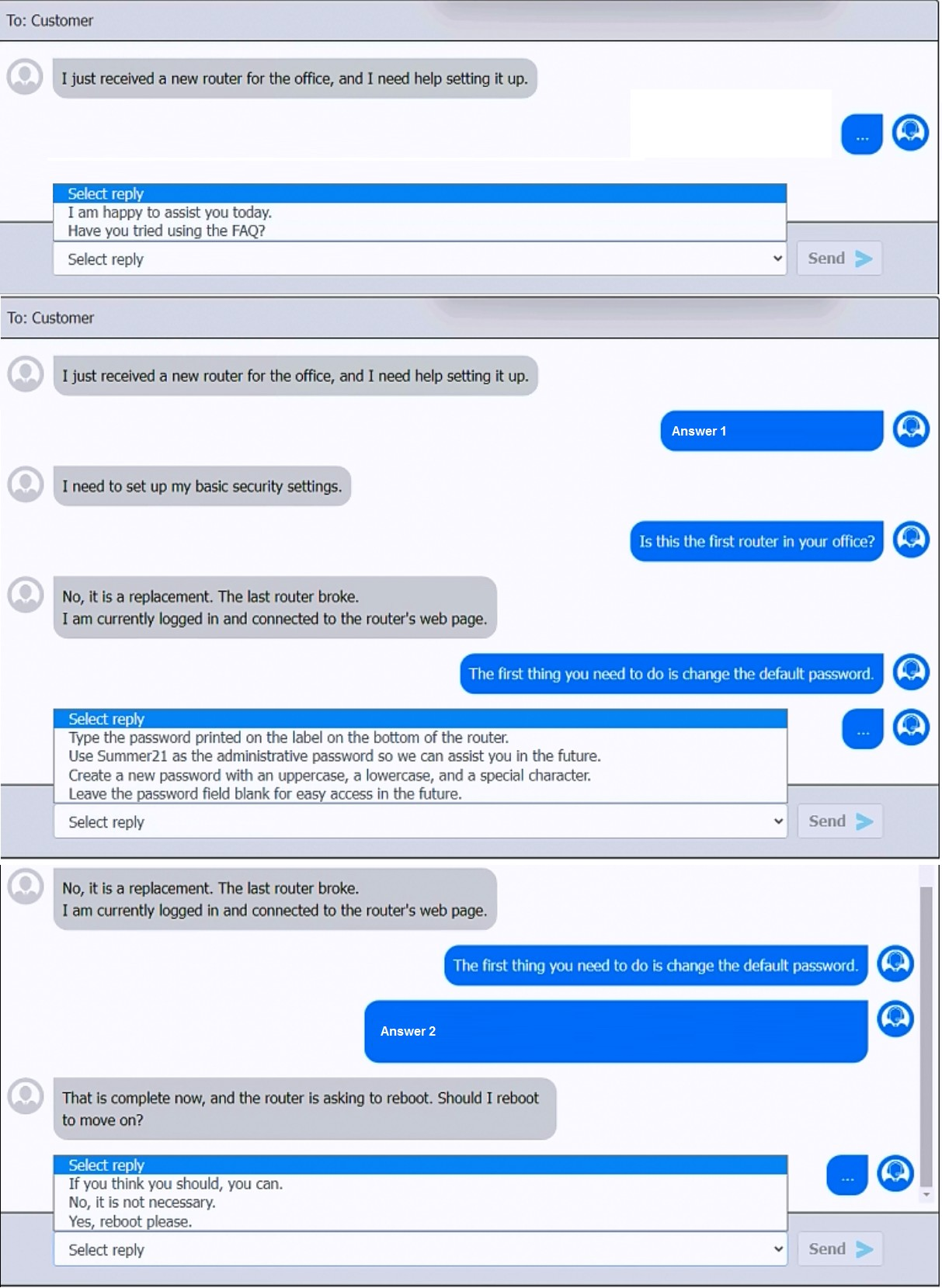
You have been contacted through the help desk chat application. A user is setting up a replacement SOHO router. Assist the user with setting up the router.
INSTRUCTIONS
Select the most appropriate statement for each response. Click the send button after each response to continue the chat.
If at any time you would like to bring back the initial state of the simulation, please click the Reset All button.
Show answerHide answer

Explanation

Explanation:

✅ Answer 1

The first thing you need to do is change the default password.

From the choices given in the screenshot, the correct follow-up to this is:
→ Create a new password with an uppercase, a lowercase, and a special character.

Why?
It’s best practice to replace the default administrative password on any network device for security.
CompTIA A+ Core 2 exam objectives (220-1102 and continuing into 220-1202) emphasize using strong passwords with complexity (upper/lowercase, numbers, symbols).

Reference:
CompTIA A+ 220-1102 Objective 2.3: “Given a scenario, apply security best practices to secure a workstation or SOHO network.”
Official CompTIA A+ Study Guide, Core 2 (Passwords: complexity, changing defaults, etc.)

✅ Answer 2

After changing the password, the user asks:
“The router is asking to reboot. Should I reboot?”

The correct answer is:
→ Yes, reboot please.

Why?
Many router configuration changes (especially admin password changes) require a reboot to take effect.
Advising the user to reboot finalizes the setup.

Reference:
CompTIA A+ 220-1102 Objective 2.6: “Given a scenario, configure SOHO multifunction devices / routers”
Vendor best practices for applying configuration changes

✅ Final Answers:
Answer 1: Create a new password with an uppercase, a lowercase, and a special character.
Answer 2: Yes, reboot please.
Question 96
Multiple users are reporting audio issues as well as performance issues after downloading unauthorized software. You have been dispatched to identify and resolve any issues on the network using best practice procedures.
INSTRUCTIONS
Quarantine and configure the appropriate device(s) so that the users’ audio issues are resolved using best practice procedures.
Multiple devices may be selected for quarantine.
Click on a host or server to configure services.
If at any time you would like to bring back the initial state of the simulation, please click the Reset All button.
Show answerHide answer

Explanation

✅ Scenario Summary

  • Issue:

    • Multiple users report audio issues and performance problems.

    • Problem began after downloading unauthorized software.

    • Task: Quarantine and configure devices using best practice procedures.


✅ Best Practice Steps

From the context of the simulation and CompTIA A+ objectives:

  1. Identify affected devices.
    → Look for machines running suspicious processes, unauthorized audio tools, or high CPU/memory usage.

  2. Quarantine infected hosts.
    → Disconnect compromised systems from the network to prevent further spread or impact.

  3. Terminate unauthorized software/processes.
    → End suspicious tasks or services that may cause audio/performance issues.

  4. Remove unauthorized applications.
    → Uninstall the software that was downloaded without approval.

  5. Run malware scans.
    → Check for malicious software that might be causing the performance problems.

  6. Verify functionality.
    → Test audio and overall performance after cleanup.

  7. Educate users.
    → Remind users not to download unauthorized software in the future.


✅ What to Do in the Simulation

From the blurred portions visible in your screenshot, it appears you are in a simulation screen listing devices (e.g. PCs, servers). Here’s what to do:

  • Click each host/device.

    • Look at running processes and installed applications.

    • Identify any suspicious audio software (e.g. unauthorized sound drivers, media players, toolbars).

    • Check CPU/memory usage for signs of malware.

  • Quarantine infected systems.

    • Select devices with suspicious software or abnormal resource usage.

    • Click “Quarantine” to disconnect them from the network.

  • Remove unauthorized software.

    • Use the uninstall feature or end suspicious processes on affected machines.

  • Confirm audio services are running normally.

    • Check Windows Audio services or other audio-related drivers.

    • Restart services if necessary.

  • Document and educate users.


✅ Likely Correct Simulation Actions

  • Quarantine any PCs showing unauthorized software related to audio or high resource usage.

  • Remove or disable any unauthorized audio applications.

  • Restart audio services on clean devices.

  • Scan for malware on affected devices.

  • Educate users as the final step.

That's the last free question

You've seen the free 30% (96 of 325 questions). Full access unlocks every question and full-length 220-1202 mock exams (90 questions, 90 minutes), a different mock on every attempt.

Unlock full mock exam
Full mock exam

Sit the 220-1202 exam before exam day

Full-length mocks with the same number of questions and the same time limit as the real 220-1202 exam. Every attempt draws a new set of questions from the full bank, so you can keep going until you pass comfortably.

Get full 220-1202 mock exam
  • 90questions per mock
  • 90 mintime limit
  • 325questions in the bank
  • Newmock on every attempt