You have been contacted through the help desk chat application. A user is setting up a
replacement SOHO router. Assist the user with setting up the router.
INSTRUCTIONS
Select the most appropriate statement for each response. Click the send button after each response to continue the chat.
If at any time you would like to bring back the initial state of the simulation, please click the Reset All button.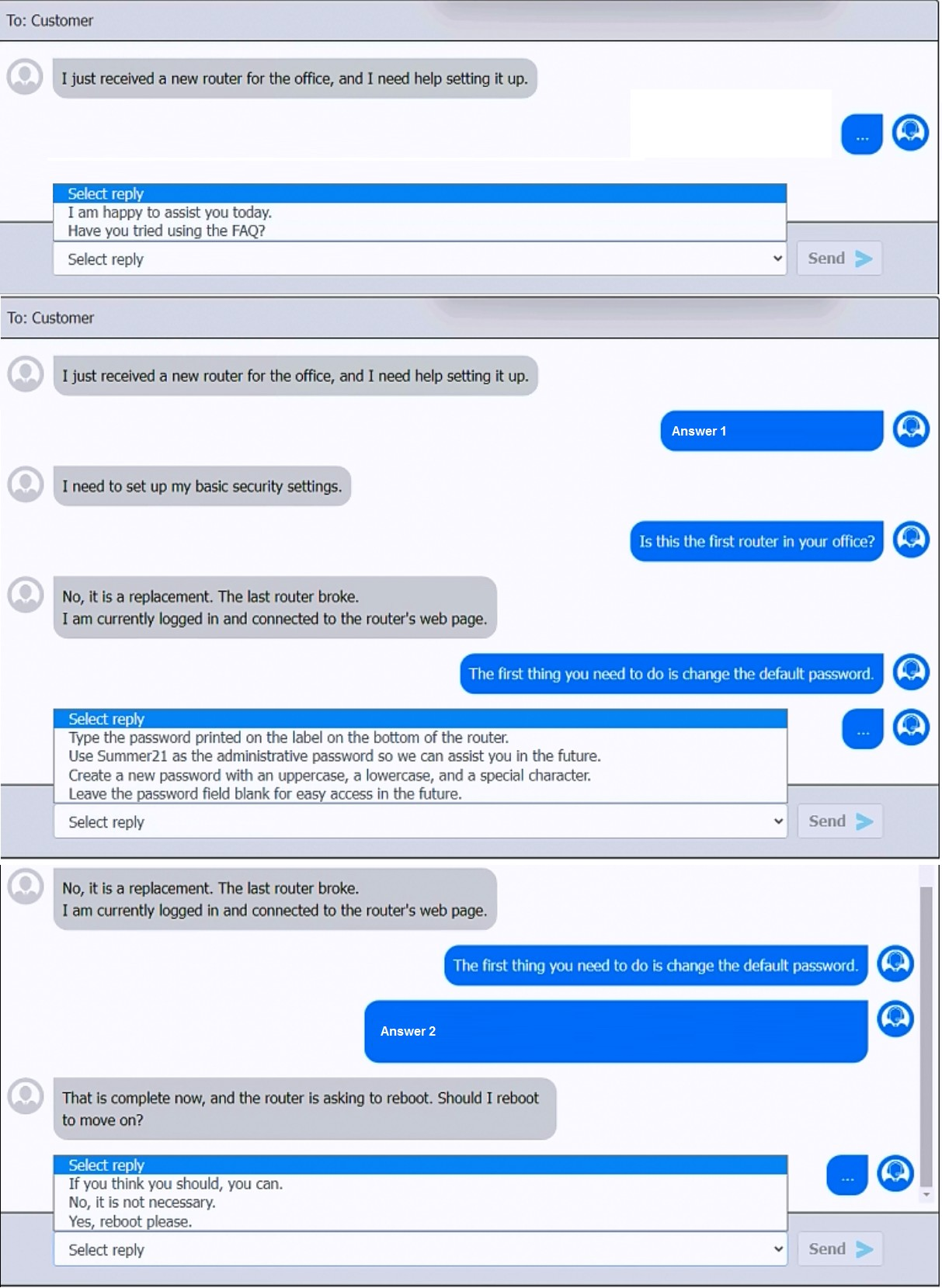
INSTRUCTIONS
Select the most appropriate statement for each response. Click the send button after each response to continue the chat.
If at any time you would like to bring back the initial state of the simulation, please click the Reset All button.
Show answerHide answer
Explanation
Explanation:✅ Answer 1
The first thing you need to do is change the default password.
From the choices given in the screenshot, the correct follow-up to this is:
→ Create a new password with an uppercase, a lowercase, and a special character.
Why?
It’s best practice to replace the default administrative password on any network device for security.
CompTIA A+ Core 2 exam objectives (220-1102 and continuing into 220-1202) emphasize using strong passwords with complexity (upper/lowercase, numbers, symbols).
Reference:
CompTIA A+ 220-1102 Objective 2.3: “Given a scenario, apply security best practices to secure a workstation or SOHO network.”
Official CompTIA A+ Study Guide, Core 2 (Passwords: complexity, changing defaults, etc.)
✅ Answer 2
After changing the password, the user asks:
“The router is asking to reboot. Should I reboot?”
The correct answer is:
→ Yes, reboot please.
Why?
Many router configuration changes (especially admin password changes) require a reboot to take effect.
Advising the user to reboot finalizes the setup.
Reference:
CompTIA A+ 220-1102 Objective 2.6: “Given a scenario, configure SOHO multifunction devices / routers”
Vendor best practices for applying configuration changes
✅ Final Answers:
Answer 1: Create a new password with an uppercase, a lowercase, and a special character.
Answer 2: Yes, reboot please.
