UiPath certification · Exam UiPath-SAIv1

UiPath-SAIv1 Mock Exam

UiPath Certified Professional Specialized AI Professional v1.0

Find out if you're ready for UiPath-SAIv1. Take the free timed mock exam and get your score in minutes, or study the free UiPath-SAIv1 questions below with answers and explanations.

20 questions · 33 minutes · free, no sign-up

Free UiPath-SAIv1 questions

1–10 of 23 free
Question 1 Choose 1
While training a UiPath Communications Mining model, the Search feature was used to pin a certain label on a few communications. After retraining, the new model version starts to predict the tagged label but infrequently and with low confidence.
According to best practices, what would be the correct next step to improve the model's predictions for the label, in the "Explore" phase of training?
Show answerHide answer

Correct answer: B Use the 'Teach" training mode to pin the label to more communications.

Explanation

Explanation: According to the UiPath documentation, the ‘Teach’ training mode is used to improve the model’s predictions for a specific label by pinning it to more communications that match the label’s criteria. This helps the model learn from more examples and increase its confidence and accuracy. The ‘Teach’ mode also allows you to unpin the label from communications that do not match it, which helps the model avoid false positives. The other training modes are not as effective for this purpose, as they either focus on different aspects of the model performance or do not provide enough feedback to the model.
Question 2 Choose 1
What is Document Understanding?
Show answerHide answer

Correct answer: B A solution that offers the ability to digitize, extract, validate, and train data from documents.

Explanation

Explanation: Document Understanding is a tool that helps you create and manage documents for your automation scenarios in the UiPath ecosystem. It allows you to process and extract data from multiple document types in an open, extensible, and versatile environment. The framework consists of components such as Taxonomy, Digitization, Data Extraction, Data Extraction Validation, Data Extraction Training, and Data Consumption, and enables you to customize and train your own algorithms12.
Question 3 Choose 1
How many types of synchronization mechanisms exist in the Document Understanding Process to prevent multiple robots to write in a file at the same time?2
Show answerHide answer

Correct answer: A 2

Explanation

Explanation: The Document Understanding Process uses two types of synchronization mechanisms to prevent multiple robots from writing in a file at the same time: file locks and queues. File locks are used to ensure that only one robot can access a file at a time, while queues are used to store the information extracted from the documents and to avoid data loss or duplication. The process uses the following activities to implement these mechanisms:
File Lock Scope: This activity creates a lock on a file or folder and executes a set of activities within it. The lock is released when the scope ends or when an exception occurs. This activity ensures that only one robot can read or write a file or folder at a time, and prevents other robots from accessing it until the lock is released.
Add Queue Item: This activity adds an item to a queue in Orchestrator, along with some relevant information, such as a reference, a priority, or a deadline. The item can be a JSON object, a string, or any serializable .NET type. This activity ensures that the information extracted from the documents is stored in a queue and can be retrieved by another robot or process later.
Get Queue Items: This activity retrieves a collection of items from a queue in Orchestrator, based on some filters, such as status, reference, or creation time. The items can be processed by the robot or passed to another activity, such as Update Queue Item or Delete Queue Item. This activity ensures that the information stored in the queue can be accessed and manipulated by the robot or process.
Question 4
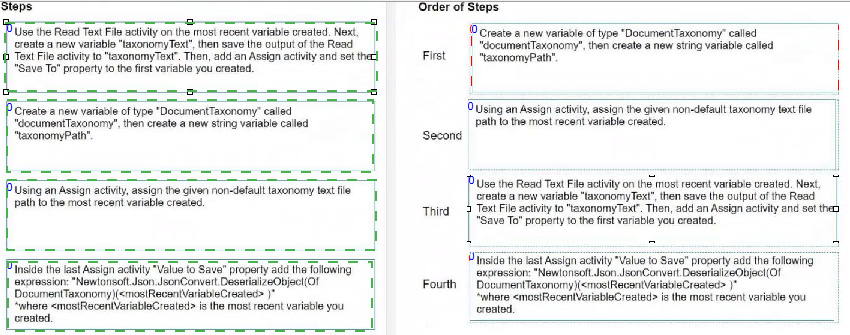
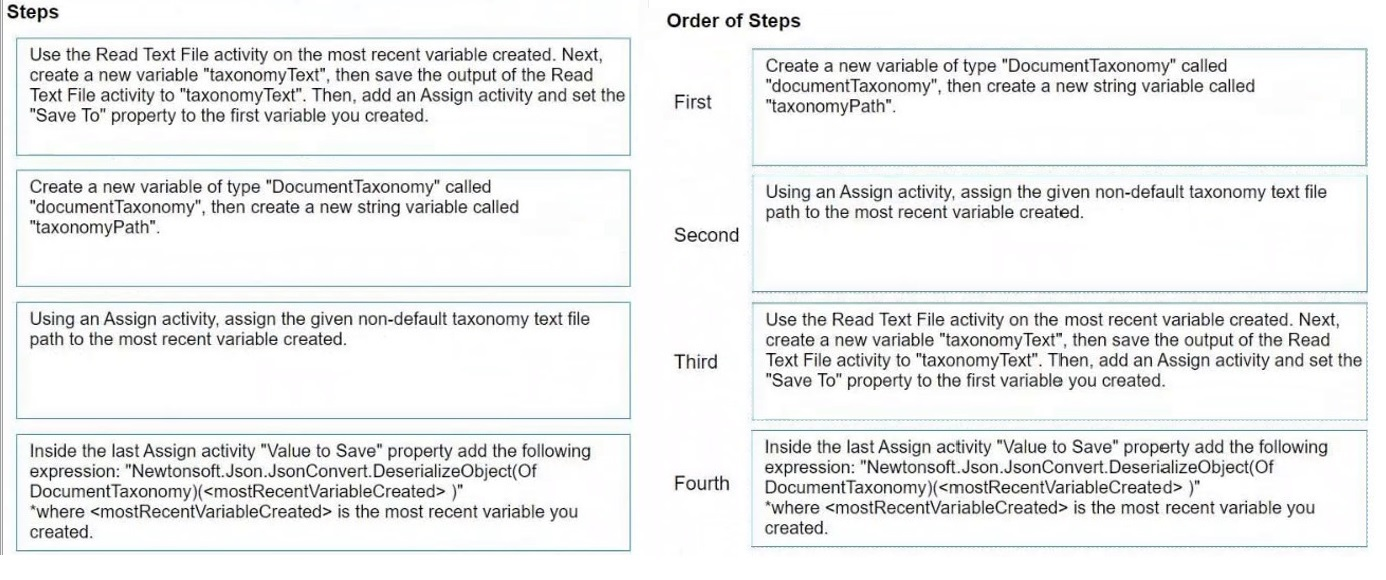
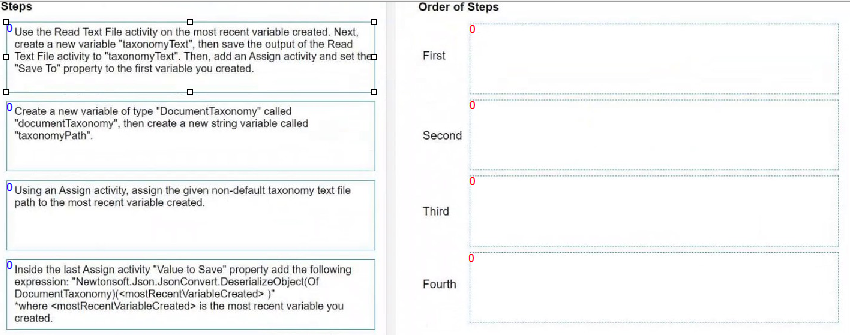
How do you load a taxonomy from a given non-default location text file into a variable?
Instructions: Drag the steps found on the "Left" and drop them on the "Right" in the correct order.

Show answerHide answer

Explanation


Explanation:
C:\Users\Waqas Shahid\Desktop\Mudassir\Untitled.jpg
to load a taxonomy from a given non-default location text file into a variable, the order of steps should be as follows:
Create a new variable of type 'DocumentTaxonomy' called 'documentTaxonomy', then create a new string variable called 'taxonomyPath'.
Using an Assign activity, assign the given non-default taxonomy text file path to the most recent variable created.
Use the Read Text File activity on the 'taxonomyPath' variable created. Next, create a new variable 'taxonomyText', then save the output of the Read Text File activity to 'taxonomyText'.
Inside the last Assign activity 'Value to Save' property add the following expression: "Newtonsoft.Json.JsonConvert.DeserializeObject(Of DocumentTaxonomy)(taxonomyText)" where 'taxonomyText' is the text read from the file and 'documentTaxonomy' (the most recent variable created) is the variable you created.
Following these steps in this order will load the taxonomy from a text file into the 'documentTaxonomy' variable in UiPath.
Question 5 Choose 1
What do entities represent in UiPath Communications Mining?
Show answerHide answer

Correct answer: B Concepts, themes, and intents.

Explanation

Explanation: Entities are additional elements of structured data which can be extracted from within the verbatims. Entities include data such as monetary quantities, dates, currency codes, organisations, people, email addresses, URLs, as well as many other industry specific categories. Entities represent concepts, themes, and intents that are relevant to the business use case and can be used for filtering, searching, and analyzing the verbatims.
Question 6 Choose 1
What can the Custom Named Entity Recognition out-of-the-box model be used for?
Show answerHide answer

Correct answer: D Extract and classify text in emails, letters, web pages, research papers, and call transcripts.

Explanation

Explanation: The Custom Named Entity Recognition out-of-the-box model is a machine learning package that allows you to bring your own dataset tagged with entities you want to extract from unstructured text. The model can be trained and deployed using the UiPath AI Center, and can be integrated with the UiPath Document Understanding framework. The model can be used to extract and classify text in various domains and formats, such as emails, letters, web pages, research papers, and call transcripts. For example, you can use the model to extract information such as names, dates, addresses, amounts, products, or any other custom entity from your documents. The model supports multiple languages and can be customized according to your needs.
Question 7 Choose 1
What is the default visibility of an ML skill?
Show answerHide answer

Correct answer: B An ML skill is by default private and can be made public.

Explanation

Explanation: An ML skill is a consumer-ready, live deployment of an ML or OS package that can be used in RPA workflows. By default, an ML skill is private, which means it can only be accessed by the users who have the permission to view and manage the project that contains the skill. However, an ML skill can be made public by enabling the Public Skill option in the ML Skill Details page. This will generate a public URL and an API key for the skill, which can be used to access the skill from any external system or application12.
Question 8 Choose 1
What is the difference between OCR (Optical Character Recognition) and IntelligentOCR?
Show answerHide answer

Correct answer: D IntelligentOCR is a UiPath Studio activity package that contains all the activities needed to enable information extraction, while OCR (Optical Character Recognition) is a method that reads text from images, recognizing each character and its position.

Explanation

Explanation: According to the UiPath documentation and web search results, OCR (Optical Character Recognition) is a method that reads text from images, recognizing each character and its position. OCR is used to digitize documents and make them searchable and editable. OCR can be performed by different engines, such as Tesseract, Microsoft OCR, Microsoft Azure OCR, OmniPaqe, and Abbyy. OCR is a basic step in the Document Understanding Framework, which is a set of activities and services that enable the automation of document processing workflows.
IntelligentOCR is a UiPath Studio activity package that contains all the activities needed to enable information extraction from documents. Information extraction is the process of identifying and extracting relevant data from documents, such as fields, tables, entities, and labels. IntelligentOCR uses different components, such as classifiers, extractors, validators, and trainers, to perform information extraction. IntelligentOCR also supports different formats, such as PDF, PNG, JPG, TIFF, and BMP. IntelligentOCR is an advanced step in the Document Understanding Framework, which builds on the OCR output and provides more functionality and flexibility.
Question 9 Choose 1
What is the recommended number of documents per vendor to train the initial dataset?
Show answerHide answer

Correct answer: B 10

Explanation

Explanation: According to the UiPath documentation, the recommended number of documents per vendor to train the initial dataset is 10. This means that for each vendor that provides a specific type of document, such as invoices or receipts, you should have at least 10 samples of their documents in your training dataset. This helps to ensure that the dataset is balanced and representative of the real-world data, and that the machine learning model can learn from the variations and features of each vendor’s documents. Having too few documents per vendor can lead to poor model performance and accuracy, while having too many documents from a single vendor can cause overfitting and bias1.
Question 10 Choose 1
Can you use Queues in the Document Understanding Process?
Show answerHide answer

Correct answer: B The Document Understanding Process can use Queues but the Auto Retry Functionality should be disabled.

Explanation

Explanation: The Document Understanding Process is a fully functional UiPath Studio project template based on a document processing flowchart. It supports both attended and unattended robots with human-in-the-loop validation via Action Center. The process uses queues to store and process the input files, one file per queue item. However, the Auto Retry Functionality should be disabled on queues, because it can interfere with the human validation step and cause errors or duplicates. The process handles the retry mechanisms internally, using the Try/Catch and Error management features.
Full mock exam

Sit the UiPath-SAIv1 exam before exam day

Full-length mocks with the same number of questions and the same time limit as the real UiPath-SAIv1 exam. Every attempt draws a new set of questions from the full bank, so you can keep going until you pass comfortably.

Get full UiPath-SAIv1 mock exam
  • 65questions per mock
  • 105 mintime limit
  • 79questions in the bank
  • Newmock on every attempt