When a developer runs a process using the REFramework, with the process utilizing
Orchestrator queues and a queue already created with the Name provided and the Auto
Retry function disabled, which states will be executed without errors?
Show answerHide answer
Correct answer: AInitialization -> Get Transaction Data -> Process Transaction -> End Process
Explanation
Explanation: The states that will be executed without errors when a developer runs a
process using the REFramework, with the process utilizing Orchestrator queues and a
queue already created with the Name provided and the Auto Retry function disabled, are
Initialization, Get Transaction Data, Process Transaction, and End Process. The
REFramework is a template that provides a robust and scalable structure for building
automation processes. The REFramework consists of four main states: Initialization, Get
Transaction Data, Process Transaction, and End Process. The Initialization state is
responsible for initializing the application, reading the configuration file, and logging in to
the Orchestrator. The Get Transaction Data state is responsible for fetching the next
transaction item from the Orchestrator queue and assigning it to the TransactionItem
variable. The Process Transaction state is responsible for executing the main logic of the
process for the current transaction item. The End Process state is responsible for closing
the application, logging out of the Orchestrator, and performing any cleanup actions. If the
process utilizes Orchestrator queues and a queue already exists with the Name provided
and the Auto Retry function disabled, then the process will be able to execute these states
without errors, assuming that there are no other issues or exceptions in the
workflow.
Question 42Choose 1
In a UiPath development scenario, which type of process design would be the most
appropriate for an automation task that executes actions in a straightforward progression
without iteration or branching?
Show answerHide answer
Correct answer: CSequential Process
Explanation
Explanation:
A sequential process is a type of process design that executes actions in a
straightforward progression without iteration or branching. A sequential process is
composed of a series of activities that are executed one after another, from top to bottom,
in a linear fashion. A sequential process is best suited for simple scenarios when activities
follow each other and there is no need for complex logic or decision making12.
The other options are not appropriate for an automation task that executes actions in a
straightforward progression without iteration or branching, because they involve different
types of process design that require more complex structures and logic. For example:
A transactional process is a type of process design that executes actions on a set
of data items, one at a time, in a loop. A transactional process is composed of a
dispatcher that adds data items to a queue, and a performer that processes each
data item from the queue and updates its status. A transactional process is best
suited for scenarios when activities need to be repeated for each data item and
there is a need for reliability and scalability34.
An iterative process is a type of process design that executes actions repeatedly
until a certain condition is met or a certain number of iterations is reached. An
iterative process is composed of a loop that contains a set of activities and a
condition that controls the exit of the loop. An iterative process is best suited for
scenarios when activities need to be performed multiple times and there is a need
for dynamic control of the execution flow56.
A linear process is not a type of process design, but a term that refers to a process
that has a clear start and end point, and a well-defined sequence of steps that lead
to a specific outcome. A linear process can be implemented using different types
of process design, depending on the complexity and logic of the steps involved7.
Question 43Choose 1
"Process A" is scheduled to run at 2:00 PM using a time trigger with the Schedule ending of
Job execution feature configured to stop the job after 20 minutes. Assuming that the robots
are busy and "Process A" is queued until 2:05 PM. at what time will "Process A* be
stopped?
Show answerHide answer
Correct answer: B2:25 PM
Explanation
Explanation:
"Process A":
The process is scheduled to run at 2:00 PM, but due to busy robots, it starts at
2:05 PM.
The Schedule ending of Job execution feature is configured to stop the job after 20
minutes.
Therefore, "Process A" will be stopped 20 minutes after it started, which is at 2:25
PM.
Question 44Choose 1
What is a prerequisite for performing Remote Debugging using an Unattended Robot
connection?
Show answerHide answer
Correct answer: DStudio and the remote robot must be connected to the same Orchestrator tenant.
Explanation
Explanation:
On the prerequisite for performing Remote Debugging using an Unattended Robot
connection:
The prerequisite is that Studio and the remote robot must be connected to the
same Orchestrator tenant. This ensures that Studio can communicate with the
remote robot for debugging purposes. While having the same version and TCP/IP
connectivity is beneficial, the key requirement for remote debugging is the
connection to the same Orchestrator tenant.
Question 45Choose 1
When building automation projects, which statement is true regarding Perform Remote
Debugging?
Show answerHide answer
Correct answer: DPerform Remote Debugging allows developers to debug a project on a different machine
using a web-based interface.
Explanation
Explanation:
Comprehensive and Detailed Explanation: Remote Debugging is a feature
of UiPath Studio that allows developers to run and debug automation projects on robots
deployed to remote machines, including on Linux robots that can run cross-platform
projects1. It enables developers to connect to the remote robot using either a remote
machine connection or an unattended robot connection, and then use the Studio
debugging tools to inspect the execution and troubleshoot any issues1. Remote Debugging
uses a web-based interface that shows the UI elements and the data of the remote
machine, as well as the breakpoints, variables, and output of the project2.
The other options are incorrect because:
Option A is incorrect because Remote Debugging is not limited by the involvement
of Orchestrator queues and assets in the automation project. Remote Debugging
can work with any project that can be executed by a robot on a remote machine,
regardless of the Orchestrator entities used1.
Option B is incorrect because Remote Debugging does not enable developers to
design new UI elements for the automation project. Remote Debugging is only
used for testing and debugging existing projects, not for creating or modifying
them1.
Option C is incorrect because Remote Debugging does not refer to the process of
testing and debugging an automation project on the same machine where UiPath
Studio is installed. That process is called Local Debugging, which is the default
debugging mode in Studio3.
Question 46Choose 1
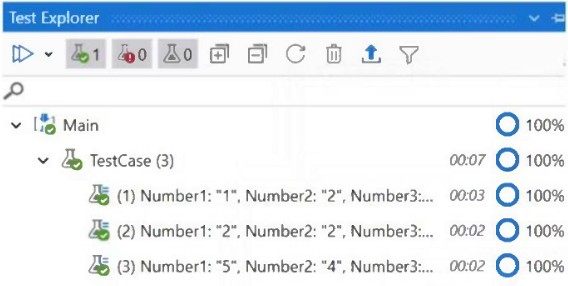
What do the percentages from the Test Explorer panel represent?
Show answerHide answer
Correct answer: DPassing percent.
Explanation
Explanation: The percentages from the Test Explorer panel represent the passing percent
of the test cases that are executed. The Test Explorer panel shows the status of each test
case, the total number of test cases, the number of passed test cases, the number of failed
test cases, and the passing percent. The passing percent is calculated by dividing the
number of passed test cases by the total number of test cases and multiplying by 100. For
example, if there are 10 test cases and 8 of them pass, the passing percent is
80%.
Question 47
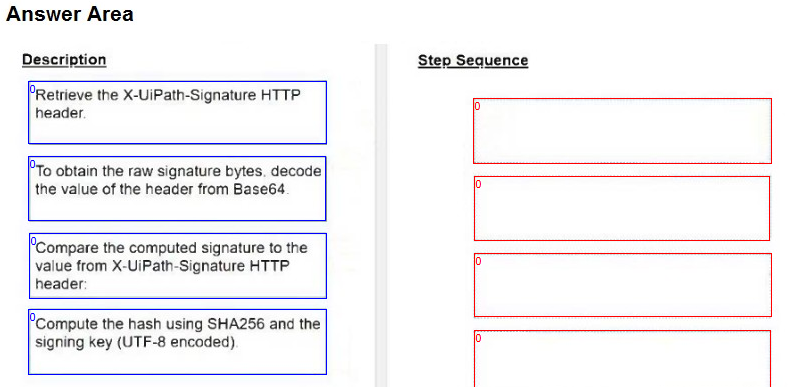
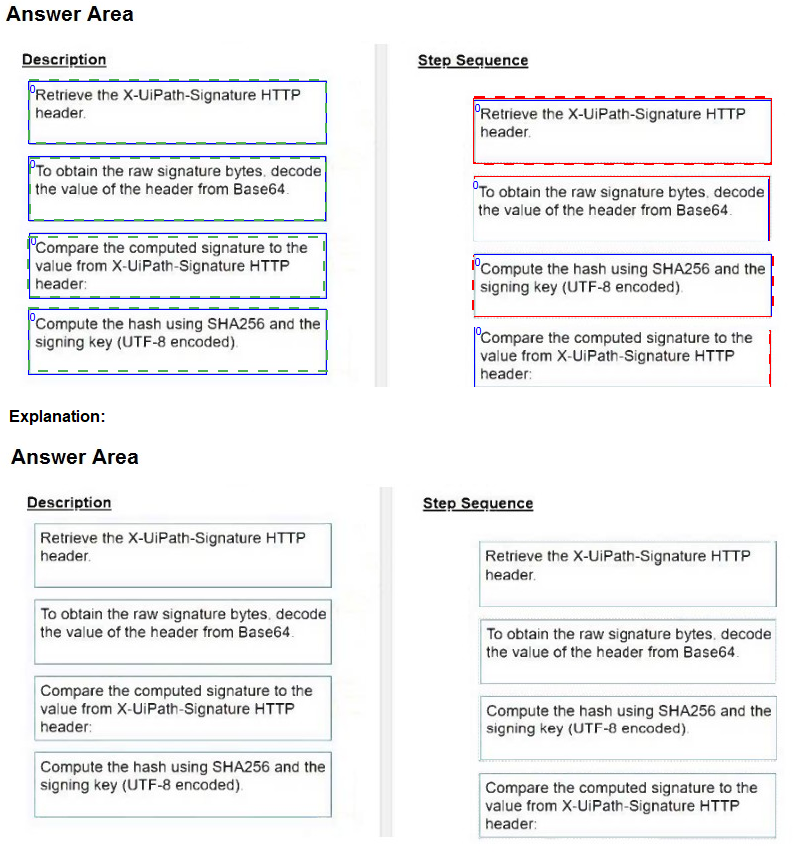
How should the computation of the signature be done for client apps that receive
Orchestrator requests and need to check their authenticity?
Instructions: Drag the Description found on the left and drop on the correct Step Sequence
found on the right.
Show answerHide answer
Explanation
Question 48Choose 1
A developer has defined a variable named "CurrentDate" of type Date Time. Which of the
following expressions can be used to show what hour was 12 hours prior to the date
from the variable?
Show answerHide answer
Correct answer: BCurrentDate.AddHours(-12).Hour
Explanation
Explanation:
In UiPath Studio, you can use DateTime and TimeSpan variables to store and manipulate
date and time values. A DateTime variable represents a specific point in time, such as the
current date and time, or a date in the past or future. A TimeSpan variable represents a
time interval, such as one hour, two days, or three weeks.
To show what hour was 12 hours prior to the date from the variable, you can use the
AddHours method on the DateTime variable and pass a negative value. For example, if
you have a DateTime variable called CurrentDate that stores a date and time value, you
can write:
CurrentDate.AddHours(-12).Hour
This expression returns an integer value that is the hour component of the DateTime value
that is 12 hours before the CurrentDate value. For example, if CurrentDate is 2024-02-08
10:51:49, then the expression returns 22.
The other options are not correct expressions for showing what hour was 12 hours prior to
the date from the variable. Option A is invalid, because the DateTime class does not have
an AddHours method. Option C is incorrect, because the DateTime variable does not have
a SubtractHours method. Option D is incorrect, because the DateTime class does not have
a SubtractHours method.
Question 49Choose 1
An error occurs during the Initialization state within the ’FrameworkMnitAIISettings.xaml” file for a process using REFramework which is executed on Orchestrator. The project
contains default values for the settings specified in "Config.xlsx".
What is the current state of the job in Orchestrator?
Show answerHide answer
Correct answer: BFaulted
Explanation
Explanation:
The current state of the job in Orchestrator is Faulted, because an error occurred during
the Initialization state of the process using REFramework. The REFramework is a template
for creating robust and scalable automation projects that uses the State Machine workflow
type1. The Initialization state is the first state in the REFramework, which is responsible for
initializing the application, reading the configuration file, and setting the log level2. If an
error occurs during the Initialization state, the process will go to the End Process state,
which will perform the final actions and close the application2. The End Process state will
also mark the job as Faulted in Orchestrator, if the value of the ShouldMarkJobAsFaulted
argument is True2. The default value of this argument in the REFramework is True, unless
it is changed in the Config.xlsx file or in the Orchestrator assets3.
Option A is incorrect, because the job is not Successful, as an error occurred during the
Initialization state. Option C is incorrect, because the job is not Suspended, as the process
did not pause or wait for any user input. Option D is incorrect, because the job is not
Stopped, as the process did not encounter any user intervention or manual termination.
Question 50Choose 1
Starting with UiPath Studio version 2022.10, what happens to dependencies that lack
Windows compatibility when they are converted in a project?
Show answerHide answer
Correct answer: DThey are marked as unresolved.
Explanation
Explanation: Starting with UiPath Studio version 2022.10, dependencies that lack
Windows compatibility are marked as unresolved when they are converted in a project.
This means that the project cannot be executed until the unresolved dependencies are
manually resolved by the developer. This is done to ensure that the project can run on both
Windows and Linux platforms without compatibility issues.
Full mock exam
Sit the UiPath-ADPv1 exam before exam day
Full-length mocks with the same number of questions and the same time limit as the real UiPath-ADPv1 exam. Every attempt draws a new set of questions from the full bank, so you can keep going until you pass comfortably.